
1. Įvadas
This manual provides detailed instructions for the installation, operation, and maintenance of your Ctronics CTIPC-790C-EU 5MP PTZ Wi-Fi Security Camera. Please read this manual thoroughly before using the product to ensure proper function and safety. This camera is designed for both indoor and outdoor surveillance, offering high-resolution video, advanced detection features, and flexible connectivity.

1 pav.: priekis view of the Ctronics 5MP PTZ Wi-Fi Security Camera. This image displays the camera's dome shape, lens, and LED illuminators.
2. Pakuotės turinys
Patikrinkite, ar pakuotėje yra visi toliau išvardyti daiktai. Jei kurių nors daiktų trūksta arba jie pažeisti, susisiekite su klientų aptarnavimo tarnyba.
- Ctronics CTIPC-790C-EU 5MP PTZ Wi-Fi Security Camera
- Maitinimo adapteris
- Įkrovimo kabelis
- Instrukcijų vadovas
- Mounting Bracket
- Tvirtinimo varžtai
3. Produktas baigtasview
The Ctronics CTIPC-790C-EU camera offers advanced surveillance capabilities:
- 5MP Ultra HD Resolution: Provides clear 2560x1920 pixel video and images, offering more detail than 1080P or 4MP cameras.
- Dual-Band Wi-Fi (2.4/5GHz): Supports both 2.4GHz for extended range and better penetration, and 5GHz for faster transmission and reduced interference.
- PTZ funkcionalumas: Pan 355° and Tilt 90° for comprehensive area coverage.
- Dirbtinio intelekto žmonių aptikimas ir automatinis sekimas: Intelligent technology reduces false alarms by up to 95% and automatically tracks detected human movement.
- Spalvotas naktinis matymas: Achieves full-color night vision up to 25 meters or infrared night vision up to 30 meters for clear visibility in low-light conditions.
- Dvipusis garsas: Integruotas mikrofonas ir garsiakalbis nuotoliniam bendravimui.
- IP66 atsparumas oro sąlygoms: Durable construction suitable for outdoor use in various weather conditions.
- Lanksčios saugojimo parinktys: Supports continuous 24/7 recording to a microSD card (up to 128GB), cloud storage, or FTP.

Figure 2: This image illustrates the superior clarity of 5MP resolution compared to 2MP, highlighting finer details in a vehicle.
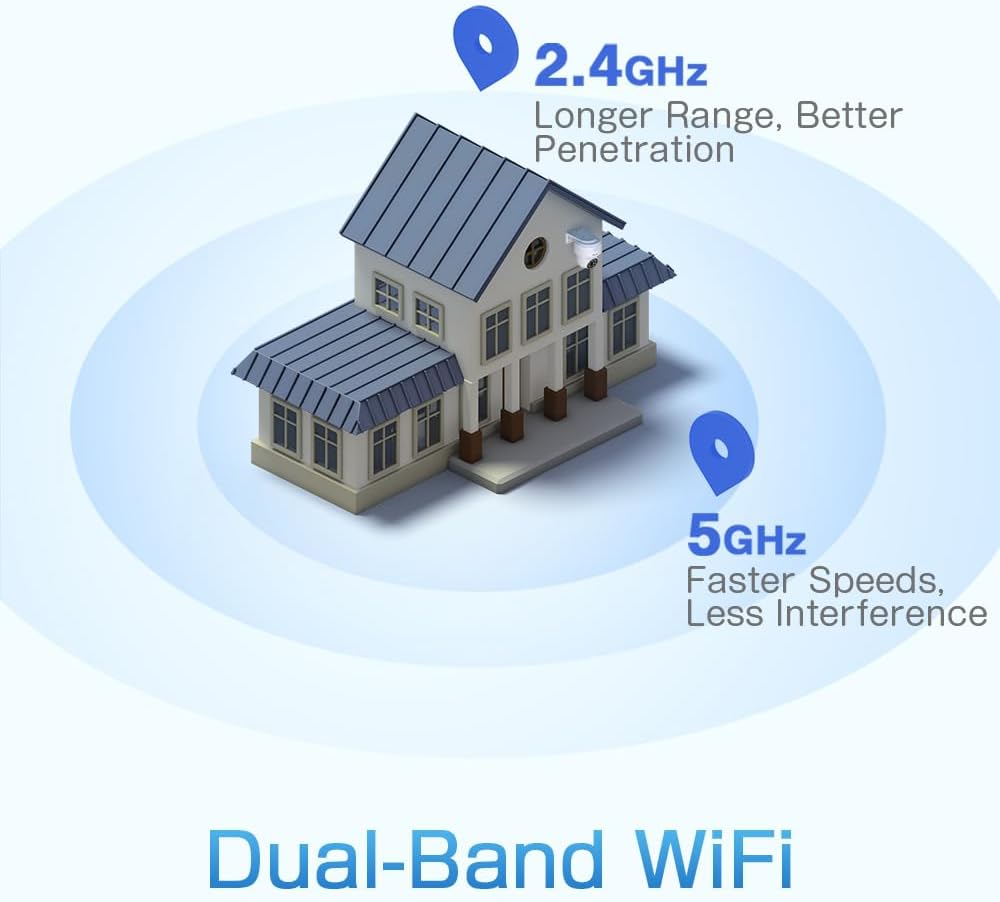
Figure 3: A diagram depicting a house with Wi-Fi signals. The 2.4GHz signal offers longer range and better penetration, while the 5GHz signal provides faster speeds and less interference.
4. Sąranka
4.1 Fizinis įrengimas
The camera can be mounted on a wall or ceiling. Ensure the mounting location provides a clear field of view ir yra „Wi-Fi“ ryšio diapazone.
- Pasirinkite vietą: Select a suitable indoor or outdoor location. The camera is IP66 waterproof, making it resistant to dust and water jets.
- Montavimas:
- Sieninis laikiklis: Use the provided mounting bracket and screws to secure the camera to a wall.
- Montavimas ant lubų: The camera can also be mounted directly to a ceiling.
- Sureguliuoti kampą: After mounting, adjust the camera's orientation as needed.

Figure 4: This image displays two installation methods: wall mounting using a bracket and ceiling mounting.

Figure 5: This image illustrates both ceiling and wall installation options, emphasizing the camera's IP66 waterproof rating by showing it under simulated rain.
4.2 Maitinimo jungtis
Connect the provided power adapter to the camera's power input and then plug it into a standard electrical outlet. Ensure the connection is secure.
4.3 Tinklo jungtis
The camera supports both 2.4GHz and 5GHz Wi-Fi networks. For initial setup, it is recommended to place the camera near your Wi-Fi router.
- Atsisiųsti programą: Download the Ctronics Pro or CamHi Pro app from your smartphone's app store (available for iOS and Android). For PC, use HiP2P Client software.
- Registruoti paskyrą: Atidarykite programėlę ir užregistruokite naują paskyrą arba prisijunkite, jei jau turite.
- Pridėti fotoaparatą: Norėdami pridėti kamerą, vadovaukitės programėlėje pateiktomis instrukcijomis. Paprastai tai reiškia, kad reikia nuskaityti QR kodą kameroje arba rankiniu būdu įvesti jos ID.
- Prisijunkite prie „Wi-Fi“: Select your desired 2.4GHz or 5GHz Wi-Fi network and enter the password. The camera will connect to the network.
5. Naudojimo instrukcijos
5.1 Tiesiogiai View ir PTZ valdymas
Once connected, you can access the live video feed through the Ctronics app or PC software.
- Tiesioginis tiekimas: Palieskite kamerą programėlėje, kad view the real-time video stream.
- Stumti / pakreipti: Use the directional controls within the app to rotate the camera horizontally (pan 355°) and vertically (tilt 90°).
- Mastelio keitimas: Digital zoom is available through the app.
- Iš anksto nustatytos pozicijos: Set up to 8 preset positions for quick navigation to specific areas.
5.2 AI Human Detection & Auto Tracking
The camera's intelligent detection system can identify human shapes and track their movement.
- Įjungti aptikimą: In the app settings, enable AI Human Detection.
- Adjust Sensitivity & Area: Customize the detection sensitivity and define specific detection zones to minimize false alarms.
- Automatinis stebėjimas: When enabled, the camera will automatically follow detected human movement within its field of view.
- Įspėjimai: Receive instant notifications via the app or email when motion is detected. The camera can also trigger customizable sound and light alarms.

Figure 6: This image shows the camera detecting a person at night, with an alarm notification displayed on a smartphone, illustrating the human detection and auto-tracking features.
5.3 Naktinis matymas
The camera offers enhanced night vision capabilities:
- Spalvotas naktinis matymas: When spotlights are activated, the camera can provide full-color video in low-light conditions up to 25 meters.
- Infraraudonųjų spindulių nakties vizija: In complete darkness, the camera automatically switches to infrared mode, providing clear black and white video up to 30 meters.

Figure 7: An image showing the camera mounted outdoors at night, with its spotlights illuminated to provide full-color night vision. A smartphone displays the live feed.
5.4 Dvipusis garsas
Use the two-way audio feature to communicate with individuals near the camera.
- Kalbėkite: Press and hold the microphone icon in the app to speak through the camera's speaker.
- Klausyk: Enable the speaker icon to listen to audio from the camera's microphone.
5.5 Įrašymas ir saugojimas
The camera supports various recording and storage methods:
- „MicroSD“ kortelė: Insert a microSD card (up to 128GB, not included) into the designated slot for local 24/7 continuous recording.
- Saugykla debesyje: Subscribe to a cloud storage service (if available) for off-site video backup.
- FTP: Configure FTP settings in the app to upload recordings to an FTP server.

Figure 8: This image illustrates the camera's 24/7 recording capability and various recording modes, including a timeline view on a smartphone and a filmstrip showing recorded events.
6. Priežiūra
6.1 Valymas
Regularly clean the camera lens and housing to ensure optimal image quality and performance.
- Naudokite minkštą, damp cloth to wipe the camera's exterior.
- Objektyvui valyti naudokite specializuotą šluostę ir tirpalą, kad išvengtumėte įbrėžimų.
- Nenaudokite stiprių chemikalų ar abrazyvinių valiklių.
6.2 Firmware atnaujinimai
Periodically check for firmware updates through the Ctronics app. Keeping your camera's firmware updated ensures access to the latest features and security enhancements.
7. Problemų sprendimas
Jei kyla problemų dėl fotoaparato, žr. šiuos dažniausiai pasitaikančius sprendimus:
| Problema | Galimas sprendimas |
|---|---|
| Kamera neprisijungia prie „Wi-Fi“. |
|
| Prasta vaizdo kokybė |
|
| Nėra judesio aptikimo įspėjimų |
|
| „MicroSD“ kortelė neįrašo |
|
For further assistance, please contact Ctronics customer support.
8. Specifikacijos
Key technical specifications for the Ctronics CTIPC-790C-EU camera:
| Funkcija | Specifikacija |
|---|---|
| Modelio pavadinimas | CTIPC-790C-EU |
| Rezoliucija | 5 MP (2560 x 1920) |
| Belaidė technologija | „Wi-Fi“ (2.4 GHz / 5 GHz) |
| „Pan“ kampas | 355 laipsnių |
| Pakreipimo kampas | 90 laipsnių |
| Naktinio matymo diapazonas | 25 Meters (Color), 30 Meters (IR) |
| Atsparumo vandeniui lygis | IP66 (atsparus vandeniui) |
| Saugojimo parinktys | MicroSD (up to 128GB), Cloud, FTP |
| Maitinimo šaltinis | Elektros laidas (12 voltai, 12 vatai) |
| Montavimo tipas | Wall Mount, Screw-in |
| Medžiaga | Akrilnitrilo butadieno stirenas (ABS) |
| Suderinami įrenginiai | Kompiuteris, išmanusis telefonas, planšetė |
| Operacinės sistemos palaikymas | Android, iOS, Windows, Mac OS |
9. Garantija ir palaikymas
Ctronics products are designed for reliability and performance. For warranty information and technical support, please refer to the official Ctronics websvetainėje arba susisiekite tiesiogiai su jų klientų aptarnavimo tarnyba. Išsaugokite pirkimo kvitą kaip pirkimo įrodymą garantijos pretenzijoms.
- Palaikymas internetu: Apsilankykite pas „Ctronics“ atstovą websvetainė, kurioje rasite DUK, trikčių šalinimo vadovus ir programinės įrangos atsisiuntimus.
- Pagalba el. paštu: Contact Ctronics customer service via email for technical assistance.