
Įvadas
The Anderic RR1004 is a universal TV remote control designed for simplicity and ease of use, particularly beneficial for seniors, individuals in assisted living, or anyone seeking a straightforward television control experience. Its large, glow-in-the-dark buttons and minimalist layout reduce complexity, focusing on essential functions for effortless TV operation.
This manual provides comprehensive instructions for setting up, operating, and maintaining your Anderic RR1004 remote control.
Pagrindinės savybės
- Large, Glow-in-the-Dark Buttons: Designed for enhanced visibility and ease of use in various lighting conditions.
- Simplified Layout: Features only essential controls (Power, Volume, Channel, Mute, Closed Captioning) to prevent confusion.
- Broad IR Compatibility: Works with most standard IR (infrared) TVs, including major brands like LG, Samsung, and Sony.
- Mokymosi funkcija: Allows copying functions from an existing IR remote for customized control, such as input or streaming buttons.
- Pre-programmed for LG TVs: Ready to use with LG televisions right out of the box.
- Patvarus dizainas: Built for reliability in various environments, including hospitality and healthcare settings.
- Riešo dirželio tvirtinimas: Provides a convenient way to keep the remote accessible and prevent loss.
Pakuotės turinys
- Anderic RR1004 Big Button TV Remote Control
- Instrukcijų vadovas (šis dokumentas)
- Note: 2 AAA batteries are required and not included.
Sąranka
1. Akumuliatoriaus įdėjimas
The Anderic RR1004 remote requires two (2) AAA batteries for operation. Ensure correct polarity when inserting the batteries.
- Nuotolinio valdymo pulto gale raskite baterijų skyriaus dangtelį.
- Norėdami atidaryti skyrių, stumkite dangtelį žemyn.
- Įdėkite dvi AAA tipo baterijas, suderindami teigiamą (+) ir neigiamą (-) polius, kaip nurodyta skyriaus viduje.
- Stumkite dangtelį atgal į vietą, kol jis patikimai užsifiksuos.

Vaizdas: Galinis view of the Anderic RR1004 remote control, highlighting the easy-removable battery cover and the small wrist lanyard attachment point. This design helps prevent battery loss and keeps the remote accessible.

Vaizdas: The Anderic RR1004 remote control displayed alongside two AAA batteries, illustrating the battery type required. The image also shows the remote's dimensions: 5.75 inches in length, 2 inches in width, and 1 inch in thickness, emphasizing its compact yet easy-to-handle size.
2. Initial TV Programming
The RR1004 is pre-programmed for LG TVs and may work immediately. For other TV brands, follow the steps below to program the remote.
Automatic Code Search (3-Step Modification)
This method allows the remote to scan through its internal code database to find a compatible code for your TV.
- Įjunkite televizorių norite kontroliuoti.
- Paspauskite ir palaikykite GALIA mygtuką ir CH+ button simultaneously for approximately three seconds. The remote's indicator light will illuminate, signifying it is in programming mode.
- While pointing the remote at the TV, press and release either the CH+ or CH- button repeatedly. Each press sends a new code. Stop when the TV turns off.
- Kai televizorius išsijungia, paspauskite NUSTATYTI mygtuką, kad išsaugotumėte kodą. Indikatoriaus lemputė užges.
Test the remote's functions (Power, Volume, Channel). If not all functions work correctly, repeat the process, stopping at a different code when the TV turns off.
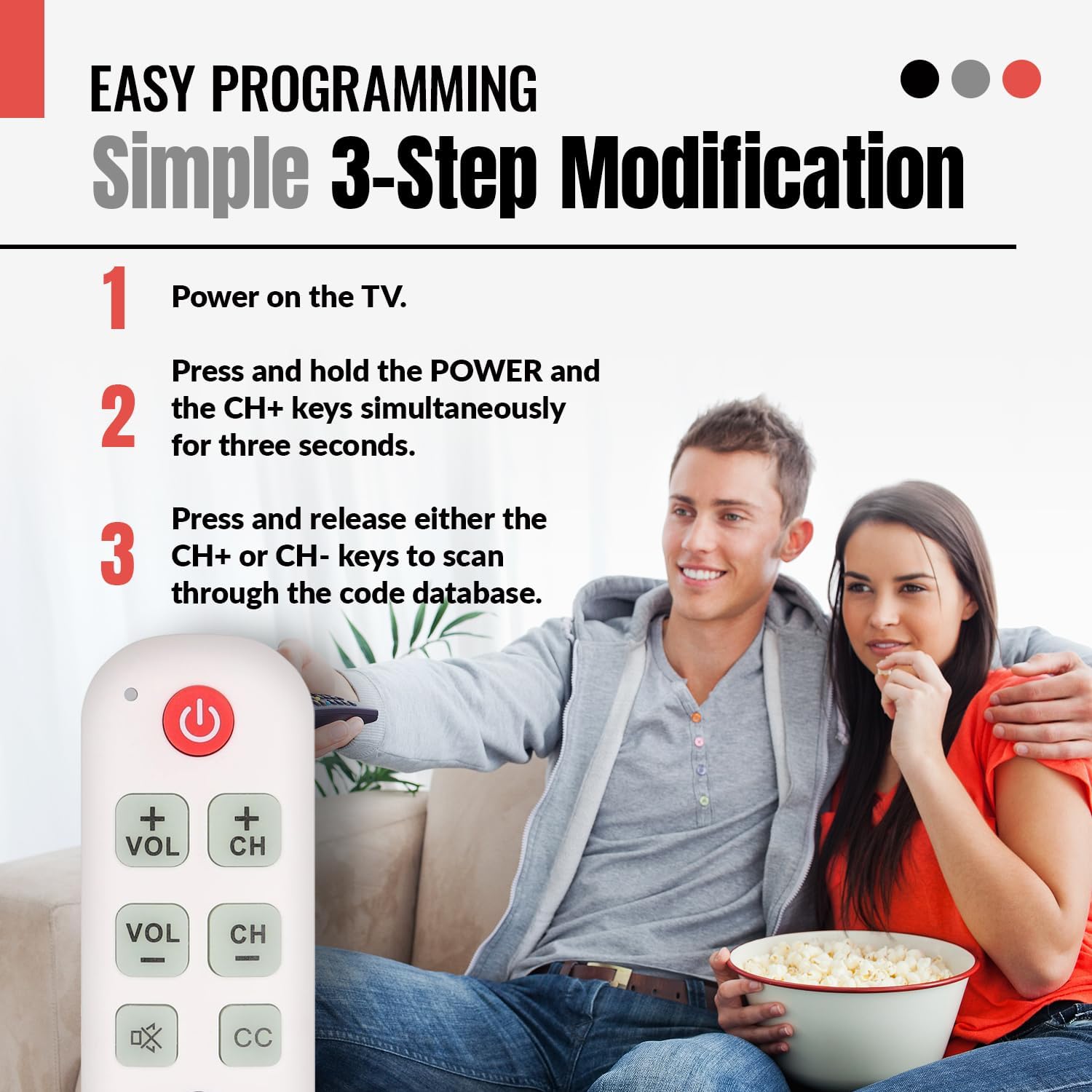
Vaizdas: A visual guide illustrating the simple 3-step programming process for the Anderic RR1004 remote control. It shows a user pressing the POWER and CH+ buttons, then repeatedly pressing CH+ or CH- to find the correct code for their TV.

Vaizdas: The Anderic RR1004 remote control in use with an LG HDTV, demonstrating its instant plug-and-play setup for LG models. This image highlights the convenience for users with LG televisions, requiring no programming.
3. Learning Function (Copying from Original Remote)
The learning function allows the RR1004 to copy infrared signals from your existing IR remote control. This is useful for adding functions not present on the RR1004, such as an "Input" button or specific streaming service buttons, provided your original remote is IR-based.
Svarbu: The learning function does not work with RF (Radio Frequency) or Bluetooth remotes. Ensure both remotes have fresh batteries and are pointed directly at each other during the learning process. Perform learning in a low-light environment to avoid interference.
- Place the Anderic RR1004 and your original remote control on a flat surface, facing each other, with their IR emitters aligned and approximately 1-2 inches apart.
- Paspauskite ir palaikykite NUSTATYTI button on the RR1004 for approximately three seconds until the indicator light illuminates steadily.
- Press the button on the RR1004 that you wish to program (e.g., the GALIA button if you want to learn a different power code). The indicator light will flash slowly.
- Press and hold the corresponding button on your original remote control (e.g., its Power button). The indicator light on the RR1004 will flash rapidly, then turn solid, indicating successful learning.
- Pakartokite 3 ir 4 veiksmus su visais kitais mygtukais, kuriuos norite programuoti.
- After programming all desired buttons, press the NUSTATYTI button on the RR1004 to exit learning mode. The indicator light will turn off.
Test the newly programmed buttons. If a button does not work, repeat the learning process for that specific button.

Vaizdas: An illustration showing the Anderic RR1004 remote control connected via a dashed line to a cable box, which in turn is connected to a TV. This demonstrates the remote's capability to control both a TV and a cable box, especially through its learning function for cable box commands.
Naudojimo instrukcijos
The Anderic RR1004 remote control features a minimalist design with clearly labeled, large buttons for essential TV functions.

Vaizdas: Aiškus frontas view of the Anderic RR1004 Big Button TV Remote Control, showcasing its large, distinct buttons for Power, Volume Up/Down, Channel Up/Down, Mute, Closed Captioning, and the SET button for programming. The remote is white with green and red buttons, and features a small wrist lanyard.

Vaizdas: The Anderic RR1004 remote control with a red circle highlighting the glow-in-the-dark keys for Volume, Channel, Mute, and Closed Captioning. This feature enhances accessibility and ease of use in low-light conditions, making it ideal for seniors.
- GALIA Mygtukas: Įjungia arba išjungia televizorių.
- VOL + / VOL- Mygtukai: Increases or decreases the television's volume.
- CH+ / CH- Mygtukai: Perjungia televizijos kanalą aukštyn arba žemyn.
- Nutildyti Button (Speaker with X): Išjungia arba įjungia televizoriaus garsą.
- CC Mygtukas: Activates or deactivates Closed Captioning.
- NUSTATYTI Mygtukas: Used for programming the remote control. Not for daily TV operation.
Priežiūra
- Valymas: Nuotolinio valdymo pultą valykite minkštu, sausu skudurėliu. Nenaudokite skystų valiklių ar abrazyvinių medžiagų.
- Baterijos keitimas: Replace batteries when the remote's performance diminishes or the indicator light does not respond. Always replace both AAA batteries simultaneously with new ones.
- Saugykla: Nuotolinio valdymo pultą laikykite vėsioje, sausoje vietoje, apsaugotoje nuo tiesioginių saulės spindulių ir ekstremalių temperatūrų.
Trikčių šalinimas
| Problema | Galima priežastis | Sprendimas |
|---|---|---|
| Nuotolinio valdymo pultas neveikia. |
|
|
| Kai kurie mygtukai neveikia po programavimo. |
|
|
| Learning function does not work. |
|
|
Specifikacijos
- Modelis: RR1004
- Matmenys: 5.75 x 2 x 1 inches (Length x Width x Thickness)
- Prekės svoris: 1.76 uncijos (be baterijų)
- Maitinimo šaltinis: 2 x AAA baterijos (į komplektą neįeina)
- Suderinamumas: Most IR (Infrared) TVs (LG, Samsung, Sony, etc.)
- Ypatingos savybės: Glow-in-the-dark buttons, Learning Function, Simplified Layout
- Gamintojas: Dan's Electronics Etc., Inc.
Garantija ir palaikymas
For warranty information or technical support regarding your Anderic RR1004 remote control, please contact the manufacturer, Dan's Electronics Etc., Inc., or refer to the official Anderic websvetainėje. Išsaugokite pirkimo kvitą kaip pirkimo įrodymą bet kokiems garantiniams prašymams.
Gamintojas: Dan's Electronics Etc., Inc.
Norėdami gauti daugiau pagalbos, apsilankykite Anderic Store on Amazon.