
Svarbios saugos instrukcijos
Prieš surinkdami ir naudodami, perskaitykite ir supraskite visas instrukcijas. Išsaugokite šį vadovą ateičiai.
- Anti-Tipping Unit: Always use the provided anti-tipping unit to securely fix the TV stand to the wall. This prevents accidental tipping, which can cause serious injury.
- Svorio talpa: Do not exceed the maximum weight capacity of 198 lb (90 kg) for the tabletop. Ensure your TV and other items placed on the stand are within this limit.
- Tinkamas išdėstymas: Place the TV stand on a flat, level, and stable surface to prevent wobbling or instability.
- Vaikai ir augintiniai: Laikykite vaikus ir naminius gyvūnus atokiau nuo surinkimo zonos. Mažos dalys gali kelti užspringimo pavojų.
- Cheminės medžiagos: Avoid contact with skin and eyes if any chemical components are present (e.g., from wood treatment). If ingested, seek medical help immediately.

Image: Anti-tip fitting installation. This image illustrates how to attach the anti-tip kit to the wall, preventing the console table from tipping over and ensuring stability.
Pakuotės turinys
Prieš pradėdami surinkimą, patikrinkite, ar visos dalys ir tvirtinimo detalės yra ir nepažeistos. Jei kokių nors dalių trūksta arba jos pažeistos, susisiekite su klientų aptarnavimo tarnyba.
- Viršutinis skydelis (1)
- Apatinė lentyna (1)
- Vidurinė lentyna (1)
- Side Frames with X-shaped Reinforcement (2)
- Stalčių komponentai (priekis, galas, šonai, apačia)
- Drawer Slides (2 sets)
- Drawer Knobs (2)
- Anti-Tipping Kit (1)
- Assembly Hardware (Screws, bolts, dowels, Allen key, etc.)
Sąrankos ir surinkimo instrukcijos
Assembly typically requires an Allen key (provided), a hammer, and a screwdriver (not provided). It is recommended to assemble the unit with two people.
1 veiksmas: paruoškite komponentus
Unpack all components and lay them out on a clean, soft surface (e.g., a blanket or cardboard) to prevent scratches. Identify each part according to the included parts list.

Image: Product Dimensions. This diagram provides detailed measurements of the TV stand, including the tabletop (39.5" L x 12" W), shelves (37" L x 11" W), and drawer (33.5" L x 9" D x 3.5" H).
Step 2: Assemble Side Frames
Attach the X-shaped reinforcement bars to the metal side frames using the provided screws. Ensure all connections are secure but do not overtighten yet.

Image: X-shaped Side Reinforcement. This image highlights the X-shaped bars on the side frames, which provide structural stability to the console table.
Step 3: Attach Shelves to Side Frames
Connect the bottom and middle shelves to the assembled side frames. Use the designated screws and ensure the shelves are oriented correctly. Gradually tighten all screws once all shelves are in place.
4 žingsnis: Surinkite stalčių
Follow the specific instructions for assembling the drawer. This typically involves attaching the front, back, and side panels, then sliding the bottom panel into place. Install the drawer slides onto the drawer and the main frame, ensuring they are correctly aligned for smooth operation. Attach the drawer knobs.

Image: Ball Bearing Slide. This image shows the ball-bearing drawer slides, designed for smooth and effortless opening and closing of the drawer.
Step 5: Attach Top Panel
Place the top panel onto the assembled frame and secure it with the remaining screws. Ensure all connections are tight and the stand is stable.
Step 6: Install Anti-Tipping Unit
As a crucial safety measure, install the anti-tipping unit. Attach one end to the back of the TV stand and the other end to a wall stud or appropriate wall anchor. This prevents the stand from tipping forward, especially with a TV placed on top.
Naudojimo instrukcijos
This TV stand is designed for indoor use to support televisions up to 45 inches and other media equipment.
- TV vieta: Place your TV centrally on the top panel. Ensure the TV base fits within the tabletop dimensions (39.5 inches L x 12 inches W) and its weight does not exceed 198 lb.
- Stalčiaus naudojimas: The large drawer (33.5 inches L x 9 inches D x 3.5 inches H) is suitable for storing remote controls, small electronic accessories, or personal items.
- Lentynos naudojimas: The two lower shelves (37 inches L x 11 inches W) can accommodate electronic equipment like record players, small sound boxes, books, magazines, or decorative items. Distribute weight evenly across the shelves.
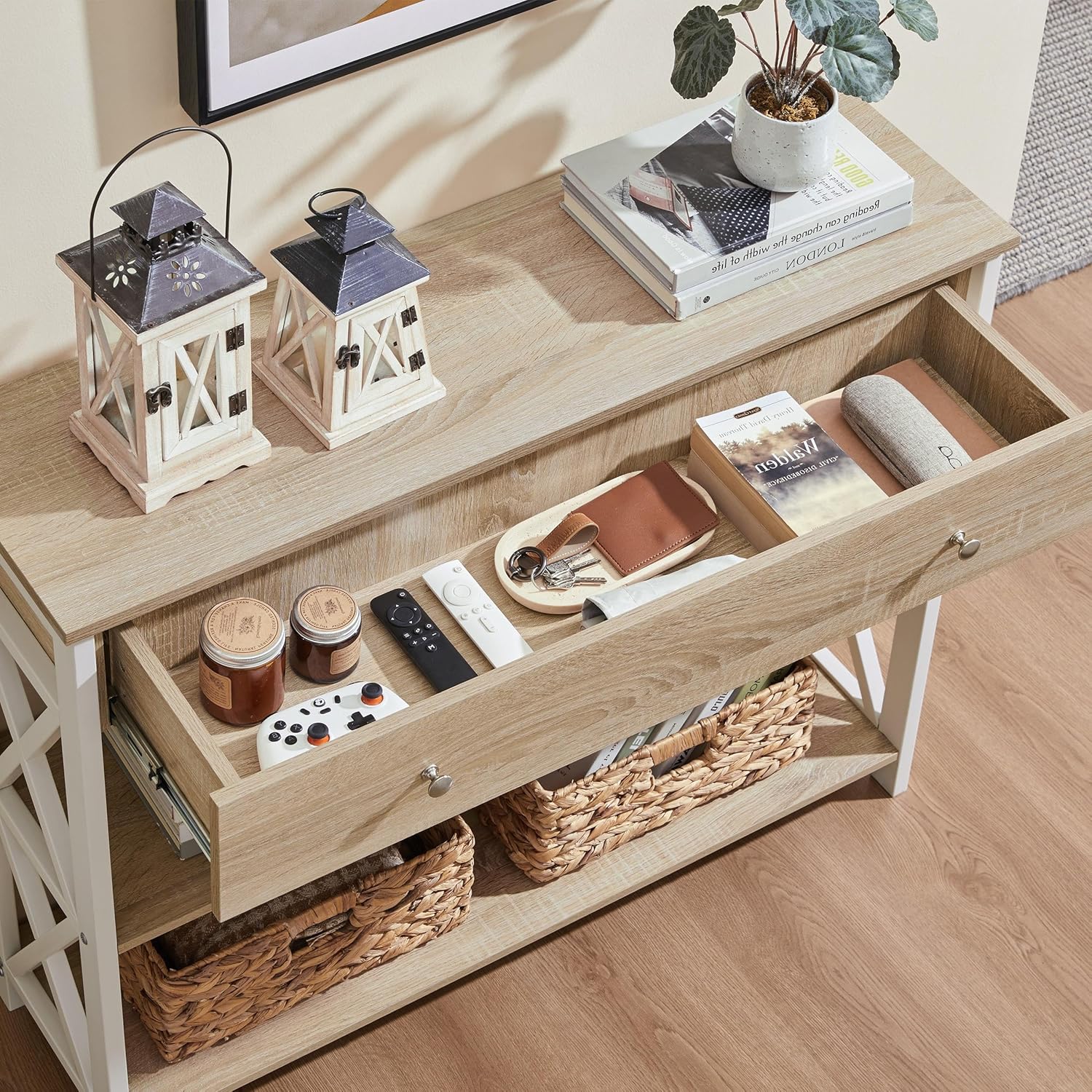
Image: Drawer Storage. This image displays the spacious drawer, organized with items such as remote controls, keys, and small accessories, demonstrating its storage capacity.
Priežiūra
Regular maintenance will help preserve the appearance and longevity of your TV stand.
- Valymas: Nuvalykite paviršius reklamaamp šluoste bendram valymui. Jei paviršius sausas, nuvalykite jį sausa šluoste. Venkite abrazyvinių valiklių ar stiprių cheminių medžiagų, kurios gali pažeisti paviršių.
- Išsiliejimai: Promptly wipe up any spills to prevent water damage or staining, especially on the engineered wood surfaces.
- Aparatinės įrangos patikrinimas: Periodiškai patikrinkite visus varžtus ir tvirtinimo detales, kad įsitikintumėte, jog jie yra tvirtai priveržti. Jei reikia, priveržkite, kad išlaikytumėte konstrukcijos vientisumą.
- Aplinkos sąlygos: Avoid placing the stand in direct sunlight or near heat sources, which can cause warping or fading. Maintain a stable room temperature and humidity.

Image: CARB P2-Certified Material. This diagram highlights the material's properties, including waterproof, scratch-resistant against slight damage, and moisture/mildew proof, indicating its durability and ease of maintenance.
Trikčių šalinimas
- Svyravimas / nestabilumas:
- Ensure the TV stand is placed on a flat, level surface.
- Patikrinkite visus surinkimo varžtus ir veržles. Priveržkite visas atsilaisvinusias jungtis.
- Verify the anti-tipping unit is correctly installed and secured to the wall.
- Stalčius neslysta sklandžiai:
- Ensure the drawer slides are properly aligned and installed on both the drawer and the main frame.
- Patikrinkite, ar stalčių bėgeliuose nėra kliūčių.
- Verify that all screws securing the drawer slides are tight.
- Trūkstamos dalys arba pažeisti komponentai:
- Refer to the "Package Contents" section. If parts are missing or damaged upon arrival, contact Yaheetech customer support immediately for assistance.
Specifikacijos
| Atributas | Detalė |
|---|---|
| Prekės ženklas | Yaheetech |
| Modelio numeris | YT-00127629-01 |
| Bendri matmenys (I x P x A) | 39.5 colio x 12 colio x 32 colio (100.3 cm x 30.5 cm x 81.3 cm) |
| Stalviršio matmenys (ilgis x plotis) | 39.5 colio x 12 colio (100.3 cm x 30.5 cm) |
| Drawer Inner Dimensions (L x D x H) | 33.5 colio x 9 colio x 3.5 colio (85.1 cm x 22.9 cm x 8.9 cm) |
| Apatinės lentynos matmenys (ilgis x plotis) | 37 colio x 11 colio (94 cm x 27.9 cm) |
| Prekės svoris | 44.53 svarai (20.2 kg) |
| Maksimalus svorio rekomendacija (stalviršis) | 198 svarai (90 kg) |
| Medžiaga | Inžinerinė mediena, geležis |
| Spalva | Šviesus ąžuolas |
| Reikalingas surinkimas | Taip |
| Rekomenduojami surinkimo įrankiai | Allen Key, Hammer, Screwdriver |
Informacija apie garantiją
Yaheetech products are manufactured with quality and care. For specific warranty details regarding your TV stand, please refer to the warranty card included in your package or visit the official Yaheetech website. Typically, warranties cover manufacturing defects under normal use.
Pagalba klientams
If you have any questions, require assistance with assembly, or need to report missing/damaged parts, please contact Yaheetech customer support.
- Palaikymas internetu: Apsilankykite oficialioje „Yaheetech“ svetainėje webDUK, pagalbos išteklių ir kontaktinių formų svetainė.
- El. paštas / Telefonas: Refer to your product packaging or the Yaheetech website for specific email addresses or phone numbers for customer service.