
1. Įvadas
This manual provides instructions for the safe and effective operation of the UNI-T UT890C and UT890D+ True RMS Digital Multimeters. These devices are designed for measuring AC/DC voltage, AC/DC current, resistance, capacitance, frequency, diode, continuity, and temperature (UT890C only). The UT890D+ model also includes a LIVE function for distinguishing live and neutral wires.
Please read this manual thoroughly before use to ensure proper operation and to prevent potential hazards.

Figure 1: UNI-T UT890C Digital Multimeter
2. Saugos informacija
Always adhere to safety precautions when using the multimeter. Failure to do so may result in electric shock, injury, or damage to the meter or equipment under test.
- Neviršykite jokių didžiausių įvesties verčių.
- Būkite ypač atsargūs dirbdami su ttagesant didesnei nei 30 V AC RMS, 42 V pikinei vertei arba 60 V DC įtampai. Šie įtampų lygiaitagtai kelia šoko pavojų.
- Įsitikinkite, kad bandymo laidai yra geros būklės ir tinkamai prijungti.
- Nenaudokite matuoklio, jei jis atrodo pažeistas arba jei akumuliatoriaus dangtelis nėra tinkamai uždarytas.
- Always turn off power to the circuit and discharge all high-voltagPrieš matuodami varžą, laidumą, diodus ar talpą, atjunkite kondensatorius.
- Kad užtikrintumėte tikslius rodmenis, pakeiskite bateriją, kai pasirodys išsikrovusio akumuliatoriaus indikatorius.
3. Produkto savybės ir komponentai
The UT890 series multimeters offer a range of functions for various electrical measurements.

2 pav. Baigtaview of measurement functions supported by the UT890 series.
3.1 Multimeter Components

Figure 3: Labeled components of the UT890C Multimeter.
- LCD ekranas: Rodo matavimo rodmenis ir indikatorius.
- Funkcijų mygtukas (SELECT): Used to switch between different measurement modes within a single rotary switch position (e.g., AC/DC, Diode/Continuity).
- MAX/MIN Switch: Toggles between maximum and minimum value display during measurement.
- Insulating Protective Cover: Provides protection for the device.
- Current Jacks (mA, A): Input terminals for current measurements.
- Transistor Jack (hFE): Socket for transistor testing.
- Duomenų laikymas (HOLD): Short press to hold the current reading; long press to activate LCD backlight.
- Function Switch (Rotary Dial): Pasirenkama norima matavimo funkcija.
- Measuring Jack (VΩHz): Įvesties terminalas ttage, varžos, dažnio, talpos ir diodų matavimai.
- Paprastasis Džekas (COM): Common input terminal for all measurements.
4. Sąranka
4.1 Akumuliatoriaus įdėjimas
The multimeter requires 1 Lithium metal battery (included). To install or replace the battery:
- Įsitikinkite, kad multimetras yra išjungtas, ir atjunkite visus bandymo laidus.
- Raskite baterijų skyrių matuoklio gale.
- Baterijų skyriaus dangteliui atidaryti naudokite atsuktuvą.
- Insert the new battery, observing correct polarity.
- Uždėkite akumuliatoriaus skyriaus dangtelį ir pritvirtinkite jį varžtu.
5. Naudojimo instrukcijos
To perform a measurement, select the desired function using the rotary dial and connect the test leads appropriately.
5.1 tomastagMatavimas (AC/DC)
Turn the rotary dial to the 'V~' for AC voltage arba „V=“, jei tai nuolatinės srovės tūristage range. Insert the red test lead into the 'VΩHz' jack and the black test lead into the 'COM' jack. Connect the test leads across the circuit or component to be measured.
5.2 Srovės matavimas (AC/DC)
Turn the rotary dial to the 'A~' for AC current or 'A=' for DC current range. For currents up to 600mA, use the 'mA' jack. For currents up to 20A, use the '20A' jack. Insert the red test lead into the appropriate current jack and the black test lead into the 'COM' jack. Connect the meter in series with the circuit.
5.3 Varžos, talpos, diodo ir tęstinumo matavimas
Turn the rotary dial to the 'Ω', 'F', or diode/continuity symbol. Use the 'SELECT' button to cycle through modes if necessary. Insert the red test lead into the 'VΩHz' jack and the black test lead into the 'COM' jack. Connect the test leads across the component.
5.4 Dažnio matavimas
The meter supports both low-voltage (below 30V, 10Hz~10MHz) and high-voltage (5V~750V, 10Hz~10kHz) frequency measurements. Turn the rotary dial to the 'Hz' position. Connect the test leads as for voltage measurement. The circuit for measuring high frequency needs to be switched to the frequency file atitinkantis ttage file.

4 pav. Pvzamples of low-voltage ir didelės apimtiestage frequency measurements.
5.5 NCV (bekontaktis tūrinistagFunkcija
NCV funkcija leidžia bekontakčiu būdu aptikti kintamosios srovės tūrįtage. Turn the rotary dial to the 'NCV' position. Bring the top of the meter close to the wire or circuit. If AC voltage is detected, the meter will beep and the display will show the sensed electric field strength.
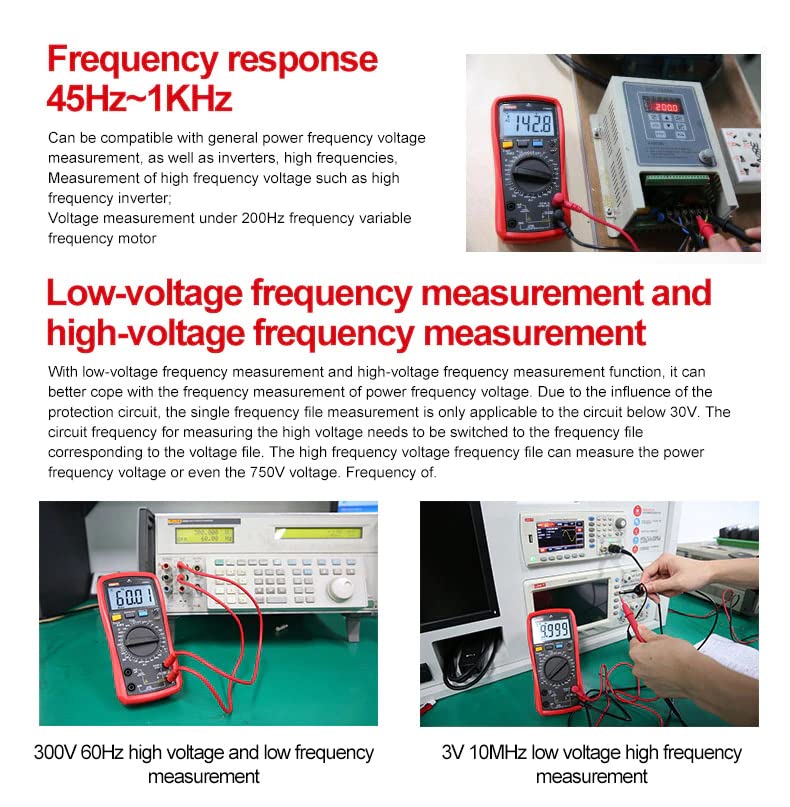
Figure 5: Using the NCV function to detect AC voltage be kontakto.
5.6 LIVE Function (UT890D+ Only)
The UT890D+ model features a LIVE function to distinguish between live and neutral wires. Insert a single test pen into the circuit. The display will indicate 'LIVE' for a live wire and 'EF' for a neutral wire, accompanied by acousto-optic indications.
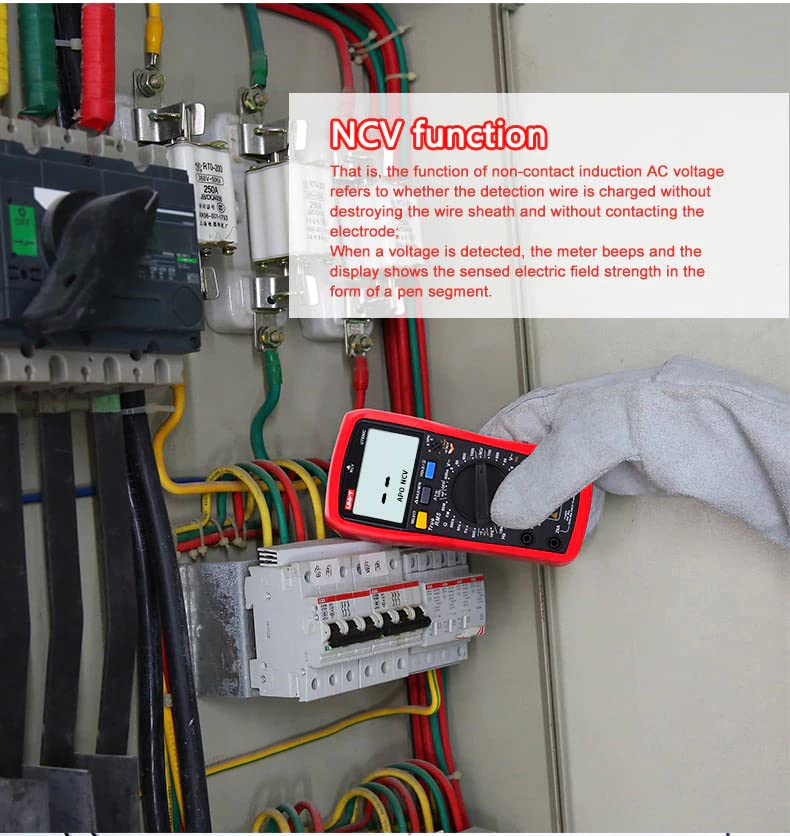
Figure 6: Live and neutral wire identification using the UT890D+ (top) and UT890C (bottom).
5.7 Data Hold and MAX/MIN
Press the 'HOLD' button briefly to freeze the current reading on the display. Press it again to release. Press the 'MAX/MIN' button to display the maximum or minimum measured value during a measurement session.
5.8 Accurate Measurement Examples

7 pav. Pvzamples of accurate measurement readings for voltage, capacitance, and current.
6. Priežiūra
6.1 Bendroji priežiūra
- Keep the meter dry. If it gets wet, wipe it dry.
- Use and store the meter in normal temperature environments. Extreme temperatures can shorten the life of electronic devices.
- Handle the meter gently and carefully. Dropping it can damage the circuit boards or case.
- Keep the meter away from dust and dirt, which can cause premature wear of parts.
- Nuvalykite skaitiklį reklamaamp retkarčiais nuvalykite audinį, kad atrodytų kaip naujas. Nenaudokite stiprių cheminių medžiagų, valymo tirpiklių ar stiprių ploviklių.
6.2 Akumuliatoriaus keitimas
When the low battery indicator (typically a battery icon) appears on the display, replace the battery as described in Section 4.1. Always use the specified battery type.
7. Problemų sprendimas
7.1 Fuse Blown Alarm
The UT890 series includes an automatic fuse blown detection and alarm. If the fuse is blown during current measurement, the meter will display a 'FUSE' alarm and emit an audible warning. This indicates that the fuse needs to be replaced. Refer to the specifications for the correct fuse type.

Figure 8: Fuse blown alarm on the multimeter display and detailed specifications.
7.2 No Display or Incorrect Readings
- Patikrinkite akumuliatoriaus lygį. Jei žemas, pakeiskite.
- Ensure test leads are correctly inserted into the appropriate jacks.
- Verify the rotary dial is set to the correct measurement function.
- If measuring current, ensure the meter is connected in series and the correct current jack is used.
8. Specifikacijos
| Funkcija | UT890C | UT890D+ |
|---|---|---|
| DC ttage | 600mV/6V/60V/600V/1000V | 600mV/6V/60V/600V/1000V |
| AC ttage | 6V/60V/600V/750V | 6V/60V/600V/750V |
| AC dažnis | 10Hz-10kHz | 10Hz-10kHz |
| DC srovė | 60uA/600uA/6mA/60mA/600mA/20A | 60uA/600uA/6mA/60mA/600mA/20A |
| Kintamosios srovės srovė | 60uA/600uA/6mA/60mA/600mA/20A | 60uA/600uA/6mA/60mA/600mA/20A |
| Atsparumas | 600Ω/6kΩ/60kΩ/600kΩ/6MΩ/60MΩ | 600Ω/6kΩ/60kΩ/600kΩ/6MΩ/60MΩ |
| Talpa | 100mF | 100mF |
| Dažnis | 9.999Hz ~ 9.999MHz | 9.999Hz ~ 9.999MHz |
| Temperatūra | -40 ° C ~ 1000 ° C / -40 ° F ~ 1832 ° F | N/A |
| Ekrano skaičius | 6000 | 6000 |
| Tiesioginė funkcija | N/A | Taip |
| Kategorijų įvertinimai | II kategorijos 1000 V, III kategorijos 600 V | II kategorijos 1000 V, III kategorijos 600 V |
Bendrosios specifikacijos
- Maitinimo šaltinis: Maitinamas baterijomis (pridedama 1 ličio metalo baterija)
- Matmenys (P x P x A): 16.5 x 11 x 12 cm
- Svoris: 600 gramų
- Gamintojas: UNI-Trend
- Modelio numeris: HY-UT890C
- Kilmės šalis: Kinija
- Atitiktis: CE, ISO 9001, RoHS, UKCA
9. Garantija ir palaikymas
9.1 Informacija apie garantiją
Šis produktas tiekiamas su a 1 metų garantija nuo pirkimo datos. Prašome išsaugoti pirkimo įrodymą garantiniams reikalavimams.
9.2 Atsarginių dalių prieinamumas
Spare parts are available for 4 metai nuo pirkimo datos.
9.3 Pagalba klientams
For technical assistance, troubleshooting, or warranty inquiries, please contact the seller, Yuqiao-Store, or refer to the official UNI-T webpalaikymo išteklių svetainė.


