
Įvadas
Thank you for choosing the ASHATA 6-Channel USB 3.7V Lithium Battery Charger Board. This device is designed to efficiently charge up to six 3.7V LiPo 1S or LiHv batteries simultaneously and independently. Its compact design and versatile power input make it an ideal solution for hobbyists and professionals requiring reliable battery charging.
Pakuotės turinys
- 1 x ASHATA 6-Channel USB Lithium Battery Charger Board
Saugos informacija
Prieš naudodami šį gaminį, perskaitykite ir supraskite visas saugos instrukcijas. Nesilaikant šių instrukcijų, gali kilti elektros smūgis, gaisras arba sunkūs sužalojimai.
- Use only with compatible 3.7V LiPo 1S or LiHv batteries. Do not attempt to charge other battery types.
- Ensure the charger is connected to a stable 5V USB power source (e.g., computer USB port, power bank, phone charger).
- Nepalikite įkraunamų baterijų be priežiūros.
- Įkroviklį laikykite atokiau nuo vandens, drėgmės ir aukštos temperatūros.
- Do not short-circuit the charging ports.
- If the charger or battery shows signs of damage, discontinue use immediately.
- Laikyti vaikams nepasiekiamoje vietoje.
Produktas baigtasview
The ASHATA 6-Channel USB Lithium Battery Charger Board features a compact design with multiple independent charging channels and user-friendly indicators.
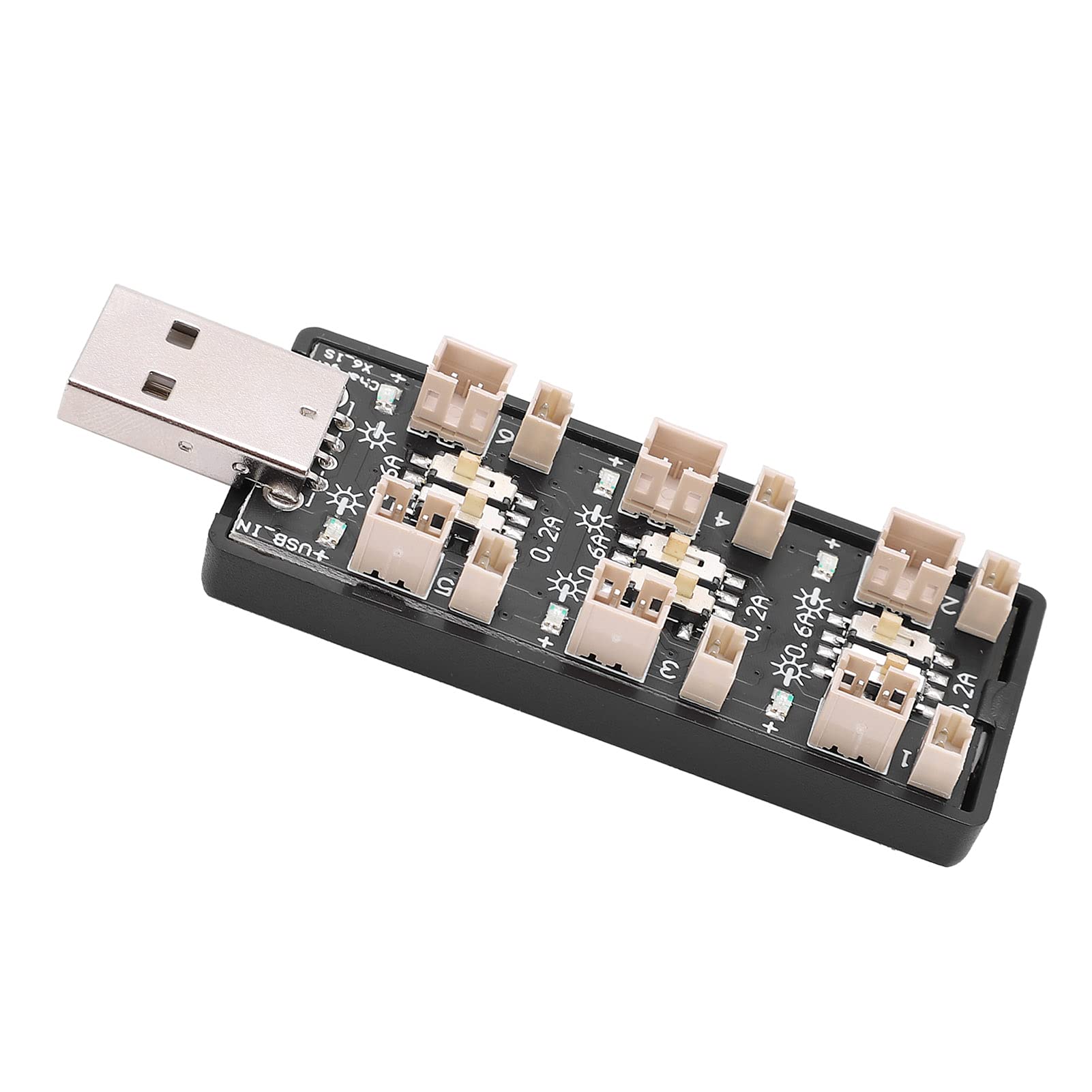
1 paveikslas: Apskritai view of the ASHATA 6-Channel USB Lithium Battery Charger Board, showing the integrated USB plug for power input and the six charging ports.
Pagrindiniai komponentai:
- USB įvesties kištukas: Standard USB-A connector for power input.
- Charging Ports (x6): Independent ports for connecting 3.7V LiPo 1S or LiHv batteries.
- Current Selection Switches (x6): Individual toggle switches for each channel to select charging current (0.2A or 0.6A).
- LED indikatoriai (x6): Each channel has an LED to indicate charging status.

2 paveikslas: Iš arti view highlighting the individual charging ports and their corresponding current selection toggle switches (0.2A and 0.6A settings) and LED indicators.
Sąranka
- Prijunkite maitinimo šaltinį: Insert the integrated USB plug of the charger board into a compatible 5V USB power source. This can be a computer USB port, a power bank, or a standard USB wall adapter (e.g., phone charger).
- Paruoškite baterijas: Ensure your 3.7V LiPo 1S or LiHv batteries are in good condition and compatible with the charger's ports.

3 paveikslas: Iš viršaus į apačią view of the charger board, illustrating the layout of the six independent charging channels and the USB input.
Naudojimo instrukcijos
- Pasirinkite įkrovimo srovę: For each battery you intend to charge, adjust the corresponding toggle switch to either 0.2A or 0.6A.
- 0.2A: Suitable for smaller capacity batteries or for a slower, more gentle charge.
- 0.6A: Suitable for larger capacity batteries or when a faster charge is desired. Ensure your battery can handle this current.
- Prijunkite baterijas: Carefully plug your 3.7V LiPo 1S or LiHv batteries into the charging ports. Ensure correct polarity.
- Monitoriaus įkrovimo būsena: The LED indicator for each channel will behave as follows:
- Mirksintis šviesos diodas: Rodo, kad šiuo metu akumuliatorius kraunamas.
- Nuolatinis šviesos diodas: Indicates that the battery is fully charged and the charging process has automatically stopped.
- Atjunkite baterijas: Once the LED turns solid, the battery is fully charged. Disconnect the battery from the charging port.
- Atjunkite maitinimą: When all charging is complete, disconnect the USB charger board from its power source.

4 paveikslas: Viršuje ir apačioje views of the charger board, showing the compact form factor and the USB input.
Priežiūra
- Valymas: Use a dry, soft cloth to clean the charger board. Do not use liquid cleaners or solvents.
- Saugykla: Kai nenaudojate, laikykite įkroviklį vėsioje, sausoje vietoje, toliau nuo tiesioginių saulės spindulių ir ekstremalių temperatūrų.
- Patikra: Periodically inspect the charger for any signs of damage to the casing, ports, or USB plug.
Trikčių šalinimas
| Problema | Galima priežastis | Sprendimas |
|---|---|---|
| LED does not light up when battery is connected. |
|
|
| Battery charges slowly. |
|
|
| Charger or battery gets excessively hot. |
|
|
Specifikacijos
| Modelio numeris | Rich0CsIrfVFiU |
| Įvesties tomastage Diapazonas | USB 5V ± 5% (0.5A ~ 2A) |
| Išėjimas ttage Diapazonas | 2.5V ~ 4.20V |
| Išėjimo srovės diapazonas | 600mA x 6CH (0.6A) / 200mA x 6CH (0.2A) |
| Kanalų skaičius | 6 nepriklausomi kanalai |
| Taikomas akumuliatoriaus tipas | LiPo 1S; LiHv high voltage lithium battery (3.7V nominal) |
| Matmenys (I x P x A) | 8 x 3 x 2 cm |
| Gamintojas | ASHATA |
| Kilmės šalis | Kinija |
Garantija ir palaikymas
For warranty information or technical support, please refer to the retailer's policy or contact ASHATA customer service through their official channels. Please have your model number (Rich0CsIrfVFiU) and purchase details ready when contacting support.