
1. Įvadas
This manual provides detailed instructions for the operation and maintenance of your Smile S666 Multimedia Speaker. Please read this manual thoroughly before using the product to ensure proper functionality and to prevent damage.
2. Saugos informacija
To ensure safe operation and prolong the lifespan of your speaker, please observe the following precautions:
- Do not expose the speaker to water or excessive moisture. This product is ne atsparus vandeniui.
- Venkite garsiakalbio laikymo tiesioginiuose saulės spinduliuose arba šalia šilumos šaltinių.
- Do not disassemble or attempt to repair the speaker yourself. Refer all servicing to qualified personnel.
- Naudokite tik gamintojo pateiktą arba rekomenduojamą maitinimo adapterį ir laidus.
- Laikyti vaikams nepasiekiamoje vietoje.
3. Pakuotės turinys
Patikrinkite pakuotę, ar joje yra šie daiktai:
- Smile S666 Multimedia Speaker
- USB maitinimo laidas
- Garso kabelis (3.5 mm lizdas)
- Vartotojo vadovas

Figure 3.1: The Smile S666 Multimedia Speaker as packaged in its retail box.
4. Produktas baigtasview
The Smile S666 is a compact multimedia speaker designed for desktop use, offering clear audio output for your computer or other compatible devices.
4.1 Komponentai
- Pagrindinis garsiakalbio blokas: Houses the audio drivers and control circuitry.
- Garsumo rankenėlė: Located on the top surface, used to adjust audio output level.
- USB maitinimo prievadas: For connecting the speaker to a power source.
- Audio Input Port (3.5mm): For connecting to audio sources like computers, phones, etc.

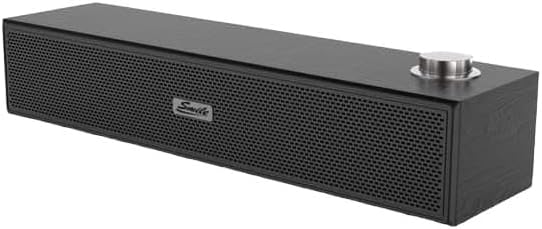
4.1 pav.: Priekinė ir viršutinė dalys view of the Smile S666 Multimedia Speaker, showing the speaker grille and volume knob. The speaker is available in different finishes, including wood grain and black.
5. Sąranka
Follow these steps to set up your Smile S666 Multimedia Speaker:
- Vieta: Place the speaker on a stable, flat surface near your computer or audio source. Ensure there is adequate ventilation around the speaker.
- Prijunkite maitinimą: Insert the USB power cable into the speaker's USB power port. Connect the other end of the USB cable to a powered USB port on your computer or a USB wall adapter (5V/1A recommended).
- Prijungti garsą: Insert one end of the 3.5mm audio cable into the audio input port on the speaker. Connect the other end of the 3.5mm audio cable to the headphone jack or audio output port of your computer, laptop, or other audio device.
- Maitinimas: The speaker will typically power on automatically once connected to a power source. Some models may have a power switch integrated with the volume knob; turn the knob clockwise until you hear a click to power on.
6. Naudojimo instrukcijos
6.1 Garsumo reguliavimas
Rotate the volume knob on the top of the speaker clockwise to increase the volume and counter-clockwise to decrease it. You can also adjust the volume from your connected device.
6.2 Garso atkūrimas
Once connected, play audio from your computer or device. The sound will be output through the Smile S666 speaker.
7. Priežiūra
To keep your speaker in optimal condition:
- Valymas: Use a soft, dry cloth to wipe the exterior of the speaker. Do not use liquid cleaners or abrasive chemicals.
- Saugykla: Kai garsiakalbio nenaudojate ilgesnį laiką, laikykite jį vėsioje, sausoje vietoje, toliau nuo tiesioginių saulės spindulių ir ekstremalių temperatūrų.
- Kabelio priežiūra: Avoid bending or crimping the power and audio cables excessively.
8. Problemų sprendimas
| Problema | Galima priežastis | Sprendimas |
|---|---|---|
| Nėra garso | Speaker not powered on; Cables not connected properly; Volume too low; Incorrect audio output selected on device. | Ensure speaker is powered on; Check all cable connections; Increase speaker and device volume; Select the correct audio output on your computer/device. |
| Iškraipytas garsas | Volume too high; Poor audio source quality; Damaged cable. | Lower the volume; Try a different audio source; Replace the audio cable. |
| Speaker not recognized by computer | Driver issue (rare for plug-and-play speakers); USB port issue. | Try a different USB port; Restart your computer. |
9. Specifikacijos
| Funkcija | Detalė |
|---|---|
| Gaminio matmenys | 40 x 5 x 5 cm |
| Pirmoji laisva data | 7 m. rugpjūčio 2023 d |
| Gamintojas | smail |
| ASIN | B0CDZBFRQ5 |
| Brand Name (as listed) | Generolas |
| Ryšio technologija | Wired (3.5mm Audio Jack), Bluetooth |
| Montavimo tipas | Stalviršio laikiklis |
| Modelio pavadinimas | S666 |
| Garsiakalbio tipas | Multimedija |
| Suderinami įrenginiai | Asmeninis kompiuteris |
| Žemųjų dažnių garsiakalbio skersmuo | 12 colių |
| Spalva | Ryški spalva |
| Atsparumas vandeniui | Nr |
10. Garantija ir palaikymas
This product comes with a standard manufacturer's warranty. For specific warranty terms and conditions, please refer to the warranty card included in the package or contact your point of purchase. For technical support or service inquiries, please contact the retailer or manufacturer directly.
Dėl papildomos pagalbos galite apsilankyti gamintojo svetainėje websvetainėje arba susisiekite su jų klientų aptarnavimo skyriumi. Išsaugokite pirkimo kvitą kaip pirkimo įrodymą garantijos pretenzijoms.