
DinoFire X17
DinoFire Rechargeable Presentation Clicker X17 User Manual
Modelis: X17
Įvadas
Thank you for choosing the DinoFire Rechargeable Presentation Clicker, Model X17. This device is designed to enhance your presentations with its wireless control, integrated laser pointer, and user-friendly features. This manual provides detailed instructions for setup, operation, maintenance, and troubleshooting to ensure optimal performance.
Pakuotės turinys
Prašome patikrinti, ar pakuotėje yra visi reikalingi daiktai:
- DinoFire Rechargeable Presentation Clicker (X17)
- USB Receiver (stored inside the clicker)
- Mikro USB įkrovimo laidas
- Vartotojo vadovas (šis dokumentas)
Produktas baigtasview
The DinoFire X17 Presentation Clicker features an ergonomic design with intuitive controls for seamless presentation delivery. Familiarize yourself with the device's components and button functions.
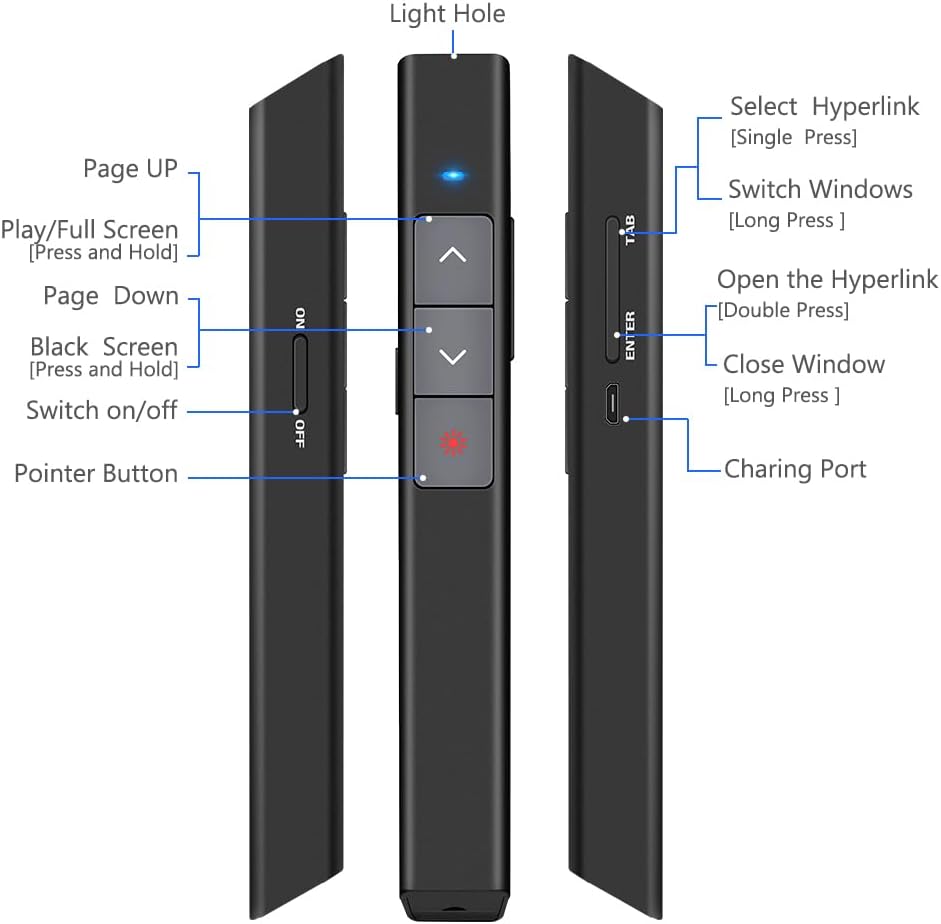
1 paveikslas: Išsamus view of the DinoFire X17 Presentation Clicker showing button functions and port locations.
Mygtukų funkcijos:
- Page Up (▲): Advances to the previous slide.
- Page Down (▼): Advances to the next slide.
- Pointer Button: Įjungia raudoną lazerinį žymeklį.
- Play/Full Screen (Press and Hold): Įjungia arba išjungia viso ekrano pristatymo režimą.
- Black Screen (Press and Hold): Toggles a black screen during presentation.
- Įjungti/išjungti: Įrenginio maitinimo jungiklis.
- Select Hyperlink (Single Press): Selects a hyperlink on the slide.
- Open the Hyperlink (Double Press): Opens the selected hyperlink.
- Switch Windows (Long Press): Cycles through open application windows.
- Close Window (Long Press): Closes the active window.
- Įkrovimo prievadas: Micro USB port for recharging the device.
- Light Hole: Location of the laser emitter.
Sąrankos vadovas
1. Pranešėjo įkrovimas
Before initial use, fully charge the presentation clicker. A full charge typically takes approximately one hour and provides power for over one week of use.
- Connect the provided Micro USB charging cable to the charging port on the side of the presenter.
- Kitą laido galą prijunkite prie USB maitinimo šaltinio (pvz., kompiuterio USB prievado, USB sieninio adapterio).
- The charging indicator light will illuminate (refer to "Low Power Indicator" section for details).
- Visiškai įkrovę atjunkite laidą.

2 paveikslas: The presentation clicker being charged via its Micro USB port, connected to a laptop.
2. USB imtuvo prijungimas
The USB receiver is stored magnetically within the presentation clicker for convenience and to prevent loss.
- Gently pull out the USB receiver from the bottom end of the presentation clicker.
- Įkiškite USB imtuvą į laisvą kompiuterio (nešiojamojo arba stacionaraus kompiuterio) USB prievadą.
- Sistema automatiškai aptiks ir įdiegs reikiamas tvarkykles. Rankinio tvarkyklių diegimo nereikia.

3 paveikslas: The magnetic storage for the USB receiver, demonstrating its removal and insertion into a computer's USB port.
3. Įjungimas/išjungimas
- Locate the "Switch on/off" button on the side of the clicker.
- Slide the switch to the "ON" position to power on the device.
- Slide the switch to the "OFF" position when not in use to conserve battery life.
4. Sistemos ir programinės įrangos suderinamumas
The DinoFire X17 is widely compatible with various operating systems and presentation software.
- Palaikomos sistemos: Windows 2003, XP, Windows Vista, Windows 7, 8, 10, Linux, Android, Mac OS.
- Palaikoma programinė įranga: Keynote, Prezi, MS Word, Excel, PowerPoint, ACD See, website browsers, iWork, Google Slides, etc.
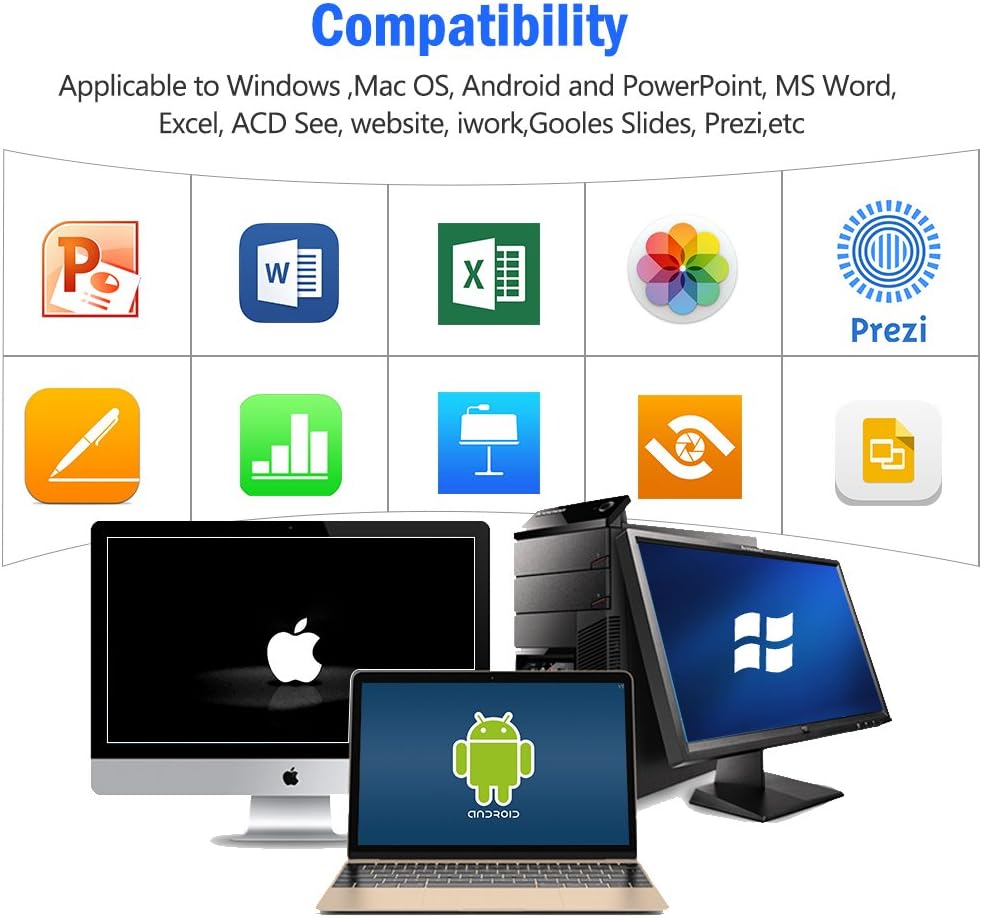
4 paveikslas: Visual representation of the broad compatibility of the presentation clicker with different operating systems and presentation applications.
Naudojimo instrukcijos
Basic Presentation Control
- Kita skaidrė: Press the "Page Down" (▼) button.
- Ankstesnė skaidrė: Press the "Page Up" (▲) button.
- Start/Exit Full Screen: Press and hold the "Page Up" (▲) button.
- Juodas ekranas: Press and hold the "Page Down" (▼) button to toggle a black screen.
Naudojant lazerinį žymeklį
The integrated red laser pointer allows you to highlight specific content on your screen or projection.
- Press and hold the "Pointer Button" (red dot icon) to activate the laser.
- Release the button to turn off the laser.
- The laser has a range of up to 300 feet (91 meters).
- Atsargiai: Do not point the laser directly at people's eyes or at highly reflective surfaces.

5 paveikslas: The red laser pointer in operation, highlighting its visibility and including a safety warning.
Išplėstinės funkcijos
- Select Hyperlink: Single press the "ENTER" button.
- Open Hyperlink: Double press the "ENTER" button.
- Perjungti „Windows“: Long press the "TAB" button to cycle through open applications.
- Close Window: Long press the "ENTER" button to close the active window.
Wireless Control Range
The DinoFire X17 offers a wireless control range of up to 100 feet (30 meters), allowing you freedom of movement during your presentation.

6 paveikslas: Illustration of the presentation clicker's effective long control range in a presentation setting.
Priežiūra
Įkrovimo gairės
- Charge the device when the low power indicator flashes continuously.
- Avoid overcharging by disconnecting the cable once fully charged.
- Use the provided Micro USB cable or a certified equivalent for charging.
USB imtuvo atmintis
Always store the USB receiver inside the magnetic compartment of the clicker when not in use to prevent loss and damage.
Valymas
Nuvalykite įrenginį minkštu, sausu skudurėliu. Nenaudokite skystų valiklių ar abrazyvinių medžiagų.
Trikčių šalinimas
| Problema | Galima priežastis | Sprendimas |
|---|---|---|
| Įrenginys nereaguoja. | Low battery; USB receiver not connected; Device is off. | Charge the device; Ensure USB receiver is securely plugged in; Turn on the device. |
| Lazerinis žymeklis neveikia. | Low battery; Laser button not pressed correctly. | Charge the device; Press and hold the laser button firmly. |
| Trumpas valdymo diapazonas. | Obstructions; Interference; Low battery. | Ensure clear line of sight to the receiver; Move away from sources of interference; Charge the device. |
| Hyperlink function not working. | Software specific issue; Hyperlink not properly selected. | Ensure the hyperlink is active and selected (single press ENTER) before attempting to open (double press ENTER). Check software settings. |
Mažos galios indikatorius
The device features a low power indicator to alert you when charging is needed. When the indicator flashes continuously, please charge the device. The device will enter auto-sleep mode after approximately 5 minutes of inactivity to save energy.

7 paveikslas: Explanation of the indicator light states for working, charging, and fully charged conditions.
Specifikacijos
- Modelis: X17
- Prekinis ženklas: DinoFire
- Belaidė technologija: 2.4GHz RF
- Valdymo diapazonas: Iki 100 pėdų (30 metrų)
- Lazerio tipas: Raudonas lazeris
- Lazerio diapazonas: Iki 300 pėdų (91 metrų)
- Baterijos tipas: 1 ličio polimero baterija (pridedama)
- Įkrovimo laikas: Maždaug 1 val
- Naudojimo laikas: Over one week (on a single charge)
- Matmenys: 6.42 x 1.61 x 1.14 colio (16.3 x 4.1 x 2.9 cm)
- Prekės svoris: 1.6 uncijos (45 gramų)
- Suderinamos sistemos: Windows 2003/XP/Vista/7/8/10, Linux, Android, Mac OS
- Suderinama programinė įranga: Keynote, Prezi, MS Word, Excel, PowerPoint, ACD See, web browsers, iWork, Google Slides
Garantija ir palaikymas
Informacija apie garantiją
The DinoFire Rechargeable Presentation Clicker X17 typically comes with a 3-year warranty. Please refer to your purchase documentation or the manufacturer's official websvetainėje, kurioje pateikiamos konkrečios garantijos sąlygos.
Pagalba klientams
For technical assistance, troubleshooting beyond this manual, or warranty claims, please contact DinoFire customer support through their official website or the retailer where the product was purchased. Keep your purchase receipt or order number handy for faster service.
Susiję dokumentaiX17

Ask a question about this manual
Ask about setup, troubleshooting, compatibility, parts, safety, or missing instructions. Manuals+ will review the question and use this page’s manual context to help answer it.