
1. Įvadas
This manual provides essential instructions for setting up, operating, maintaining, and troubleshooting your VIBOX VI-63 PC Gamer. Please read this guide thoroughly before using your new computer to ensure optimal performance and longevity.
2. Saugos informacija
- Ensure the PC is placed on a stable, flat surface with adequate ventilation.
- Do not block any ventilation openings on the PC case.
- Keep the PC away from direct sunlight, heat sources, and liquids.
- Use only the power adapter supplied with your PC.
- Prieš valydami ar atlikdami bet kokią techninę priežiūrą, atjunkite maitinimo laidą.
- Avoid opening the PC case unless instructed by VIBOX support, as this may void your warranty.
3. Pakuotės turinys
Patikrinkite, ar pakuotėje yra visi toliau išvardyti daiktai:
- VIBOX VI-63 PC Gamer Tower
- 22 colio monitorius
- RGB žaidimų klaviatūra
- RGB žaidimų pelė
- Black Mouse Pad
- Žaidimų ausinės su mikrofonu
- Wireless WiFi Network Adapter (600 Mbps)
- Maitinimo kabelis (-iai)
- Display Cable (HDMI or VGA, depending on monitor)
- Dokumentacija (šis vadovas)
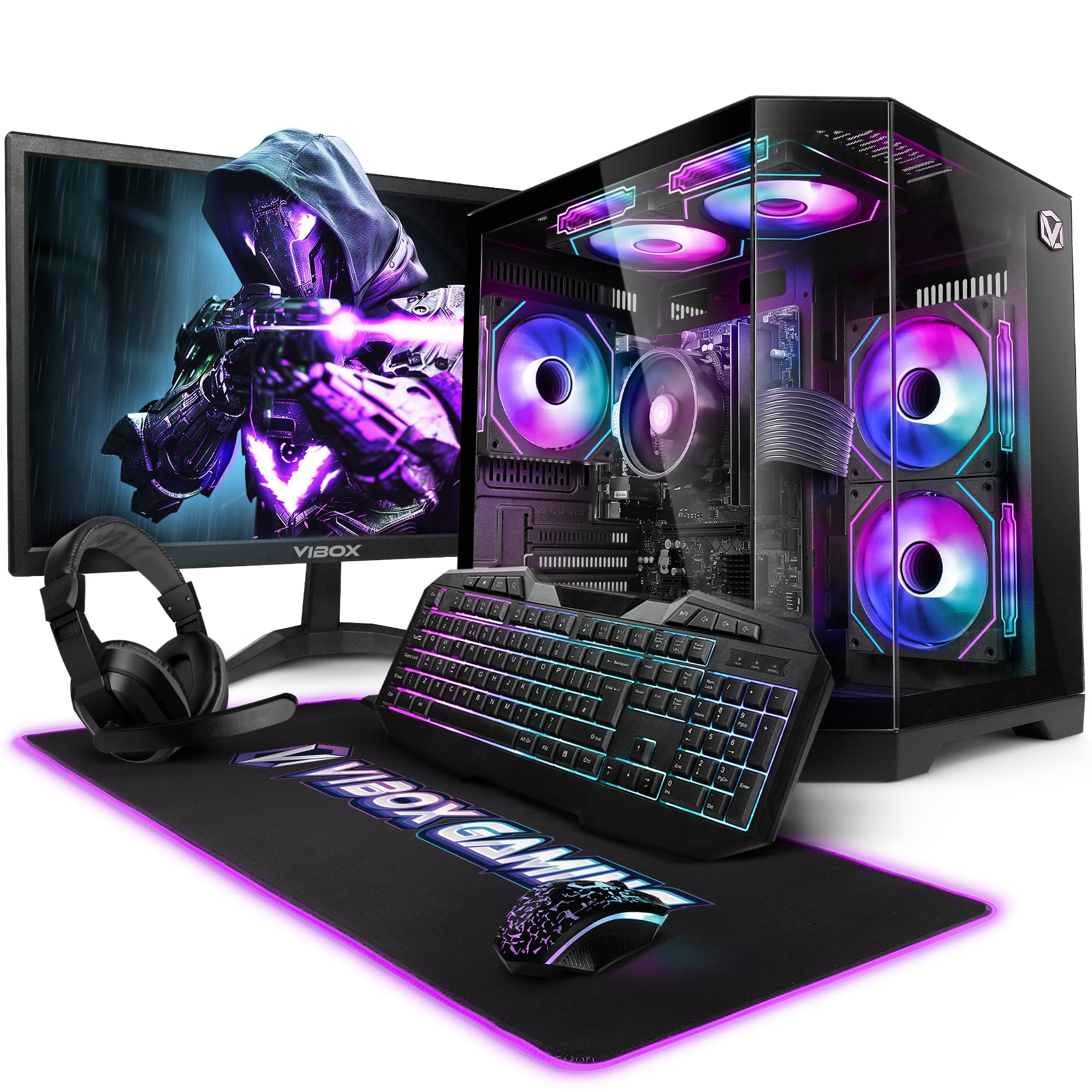
Image 3.1: VIBOX VI-63 PC Gamer Tower with internal RGB lighting.
4. Sąrankos instrukcijos
4.1. Išpakavimas ir įdėjimas
- Atsargiai išimkite visus komponentus iš jų pakuotės.
- Place the PC tower on a flat, stable surface. Ensure there is sufficient space around the tower for proper airflow.
- Place the monitor on a stable surface at a comfortable viewaukštis.
4.2. Išorinių įrenginių prijungimas
- Monitorius: Connect one end of the display cable (HDMI or VGA) to the corresponding port on the back of the PC and the other end to the monitor.
- Klaviatūra ir pelė: Connect the USB cables of the keyboard and mouse to any available USB ports on the PC.
- laisvų rankų įranga: Connect the headset to the audio jacks (headphone and microphone) on the front or rear of the PC.
- WiFi adapteris: Insert the wireless WiFi network adapter into an available USB port.
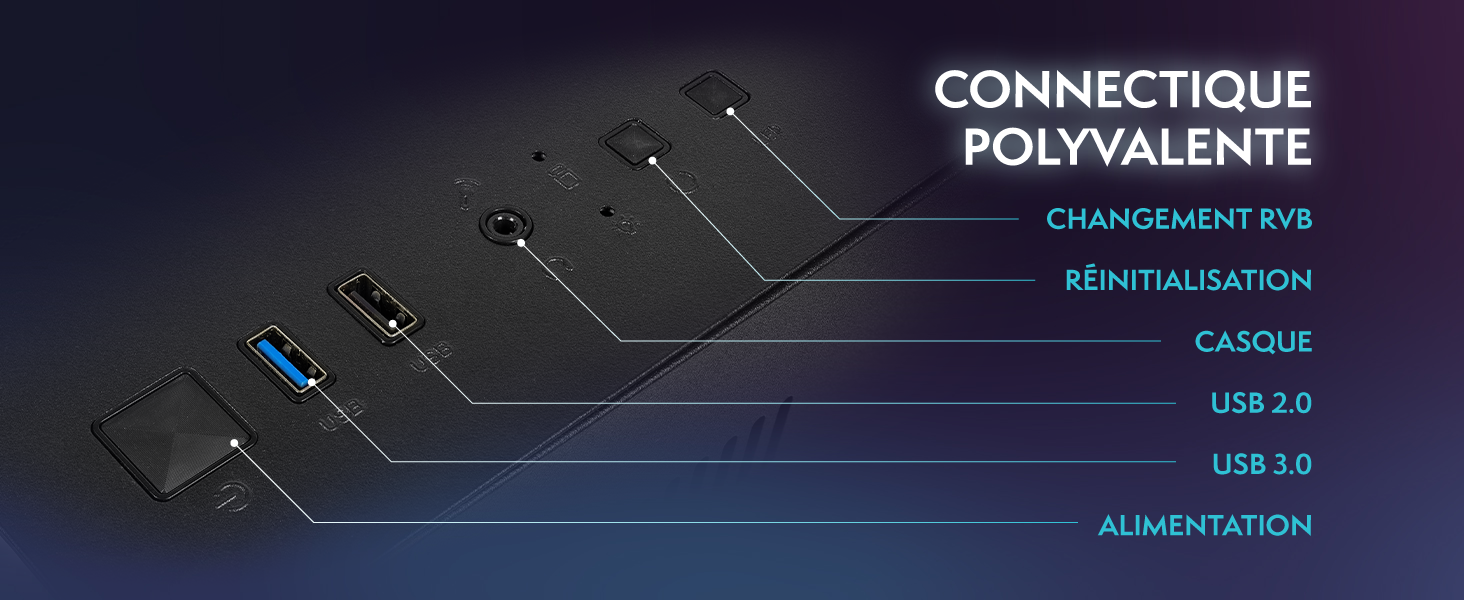
Image 4.1: Front panel connections including USB 2.0, USB 3.0, headset jack, reset button, and RGB change button.
4.3. Maitinimo prijungimas
- Connect the power cable to the power supply unit (PSU) at the back of the PC.
- Connect the other end of the power cable to a wall outlet.
- Connect the monitor's power cable to a wall outlet.
4.4. Pradinis paleidimas ir „Windows 11“ sąranka
- Press the power button on the front of the PC tower.
- Įjunkite monitorių.
- Follow the on-screen instructions to complete the Windows 11 Home setup. This typically involves selecting your region, language, creating a user account, and connecting to a Wi-Fi network.
5. Naudojimo instrukcijos
5.1. Pagrindinė operacija
- Maitinimo įjungimas/išjungimas: Press the power button to turn on the PC. To shut down, click the Start button in Windows, then Power > Shut down.
- Paleisti iš naujo: Meniu Pradėti pasirinkite Maitinimas > Paleisti iš naujo.
- Miegojimo rezimas: Meniu Pradžia pasirinkite Maitinimas > Miego režimas.
5.2. „Windows 11“ funkcijos
Your VIBOX VI-63 PC Gamer comes with Windows 11 Home pre-installed, offering features designed to enhance your computing and gaming experience:
- DirectStorage: Enables faster loading times for compatible games.
- AutoHDR: Automatically enhances visuals for a wider range of games.
- Xbox Game Pass Integration: Seamless access to a library of games (subscription may be required).
- Optimized CPU Performance: Windows 11 is designed to optimize CPU usage for gaming and multitasking.
5.3. Žaidimų našumas
The VIBOX VI-63 is equipped with an AMD Ryzen 3 3200GE processor and integrated Radeon Vega 8 graphics, providing solid performance for everyday computing and gaming at 720p to 1080p resolutions.

5.1 vaizdas: Baigtaview of internal components including CPU, GPU, RAM, and storage.
5.4. RGB apšvietimo valdymas
Your PC features RGB lighting. Use the dedicated RGB change button on the front panel (refer to Image 4.1) to cycle through different lighting modes and colors.
6. Priežiūra
6.1. Kompiuterio valymas
- Išorė: Naudokite minkštą, damp cloth to wipe down the exterior of the PC case and monitor. Avoid abrasive cleaners.
- Dulkės: Periodically use compressed air to clear dust from the ventilation openings and fan grilles. Ensure the PC is powered off and unplugged before doing so.
- Išoriniai įrenginiai: Clean your keyboard and mouse regularly to prevent dust and debris buildup.
6.2. Programinės įrangos atnaujinimai
- Reguliariai tikrinkite, ar yra „Windows“ naujinimų, ir juos įdiekite, kad užtikrintumėte sistemos stabilumą ir saugumą. Eikite į „Nustatymai“ > „Windows“ naujinimas.
- Keep your graphics drivers updated for optimal gaming performance. You can usually download the latest drivers from the AMD websvetainę.
6.3. System Care
- Avoid installing unnecessary software to keep your system lean and fast.
- Run regular antivirus scans to protect against malware. Windows Defender is pre-installed.
- Ensure proper airflow around the PC to prevent overheating. The inverted airflow design helps with cooling.
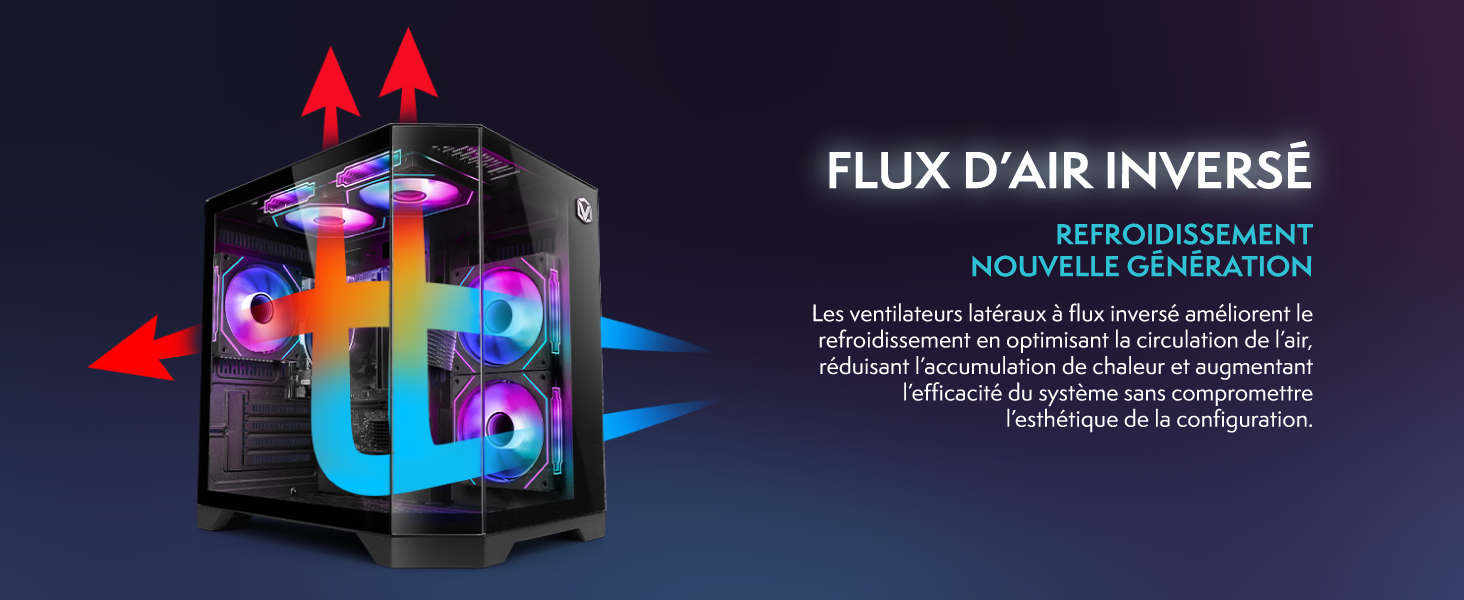
Image 6.1: Inverted airflow design for efficient cooling.
7. Problemų sprendimas
- Nėra galios: Check all power cable connections. Ensure the wall outlet is functional.
- Nėra ekrano: Ensure the monitor is powered on and the display cable is securely connected to both the PC and the monitor. Try a different display cable or port if available.
- Nėra interneto ryšio: Verify the WiFi adapter is properly installed. Check your router and internet service. In Windows, go to Settings > Network & internet to troubleshoot.
- PC Freezes/Crashes: Restart the PC. Ensure all drivers are updated. Check for overheating (ensure good airflow).
- Periferiniai įrenginiai neveikia: Try connecting the keyboard, mouse, or headset to different USB/audio ports. Ensure drivers are installed if required.
8. Specifikacijos
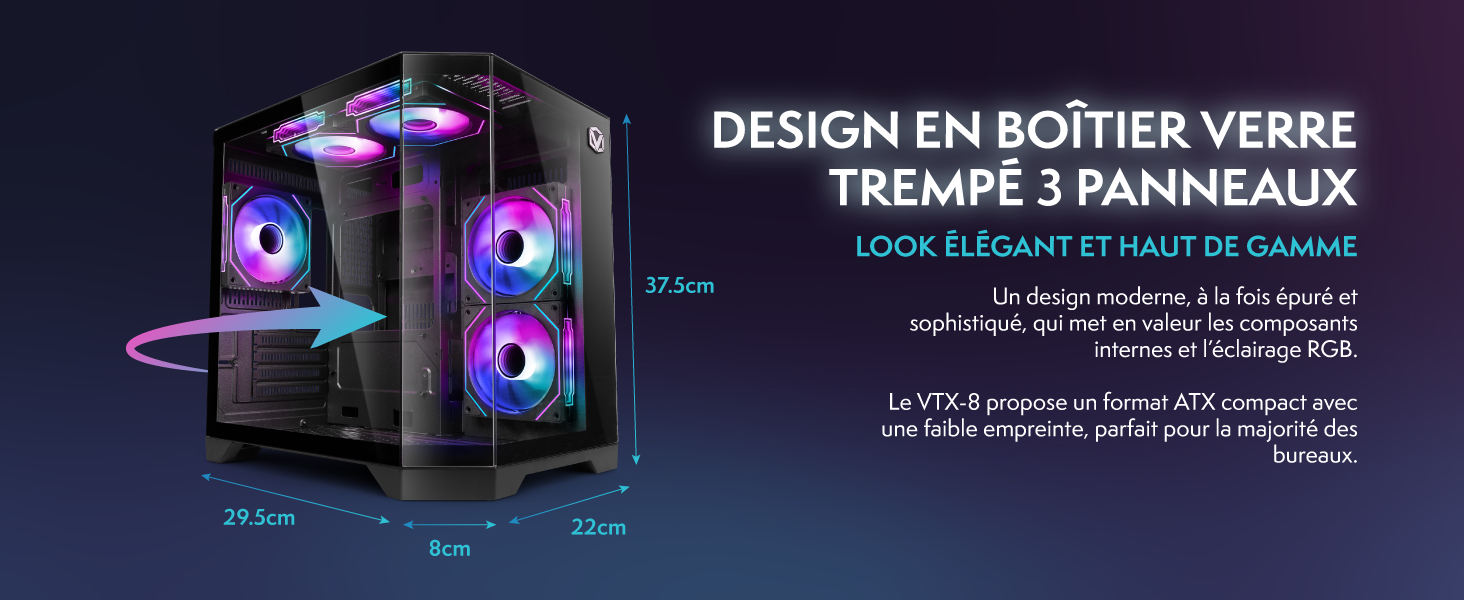
Image 8.1: VIBOX VI-63 PC Gamer case dimensions.
| Funkcija | Specifikacija |
|---|---|
| Prekės ženklas | VIBOX |
| Modelio pavadinimas | Vibox VI-63 Gaming PC |
| Operacinė sistema | Windows 11 Home |
| CPU modelis | AMD Ryzen 3 3200G |
| CPU greitis | 3.6 GHz (4 GHz Turbo) |
| CPU branduoliai | 4 |
| Grafikos koprocesorius | Radeon Vega 8 (Integrated) |
| Graphics RAM | 2 GB (Shared) |
| RAM Installed | 16 GB DDR4 |
| RAM Speed | 2666 MHz |
| Sandėliavimo talpa | 1 TB SSD diskas |
| Kietojo disko technologija | SSD |
| Monitoriaus dydis | 22 colių |
| Maksimali ekrano raiška | 1920 x 1080 pikselių |
| Vaizdo išvesties sąsaja | HDMI, VGA |
| Ryšio technologija | AMD Radeon Vega 8, Ethernet, HDMI, USB, Wi-Fi |
| Matmenys (I x P x A) | 32.6 x 19.5 x 42 cm |
| Spalva | VTX-1 Black |
9. Garantija ir palaikymas
9.1. Informacija apie garantiją
Your VIBOX VI-63 PC Gamer comes with a 2 metų garantija on spare parts. This warranty covers manufacturing defects and component failures under normal use. Please retain your proof of purchase for warranty claims.
9.2. Pagalba klientams
For technical assistance, troubleshooting, or warranty inquiries, please contact VIBOX customer support. Refer to the contact information provided with your purchase documentation or visit the official VIBOX websvetainėje, kur rasite išsamios pagalbos.
Internetiniai ištekliai: For additional support and FAQs, please visit the VIBOX official websvetainę.