
1. Įvadas
This manual provides essential information for the safe and efficient use of your TCL 32L5AG 32-inch Full HD Smart Google TV. Please read these instructions thoroughly before operating the device and retain them for future reference. This television combines a Full HD display with Google TV functionality, offering a wide range of entertainment options and smart features.
2. Saugos informacija
Visada laikykitės šių saugos priemonių, kad išvengtumėte elektros smūgio, gaisro ar gaminio sugadinimo:
- Saugokite televizorių nuo lietaus ar drėgmės.
- Užtikrinkite tinkamą vėdinimą; neužblokuokite ventiliacijos angų.
- Naudokite tik prie televizoriaus pridėtą maitinimo laidą.
- Neatidarykite televizoriaus korpusoasing; visus techninės priežiūros darbus patikėkite kvalifikuotiems darbuotojams.
- Laikykite televizorių atokiau nuo tiesioginių saulės spindulių, šilumos šaltinių ir stiprių magnetinių laukų.
- Place the TV on a stable, level surface or mount it securely to a wall using a VESA-compliant bracket.
3. Produktas baigtasview
The TCL 32L5AG is a 32-inch Full HD Smart Google TV designed for an immersive viewing experience. It features a sleek, bezel-less design and integrates advanced image processing technologies.

Vaizdas: priekis view of the TCL 32L5AG 32-inch Full HD Smart Google TV.
4. Sąranka
4.1 Išpakavimas
Atsargiai išimkite televizorių ir visus priedus iš pakuotės. Įsitikinkite, kad yra visi komponentai:
- TCL 32L5AG TV unit
- Nuotolinio valdymo pultas
- Maitinimo laidas
- TV stand components and screws
- Vartotojo vadovas (šis dokumentas)
4.2 Stovo montavimas
Norėdami sumontuoti televizoriaus stovą:
- Padėkite televizorių ekranu žemyn ant minkšto, lygaus paviršiaus, kad nepažeistumėte ekrano.
- Sulygiuokite stovo pagrindus su atitinkamais lizdais televizoriaus apačioje.
- Pritvirtinkite stovus naudodami pateiktus varžtus.

Image: Diagram showing the TV dimensions and how the stand attaches to the base of the television.
4.3 Jungiamieji kabeliai
Prijunkite reikiamus laidus prie televizoriaus galinių prievadų:
- Galia: Prijunkite maitinimo laidą prie televizoriaus ir sieninio lizdo.
- Antena: Connect your terrestrial or satellite antenna cable to the ANTENNA INPUT port.
- HDMI: For external devices like Blu-ray players or game consoles, use the HDMI INPUT 1 or 2 ports.
- LAN: Norėdami prisijungti prie interneto laidiniu būdu, prijunkite Ethernet kabelį prie LAN prievado.
- USB: For external storage (e.g., HDD for recording), use the USB port.
- Optinė skaitmeninė garso išvestis: Skirta prijungti prie garso juostos arba namų kino sistemos.
- Ausinių išvestis: Ausinėms prijungti.
- Vaizdo įvestis: Senesniems įrenginiams, naudojantiems kompozicinį vaizdo signalą.
- „miniB-CAS“ kortelės lizdas: Insert your miniB-CAS card for digital broadcast reception (required for digital broadcasting in Japan).
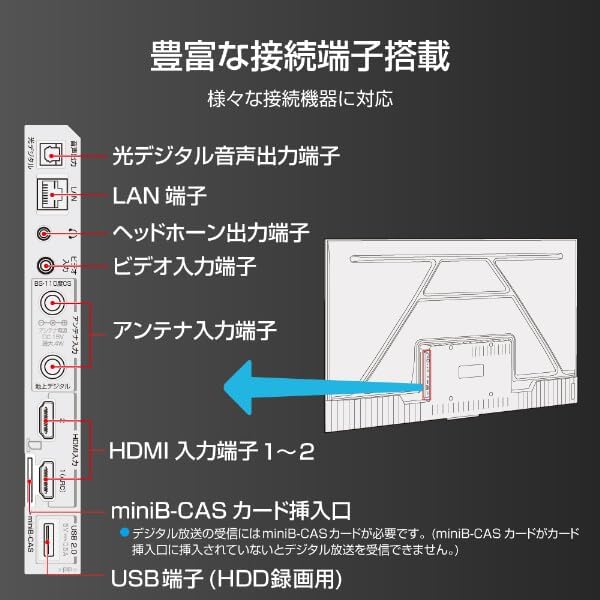
Image: Diagram illustrating the various input and output ports on the back of the TCL 32L5AG TV, including HDMI, USB, LAN, antenna, and audio outputs.
4.4 Pradinė sąranka
After connecting all cables and powering on the TV for the first time, follow the on-screen instructions to complete the initial setup, which includes:
- Kalbos pasirinkimas.
- Tinklo ryšys („Wi-Fi“ arba laidinis LAN).
- Google account login for Google TV features.
- Kanalų skenavimas transliuojamai televizijai.
5. Naudojimo instrukcijos
5.1 Pagrindinis televizoriaus valdymas
- Maitinimo įjungimas/išjungimas: Paspauskite nuotolinio valdymo pulto maitinimo mygtuką.
- Įvesties pasirinkimas: Use the 'Input' button on the remote to switch between HDMI, TV, and other sources.
- Garsumo valdymas: Naudokite mygtukus „Garsumo didinimas / mažinimas“.
- Kanalo keitimas: Use the 'Channel Up/Down' buttons for broadcast TV.
5.2 „Google TV“ funkcijos
Your TCL 32L5AG comes with Google TV, providing a personalized and integrated entertainment experience.
- Content Browsing: The home screen displays recommended content based on your viewing history and preferences from various streaming services.
- Voice Search (OK Google): Press the Google Assistant button on your remote and speak into the microphone to search for movies, shows, or control your TV.
- Srautinio perdavimo programos: Access popular services like Netflix, YouTube, Amazon Prime Video, Disney+, Hulu, and more directly from the TV.

Paveikslėlis: „Google TV“ pagrindinio ekrano, kuriame rodomos įvairios transliacijos programos ir turinio rekomendacijos, ekrano kopija.
5.3 Įtaisytasis „Chromecast“.
The TV includes Chromecast built-in, allowing you to cast content from your smartphone, tablet, or computer directly to the TV screen.
- Įsitikinkite, kad jūsų mobilusis įrenginys ir televizorius prijungti prie to paties „Wi-Fi“ tinklo.
- Mobiliajame įrenginyje atidarykite „Chromecast“ palaikančią programėlę (pvz., „YouTube“, „Netflix“).
- Palieskite perdavimo piktogramą (
 ) programoje.
 - Select your TCL TV from the list of devices to start casting.

Image: A smartphone displaying a video, with an arrow indicating it is casting to the larger TCL TV screen.
6. Savybės
6.1 Algo Engine Lite
The Algo Engine Lite utilizes an advanced image analysis algorithm to enhance picture quality for both broadcast TV and streaming services, delivering a high-quality visual experience.

Image: A close-up of a microchip labeled "Algo Engine Lite" on a circuit board, representing the TV's image processing unit.
6.1.1 Detail Restoration
The Algo Engine effectively suppresses noise around text and edges, as well as wave-like noise in flat image areas. It also intelligently upscales HD and 2K images to 4K resolution, reproducing high-definition visuals.

Image: A split image showing a cityscape. The 'Before' side appears less sharp with more noise, while the 'After' side, processed by Algo Engine, shows improved detail and reduced noise.
6.1.2 Superior Contrast (Micro Dimming)
Equipped with a "Micro Dimming" function, the Algo Engine analyzes image information in detail for each zone. By clearly distinguishing brightness and darkness down to fine details, it renders landscapes with a more realistic sense of depth.

Image: A split image of a night city scene. The 'Without Micro Dimming' side shows less defined lights and shadows, while the 'With Micro Dimming' side exhibits enhanced contrast and clearer details in both bright and dark areas.
6.1.3 Precise Color Management
With 3D color management, the Algo Engine suppresses color gamut loss during color transitions, accurately reproducing tones and colors from dark to bright areas.

Image: A split image showing various food bowls. The 'Before' side has muted or inaccurate colors, while the 'After' side, processed by Algo Engine, displays vibrant and accurate colors with a wider color spectrum indicated by a gradient bar.
6.1.4 Enhanced HDR Expression
The Algo Engine analyzes High Dynamic Range (HDR) images without omission, flexibly adapting to a wide range of brightness levels. It faithfully reproduces the bright and dark areas of the image, supporting HDR10 and HLG formats (1080p only).

Image: A split image of a sunset landscape. The 'Before' side shows less dynamic range, while the 'After' side, processed by Algo Engine, reveals richer colors, brighter highlights, and deeper shadows, enhancing the HDR effect.
6.2 Full HD LCD Display
The TV features a Full HD LCD panel with direct-lit LED backlighting, providing bright and high-quality images across the entire screen. The panel resolution is twice that of standard HD, allowing for detailed visuals and rich content expression.

Image: A split image comparing an HD display to a Full HD display, showing the difference in pixel density and clarity, particularly visible in magnified sections of the image.
6.3 „Dolby Audio“
Experience clear and powerful sound with Dolby Audio support, enhancing your overall entertainment experience.

Image: A visual representation of sound waves emanating from a waterfall, illustrating the immersive audio experience provided by Dolby Audio.
6.4 Bezel-less Design
The TV features a metal bezel-less frame, maximizing the screen area and enhancing the aesthetic presence in your living space.

Paveikslėlis: Trys stambaus plano views of the TCL TV, highlighting its thin metal frame and minimal bezels, showcasing the bezel-less design from different angles.
7. Specifikacijos
| Funkcija | Aprašymas |
|---|---|
| Prekės ženklas | TCL |
| Modelio pavadinimas | 32L5AG |
| Ekrano technologija | LCD |
| Rezoliucija | Full HD (1920 x 1080) |
| Atnaujinimo dažnis | 120 Hz |
| Krašto santykis | 1.78:1 |
| Kontrasto santykis | 4000:1 |
| HDR palaikymas | HDR10 |
| Motion Enhancement Technology | Algo Engine Lite |
| Image Quality Enhancement Technology | Algo Engine |
| Ryšio technologija | „Bluetooth“, „Wi-Fi“ |
| Recommended Internet Services | YouTube, Netflix |
| Garso įvestis | RCA, Bluetooth |
| Signalo formatas | Composite, HDMI |
| HDMI prievadai | 2 |
| USB 3.0 prievadai | 1 |
| Gaminio matmenys (D x P x A) | 18 x 71.6 x 46.8 cm |
| Produkto svoris | 5 kg |
| Garsiakalbio savybės | 10W garsiakalbiai |
| Speaker Channel Configuration | 2.0 |
| Vattage | 65 W |
| Energijos suvartojimas | 64 kWh/metus |
| Kontrolės metodas | Nuotolinis |
| Vaizdo įrašų kodavimo formatas | H.264, H.265 (HEVC) |
| Release Year / Model Year | 2021 |
| VESA tvirtinimo standartas | 100x100mm |
8. Priežiūra
Norėdami užtikrinti televizoriaus ilgaamžiškumą ir optimalų veikimą, laikykitės šių priežiūros nurodymų:
- Ekrano valymas: Švelniai nuvalykite ekraną minkštu, nepūkuotu skudurėliu. Jei dėmės sunkiai įveikiamos, šiek tiek nuvalykite.ampNuvalykite šluostę vandeniu arba specializuotu ekrano valikliu. Nepurkškite skysčio tiesiai ant ekrano.
- C valymasasing: Televizoriaus vidų nuvalykite minkštu, sausu skudurėliu.asing. Venkite abrazyvinių valiklių ar tirpiklių.
- Vėdinimas: Įsitikinkite, kad televizoriaus gale esančios ventiliacijos angos nėra užblokuotos dulkėmis ar kitais daiktais. Reguliariai valykite susikaupusias dulkes.
- Maitinimo laidas: Periodically check the power cord for any damage. If damaged, contact customer support for a replacement.
9. Problemų sprendimas
Jei kyla problemų dėl televizoriaus, žr. toliau pateiktas dažniausiai pasitaikančias problemas ir sprendimus:
| Problema | Galimas sprendimas |
|---|---|
| Nėra galios | Patikrinkite, ar maitinimo laidas tvirtai prijungtas prie televizoriaus ir sieninio lizdo. Išbandykite kitą lizdą. |
| Nėra vaizdo, bet yra garsas | Įsitikinkite, kad pasirinktas teisingas įvesties šaltinis. Patikrinkite kabelio jungtis su išoriniais įrenginiais. |
| Nėra garso, bet vaizdas yra | Check volume level and mute settings. Ensure external audio systems are correctly connected and powered on. |
| Nuotolinio valdymo pultas neveikia | Pakeiskite baterijas. Įsitikinkite, kad tarp nuotolinio valdymo pulto ir televizoriaus IR jutiklio nėra jokių kliūčių. |
| Nepavyksta prisijungti prie „Wi-Fi“. | Patikrinkite maršrutizatorių ir modemą. Iš naujo įveskite „Wi-Fi“ slaptažodį. Pabandykite iš naujo paleisti televizorių ir maršrutizatorių. |
| Google TV features not working | Ensure you are logged into your Google account and have an active internet connection. |
Jei problema išlieka ir išbandžius šiuos sprendimus, susisiekite su klientų aptarnavimo tarnyba.
10. Garantija ir palaikymas
Your TCL 32L5AG TV comes with a limited warranty. Please refer to the warranty card included in your product packaging for specific terms and conditions. For technical support, service, or warranty claims, please contact TCL customer service through their official websvetainėje arba kontaktinę informaciją, pateiktą jūsų garantijos dokumentuose.
For the latest information and support, visit the official TCL websvetainė: www.tcl.com