
Rigol DHO802
RIGOL DHO802 skaitmeninio osciloskopo naudotojo vadovas
Modelis: DHO802
1. Įvadas
The RIGOL DHO802 Digital Oscilloscope is a high-performance instrument designed for precise signal analysis. It features ultra-low background noise for pure signal acquisition and a 12-bit hardware high resolution across all series. With up to 70MHz analog bandwidth and 2 analog channels, it supports real-time sampling rates up to 1.25 GSa/s and a storage depth of up to 25 Mpts. The Ultra Aqua mode provides an impressive 1 million wfms/s waveform capture rate, making it ideal for capturing transient events.
Key features include gray scale digital real-time brightness function, waveform search and navigation, a 7-inch 1024x600 high-definition touch screen, and a new Flex knob for enhanced interactive experience. Connectivity options include USB Device & Host, LAN, and HDMI ports. The compact design ensures convenient maneuverability, and it supports online version upgrades.

Figure 1.1: Common applications for the DHO802 Digital Oscilloscope, such as embedded development, factory production lines, instrument maintenance, education and research, and automotive manufacturing.
2. Kas yra dėžutėje
- Pagrindinis blokas (1)
- Passive Probes (150MHz) (2)
- Maitinimo šaltinis (1)
- USB kabelis (1)
- Grounding Cable (1)
- Garantijos kortelė (1)
- Calibration Certificate (1)
- Card Certificate of Conformity (1)

Figure 2.1: Contents of the RIGOL DHO802 Digital Oscilloscope packaging, including the main unit, probes, power supply, USB cable, grounding cable, and documentation.
3. Sąranka
3.1 Išpakavimas ir patikrinimas
Carefully remove the oscilloscope and all accessories from the packaging. Inspect all items for any signs of damage during transit. If any damage is found, contact your supplier immediately.
3.2 Maitinimo jungtis
- Ensure the oscilloscope is placed on a stable, flat surface with adequate ventilation.
- Connect the provided power cable to the power input on the rear panel of the oscilloscope.
- Kitą maitinimo laido galą prijunkite prie tinkamo kintamosios srovės lizdo.
- Norėdami įjungti įrenginį, paspauskite priekiniame skydelyje esantį maitinimo mygtuką.
3.3 Zondo jungtis
The DHO802 comes with two passive probes. To connect a probe:
- Align the BNC connector of the probe with one of the input channels (CH1 or CH2) on the front panel.
- Push the connector in and twist clockwise until it locks into place.
- Attach the probe's ground clip to a common ground point in your circuit.
- For accurate measurements, ensure the probe compensation is correctly adjusted. Refer to the "Probe Compensation" section in the full manual for detailed instructions.

Figure 3.1: The RIGOL DHO802 Digital Oscilloscope with its included probes and cables, ready for setup.
4. Naudojimo instrukcijos
4.1 Priekinio skydelio viršusview
The front panel of the DHO802 features a 7-inch 1024x600 high-definition touch screen and various controls for intuitive operation. Key controls include vertical scale and position knobs for each channel, horizontal scale and position knobs, trigger controls, and dedicated function buttons.

4.1 pav.: priekis view of the DHO802, highlighting the touch screen and physical controls.
4.2 Basic Waveform Acquisition
- Connect the probe to the signal source you wish to measure.
- Paspauskite Auto button on the front panel for automatic setup of vertical, horizontal, and trigger parameters.
- Sureguliuokite Vertikali skalė (V/div) and Vertikali padėtis knobs for each channel to optimize the waveform display.
- Sureguliuokite Horizontali skalė (s/div) and Horizontali padėtis knobs to view the desired time duration of the waveform.
- Naudokite Trigeris controls to stabilize repetitive waveforms.
4.3 Išplėstinės funkcijos
The DHO802 supports various advanced features accessible via the touch screen and Flex knob:
- Waveform Search and Navigation: Utilize the touch screen to easily navigate and search for specific events within long waveform records.
- Gray Scale Digital Real-time Brightness: Enhance waveform visibility with 256 levels of brightness, revealing signal details that might otherwise be hidden.
- Ryšys: Use the USB, LAN, and HDMI ports for data transfer, remote control, and external display.
The oscilloscope's system supports switching between 8 major languages, including Chinese, English, German, French, Korean, Portuguese, Polish, and Japanese.

Figure 4.2: The DHO802 display demonstrating multi-language support.
4.4 Vaizdo demonstracija
No official product videos from the seller were available for embedding at this time, as per the embedding guidelines.
5. Priežiūra
- Keep the oscilloscope clean and free from dust. Use a soft, dry cloth for cleaning the exterior.
- Saugokite, kad prietaisas nepatektų į ekstremalią temperatūrą, drėgmę ar tiesioginius saulės spindulius.
- Do not block the ventilation openings on the rear and sides of the instrument.
- Regularly check the probes and cables for any signs of wear or damage. Replace if necessary.
- For internal cleaning or repair, contact qualified service personnel.
6. Problemų sprendimas
- Nėra galios: Ensure the power cable is securely connected and the power outlet is functional. Check the power button.
- Be bangos formos rodymo: Verify probes are correctly connected to the input channels and the signal source. Check vertical and horizontal scale settings. Ensure the trigger is properly set or use the Auto button.
- Nestabili bangos forma: Adjust the trigger level and trigger mode. Ensure the trigger source is appropriate for the signal.
- Software Freezing: If the software locks up, try restarting the device. If the issue persists, check for available online firmware updates.
- Iškraipyta bangos forma: Check probe compensation. Ensure the input signal does not exceed the oscilloscope's maximum input voltage.
For persistent issues, refer to the comprehensive help file built into the device or contact RIGOL customer support.
7. Specifikacijos
| Funkcija | Specifikacija |
|---|---|
| Pralaidumas | 70 MHz |
| Analoginiai kanalai | 2 + EXT |
| Realiu laiku Sample Įvertinkite | Iki 1.25 GSa/s |
| Atminties gylis | Iki 25 Mpts |
| Bangos formos fiksavimo greitis | Up to 1,000,000 wfms/s (Ultra Aqua mode) |
| Vertikali skiriamoji geba | 12 bitų |
| Vertikalus jautrumo diapazonas | 500 µV/div to 10 V/div |
| Ekranas | 7-inch 1024 x 600 HD Touch Screen |
| Ryšys | USB Device & Host, LAN, HDMI |
| Gaminio matmenys | 10.5 x 6.4 x 3.0 colio (265.36 x 161.75 x 77.38 mm) |
| Produkto svoris | 3.9 svarai (1.78 kg) |

Figure 7.1: Key technical specifications of the DHO802 Digital Oscilloscope, highlighting its 70MHz bandwidth and 12-bit resolution.
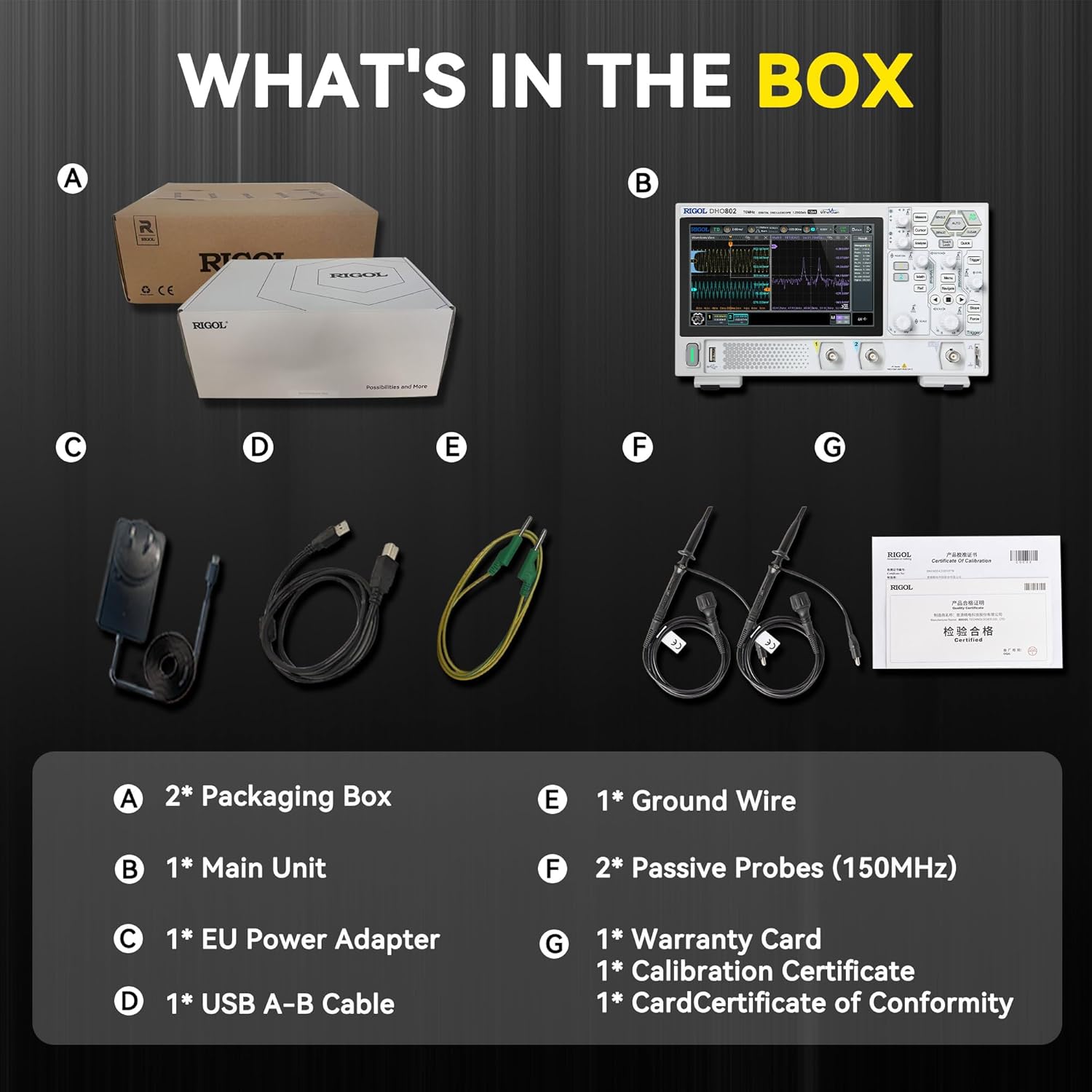
Figure 7.2: Physical dimensions and weight of the RIGOL DHO802 Digital Oscilloscope.
8. Garantija ir palaikymas
The main body of RIGOL equipment, including the DHO802 Digital Oscilloscope, comes with a standard 3-year warranty. For detailed warranty terms and conditions, please refer to the warranty card included in the product packaging.
For further support, technical assistance, or service inquiries, please visit the official Rigol Store on Amazon: Rigol Store.
Ask a question about this manual
Ask about setup, troubleshooting, compatibility, parts, safety, or missing instructions. Manuals+ will review the question and use this page’s manual context to help answer it.