
OLEVS XBC-G1106GH-HH
OLEVS XBC-G1106GH-HH Men's Chronograph Analog-Digital Watch Instruction Manual
Model: XBC-G1106GH-HH
Įvadas
Thank you for choosing the OLEVS XBC-G1106GH-HH Men's Chronograph Analog-Digital Watch. This timepiece combines a classic analog display with modern digital functions, including chronograph, alarm, day, and date. This manual provides detailed instructions for setting up and operating your watch to ensure optimal performance and longevity.

Image: The OLEVS XBC-G1106GH-HH watch featuring a black band and black dial, showcasindėl tvirto dizaino.
Produktas baigtasview
Familiarize yourself with the main components and controls of your OLEVS watch.
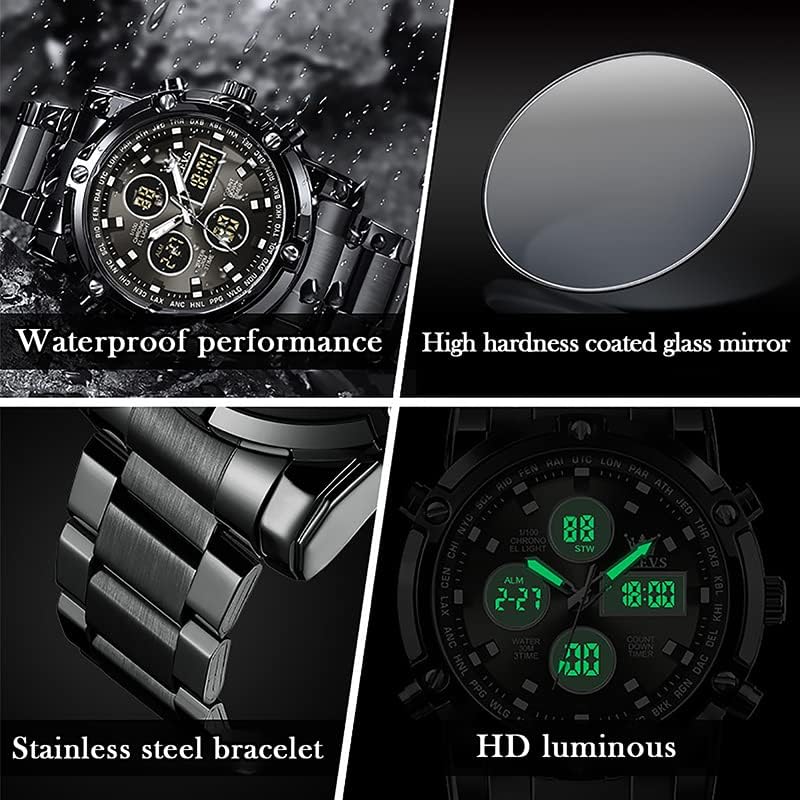
Image: Detailed diagram illustrating the various buttons and digital display functions of the OLEVS watch, including time, date, alarm, and chronograph indicators.
Laikrodžio komponentai ir funkcijos:
- Karūna: Used for setting analog time (pull out to adjust).
- Mygtukai (stūmikliai): Control digital functions such as mode selection, setting adjustments, and chronograph operations.
- Analoginis ekranas: Tradicinės valandų, minučių ir sekundžių rodyklės.
- Skaitmeniniai ekranai: Multiple digital screens showing time, date, day, alarm, stopwatch, and countdown timer.
- Foninis apšvietimas: Illuminates the digital display for visibility in low light conditions.
- Savaitės rodymas: Indicates the current day of the week (MON, TUE, WED, THU, FRI, SAT, SUN).
- Režimo indikatoriai: AL (Alarm mode), ST (Stopwatch mode), TR (Countdown mode).
Sąranka
1. Analoginio laiko nustatymas
- Ištraukite karūnėlę, esančią laikrodžio dešinėje pusėje.
- Pasukite karūnėlę, kad valandų ir minučių rodyklės būtų nustatytos iki norimo laiko.
- Įstumkite karūnėlę atgal, kad užtikrintumėte laiko nustatymą.
2. Skaitmeninio laiko ir datos nustatymas
The digital display allows for precise time, date, and day settings. Refer to the product overview Mygtukų vietų paveikslėlis.
- Įeikite į nustatymų režimą: Press and hold the button labeled "Long press to enter settings" (typically bottom-right) until the digital display starts flashing.
- Pasirinkite elementą, kurį norite reguliuoti: Press the button labeled "Convert hours, minutes when setting week, month, day, etc." (typically top-left) to cycle through the settings: seconds, hours, minutes, year, month, day, and week.
- Koreguoti reikšmę: Use the button labeled "Increment value when setting" (typically top-right) to increase the selected value.
- Patvirtinti ir išeiti: Once all settings are correct, press the button labeled "Long press to enter settings" again to exit the setting mode.
3. Signalo nustatymas
- Įjunkite aliarmo režimą: Press the mode button (typically bottom-left, labeled "Convert seconds, timing Functions such as normal time" or similar) until "AL" (Alarm mode) is displayed on the digital screen.
- Įveskite žadintuvo nustatymą: Press and hold the button labeled "Long press to enter settings" until the alarm time starts flashing.
- Keisti žadintuvo laiką: Use the button labeled "Convert hours, minutes when setting week, month, day, etc." to select hours or minutes, and the button labeled "Increment value when setting" to adjust the values.
- Įjungti/išjungti signalą: While in Alarm mode (AL), press the button labeled "Alarm on" (typically bottom-right) to toggle the alarm on or off. An alarm icon will appear when activated.
- Išėjimo aliarmo nustatymas: Press the button labeled "Long press to enter settings" to save and exit.
Veikimo funkcijos
1. Chronografo (chronometro) naudojimas
Chronografo funkcija leidžia matuoti praėjusį laiką.
- Įjunkite chronometro režimą: Press the mode button (typically bottom-left) until "ST" (Stopwatch mode) is displayed.
- Pradėti/sustabdyti: Press the button labeled "Convert seconds, timing functions such as normal time" (typically bottom-left) to start the stopwatch. Press it again to stop.
- Atstatyti: While the stopwatch is stopped, press the button labeled "Increment value when setting" (typically top-right) to reset the stopwatch to zero.
2. Atgalinio laikmačio naudojimas
The countdown timer allows you to set a specific duration and will alert you when it reaches zero.
- Enter Countdown Mode: Press the mode button (typically bottom-left) until "TR" (Countdown mode) is displayed.
- Nustatyti atgalinį skaičiavimo laiką: Press and hold the button labeled "Long press to enter settings" until the countdown time flashes. Use the button labeled "Convert hours, minutes when setting week, month, day, etc." to select hours or minutes, and the button labeled "Increment value when setting" to adjust the values. Press the button labeled "Long press to enter settings" again to save.
- Pradėti/sustabdyti: Press the button labeled "Convert seconds, timing functions such as normal time" to start the countdown. Press it again to pause/resume.
- Atstatyti: While the countdown is paused, press the button labeled "Increment value when setting" to reset to the preset time.
3. Foninio apšvietimo funkcija
To illuminate the digital display in dark conditions, press the button labeled "Backlit keys" (typically top-left). The backlight will typically stay on for a few seconds.
Atsparumo vandeniui gairės
Your OLEVS XBC-G1106GH-HH watch is rated for 30 meters (3ATM) water resistance. This means it is suitable for daily use and can withstand splashes, rain, and brief immersion in water. However, it is ne suitable for swimming, diving, or showering with hot water, as steam and temperature changes can compromise the seals.
- Negalima operate any buttons or pull out the crown while the watch is wet or submerged.
- Avoid exposing the watch to extreme temperature changes.
- If the watch comes into contact with saltwater, rinse it with fresh water and dry thoroughly.

Image: The OLEVS watch demonstrating its water-resistant capabilities, suitable for splashes and rain.
Priežiūra
Proper care will extend the life and maintain the appearance of your watch.
- Valymas: Reguliariai valykite laikrodžio korpusą ir dirželį minkštu, sausu skudurėliu. Nerūdijančiam plienui naudokite šiek tiek sausą šluostę.amp galima naudoti šluostę, po kurios nedelsiant reikia išdžiovinti.
- Venkite cheminių medžiagų: Saugokite laikrodį nuo tirpiklių, ploviklių, kvepalų ar kosmetinių purškiklių, nes jie gali pažeisti korpusą, dirželį ar tarpines.
- Temperatūra: Venkite laikrodžio laikymo ekstremaliose temperatūrose (aukštesnėse nei 60 °C / 140 °F arba žemesnėse nei 0 °C / 32 °F) arba staigiuose temperatūros pokyčiuose.
- Magnetiniai laukai: Keep the watch away from strong magnetic fields, which can affect the accuracy of the quartz movement.
- Baterijos keitimas: When the watch battery runs low, the digital display may dim or the watch may stop. Have the battery replaced by a qualified watch technician to ensure water resistance is maintained.
Trikčių šalinimas
| Problema | Galima priežastis | Sprendimas |
|---|---|---|
| Analoginės rodyklės nejuda | Išsikrovusi baterija; ištraukta karūnėlė; mechaninė problema. | Check if crown is pushed in. Replace battery. Contact service if issue persists. |
| Skaitmeninis ekranas tuščias arba blankus | Baterija išsikrovusi. | Pakeiskite bateriją. |
| Rodomas neteisingas laikas / data | Time/date not set correctly; Watch exposed to strong magnetic fields. | Reset time and date according to instructions. Keep watch away from magnets. |
| Mygtukai nereaguoja | Laikrodis šlapias; vidinis gedimas. | Ensure watch is dry before operating buttons. If issue persists, contact service. |
Specifikacijos
- Prekinis ženklas: OLEVS
- Modelio numeris: XBC-G1106GH-HH
- Ekrano tipas: Analog-Digital
- Judėjimas: Kvarcas
- Maitinimo šaltinis: Maitinamas baterijomis
- Korpuso medžiaga: Nerūdijantis plienas
- Juostos medžiaga: Nerūdijantis plienas
- Kristalas: Hardlex
- Korpuso skersmuo: 48 milimetrų
- Korpuso storis: 16 milimetrų
- Juostos plotis: 23 milimetrų
- Atsparumo vandeniui gylis: 30 Metres (3ATM)
- Užsegimo tipas: Mygtuko atlenkiamas užsegimas su sauga
- Funkcijos: Chronograph, LED Backlight, Day, Date, Alarm, Stopwatch, Countdown Timer
Garantija ir palaikymas
For warranty information and customer support, please refer to the documentation provided with your purchase or contact the retailer where you purchased the OLEVS XBC-G1106GH-HH watch. Keep your proof of purchase for any warranty claims.
For further assistance, you may also visit the official OLEVS websvetainėje arba susisiekite tiesiogiai su jų klientų aptarnavimo skyriumi.
Ask a question about this manual
Ask about setup, troubleshooting, compatibility, parts, safety, or missing instructions. Manuals+ will review the question and use this page’s manual context to help answer it.