
SUNOL T16
SUNOL T16 Wireless Earbuds User Manual
Model: T16 | Brand: SUNOL
Įvadas
The SUNOL T16 Wireless Earbuds are designed for an active lifestyle, offering high-quality audio and convenient features. These Bluetooth headphones provide up to 48 hours of total playtime with their wireless charging case, featuring an LED power display for easy monitoring. With earhooks for a secure fit and water resistance, they are ideal for workouts, running, and various sports activities. The built-in microphone with noise cancellation ensures clear calls.
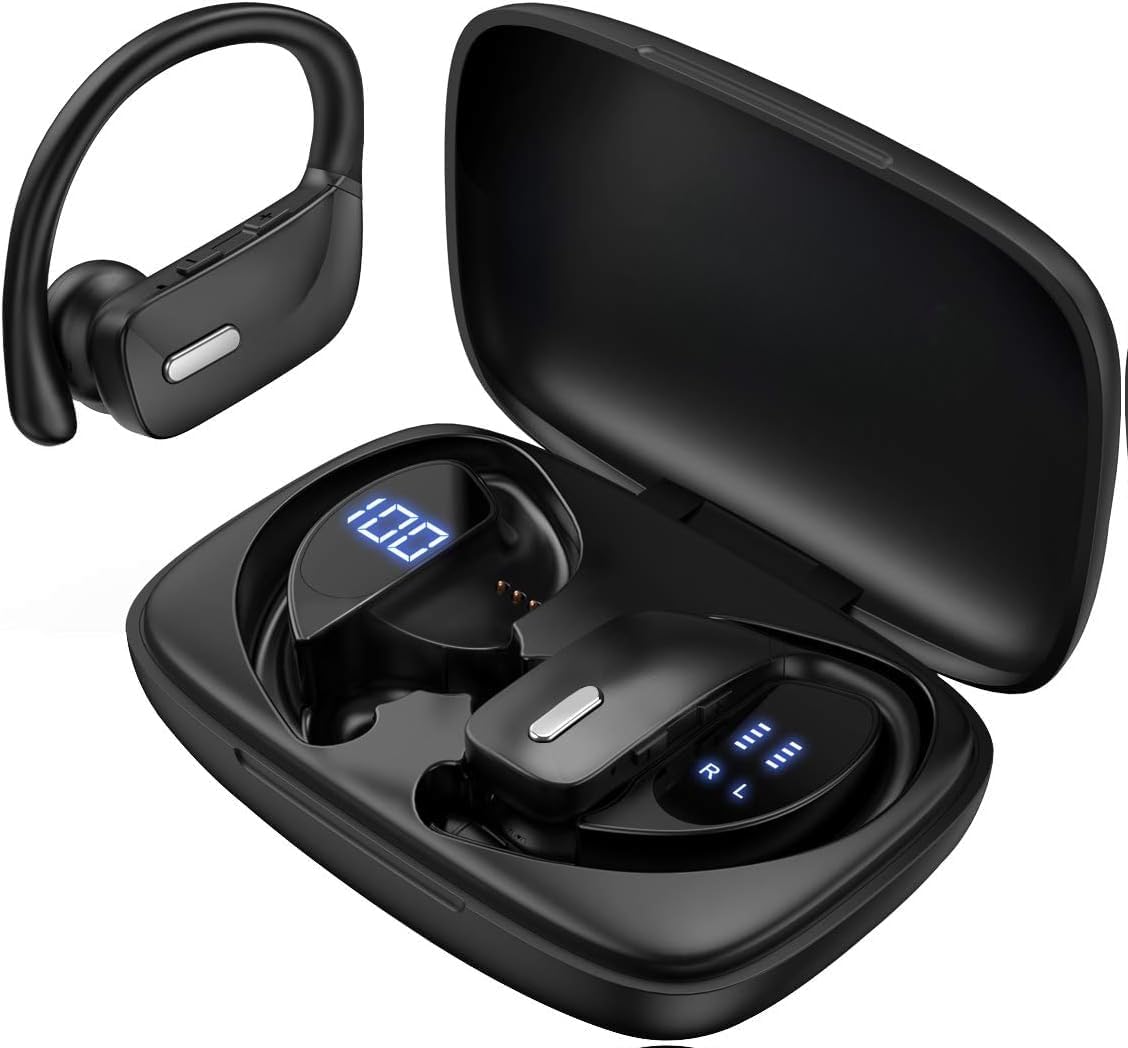
Image: The SUNOL T16 Wireless Earbuds with their charging case, showcasing the digital display.
Kas yra dėžutėje
- SUNOL T16 Wireless Earbuds (Left and Right)
- Belaidžio įkrovimo dėklas
- USB-C įkrovimo laidas
- 3 Pairs of Ear Caps (S, M, L)
Specifikacijos
| Funkcija | Detalė |
|---|---|
| Modelio pavadinimas | T16 |
| Ryšio technologija | Belaidis ryšys („Bluetooth 5.0“) |
| Bluetooth diapazonas | Iki 10 metrų |
| Ausinių baterijos veikimo laikas | Iki 9 valandų (vienas įkrovimas) |
| Bendras grojimo laikas (su dėklu) | Iki 48 valandų |
| Įkrovimo parinktys | Wireless Charging, USB-C Charging |
| Garso tvarkyklės dydis | 10 mm dinaminis vairuotojas |
| Dažnių diapazonas | 20 Hz–20 000 Hz |
| Varža | 40 omų |
| Triukšmo valdymas | Aktyvus triukšmo slopinimas |
| Mikrofonas | Built-in with Noise Cancellation |
| Atsparumo vandeniui lygis | Atsparus vandeniui |
| Valdymo tipas | Touch, Siri Voice Assistant |
| Ausų išdėstymas | Už ausies (su ausų kabliukais) |
| Medžiaga | Akrilnitrilo butadieno stirenas (ABS) |
| Prekės svoris | 6.4 uncijos |

Image: Diagram illustrating the premium stereo sound quality and Bluetooth 5.0 connectivity.
Sąranka
1. Ausinių ir dėklo įkrovimas
The charging case supports both wireless charging and USB-C charging. The impressive 9 hours of listening time on a single charge for the sports wireless headphones are extended to a remarkable 48 hours of play time with the included charging case.
- To charge the case, connect a USB-C cable to the charging port on the back of the case, or place it on a compatible wireless charging pad.
- Įdėkite ausines į atitinkamus įkrovimo dėklo lizdus. Įsitikinkite, kad jos tinkamai įstatytos, kad pradėtumėte įkrovimą.
- The smart LED digital power display on the case will show the remaining battery level of the charging case and the individual earbuds. The percentage in the middle indicates the case battery, while the battery icons on both sides indicate the left and right earbud charge levels.

Paveikslėlis: įkrovimo dėklas su LED ekranu, rodančiu dėklo ir atskirų ausinių akumuliatoriaus lygį.

Image: Diagram illustrating the battery life: 15 min charge for 1 hour playtime, 8 hours on a single charge, and 48 hours with the charging case.
2. Susiejimas su jūsų įrenginiu
Ausinės automatiškai persijungia į susiejimo režimą, kai išimamos iš įkrovimo dėklo.
- Atidarykite įkrovimo dėklą ir išimkite abi ausines. Jos automatiškai įsijungs ir pradės veikti susiejimo režimu.
- On your mobile device (smartphone, tablet, laptop), go to the Bluetooth settings.
- Ieškokite available devices. You should see "T16" or "S8" appear in the list.
- Select "T16" or "S8" to connect. Once connected, you will hear an audio prompt, and the earbuds will be ready for use.

Image: Diagram showing the earbuds automatically pairing with mobile phones.
Video: Official product video demonstrating the unboxing, charging, and Bluetooth pairing process of the SUNOL T16 Wireless Earbuds.
Naudojimo instrukcijos
Nešioti ausines
The T16 earbuds are designed with flexible earhooks to ensure a secure and comfortable fit, especially during physical activity. Gently place the earbud into your ear canal and adjust the earhook over the top of your ear until it feels stable and comfortable. Experiment with the included ear cap sizes to find the best fit for optimal sound and comfort.

Image: A woman wearing the SUNOL T16 earbuds, demonstrating their secure fit for an active lifestyle.
Palieskite valdiklius
The earbuds feature physical buttons for precise control of various functions:
- Leisti / pristabdyti: Vieną kartą bakstelėkite bet kurią ausinę.
- Atsiliepti / nutraukti ragelį: Skambučio metu bakstelėkite vieną kartą ant bet kurios ausinės.
- Ankstesnė daina: Dukart palieskite kairįjį ausinės antgalį.
- Kita daina: Dukart palieskite dešinįjį ausinės antgalį.
- Active Voice Assistant (Siri): Tris kartus palieskite bet kurią ausinę.
- Atmesti skambučius: Įeinančio skambučio metu ilgai paspauskite bet kurią ausinę.
- Garso reguliavimas: Use the dedicated volume buttons on the earbuds.

Image: Diagram detailing the physical buttons and their functions, including volume adjustment, play/pause, call management, and voice assistant activation.
Priežiūra
To ensure the longevity and optimal performance of your SUNOL T16 Wireless Earbuds, follow these maintenance guidelines:
- Valymas: Regularly wipe the earbuds and charging case with a soft, dry, lint-free cloth. For ear caps, remove them and clean with mild soap and water, then dry thoroughly before reattaching.
- Atsparumas vandeniui: While water-resistant, avoid submerging the earbuds in water. Dry them completely if they get wet from sweat or rain before placing them back in the charging case.
- Saugykla: Kai nenaudojate, laikykite ausines įkrovimo dėkle, kad jos būtų apsaugotos ir įkrautos. Laikykite vėsioje, sausoje vietoje, toliau nuo ekstremalių temperatūrų.
- Įkrovimo prievadas: Laikykite USB-C įkrovimo prievadą švarų nuo dulkių ir šiukšlių.
Trikčių šalinimas
If you encounter any issues with your SUNOL T16 Wireless Earbuds, try the following solutions:
- Ausinės nesusijungia:
- Įsitikinkite, kad abi ausinės yra visiškai įkrautos.
- Place earbuds back in the case, close the lid, wait a few seconds, then open and remove them again.
- Išjunkite „Bluetooth“ savo įrenginyje, tada vėl jį įjunkite ir bandykite susieti dar kartą.
- Forget or remove the "T16" or "S8" device from your device's Bluetooth list and attempt to pair from scratch.
- Veikia tik viena ausinė:
- Įsitikinkite, kad abi ausinės yra įkrautos.
- Place both earbuds back in the charging case, close the lid, and then take them out simultaneously.
- Jei problema išlieka, pabandykite iš naujo nustatyti ausines.
- Prasta garso kokybė:
- Ensure the earbuds are properly seated in your ears and the ear caps provide a good seal.
- Patikrinkite garso šaltinio įrenginio garsumo ir garso nustatymus.
- Move closer to your connected device to avoid interference or exceeding the 10-meter Bluetooth range.
- Clean the earbud speakers and ear caps.
- Įkrovimo dėklas neįkraunamas:
- Įsitikinkite, kad USB-C laidas yra tvirtai prijungtas prie dėklo ir maitinimo šaltinio.
- Išbandykite kitą USB-C laidą arba maitinimo adapterį.
- Jei naudojate belaidį įkrovimą, įsitikinkite, kad dėklas tinkamai padėtas ant įkrovimo padėklo.
Garantija ir palaikymas
For warranty information and technical support, please refer to the documentation included with your product or contact the manufacturer, SUNOL, directly through their official websvetainėje arba klientų aptarnavimo kanaluose. Išsaugokite pirkimo kvitą kaip pirkimo įrodymą bet kokiems garantiniams prašymams.
Ask a question about this manual
Ask about setup, troubleshooting, compatibility, parts, safety, or missing instructions. Manuals+ will review the question and use this page’s manual context to help answer it.