
Įvadas
This manual provides essential information for setting up, operating, maintaining, and troubleshooting your Lenovo IdeaPad Slim 5 laptop, model 82XD005RIN. This device features a 13th Gen Intel Core i5-13420H processor, a 14-inch WUXGA OLED display, 16GB of LPDDR5 RAM, and a 512GB SSD, running on Windows 11 Home.
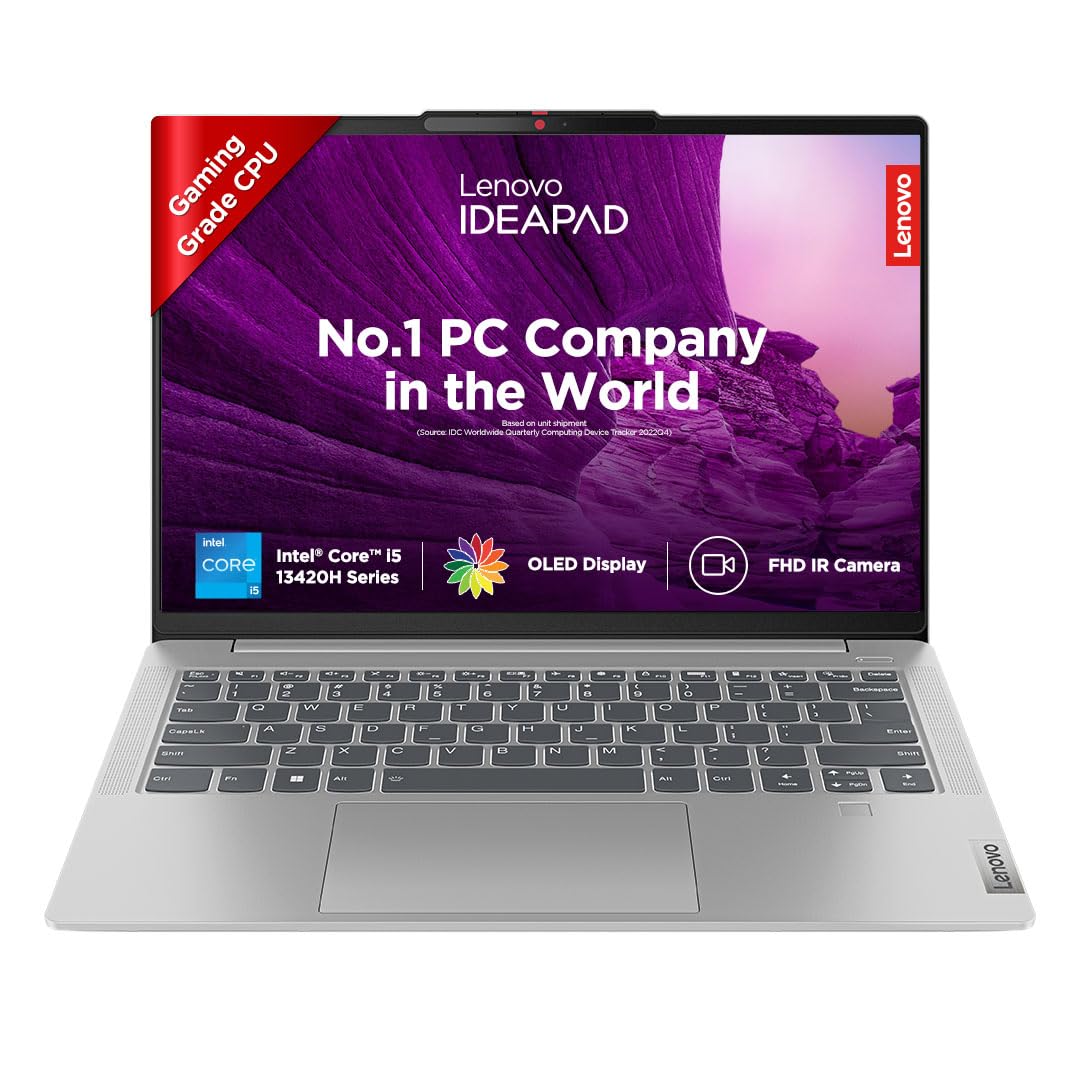
Image: The Lenovo IdeaPad Slim 5 laptop, showcasindėl savo elegantiško dizaino ir ekrano.
Sąranka
1. Išpakavimas ir pradinė apžiūra
Carefully remove all components from the packaging. Verify that all items listed in the box contents are present. Inspect the laptop for any physical damage.
2. Prisijungimas prie maitinimo
Connect the power adapter to the laptop's USB-C port (which supports Power Delivery 3.0) and then to a power outlet. It is recommended to fully charge the battery before initial use.
3. Pradinis įjungimas ir „Windows“ sąranka
Open the laptop lid. The laptop may automatically power on (Flip-to-Start feature). If not, press the power button. Follow the on-screen instructions to complete the Windows 11 Home setup, including language, region, network connection, and user account creation.
4. Išorinių įrenginių prijungimas
Išoriniams įrenginiams prijungti naudokite turimus prievadus:
- USB-C 3.2 Gen 1 (x2): For data transfer, power delivery, and DisplayPort 1.2 video output.
- „USB-A 3.2 Gen 1“ (x2): For connecting USB devices, one port is Always On for charging.
- HDMI 1.4b: For connecting to external displays.
- Micro SD kortelių skaitytuvas: For reading microSD cards.
- Headphone/Microphone Combo Jack (3.5mm): For audio input/output.

Vaizdas: Šoninė view of the Lenovo IdeaPad Slim 5 laptop showing the HDMI port, two USB-C ports, and a headphone/microphone combo jack on one side, and a microSD card reader and a USB-A port on the other side.
Nešiojamojo kompiuterio valdymas
Ekrano funkcijos
The laptop features a 14-inch WUXGA (1920x1200) OLED IPS Display with 400 nits brightness. It includes Anti-Glare coating, Intelligent Sens-Super Resolution, and TUV Low Blue Light Protection for enhanced viewing comfort and reduced eye strain.

Paveikslėlis: Nešiojamojo kompiuterio ekranasasing its key features: 14" WUXGA OLED Display, 16:10 Aspect Ratio, 100% DCI-P3 color gamut, 400 Nits Brightness, and TUV Low Blue Light certification.
Klaviatūra ir jutiklinė dalis
The laptop is equipped with a backlit keyboard for comfortable typing in various lighting conditions. The integrated touchpad supports multi-touch gestures for navigation.
Kamera ir garsas
The integrated FHD 1080p camera includes an IR Privacy Shutter and ToF Sensor, enabling Smart Login with facial recognition. Audio is provided by front-facing 2x 2W HD Stereo Speakers optimized with Dolby Audio.

Image: Close-up of the laptop's top bezel showing the FHD IR Camera with ToF Sensor and Privacy Shutter, along with an illustration of the 2Wx2 User-Facing Speakers optimized with Dolby Audio.
Smart Features (Lenovo AI Chip)
- Smart Login: Seamless and secure face recognition for instant access.
- Išmanioji galia: Adaptive performance and extended battery life up to 20%.
- Išmanusis triukšmo slopinimas: Reduces distractions during calls and classes, providing 20dB amplified speech clarity and isolated voices.
- Lenovo Eye Care: Certified TÜV low blue light screen for accurate colors and reduced eye strain.
- Background Blur: Intuitive background blur with A.I. for privacy during video calls.
- Flip-to-Start: The laptop starts immediately upon lifting the lid.

Image: The laptop displaying various smart features such as Smart Login, Smart Power, Smart Noise Cancelling, Lenovo Eye Care, Background Blur, and Flip-to-Start, all powered by the Lenovo AI chip.
Akumuliatoriaus valdymas
The laptop is equipped with a 56.6Wh battery, providing up to 11 hours of battery life. It supports Rapid Charge technology, offering 2 hours of runtime with a 15-minute charge. Intelligent Power and Cooling with Smart Power enhance thermal performance and battery efficiency.

Image: The laptop screen displaying a charging icon, illustrating the 56.6Wh battery, up to 11 hours battery life, and Rapid Charge feature (2 hours playback in 15 minutes).
Priežiūra
Nešiojamojo kompiuterio valymas
- Šiek tiek naudokite minkštą, be pūkelių šluostę dampvandeniu arba ekrano valikliu ekranui valyti.
- Klaviatūrai ir korpusui valyti naudokite minkštą šluostę. Venkite stiprių cheminių medžiagų ar abrazyvinių medžiagų.
- Prieš valydami įsitikinkite, kad nešiojamas kompiuteris yra išjungtas ir atjungtas nuo elektros tinklo.
Programinės įrangos atnaujinimai
Reguliariai tikrinkite, ar yra operacinės sistemos atnaujinimų („Windows Update“) ir tvarkyklių atnaujinimų iš „Lenovo“ palaikymo tarnybos, ir įdiekite juos. websvetainę, kad būtų užtikrintas optimalus veikimas ir saugumas.
Sandėliavimo valdymas
Periodically manage your 512GB SSD storage to maintain performance. Delete unnecessary filepašalinkite nenaudojamas programas ir apsvarstykite galimybę dideliems failams saugoti debesyje files.
Trikčių šalinimas
| Problema | Galima priežastis | Sprendimas |
|---|---|---|
| Nešiojamasis kompiuteris neįsijungia. | Išsikrovusi baterija arba maitinimo adapterio problema. | Ensure the power adapter is securely connected and the outlet is functional. Allow the laptop to charge for at least 30 minutes before attempting to power on again. |
| Ekranas tuščias arba mirga. | Display driver issue, external display conflict, or hardware problem. | Try connecting to an external monitor via HDMI to check if the issue is with the laptop's display. Update graphics drivers. Restart the laptop. |
| Lėtas veikimas. | Per daug veikiančių programų, mažai vietos saugykloje arba pasenusios tvarkyklės. | Close unnecessary applications. Free up disk space. Update Windows and drivers. Check for malware. |
| Baterija greitai išsikrauna. | High screen brightness, power-intensive applications, or background processes. | Adjust power settings to a balanced mode. Reduce screen brightness. Close background applications. Ensure Smart Power is enabled. |
| „Wi-Fi“ arba „Bluetooth“ ryšio problemos. | Driver issues, interference, or incorrect settings. | Restart the laptop and router. Update wireless drivers. Check network settings. Ensure no physical obstructions are blocking signals. |
Specifikacijos
| Funkcija | Detalė |
|---|---|
| Modelio pavadinimas | IdeaPad Slim 5 14IRL8 |
| Modelio numeris | 82XD005RIN |
| Procesorius | Intel Core i5-13420H (13th Gen), 2.1 GHz (Base) - 4.6 GHz (Max), 8 Cores, 12 Threads, 12MB Cache |
| Operacinė sistema | „Windows 11 Home“ (iš anksto įdiegta su viso gyvenimo galiojimo laiku) |
| Iš anksto įdiegta programinė įranga | „MS Office Home and Student 2021“, „Xbox GamePass Ultimate“ (3 mėnesių prenumerata) |
| Atmintis (RAM) | 16GB LPDDR5-5200 (Soldered) |
| Sandėliavimas | 512 GB SSD (išplečiama iki 1 TB) |
| Grafika | Integruota Intel UHD grafika |
| Ekranas | 14" WUXGA (1920x1200) OLED IPS Display, 400 nits Brightness, Anti-Glare, Intelligent Sens-Super Resolution, TUV Low Blue Light Protection |
| Dizainas | All Metal Body, 1.69 cm Thin, 1.46 Kg Light |
| Klaviatūra | Apšviesta klaviatūra |
| Baterija | 56.6Wh, up to 11 Hours Battery Life, Rapid Charge (2 hours runtime with 15-minute charge) |
| Fotoaparatas | FHD 1080p with IR Privacy Shutter, Smart Login (Facial Recognition), Fixed Focus, ToF Sensor |
| Garsas | Front Facing 2x 2W HD Stereo Speakers, Dolby Audio |
| Uostai | 2x USB-C 3.2 Gen 1 (Data transfer, Power Delivery 3.0 & DisplayPort 1.2), 2x USB-A 3.2 Gen 1 (1 Always On), 1x Headphone/microphone combo jack (3.5mm), 1x HDMI 1.4b, 1x micro SD card Reader |
| Belaidis ryšys | „Wi-Fi“ (802.11bgn), „Bluetooth“ |
| Matmenys (I x P x Storis) | 31.2I x 22.1P x 1.7T centimetrų |
| Svoris | 1.46 kg |
| Military Standards | MIL-STD-810H Qualified (Vibration, Low & High Temp, Temp Shock, Drop & Shock Tests) |

Image: Illustration of the laptop's MIL-STD-810H qualification, showing icons for Vibration Test, Low & High Temperature Test, Temperature Shock Test, and Drop & Shock Test.
Garantija ir palaikymas
Informacija apie garantiją
Your Lenovo IdeaPad Slim 5 (82XD005RIN) comes with the following warranty:
- 1 Year Onsite Warranty
- 1 Year Premium Care
- 1 metų apsauga nuo atsitiktinių pažeidimų
The default warranty begins from the unit shipped date. To activate your warranty or check its status, visit: http://tiny.cc/LenovoWarranty

Image: A visual representation of the pre-bundled warranty (1 Year Onsite Warranty, 1 Year Premium Care) and options to upgrade for Base Warranty Extension, Premium Care, Smart Performance, and Accidental Damage Protection. Includes warranty activation link and contact numbers.
Palaikymo kontaktas
For warranty-related queries or technical support, please contact Lenovo:
- Telefonas: 1800-419-7555
- WhatsApp: +91 8067916666
- Importer Contact Information: Lenovo (India) Private Limited, RBD Icon, Level 2, Doddenakundi Village, Marathahalli Outer Ring Road, K. R. Puram Hobli, Bangalore 560037, Karnataka, India