
HAILIWEI LYYX-M12
HAILIWEI Portable Karaoke Machine User Manual
Model: LYYX-M12
Įvadas
Thank you for choosing the HAILIWEI Portable Karaoke Machine. This device is designed to provide an enjoyable audio experience with its portable speaker and two wireless microphones, perfect for various occasions. Please read this manual carefully to ensure proper use and maintenance of your new karaoke machine.
Kas yra dėžutėje
- 1 x HAILIWEI Portable Karaoke Machine Speaker
- 2x belaidžiai mikrofonai
- 1x USB įkrovimo laidas
- 1 x AUX kabelis
- 1 x Naudotojo vadovas (šis dokumentas)

Figure 1: HAILIWEI Portable Karaoke Machine package contents, including the speaker, two microphones, and the gift box.
Produktas baigtasview
Familiarize yourself with the main components and features of your HAILIWEI Portable Karaoke Machine.

Figure 2: The karaoke machine connected to a smartphone and laptop, showcasing its Bluetooth 5.3 compatibility and various sound effects.

Figure 3: A child using the wireless microphone, emphasizing the product's ease of use and portability for all ages.
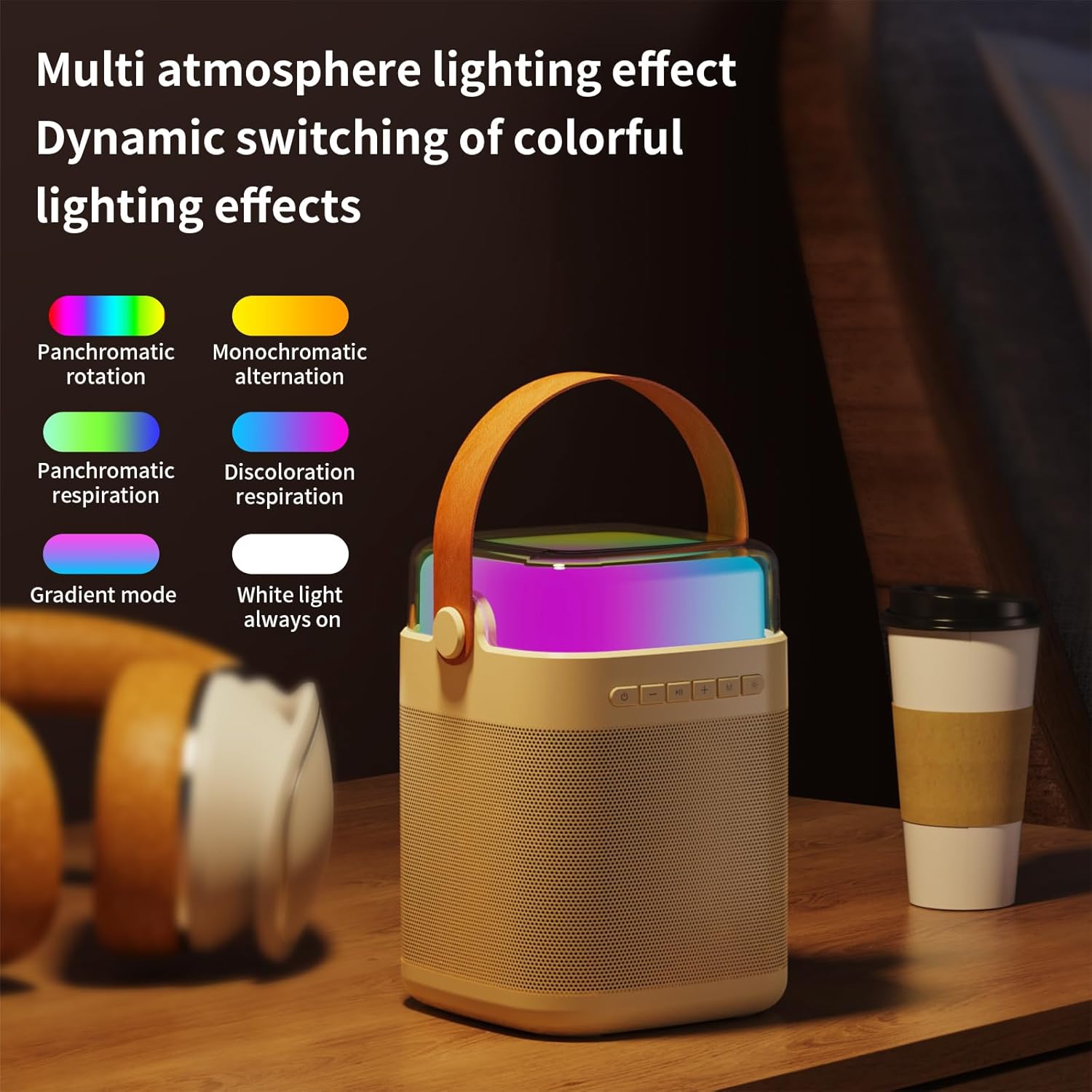
4 pav. Baigtaview of the machine's features including colorful lights, dual wireless microphones, USB-C charging, AUX-in, SD card slot, and USB-A port.
Sąrankos vadovas
1. Įrenginio įkrovimas
Before first use, fully charge the karaoke machine speaker and both wireless microphones. Use the provided USB charging cable.
- Garsiakalbio įkrovimas: Connect the USB-C cable to the charging port on the speaker and to a USB power adapter (not included). The charging indicator will show status.
- Mikrofono įkrovimas: Connect the USB cable to the charging port on each microphone.
- Įkrovimo laikas: Speaker takes approximately 3 hours for a full charge. Microphones take approximately 2 hours.
2. Įjungimas/išjungimas
- Pranešėjas: Press and hold the power button on the speaker for 3 seconds to turn on or off.
- Mikrofonai: Press and hold the power button on each microphone for 3 seconds to turn on or off.
3. „Bluetooth“ ryšys
The karaoke machine uses Bluetooth 5.3 for stable wireless connection to your devices.
- Turn on the karaoke machine speaker. It will automatically enter Bluetooth pairing mode.
- On your smartphone, tablet, or other Bluetooth-enabled device, go to Bluetooth settings and search for "HAILIWEI".
- Select "HAILIWEI" to pair. A voice prompt will confirm successful connection.
Once connected, you can play music from your device through the karaoke machine speaker.
4. Mikrofono susiejimas
The two wireless microphones are pre-paired with the speaker. If they do not connect automatically:
- Ensure both the speaker and microphones are powered on.
- The microphones should automatically connect to the speaker. A blue indicator light on the microphone will confirm connection.
- If connection fails, turn off both the speaker and microphones, then turn them on again.
Naudojimo instrukcijos
1. Muzikos atkūrimas
- Bluetooth: Leiskite muziką iš susieto įrenginio.
- AUX įvestis: Connect an external audio source using the 3.5mm AUX cable.
- USB/TF kortelė: Insert a USB flash drive or TF (Micro SD) card with MP3 files into the respective port. The speaker will automatically play music.
2. Garsiakalbio valdikliai
Garsiakalbio viršutiniame skydelyje yra intuityvūs valdikliai:
- Maitinimo mygtukas: Press and hold to power on/off. Short press to switch modes (Bluetooth/AUX/USB/TF).
- Atkūrimo / pristabdymo mygtukas: Trumpai paspauskite norėdami paleisti arba pristabdyti muziką.
- Ankstesnis / Garsumo mažinimas (-): Trumpas paspaudimas, norint pereiti į ankstesnį takelį. Ilgas paspaudimas, norint sumažinti garsumą.
- Toliau/Garsumo didinimas (+): Trumpas paspaudimas, kad pereitumėte į kitą takelį. Ilgas paspaudimas, kad padidintumėte garsumą.
- Microphone Volume (M): Sureguliuokite mikrofono garsumą.
- Light Mode Button (*): Short press to cycle through different lighting effects.

Figure 5: The speaker's top panel showing control buttons and dynamic lighting effects.
3. Mikrofono naudojimas
- Įsitikinkite, kad mikrofonai įjungti ir prijungti prie garsiakalbio.
- Speak or sing into the microphone. Adjust the microphone volume using the 'M' button on the speaker.
- Garso efektai: The system supports five sound change effects: Original Voice, Child, Monster, Male Voice, Female Voice. Refer to the speaker controls for activating these effects.
Priežiūra
Proper care will extend the life of your karaoke machine.
- Valymas: Use a soft, dry cloth to clean the exterior of the speaker and microphones. Do not use abrasive cleaners or solvents.
- Saugykla: Laikykite prietaisą vėsioje, sausoje vietoje, apsaugotoje nuo tiesioginių saulės spindulių ir ekstremalių temperatūrų.
- Akumuliatoriaus priežiūra: To maintain battery health, charge the device regularly, even if not in frequent use. Avoid fully discharging the battery for extended periods.
- Vandens ekspozicija: Šis prietaisas nėra atsparus vandeniui. Venkite sąlyčio su vandeniu ar didele drėgme.
Trikčių šalinimas
Jei kyla problemų, žr. toliau pateiktas dažniausiai pasitaikančias problemas ir sprendimus:
| Problema | Sprendimas |
|---|---|
| Iš garsiakalbio nėra garso. |
|
| Mikrofonai neveikia. |
|
| Bluetooth ryšio problemos. |
|
| Trumpas baterijos veikimo laikas. |
|
Specifikacijos
| Funkcija | Detalė |
|---|---|
| Modelio numeris | LYYX-M12 |
| Prekės ženklas | HAILIWEI |
| Montavimo tipas | Stalviršis |
| Maitinimo šaltinis | Maitinamas baterijomis |
| Jungties tipas | Papildoma jungtis, USB |
| Medžiaga | Metalas |
| Išėjimo vattage | 13 vatų |
| Kanalų skaičius | 1 |
| Garso įvestis | Bluetooth, TF card, USB flash drive, AUX cable |
| Gaminio matmenys | 6.62 x 5.2 x 7 colio |
| Prekės svoris | 2.4 svaro |
| Mikrofono svoris | 0.18 svaro (apytiksliai) |
| Mikrofono baterijos talpa | 500 mAh (apytiksliai) |
| Microphone Usage Time | Apie 15 valandas |
| Garsiakalbio baterijos talpa | 3000 mAh (apytiksliai) |
| Speaker Usage Time | 5-12 valandas |
| Ryšio technologija | AUX, „Bluetooth“, USB |
| Spalva | Smėlio spalvos |
| Suderinami įrenginiai | Išmanusis telefonas, planšetinis kompiuteris |

Figure 6: Detailed dimensions and weight of the speaker and microphone.
Garantija ir palaikymas
HAILIWEI products are manufactured to high quality standards. For warranty information or technical support, please refer to the contact details provided with your purchase or visit the official HAILIWEI websvetainę.
Additional user guides in PDF format may be available for download from the product's Amazon listing or the manufacturer's websvetainę.
Ask a question about this manual
Ask about setup, troubleshooting, compatibility, parts, safety, or missing instructions. Manuals+ will review the question and use this page’s manual context to help answer it.