
1. Baigėsiview
The Moukey MAMP1 is a compact yet powerful 2.0 channel Bluetooth audio stereo amplifier receiver designed for various home audio applications. It delivers 400 watts of maximum power output, providing a high-quality audio experience for karaoke, home theater, acoustic sound systems, and monitor headphones. Featuring multiple input and output modes, EQ controls, Bluetooth 5.0 connectivity, and an HD LED screen, the MAMP1 offers versatile and user-friendly operation.
2. Svarbi saugos informacija
- Read and heed all instructions.
- Nenaudokite šio gaminio šalia vandens.
- Valykite tik sausa šluoste.
- Įsitikinkite, kad ttage of your local mains supply matches the product's requirements.
- Do not block any ventilation openings. Install according to manufacturer's instructions.
- Nemontuokite šalia jokių šilumos šaltinių, pvz., radiatorių, šilumokaičių, viryklių ar kitų įrenginių (įskaitant ampkeltuvai), kurie gamina šilumą.
- Naudokite tik gamintojo nurodytus priedus/priedus.
- Atjunkite šį gaminį iš elektros tinklo žaibuojant arba kai nenaudojamas ilgą laiką.
- Visus techninės priežiūros darbus patikėkite kvalifikuotam techninės priežiūros personalui.
3. Pakuotės turinys
- Moukey MAMP1 Audio Stereo Ampgyvybingesnis
- Nuotolinio valdymo pultas
- FM antena
- Maitinimo kabelis
- Vartotojo vadovas
4. Produkto ypatybės
- 400 vatų maksimali galia: Compact yet powerful 2.0 Channel Bluetooth Audio Stereo Amplifier Receiver, ideal for karaoke, home theater, acoustic sound systems, and monitor headphones.
- Multiple Input and Output Modes: Supports 2 pairs of RCA audio inputs (for CD/DVD players), 2 x 1/4 inch (6.35mm) microphone inputs, USB (Max 64G), SD card (Max 32G), 3.5mm AUX IN, and FM radio. Features RCA Line Out and banana plug speaker outputs. Includes a 1/4 inch (6.35mm) headphone connection.
- EQ valdikliai: Features clear, responsive buttons and knobs for microphone echo/volume, balance, bass, treble, master volume, input source, and unique folder/track control.
- Bluetooth 5.0 ryšys: Professional indoor stereo receiver with Bluetooth music streaming up to 40 feet / 10 meters or more. Easily pairs with smartphones, tablets, iPads, iPhones, and computers.
- HD LED Screen: Integrated FM radio with built-in LED display and front panel audio control center. FM Antenna and Remote Control included for distant audio adjustments.
5. Priekinio skydelio valdikliai
The front panel provides access to all essential controls for operating your Moukey MAMP1 ampgyvesnis.
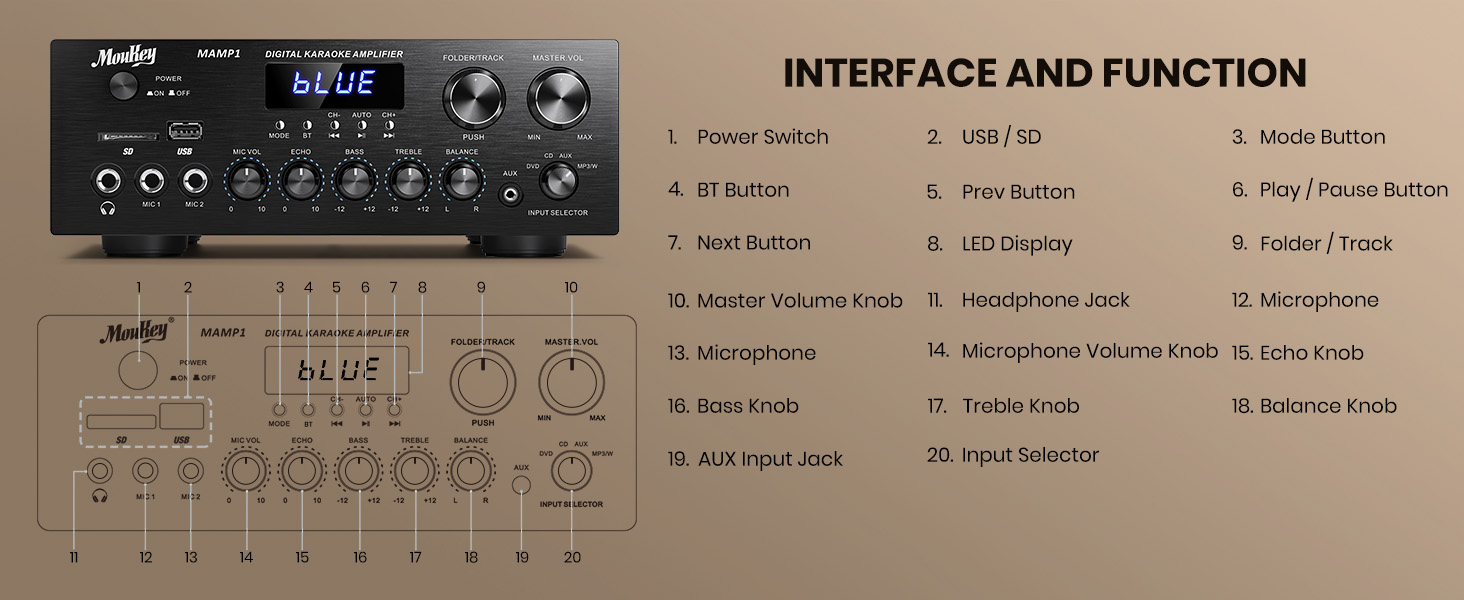
Figure 1: Moukey MAMP1 Priekinio skydelio išdėstymas
- Maitinimo jungiklis: Paspauskite, kad įjungtumėte arba išjungtumėte įrenginį.
- USB / SD Card Slot: Insert USB flash drives (max 64GB) or SD cards (max 32G) for MP3 playback.
- Režimo mygtukas: Press to cycle through input sources (USB/SD, Bluetooth, FM, AUX, CD, DVD).
- BT mygtukas: Paspauskite, kad pasirinktumėte „Bluetooth“ režimą.
- Ankstesni/kiti mygtukai: Navigate tracks in USB/SD/Bluetooth mode or stations in FM mode.
- Atkūrimo / pristabdymo mygtukas: Paleisti arba pristabdyti garso atkūrimą.
- Skystųjų kristalų ekranas: Rodo dabartinį režimą, takelio informaciją arba FM dažnį.
- Aplanko / takelio rankenėlė: Select folders or tracks.
- Pagrindinis garsumo rankenėlė: Reguliuoja bendrą išvesties garsumą.
- Ausinių lizdas (6.35 mm): Prijunkite ausines privačiam klausymuisi.
- Microphone Inputs (MIC1, MIC2 - 6.35mm): Connect up to two microphones for karaoke or public address.
- Mikrofono garsumo rankenėlė: Reguliuoja prijungtų mikrofonų garsumą.
- Echo rankenėlė: Reguliuoja mikrofonų aidėjimo efektą.
- Boso rankenėlė: Reguliuoja žemo dažnio išvestį.
- Aukštoji rankenėlė: Reguliuoja aukšto dažnio išvestį.
- Balanso rankenėlė: Reguliuoja kairiojo / dešiniojo kanalų balansą.
- Įvesties pasirinkimo rankenėlė: Manually select input sources (CD, AUX, DVD, MP3/BT).
6. Galinio skydelio jungtys
The rear panel provides all necessary ports for connecting your audio sources and speakers.

Figure 2: Moukey MAMP1 Galinio skydelio išdėstymas
- FM Antenna Jack: Prijunkite pridedamą FM anteną radijo imtuvui.
- Audio Input (DVD/CD - RCA): Connect external audio sources like DVD or CD players using RCA cables.
- Linija išvestis (RCA): Prisijunkite prie kito ampilgaamžiškumą ar įrašymo įrenginį.
- Speaker Output (Banana Plugs): Connect your passive speakers. Ensure correct polarity (+ to + and - to -).
- Maitinimo įvestis: Connect the power cable to a standard AC outlet.
7. Sąranka
7.1 Garsiakalbio prijungimas
To connect your passive speakers to the Moukey MAMP1 ampkeltuvas, atlikite šiuos veiksmus:

Figure 3: Speaker Connection Diagram
- Užtikrinti, amplifier yra išjungtas ir atjungtas nuo elektros lizdo.
- Identify the positive (+) and negative (-) terminals on both your speakers and the ampgyvesnis.
- For bare wire connections: Rotate and loosen the speaker knob on the amplifier. Insert the bare wire (remove approximately 10mm insulation). Tighten the knobs to secure the wires.
- Prijunkite garsiakalbio teigiamą (+) gnybtą prie garsiakalbio teigiamo (+) gnybto. ampgyvesnis.
- Prijunkite garsiakalbio neigiamą (-) gnybtą prie garsiakalbio neigiamo (-) gnybto. ampgyvesnis.
- Repeat for all speakers. Ensure all connections are secure to prevent short circuits.
7.2 Garso šaltinių prijungimas
- RCA Devices (CD/DVD Player): Use RCA cables to connect the audio output of your CD or DVD player to the corresponding RCA input jacks on the amp„Lifier“ galinis skydelis.
- Pagalbiniai įrenginiai: Connect devices with a 3.5mm audio output (e.g., smartphone, tablet) to the 3.5mm AUX IN jack on the front panel.
- Mikrofonai: Plug 1/4 inch (6.35mm) microphones into the MIC1 or MIC2 jacks on the front panel.
- FM antena: Connect the included FM antenna to the FM ANT jack on the rear panel for radio reception.
7.3 Maitinimo jungtis
- Ensure all audio and speaker connections are made.
- Connect the power cable to the AC POWER INPUT on the rear panel of the ampgyvesnis.
- Kitą maitinimo laido galą prijunkite prie tinkamo kintamosios srovės lizdo.
8. Naudojimo instrukcijos
8.1 Maitinimo įjungimas/išjungimas
Paspauskite GALIA priekiniame skydelyje esantį jungiklį, kad įjungtumėte amplifier ON or OFF. The LED display will illuminate when powered on.
8.2 Įvesties šaltinio pasirinkimas
Naudokite REŽIMAS mygtuką arba ĮVADŲ RINKIMAS knob on the front panel to choose your desired audio source (Bluetooth, USB, SD, AUX, FM, CD, DVD).
8.3 Garsumo ir tono valdymas
- Pagrindinis garsas: Pasukite MASTER VOL rankenėlę, skirtą bendram garso lygiui reguliuoti.
- Mikrofono garsumas: Naudokite MIC VOL knob to adjust microphone volume independently.
- Aidas: Adjust the microphone echo effect with the ECHO rankenėlė.
- Žemieji / aukštieji dažniai: Fine-tune the low and high frequencies using the BASS ir TREBLE rankenėlės.
- Likutis: Adjust the left/right channel balance with the BALANSAS rankenėlė.
8.4 Bluetooth poravimas
- Paspauskite REŽIMAS mygtukas arba BT button to select Bluetooth mode. The LED display will show "BLUE".
- Savo mobiliajame įrenginyje įjunkite Bluetooth ir ieškokite galimų įrenginių.
- Select "MAMP1" from the list to pair. A confirmation tone will sound upon successful connection.
8.5 USB/SD atkūrimas
- Insert a USB flash drive or SD card into the respective slot on the front panel.
- The amplifier will automatically switch to USB/SD mode and begin playback. If not, press the REŽIMAS mygtuką, kad jį pasirinktumėte.
- Naudokite PREV/KITAS mygtukai, skirti praleisti takelius, ir PALEISTI / PAUZĖ mygtukas atkūrimui valdyti.
8.6 FM radijo veikimas
- Ensure the FM antenna is connected to the rear panel.
- Paspauskite REŽIMAS button to select FM radio mode. The LED display will show the frequency.
- Paspauskite AUTO mygtuką, kad automatiškai nuskaitytumėte ir išsaugotumėte galimas FM stotis.
- Naudokite CH- ir CH+ mygtukus naršyti per išsaugotas stotis.
9. Priežiūra
- Laikykite įrenginį švarų, nuvalydami jį minkšta, sausa šluoste.
- Venkite naudoti stiprių cheminių medžiagų ar abrazyvinių valiklių.
- Užtikrinkite tinkamą vėdinimą, neuždengdami ventiliacijos angų.
- Laikykite ampLaikyti vėsioje, sausoje vietoje, apsaugotoje nuo tiesioginių saulės spindulių ir ekstremalių temperatūrų.
10. Problemų sprendimas
| Problema | Galima priežastis | Sprendimas |
|---|---|---|
| Nėra galios | Maitinimo laidas neprijungtas; Maitinimo jungiklis išjungtas; Lizdo gedimas | Check power cable connection; Turn power switch ON; Test outlet with another device. |
| Nėra garso išvesties | Incorrect input source; Volume too low; Speaker connections loose/incorrect; Faulty audio cable | Select correct input source; Increase master volume; Check speaker wiring; Replace audio cables. |
| Bluetooth neprisijungia | Not in Bluetooth mode; Device too far; Device already connected to another unit | Perjunkite į „Bluetooth“ režimą; perkelkite įrenginį arčiau; atjunkite nuo kitų įrenginių ir bandykite dar kartą. |
| Prastas FM priėmimas | Antena neprijungta; silpnas signalas | Connect FM antenna; Adjust antenna position for better reception. |
11. Specifikacijos
| Funkcija | Specifikacija |
|---|---|
| Prekės ženklas | Moukey |
| Modelis | MAMP1 |
| Išėjimo galia | Maks. 400 vatų |
| Kanalai | 2.0 kanalas |
| Bluetooth versija | 5.0 |
| Bluetooth diapazonas | Iki 40 pėdų / 10 metrų |
| Įvesties sąsajos | 2x RCA (CD/DVD), 2x 1/4" (6.35mm) MIC, USB, SD, 3.5mm AUX IN, FM Antenna |
| Išvesties sąsajos | RCA Line Out, Banana Plug Speaker Outputs, 1/4" (6.35mm) Headphone |
| USB/SD Max Capacity | USB: 64G, SD: 32G |
| Dažnio atsakas | 20Hz-20kHz |
| Derintuvo technologija | FM |
| Gaminio matmenys | 81.28 x 78.74 x 43.18 cm; 3.19 kg |
12. Garantija ir palaikymas
Moukey products are designed and manufactured to the highest quality standards. For detailed warranty information and customer support, please refer to the warranty card included in your package or visit the official Moukey website. If you encounter any issues or have questions regarding your MAMP1 amplifier, please contact Moukey customer service for assistance.