
1. Įvadas
This manual provides essential instructions for the safe and effective operation of your Andoer H8 Compact Digital Camera. Please read this manual thoroughly before using the camera and retain it for future reference.
2. Saugos informacija
Norėdami užtikrinti saugų darbą, laikykitės šių atsargumo priemonių:
- Saugokite fotoaparatą nuo vandens ar drėgmės.
- Venkite fotoaparato numetimo ir stiprių smūgių.
- Keep the camera away from extreme temperatures.
- Nebandykite patys ardyti ar taisyti fotoaparato. Kreipkitės į kvalifikuotus techninės priežiūros darbuotojus.
- Naudokite tik nurodytą įkrovimo laidą ir akumuliatorių.

Vaizdo aprašymas: A red triangular warning symbol with an exclamation mark, accompanied by text in multiple languages warning to keep plastic bags away from babies and children to prevent suffocation.
3. Pakuotės turinys
Patikrinkite, ar pakuotėje yra visi reikalingi daiktai:
- Andoer H8 Digital Camera
- C tipo kabelis
- Virvelė
- Vartotojo vadovas

Vaizdo aprašymas: A pink Andoer H8 compact digital camera, displayed with its front and back sides visible, highlighting its compact design and screen.
4. Fotoaparatas baigtasview
Susipažinkite su fotoaparato komponentais:
- Objektyvas: Užfiksuoja vaizdus ir vaizdo įrašus.
- Flash: Suteikia apšvietimą esant silpnam apšvietimui.
- 2.8 colių IPS ekranas: Už viewing menus, photos, and videos.
- Maitinimo mygtukas: Įjungia / išjungia fotoaparatą.
- Užrakto mygtukas: Fotografuoja.
- Priartinimo valdikliai: Adjusts 8x digital zoom.
- Naršymo mygtukai: Meniu naršymui ir pasirinkimui.
- Režimo mygtukas: Switches between photo, video, game, and music modes.
- USB-C prievadas: Įkrovimui ir duomenų perdavimui.
- TF kortelės lizdas: Atminties kortelės įdėjimui.

Vaizdo aprašymas: An illustration showing the Andoer H8 camera in four different colors (Purple, Blue, Black, Pink) and icons representing its main functions: Photo, Video, Game, Music, and Flash lamp.
5. Sąranka
5.1. Akumuliatoriaus įkrovimas
- Connect the supplied Type-C cable to the camera's USB-C port.
- Kitą laido galą prijunkite prie USB maitinimo adapterio (nepridedamas) arba kompiuterio USB prievado.
- The charging indicator will illuminate. Charging typically takes 2-4 hours.
- Kai akumuliatorius visiškai įkrautas, indikatoriaus lemputė gali pasikeisti arba užgesti.
5.2. Inserting a Memory Card (TF Card)
The camera supports TF cards up to 32GB (not included).
- Locate the TF card slot on the camera.
- Insert the TF card with the metal contacts facing down until it clicks into place.
- Norėdami išimti, švelniai paspauskite kortelę, kol ji iššoks.
6. Naudojimo instrukcijos
6.1. Maitinimo įjungimas/išjungimas
- Norėdami įjungti, paspauskite ir palaikykite maitinimo mygtuką.
- Norėdami išjungti, dar kartą paspauskite ir palaikykite nuspaudę maitinimo mygtuką.
6.2. Fotografavimas
- Turn on the camera and ensure it is in Photo mode (indicated by an icon on the screen).
- Kadruokite kadrą naudodami 2.8 colio IPS ekraną.
- Use the zoom controls to adjust the 8x digital zoom.
- Press the Shutter button to capture the image.

Vaizdo aprašymas: A pink Andoer H8 camera showing a high-definition image on its screen, with text indicating "4800W shot in HD" and "8000x6000 HD resolution," demonstrating its photo capabilities.
6.3. Vaizdo įrašų įrašymas
- Perjunkite kamerą į vaizdo įrašymo režimą.
- Press the Shutter button to start recording. A recording indicator will appear on the screen.
- Norėdami sustabdyti įrašymą, dar kartą paspauskite užrakto mygtuką.

Vaizdo aprašymas: A pink Andoer H8 camera displaying a live video recording on its screen, with "1080P Video recording" and "Recording the good times" text, illustrating its video capture function.
6.4. Atkūrimas
- In Photo or Video mode, press the Playback button (usually indicated by a triangle icon) to enter playback mode.
- Use the navigation buttons to browse through your photos and videos.
- Paspauskite mygtuką Gerai / Įvesti, kad view nuotrauką arba paleiskite vaizdo įrašą.
6.5. Special Features: Stickers, Frames, and Filters
Enhance your photos with built-in creative options:
- Access these features through the camera's menu settings, typically found in Photo mode.
- Select from 40 kinds of head stickers, 26 photo frames, and 6 filters to customize your images before or after capture (depending on camera firmware).

Vaizdo aprašymas: A collage demonstrating various creative options available on the camera, including 40 types of cute head stickers, 26 adorable photo frames, and 6 filters, applied to different child portraits.
6.6. Muzikos atkūrimas
The camera supports MP3 music playback.
- Perkelti MP3 files į TF kortelę.
- Switch the camera to Music mode.
- Use the navigation buttons to select and play music.
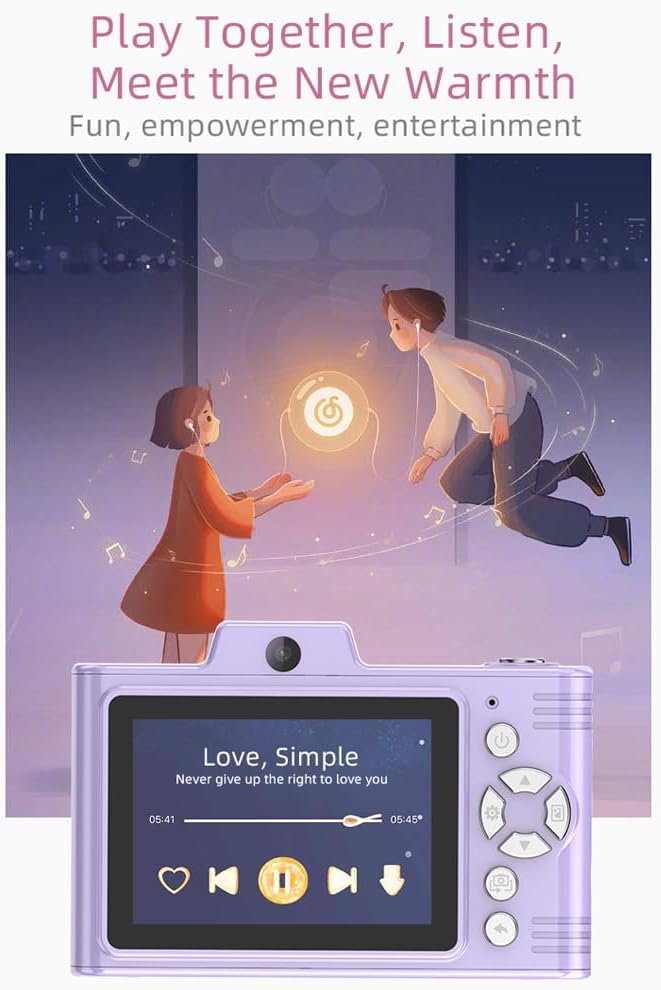
Vaizdo aprašymas: A purple Andoer H8 camera showing a music player interface on its screen, with song title "Love, Simple" and playback controls, indicating its music playback capability.
6.7. Connecting to a Computer / Transferring Files
You can transfer photos and videos to a computer or phone.
- Connect the camera to your computer using the Type-C cable.
- The camera should appear as a removable disk.
- Vilkite ir numeskite files prie kompiuterio.
- For phone transfer, use an OTG adapter (not included) if your phone supports OTG functionality.
7. Priežiūra
- Valymas: Use a soft, dry cloth to clean the camera body. For the lens, use a specialized lens cleaning cloth.
- Saugykla: Store the camera in a cool, dry place away from direct sunlight and dust. Remove the battery if storing for extended periods.
8. Problemų sprendimas
| Problema | Galimas sprendimas |
|---|---|
| Kamera neįsijungia. | Įsitikinkite, kad akumuliatorius įkrautas. Įdėkite akumuliatorių atgal. |
| Negalima fotografuoti / filmuoti. | Check if a TF card is inserted and has sufficient space. Ensure camera is in the correct mode. |
| Vaizdai neryškūs. | Clean the lens. Ensure adequate lighting. Hold the camera steady. |
| Kamera užstringa. | Išimkite ir vėl įdėkite bateriją, kad iš naujo nustatytumėte fotoaparato gamyklinius nustatymus. |
9. Specifikacijos
| Funkcija | Detalė |
|---|---|
| Produkto modelis | H8 |
| Ekranas | 2.8 colio IPS |
| Nuotraukų pikselis | Iki 48 MP |
| Vaizdo raiška | 1080p HD |
| Skaitmeninis priartinimas | 8x |
| File Formatas | JPG/AVI/MP3 |
| Įkrovimo laikas | apytiksliai 2-4 valandos |
| Baterijos talpa | 700 mAh, 3.7 V |
| Produkto svoris | 110g |
| Produkto dydis | 105.5 x 72 x 46 mm |
| Įkrovimo ttage | DC5V 1A |
| Atminties palaikymas | TF kortelė (iki 32 GB) |
| Ypatingos savybės | 40 Head Stickers, 26 Photo Frames, 6 Filters |
| Ryšys | USB (C tipo) |
| Vaizdo stabilizavimas | Skaitmeninis |
| Jutiklio tipas | CMOS |
| Įgūdžių lygis | Naujokas |
10. Garantija ir palaikymas
For warranty information and technical support, please refer to the documentation provided with your purchase or contact Andoer customer service directly. Keep your proof of purchase for warranty claims.