
SUNOL K8
GM20 True Wireless Earbuds User Manual
Modelis: K8
Įvadas
Thank you for choosing the SUNOL GM20 True Wireless Earbuds. This manual provides detailed instructions on how to set up, operate, and maintain your earbuds to ensure optimal performance and longevity. Please read this manual thoroughly before using the product.
Produktas baigtasview

Image: The GM20 True Wireless Earbuds in orange, shown with their matching charging case. The charging case features an LED display indicating battery percentage.
The GM20 True Wireless Earbuds are designed for a superior audio experience with advanced features:
- Bluetooth 5.3 technologija: Ensures faster pairing, more stable connection, and lower power consumption with an effective range of up to 10 meters.
- Integruotas mikrofonas: High-quality microphone with environmental noise reduction for clear hands-free calls.
- Išplėstinis atkūrimas: Up to 48 hours of total playback time with the 600mAh charging case, which can recharge the earbuds four times.
- Skystųjų kristalų ekranas: The charging case features an LED display to show the power levels of both the earbuds and the charging case.
- Neperšlampamas dizainas: IPX8 waterproof nano-coating makes the earbuds suitable for various activities, including sports.
- Patogus prigludimas: Ergonomic in-ear design with multiple ear tip sizes for prolonged comfortable wear.
Kas yra dėžutėje
Upon opening your GM20 True Wireless Earbuds package, you should find the following items:
- GM20 True Wireless Earbuds (Left and Right)
- Įkrovimo dėklas
- Įkrovimo kabelis
- Multiple sizes of Ear Tips
- Vartotojo vadovas (šis dokumentas)
Sąranka
1. Ausinių ir dėklo įkrovimas
Prieš pirmą kartą naudodami įsitikinkite, kad ir ausinės, ir įkrovimo dėklas yra visiškai įkrauti.
- Place the earbuds into the charging case. Ensure they are correctly seated; the LED display on the case will show charging status.
- Connect the charging cable to the charging port on the case and to a USB power source. The LED display will indicate the charging progress of the case.
- A full charge for the case typically takes a few hours. The earbuds will charge automatically when placed inside the powered case.

Image: The GM20 charging case displaying "100" on its LED screen, indicating a full charge. An earbud is shown next to it, ready for use.
2. Susiejimas su jūsų įrenginiu (susiejimas vienu veiksmu)
The GM20 earbuds feature automatic pairing for convenience.
- Pradinis poravimas:
- Atidarykite įkrovimo dėklą ir išimkite abi ausines. Jos automatiškai įsijungs ir pradės veikti susiejimo režimu.
- Savo įrenginyje (išmaniajame telefone, planšetiniame kompiuteryje ir kt.) įjunkite „Bluetooth“.
- Ieškokite Bluetooth devices and select "GM20 TWS" from the list.
- Prijungus, išgirsite patvirtinimo signalą ir ausinės bus paruoštos naudoti.
- Pakartotinis susiejimas: The earbuds will automatically connect to the last paired device when taken out of the charging case.
- If the earbuds do not connect automatically, ensure Bluetooth is enabled on your device and select "GM20 TWS" from your Bluetooth settings.
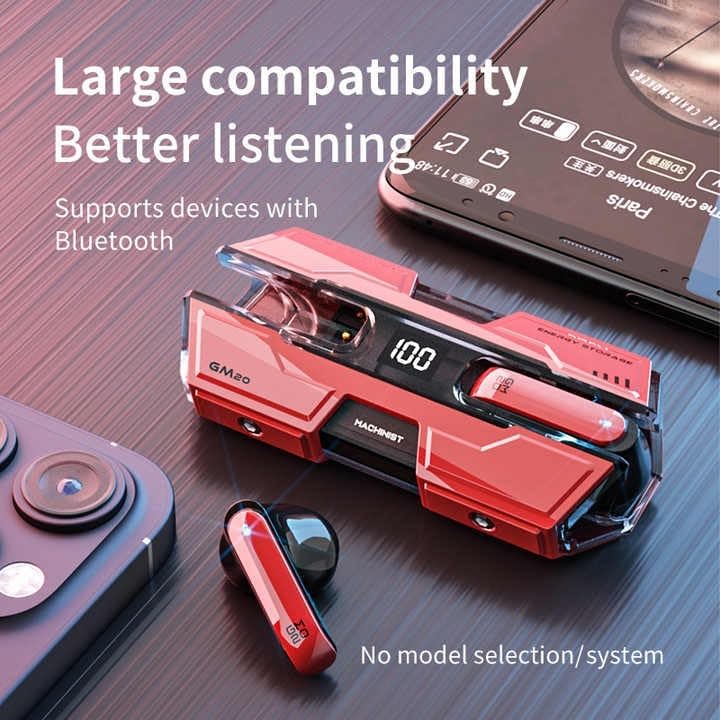
Image: The GM20 earbuds and charging case positioned near a smartphone, emphasizing their broad compatibility with Bluetooth-enabled devices.
Naudojimo instrukcijos
Ausinių valdikliai
The GM20 earbuds feature a multifunction button on each earbud for easy control of audio playback and calls.
| Veiksmas | Funkcija |
|---|---|
| Single Press (Left/Right Earbud) | Groti / pristabdyti muziką, atsiliepti / baigti skambutį |
| Du kartus paspauskite (kairioji ausinė) | Ankstesnė daina |
| Du kartus paspauskite (dešinė ausinė) | Kita daina |
| Ilgas paspaudimas (2 sekundės) | Atmesti skambutį, įjungti balso asistentą |
| Ilgas paspaudimas (5 sekundės) | Maitinimo įjungimas/išjungimas |
Nešioti ausines
For optimal sound quality and comfort, ensure the earbuds are properly seated in your ears. Experiment with the different sizes of ear tips provided to find the best fit for your ears.

Paveikslėlis: sprogęs view diagram of an earbud, illustrating its internal components such as the 13mm moving coil and composite diaphragm, which contribute to high-resolution sound.
Priežiūra
Proper maintenance will extend the life of your GM20 earbuds.
- Valymas: Reguliariai valykite ausines ir įkrovimo dėklą minkštu, sausu, nepūkuotu skudurėliu. Nenaudokite abrazyvinių valiklių ar tirpiklių.
- Atsparumas vandeniui: The earbuds are IPX8 waterproof, meaning they are protected against prolonged immersion in water. However, the charging case is not waterproof. Avoid exposing the charging case to liquids. Always ensure earbuds are dry before placing them back in the charging case.
- Saugykla: Kai nenaudojate, laikykite ausines įkrovimo dėkle, kad jos būtų apsaugotos ir įkrautos. Laikykite vėsioje, sausoje vietoje, toliau nuo ekstremalių temperatūrų.
- Akumuliatoriaus priežiūra: Norėdami taupyti akumuliatoriaus veikimo laiką, venkite dažnai visiškai iškrauti ausines ir įkrovimo dėklą. Reguliariai juos įkraukite, net jei nenaudojate nuolat.
Trikčių šalinimas
If you encounter issues with your GM20 earbuds, try the following solutions:
- Ausinės nesusijungia:
- Įsitikinkite, kad abi ausinės yra visiškai įkrautos.
- Išjunkite „Bluetooth“ savo įrenginyje, tada vėl jį įjunkite.
- Forget "GM20 TWS" from your device's Bluetooth settings and attempt to re-pair.
- Įdėkite ausines atgal į dėklą, uždarykite dangtelį, palaukite kelias sekundes, tada atidarykite ir bandykite dar kartą.
- Nėra garso arba garsas per mažas:
- Patikrinkite garsumo lygį tiek savo įrenginyje, tiek ausinėse.
- Įsitikinkite, kad ausinės tinkamai prijungtos prie jūsų įrenginio.
- Nuvalykite visas šiukšles nuo ausinių garsiakalbio tinklelio.
- Sound distortion or crackling:
- Įsitikinkite, kad ausinės yra ne toliau kaip 10 metrų „Bluetooth“ diapazone nuo jūsų įrenginio.
- Sumažinkite trukdžius pasitraukdami nuo kitų belaidžių įrenginių arba stiprių elektromagnetinių laukų.
- Pabandykite iš naujo susieti ausines.
- Ausinės neįkraunamos:
- Įsitikinkite, kad įkrovimo laidas yra tvirtai prijungtas tiek prie dėklo, tiek prie maitinimo šaltinio.
- Patikrinkite, ar dėklo įkrovimo prievadas švarus ir be šiukšlių.
- Išbandykite kitą įkrovimo laidą arba maitinimo adapterį.
Specifikacijos
| Funkcija | Detalė |
|---|---|
| Modelio pavadinimas | K8 |
| Bluetooth versija | 5.3 |
| Bluetooth diapazonas | 10 metrai |
| Baterijos veikimo laikas (ausinės) | Approx. 8-10 hours (single charge) |
| Baterijos veikimo laikas (su įkrovimo dėklu) | Iki 48 valandų |
| Įkrovimo dėklo akumuliatoriaus talpa | 600 mAh |
| Atsparumo vandeniui lygis | IPX8 (tik ausinėms) |
| Dažnio atsakas | 20 Hz–20 kHz |
| Varža | 32 omų |
| Kontrolės metodas | Lietiklis / mygtukas |
| Medžiaga | Akrilnitrilo butadieno stirenas (ABS) |
| Prekės svoris | 14.4 uncijos (visas paketas) |
Garantija ir palaikymas
For warranty information and customer support, please refer to the documentation included with your purchase or visit the official SUNOL website. If you experience any issues not covered in this manual, please contact SUNOL customer service for assistance.
Išsaugokite pirkimo įrodymą, kad galėtumėte kreiptis dėl garantijos.
Ask a question about this manual
Ask about setup, troubleshooting, compatibility, parts, safety, or missing instructions. Manuals+ will review the question and use this page’s manual context to help answer it.