
Įvadas
This manual provides detailed instructions for the SUNOL GM20 True Wireless Earbuds. Please read this manual carefully before using the product to ensure proper operation and to maximize your listening experience. These earbuds feature Bluetooth 5.3 connectivity, a waterproof design, and a charging case with an LED display.
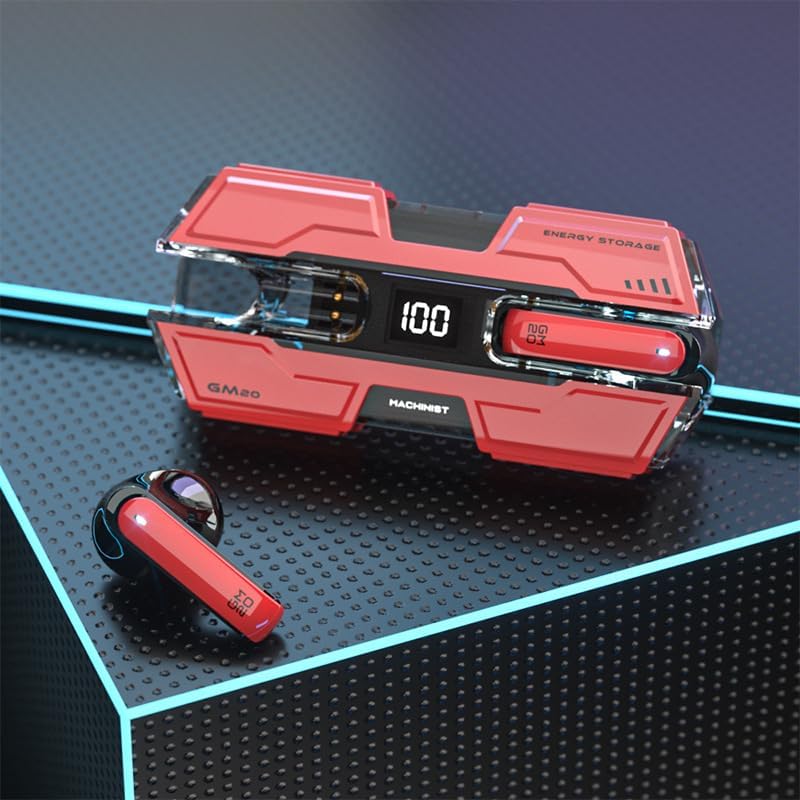
Image: The SUNOL GM20 True Wireless Earbuds with their charging case, showcasing the design and LED display.
Pakuotės turinys
Įsitikinkite, kad pakuotėje yra visi daiktai:
- GM20 True Wireless Earbuds (Left and Right)
- Įkrovimo dėklas
- Įkrovimo kabelis
- Vartotojo vadovas
- Įvairūs ausų antgalių dydžiai
Produkto savybės
- Bluetooth 5.3 technologija: Offers faster pairing, stable connection, and lower power consumption with an effective range of up to 10 meters.
- 48-Hour Playback: The charging case provides multiple charges, extending total listening time.
- „IPX8“ atsparus vandeniui: Designed to withstand water exposure, suitable for sports and outdoor activities.
- Skystųjų kristalų ekranas: The charging case features an LED display to show battery life.
- Gilus bosas: Equipped with a 14mm dynamic bass unit for enhanced sound quality.
- Integruotas mikrofonas: Supports hands-free calls with environmental noise reduction.
- Ergonomiškas dizainas: Lengvi ir patogūs ilgalaikiam dėvėjimui.

Image: The GM20 earbuds and charging case, emphasizing Bluetooth 5.3 and high-definition sound quality.

Paveikslėlis: sprogęs view diagram illustrating the internal components of the earbud, highlighting the 13mm moving coil and composite diaphragm for high-fidelity sound.
Sąranka
1. Ausinių ir įkrovimo dėklo įkrovimas
Before first use, fully charge the earbuds and the charging case. Connect the provided charging cable to the charging case and a USB power source. The LED display on the charging case will indicate the charging status and battery level. When charging the earbuds inside the case, the display will show their individual battery life.
2. Įjungimas/išjungimas
- Maitinimas: Išėmus iš įkrovimo dėklo ausinės įsijungs automatiškai.
- Išjungti: Įdėkite ausines atgal į įkrovimo dėklą, kad jos automatiškai išsijungtų ir pradėtų krauti.
3. Susiejimas su įrenginiu
The earbuds support one-step pairing for convenience.
- Įsitikinkite, kad ausinės yra įkrautos.
- Atidarykite įkrovimo dėklą ir išimkite abi ausines. Jos automatiškai įsijungs ir bandys prisijungti viena prie kitos.
- After approximately 10 seconds, the earbuds will enter pairing mode.
- Savo įrenginyje (išmaniajame telefone, planšetiniame kompiuteryje ir kt.) įjunkite „Bluetooth“ ir ieškokite galimų įrenginių.
- Select "GM20 TWS" from the list of found devices to complete the pairing process.
- Susiejus ausines, jos automatiškai prisijungs prie paskutinio susieto įrenginio, kai bus išimtos iš įkrovimo dėklo.

Image: The GM20 earbuds and charging case, illustrating the quick connect and pairing process with a smartphone.
Naudojimo instrukcijos
1. Ausinių dėvėjimas
Select the ear tips that provide the most comfortable and secure fit. Insert the earbuds gently into your ear canal and rotate slightly until they feel snug. A proper fit ensures optimal sound quality and noise isolation.
2. Pagrindiniai valdikliai
The earbuds feature a multifunction button for various controls:
- Leisti / pristabdyti muziką: Single press the multifunction button on either earbud.
- Kita daina: Double press the multifunction button on the right earbud.
- Ankstesnė daina: Double press the multifunction button on the left earbud.
- Atsiliepti / Baigti skambutį: Single press the multifunction button on either earbud during an incoming call or active call.
- Atmesti skambutį: Press and hold the multifunction button on either earbud during an incoming call.
- Garsumo valdymas: (Note: Specific volume control via earbuds is not detailed in product information. Adjust volume via your connected device.)
3. Atsparumas vandeniui
The GM20 earbuds are designed with an IPX8 waterproof nano-coating, making them resistant to water. This feature makes them suitable for activities such as running, cycling, and other sports where exposure to sweat or light rain may occur. Avoid prolonged submersion in water.

Image: The GM20 earbuds and charging case in a gaming context, highlighting fast transmission and no delay for an enhanced experience.
Priežiūra
1. Valymas
Regularly clean your earbuds and charging case to maintain optimal performance and hygiene. Use a soft, dry, lint-free cloth. For stubborn dirt, a slightly damp cloth can be used, but ensure no moisture enters the earbud openings or charging ports. Do not use harsh chemicals or abrasive materials.
2. Sandėliavimas
Kai nenaudojate, laikykite ausines įkrovimo dėkle, kad apsaugotumėte jas nuo dulkių, pažeidimų ir kad jos būtų įkrautos. Dėklą laikykite vėsioje, sausoje vietoje, toliau nuo tiesioginių saulės spindulių ir ekstremalių temperatūrų.
3. Akumuliatoriaus priežiūra
To prolong battery life, avoid fully discharging the earbuds and charging case frequently. Charge them regularly, even if not in constant use. Do not expose batteries to excessive heat.
Trikčių šalinimas
- Ausinės nesusijungia tarpusavyje: Place both earbuds back into the charging case, close the lid, wait a few seconds, then remove them again. They should automatically connect.
- Ausinės neprisijungia prie įrenginio: Ensure Bluetooth is enabled on your device and the earbuds are in pairing mode. Forget "GM20 TWS" from your device's Bluetooth list and try pairing again.
- Nėra garso iš vienos ausinės: Check if both earbuds are charged. Try resetting them by placing them in the case and then removing them.
- Įkrovimo problemos: Įsitikinkite, kad įkrovimo laidas yra tvirtai prijungtas ir kad maitinimo šaltinis veikia. Nuvalykite įkrovimo kontaktus ant ausinių ir dėklo.
- Prasta garso kokybė: Ensure the earbuds are properly seated in your ears. Try different sized ear tips for a better seal. Check the audio source device for any issues.
Techninės specifikacijos
| Modelio pavadinimas | GM20 (K8) |
| Bluetooth versija | 5.3 |
| Bluetooth diapazonas | Iki 10 metrų |
| Baterijos veikimo laikas (ausinės) | Approximately 48 hours with charging case |
| Įkrovimo dėklas Akumuliatorius | 600 mAh |
| Atsparumo vandeniui lygis | IPX8 |
| Garso tvarkyklės tipas | 14 mm dinaminė tvarkyklė |
| Dažnių diapazonas | 20 Hz–20 kHz |
| Kontrolės metodas | Lietiklis / mygtukas |
| Medžiaga | Akrilnitrilo butadieno stirenas (ABS) |
Informacija apie garantiją
The SUNOL GM20 True Wireless Earbuds come with a standard manufacturer's warranty. Please refer to the warranty card included in your package or contact customer support for specific details regarding warranty coverage and duration. Keep your proof of purchase for warranty claims.
Pagalba klientams
If you encounter any issues not covered in this manual or require further assistance, please contact SUNOL customer support. Contact information can typically be found on the product packaging or the official SUNOL websvetainę.