
1. Produktas baigtasview
The CPVAN Remote Control (2nd Generation), model CP10 Pro, is designed for wireless operation of compatible CPVAN home security systems. This remote provides convenient control over your alarm system's functions from a distance.
Suderinamumas: This remote control is compatible with CPVAN CP2, CP2 Pro, CP7R, CP8, and CP9 Home Security Systems.

1 vaizdas: priekis view of the CPVAN remote control.
2. Pagrindinės savybės
- Belaidis veikimas: Provides convenient control of your alarm system without physical interaction with the main unit.
- Platus suderinamumas: Works with CPVAN CP2, CP2 Pro, CP7R, CP8, and CP9 alarm systems.
- Tolimojo nuotolio valdymas: Enables control of the motion sensor detector alarm from a significant range.
- Paruošta naudoti: Comes with a pre-installed battery for immediate functionality.
- Ergonomiškas dizainas: Features a comfortable and user-friendly form factor.
3. Pakuotės turinys
- CPVAN Remote Control (2nd Generation)
- 1 x CR2 baterija (iš anksto įdiegta)
4. Sąranka ir susiejimas
Poravimas su nauju nuotolinio valdymo pultu
To integrate your new remote control with a CPVAN PIR motion sensor alarm, follow these steps:
- Ensure the PIR motion sensor alarm is powered ON.
- On the PIR motion sensor alarm, long press the Pairing button (often indicated by a signal icon) to enter pairing mode. The detector light will illuminate continuously.
- Press any button on your remote control. You will hear two beeps from the alarm to confirm successful pairing.
- Short press the Pairing button on the alarm again to exit pairing mode. Your remote has now been paired.

Image 2: Pairing process of the remote control with a motion sensor alarm.
5. Operacija
Nuotolinio valdymo pulto funkcijos
The CPVAN remote control features four distinct buttons for managing your alarm system:
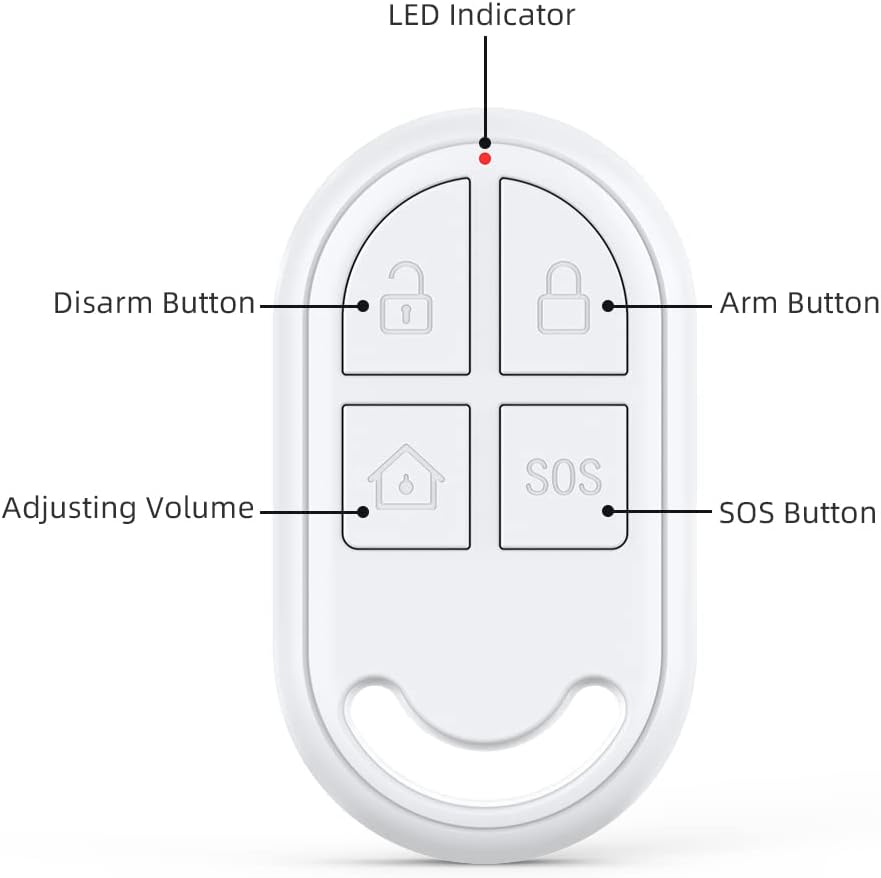
Image 3: Labeled buttons on the CPVAN remote control.
- Arm Button (Locked Padlock Icon): Activates the alarm system, placing it in armed mode.
- Disarm Button (Unlocked Padlock Icon): Deactivates the alarm system, turning off armed mode.
- Adjusting Volume Button (House Icon): Typically used to switch between different alarm modes or adjust volume settings on the connected alarm unit. Refer to your main alarm system manual for specific functions.
- SOS Button (SOS Text): Triggers an immediate emergency alarm. Use in situations requiring urgent attention.
- LED indikatorius: A small light that illuminates to indicate button presses and operational status.
6. Priežiūra
Baterijos keitimas
The remote control is powered by one CR2 battery. When the remote's performance degrades or the LED indicator fails to light up upon button press, it may be time to replace the battery.
- Locate the battery compartment on the remote control. This is typically on the back or side, secured by a small screw or clip.
- Atsargiai atidarykite skyrių.
- Išimkite seną CR2 bateriją.
- Insert a new CR2 battery, ensuring correct polarity (+ and -).
- Saugiai uždarykite akumuliatoriaus skyrių.
Baterijos tipas: 1 x CR2 (3 Volts, Lithium Manganese Dioxide)
7. Problemų sprendimas
- Nuotolinis nereaguoja: Check the battery. Replace if necessary. Ensure the remote is within the operating range of the alarm system.
- Susiejimo sutrikimas: Ensure the alarm system is in pairing mode. Repeat the pairing steps carefully. Check if the remote's battery is charged.
- Atsitiktinis aktyvavimas: The remote keys can be sensitive. Avoid placing the remote in pockets or areas where buttons might be pressed inadvertently.
8. Techninės specifikacijos
| Prekės ženklas | CPVAN |
| Modelio numeris | CP10 Pro |
| Spalva | Baltas |
| Maitinimo šaltinis | Maitinamas baterijomis |
| Suderinami įrenginiai | CPVAN CP2, CP2 Pro, CP7R, CP8, CP9 Home Security Systems |
| Matmenys (I x P x A) | 2.46 x 0.43 x 1.38 colio |
| Ryšio technologija | Bevielis |
| Prekės svoris | 0.01 kilogramo (0.317 uncijos) |
| ttage | 3 voltų |
| Baterijos tipas | 1 x CR2 (Lithium Manganese Dioxide) |
| Didžiausias diapazonas | 100 metrai |
| Ypatingos savybės | Ergonomiškas |

Image 4: Dimensions of the CPVAN remote control.
9. Pagalba klientams
For further assistance, technical support, or warranty inquiries, please refer to the main manual of your CPVAN Home Alarm System or visit the official CPVAN website. You can also contact CPVAN customer service through the retailer where the product was purchased.
Gamintojas: CPVAN
Dalies numeris: CP2-RC