
Pakaitinis nuotolinio valdymo pultas (ASIN: B0CKWGC1KD)
Pakaitinio nuotolinio valdymo pulto naudotojo vadovas
Model: Replacement Remote Control (ASIN: B0CKWGC1KD)
Įvadas
This manual provides instructions for the use and maintenance of your new replacement remote control. This remote is designed to function as a substitute for the original remote control of Chiq GCBLTV6EA-C4 L32H7N Smart LED TVs. Please note that as a replacement, some advanced or specific functions of your original remote may not be fully replicated.
Sąranka
Akumuliatoriaus montavimas
Nuotolinio valdymo pultui reikalingos dvi AAA baterijos (nepridedamos). Norėdami jas įdėti, atlikite šiuos veiksmus:
- Nuotolinio valdymo pulto gale raskite baterijų skyriaus dangtelį.
- Paspauskite skirtuką žemyn ir pastumkite dangtelį žemyn, kad atidarytumėte skyrių.
- Įdėkite dvi AAA tipo baterijas, užtikrindami, kad teigiamas (+) ir neigiamas (-) poliai teisingai sutaptų su žymėjimais baterijų skyriuje.
- Stumkite baterijų skyriaus dangtelį atgal į vietą, kol jis tvirtai spragtelės.
Once batteries are installed, the remote control is ready for use. No pairing or programming is typically required for this replacement remote.
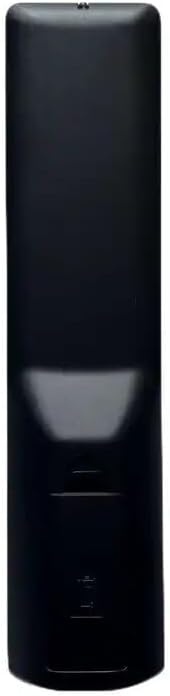
Paveikslėlis: Nugara view of the remote control, illustrating the location of the battery compartment. The compartment is a rectangular indentation on the lower half of the remote's back, designed to hold two AAA batteries.
Naudojimo instrukcijos
This section outlines the general functions of the buttons on your replacement remote control. Button layouts may vary slightly depending on the specific model received (black or white version).

Vaizdas: priekis view of the replacement remote control. It is black with various grey and colored buttons, including a power button, number pad, navigation arrows, volume and channel controls, and dedicated buttons for Netflix and YouTube.
- Įjungimo mygtukas (●): Įjungia arba išjungia televizorių.
- Skaičių klaviatūra (0–9): Tiesiogiai įvedami kanalų numeriai.
- Garsumo didinimas / sumažinimas (+/-): Reguliuoja garso garsumą.
- Kanalo aukštyn/žemyn (P+/P-): Keičia televizijos kanalą.
- Nutildyti (Nutildyti): Nutildo arba įjungia televizoriaus garsą.
- Naršymo rodyklės (aukštyn, žemyn, kairėn, dešinėn): Naršykite meniu ir parinktis.
- Gerai mygtukas: Patvirtina pasirinkimus meniu.
- Atgal/Grįžti: Grįžta į ankstesnį ekraną arba meniu.
- Šaltinis / Įvestis: Changes the input source (HDMI, AV, etc.).
- „Netflix“ mygtukas: Tiesioginė prieiga prie „Netflix“ programėlės.
- „YouTube“ mygtukas: Tiesioginė prieiga prie „YouTube“ programėlės.
- Meniu / Pagrindinis puslapis: Opens the TV's main menu or smart TV home screen.
For specific functions not listed, refer to your television's original user manual, as this remote is designed to mimic common functions.
Priežiūra
Nuotolinio valdymo pulto valymas
Nuotolinio valdymo pultą valykite minkšta, sausa šluoste. Jei nešvarumai sunkiai įveikiami, šiek tiek nuvalykite.ampNuvalykite šluostę vandeniu arba švelniu, neabrazyviniu valikliu. Nenaudokite stiprių cheminių medžiagų ir nemerkite nuotolinio valdymo pulto į vandenį.
Baterijos keitimas
Pakeiskite baterijas, kai nuotolinio valdymo pulto jautrumas sumažėja arba jis nustoja veikti. Visada keiskite abi baterijas vienu metu naujomis AAA baterijomis. Nemaišykite senų ir naujų baterijų arba skirtingų tipų baterijų.
Trikčių šalinimas
| Problema | Galima priežastis | Sprendimas |
|---|---|---|
| Neveikia nuotolinio valdymo pultas. | Išsikrovusios arba neteisingai įdėtos baterijos. Kliūtis tarp nuotolinio valdymo pulto ir televizoriaus. | Check battery polarity and replace batteries. Ensure clear line of sight to TV's IR receiver. |
| Some functions not working. | This is a replacement remote; some specific functions may not be supported. | Confirm if the function is standard. If not, it may be a limitation of the replacement remote. |
| Remote is unresponsive. | Low batteries. Remote sensor blocked. | Replace batteries. Clean the remote's IR emitter and TV's IR receiver. |
Specifikacijos
- Prekinis ženklas: Bendras
- Modelis: Pakaitinis nuotolinio valdymo pultas (ASIN: B0CKWGC1KD)
- Suderinami įrenginiai: Television, Stereo System, Set Top Box, DVD/Blu-ray Player, Home Theater
- Maksimalus palaikomų įrenginių skaičius: 5
- Ypatinga funkcija: Ergonomiškas
- Spalva: Black/White (sent randomly)
- Medžiaga: ABS plastikas
Garantija ir palaikymas
Specific warranty information for this generic replacement remote control is not provided in the product details. For any issues or support inquiries, please contact the seller directly through the platform where the purchase was made. It is recommended to provide your original remote part number or unit model to the seller for better assistance.
Ask a question about this manual
Ask about setup, troubleshooting, compatibility, parts, safety, or missing instructions. Manuals+ will review the question and use this page’s manual context to help answer it.