
LS VISION LS-MS2
LS VISION 4K 180-Degree Ultra-Wide Angle 4G Solar-Powered Outdoor Security Camera
Model: LS-MS2
Prekės ženklas: LS VISION
1. Įvadas
This user manual provides detailed instructions for the installation, operation, and maintenance of your LS VISION 4K 180-Degree Ultra-Wide Angle 4G Solar-Powered Outdoor Security Camera. Please read this manual thoroughly before using the product to ensure proper functionality and safety.
2. Produktas baigtasview
2.1 Pagrindinės savybės
- 4K/8MP Resolution for clear video capture.
- 180-Degree Ultra-Wide Angle Dual Lens for comprehensive coverage without distortion.
- Integrated 4G Module for connectivity without Wi-Fi, ideal for remote locations.
- Solar-Powered with 6W solar panel and built-in 18000 mAh batteries for continuous operation. Supports integrated and separate solar panel installation.
- Dvipusis garsas bendravimui realiuoju laiku.
- Cloud Storage and local TF card storage (up to 128GB, TF card not included).
- Nuotolinis Viewing and Playback via Niview app (Android/iOS).
- PIR + Human Detection with automatic human tracking, wake-up video recording, and push notifications.
- Multiple Recording Modes: 24-hour continuous recording, 24-hour + trigger recording, and three trigger recording modes.
- Dual Light Source Design: Full-color night vision up to 20 meters and infrared night vision up to 40 meters.
- IP66 Waterproof Rating for outdoor durability.
2.2 Gaminio schema
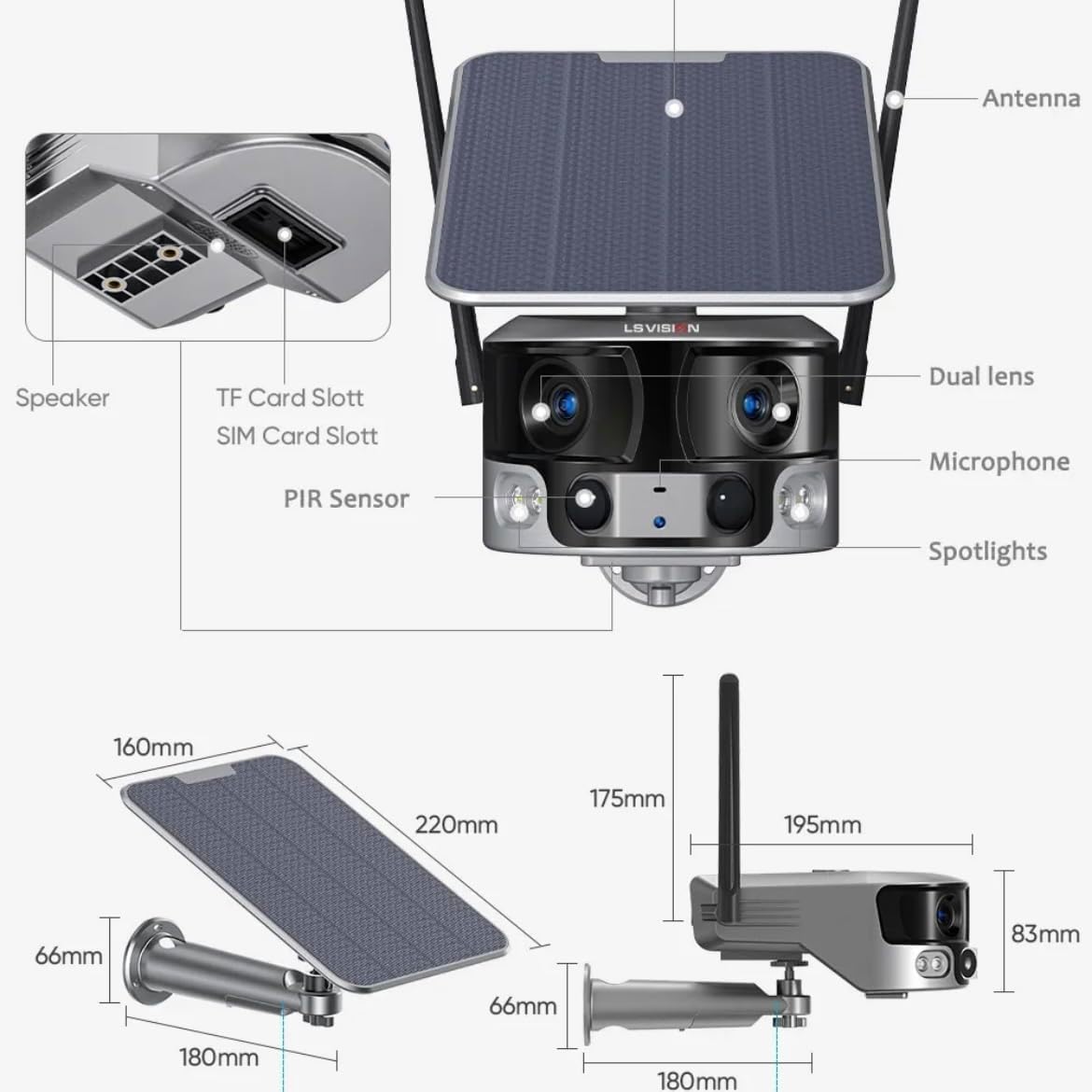
Figure 2.1: Product components and dimensions. Key parts include the solar panel, antennas, dual lens, microphone, spotlights, PIR sensor, speaker, TF card slot, and SIM card slot.
3. Pakuotės turinys
Atidarius pakuotę, patikrinkite jos turinį, kad įsitikintumėte, jog yra visos sudedamosios dalys ir jos nepažeistos:
- 1 x LS VISION 4K 180-Degree Ultra-Wide Angle 4G Solar-Powered Outdoor Security Camera
- 1 x saulės modulis (6 W)
- 1 x montavimo laikiklių rinkinys
- 1x4G antena
- 1 x varžtų ir sieninių kaiščių rinkinys
- 1 x 2-meter Extension Cable for Solar Panel
4. Sąrankos vadovas
4.1 Pradinis įkrovimas
Although the camera is solar-powered, it is recommended to fully charge the built-in batteries before the first use. Connect the camera to a 5V/2A USB power adapter (not included) using a standard USB cable for initial charging. The charging indicator will show the status.
4.2 SIM ir TF kortelių įdėjimas
Locate the SIM card slot and TF card slot on the camera (refer to Figure 2.1). Ensure the camera is powered off before inserting or removing cards.
- Open the protective cover of the card slots.
- Insert a standard 4G SIM card into the SIM card slot with the gold contacts facing down. Ensure it clicks into place.
- Insert a TF (microSD) card (up to 128GB, not included) into the TF card slot with the gold contacts facing down. Ensure it clicks into place.
- Close the protective cover firmly to maintain the IP66 waterproof rating.
4.3 Fotoaparato montavimas
The camera is designed for wall mounting and outdoor use. Consider the following for optimal placement:
- Pasirinkite vietą su amptiesioginiai saulės spinduliai saulės baterijoms.
- Įsitikinkite, kad fotoaparatas turi aiškų view ploto, kurį norite stebėti.
- Mount the camera at a height that provides good coverage and deters tamperingas.

Figure 4.1: The LS VISION camera shown with its solar panel and mounting bracket, ready for outdoor installation.

Figure 4.2: The camera operates on a 4G network, eliminating the need for a Wi-Fi router, making it suitable for locations without existing Wi-Fi infrastructure.
The solar panel can be installed integrated with the camera or separately using the 2-meter extension cable for optimal sun exposure.
4.4 Programėlės diegimas ir prijungimas
To access and control your camera, download the Niview programėlę iš savo išmaniojo telefono programėlių parduotuvės (galima naudoti „Android“ ir „iOS“).
- Ieškokite "Niview" in the App Store or Google Play Store and install it.
- Registruokite naują paskyrą arba prisijunkite, jei jau turite.
- Norėdami pridėti kamerą, vadovaukitės programėlėje pateiktomis instrukcijomis. Paprastai tai reiškia, kad reikia nuskaityti QR kodą kameroje arba rankiniu būdu įvesti jos ID.
- Prisijungę galite view gyvas kvailystage, access recordings, and configure settings.
5. Naudojimo instrukcijos
5.1 Tiesiogiai View & Atkūrimas
Access the Niview app on your smartphone or tablet to view live video streams from your camera anytime, anywhere. The app also allows you to review įrašytas footage.

Figure 5.1: The Niview app interface demonstrating real-time monitoring and timeline playback, ensuring no moment is missed.
5.2 Judesio aptikimas ir įspėjimai
The camera features advanced PIR and human detection capabilities. When motion or a human figure is detected, the camera will:
- Automatically begin recording a wake-up video.
- Send instant push notifications to your connected smartphone.
- Initiate automatic human tracking to follow the detected subject.

Figure 5.2: The camera's human tracking feature automatically follows detected individuals, ensuring continuous monitoring of their movement.
5.3 Naktinis matymas
The camera is equipped with a dual light source design for enhanced night vision:
- Spalvotas naktinis matymas: Provides clear, colored images up to 20 meters in low-light conditions when spotlights are activated.
- Infraraudonųjų spindulių (IR) naktinis matymas: Offers black and white vision up to 40 meters using infrared LEDs.
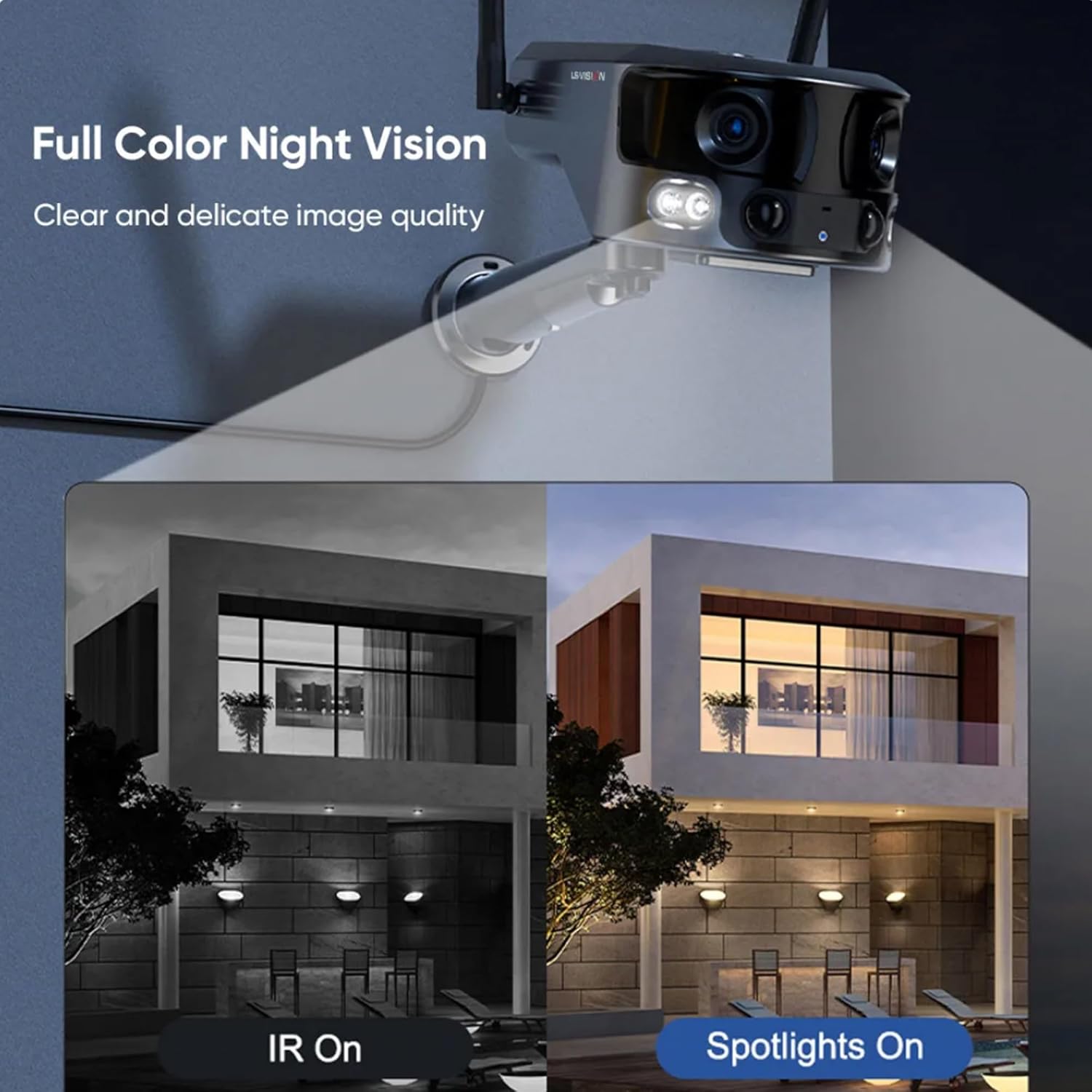
Figure 5.3: Comparison illustrating the difference between standard IR night vision and full-color night vision when the camera's spotlights are active.
5.4 Dvipusis garsas
Utilize the built-in microphone and speaker for two-way audio communication through the Niview app. This allows you to listen in on the camera's surroundings and speak through the camera.
5.5 Įrašymo režimai
The camera supports various recording modes to suit your needs:
- 24 valandų nepertraukiamas įrašymas: Įrašai daromi nuolat visą dieną.
- Trigger Recording: Records only when motion or human detection is triggered. This mode has three sub-options for customization.
6. Priežiūra
Reguliarus fotoaparato aptarnavimas užtikrina optimalų veikimą ir ilgaamžiškumą:
- Valymas: Periodiškai nuvalykite kameros objektyvą ir saulės bateriją minkšta,amp šluoste dulkėms ir šiukšlėms pašalinti. Nenaudokite stiprių cheminių medžiagų.
- Akumuliatoriaus priežiūra: Ensure the solar panel is exposed to sufficient sunlight to keep the built-in batteries charged. In prolonged periods of low sunlight, consider manually charging the camera.
- Firmware atnaujinimai: Check the Niview app regularly for firmware updates. Keeping the firmware updated ensures the latest features and security patches.
- Aplinkos apsauga: While IP66 rated, avoid exposing the camera to extreme weather conditions beyond its specified operating range if possible.

Figure 6.1: The camera's IP66 industrial-grade waterproof design ensures reliable operation even in adverse outdoor weather conditions like rain.
7. Problemų sprendimas
Jei kyla problemų dėl fotoaparato, žr. toliau pateiktas dažniausiai pasitaikančias problemas ir sprendimus:
| Problema | Galima priežastis | Sprendimas |
|---|---|---|
| Fotoaparatas neprisijungęs | Nėra 4G signalo; Išsikrovusi baterija; SIM kortelės problema. | Check 4G signal strength; Recharge battery; Reinsert SIM card or try a different one. |
| Prasta vaizdo kokybė | Dirty lens; Insufficient light; Network bandwidth. | Clean the lens; Ensure adequate lighting or enable night vision; Check 4G network speed. |
| Judesio aptikimas neveikia | Detection sensitivity too low; Incorrect settings; Obstructions. | Adjust sensitivity in app; Verify detection zone settings; Clear any obstructions. |
| Akumuliatorius neįkraunamas | Insufficient sunlight; Dirty solar panel; Faulty connection. | Relocate solar panel to direct sunlight; Clean solar panel; Check cable connections. |
Jei problema išlieka, susisiekite su klientų aptarnavimo tarnyba.
8. Specifikacijos
| Funkcija | Specifikacija |
|---|---|
| Modelio pavadinimas | LS-MS2 |
| Vaizdo įrašymo raiška | 4K |
| Viewing kampas | 180 laipsnių (itin platus) |
| Ryšio technologija | 4G Cellular Network (also supports Wi-Fi) |
| Maitinimo šaltinis | Saulės energija varomas (6 W saulės modulis) |
| Baterijos talpa | 18000 mAh (įmontuotas) |
| Naktinio matymo diapazonas (spalvotas) | Iki 20 metrų |
| Naktinio matymo diapazonas (IR) | Iki 40 metrų |
| Sandėliavimas | Cloud Storage, TF Card (Max 128GB, not included) |
| Atsparumo vandeniui įvertinimas | IP66 |
| Medžiaga | Acrylonitrile Butadiene Styrene (ABS) and Metal |
| Diegimo tipas | Sieninis laikiklis |
| Suderinami įrenginiai | Tablet, Smartphone (Android/iOS) |
| Gaminio matmenys | 18 x 18 x 15 cm |
| Prekės svoris | 1.25 kilogramo |
9. Informacija apie garantiją
This product comes with a standard manufacturer's warranty. For specific warranty terms, duration, and claim procedures, please refer to the warranty card included in your product packaging or contact the retailer/manufacturer directly. Keep your purchase receipt as proof of purchase.
10. Pagalba klientams
For technical assistance, product inquiries, or troubleshooting beyond this manual, please contact LS VISION customer support. Contact details can typically be found on the product packaging, the manufacturer's official websvetainėje arba per pirkimo vietą.
Ask a question about this manual
Ask about setup, troubleshooting, compatibility, parts, safety, or missing instructions. Manuals+ will review the question and use this page’s manual context to help answer it.