
SIMPLIFIRE SF-INC36-FFWMK
„SimpliFire Inception“ 36 colių elektrinio židinio „Wescott Mantel Package“ naudotojo vadovas
Model: SF-INC36-FFWMK | Brand: SIMPLIFIRE
1. Produktas baigtasview
The SimpliFire Inception 36-Inch Electric Fireplace with Wescott Mantel Package offers a realistic flame experience and efficient heating for your home. This unit features Digital Spark Technology for true-to-life flames, an elegant Folio Front design, and user-friendly controls via app, remote, or voice commands. It provides customizable flame brightness, ember bed, and accent lighting, along with efficient heating controlled by a thermostat and timer.

Figure 1.1: SimpliFire Inception Electric Fireplace with Wescott Mantel and remote control.

Figure 1.2: The SimpliFire Inception Electric Fireplace seamlessly integrated into a modern living space.

Figure 1.3: Available stylish front designs including Folio, Halston, and Chateau Forge, offering various aesthetic options.
2. Svarbi saugos informacija
Prieš montuodami ir naudodami atidžiai perskaitykite visas instrukcijas. Nesilaikant šių instrukcijų, gali kilti elektros smūgis, gaisras arba kūno sužalojimas.
- Ensure the power source matches the electrical requirements of the fireplace.
- Nenaudokite židinio su pažeistu laidu ar kištuku.
- Laikykite degias medžiagas bent 0.9 metro (3 pėdų) atstumu nuo židinio priekio.
- Neužblokuokite ventiliacijos angų.
- Šis prietaisas skirtas naudoti tik patalpose.
- Proposition 65 Warning: This product can expose you to chemicals including carbon black, which is known to the State of California to cause cancer. For more information go to www.P65Warnings.ca.gov.
3. Sąranka ir diegimas
The SimpliFire Inception electric fireplace offers flexible installation options, including building into a wall or using the optional Wescott Mantel Kit for a built-in look without construction.
3.1. Dimensions and Framing
Accurate measurements are crucial for proper installation. Refer to the diagrams below for unit and framing dimensions.

Figure 3.1: Detailed size and dimensions for the SimpliFire Inception Electric Fireplace, including front, side, and top views, and framing requirements.

Figure 3.2: Dimensions for the Wescott Mantel, designed to provide a built-in appearance.
3.2. Diegimo parinktys
Choose the installation method that best suits your space:
- Optional Wescott Mantel Kit:
- Assemble, paint, and mount mantel to wall.
- Mount Inception unit.
- No need for construction.
- Build into Wall:
- Build out your framing according to dimensions.
- Mount Inception unit.
- Finish wall with desired application.

Figure 3.3: Visual guide to the two primary installation methods for the SimpliFire Inception fireplace.
Išsamius diegimo veiksmus rasite specialiame diegimo vadove (PDF), kurį galima atsisiųsti.
4. Naudojimo instrukcijos
The SimpliFire Inception fireplace can be controlled via the IntelliFire App, the included multi-function remote, or on-device controls.
4.1. Valdymasview

4.1 pav. Baigtaview of control options, including the IntelliFire App for smart devices and the multi-function remote.
4.2. Multi-Function Remote
The remote control allows you to adjust various settings and features of your fireplace. It also functions as a wireless room sensor in Thermostat mode.
- Maitinimo įjungimas/išjungimas: Norėdami įjungti arba išjungti įrenginį, paspauskite maitinimo mygtuką.
- Liepsnos ryškumas: Adjust the intensity of the flames.
- Žarijos lova: Customize the glow of the ember bed.
- Akcentinis apšvietimas: Control additional lighting features.
- Šildytuvas: Įjunkite arba išjunkite šildymo funkciją.
- Termostatas: Set your desired room temperature. The remote acts as a sensor.
- Laikmatis: Nustatykite automatinio išsijungimo laikmatį.
- Garso efektai: Enable or disable background sound effects.
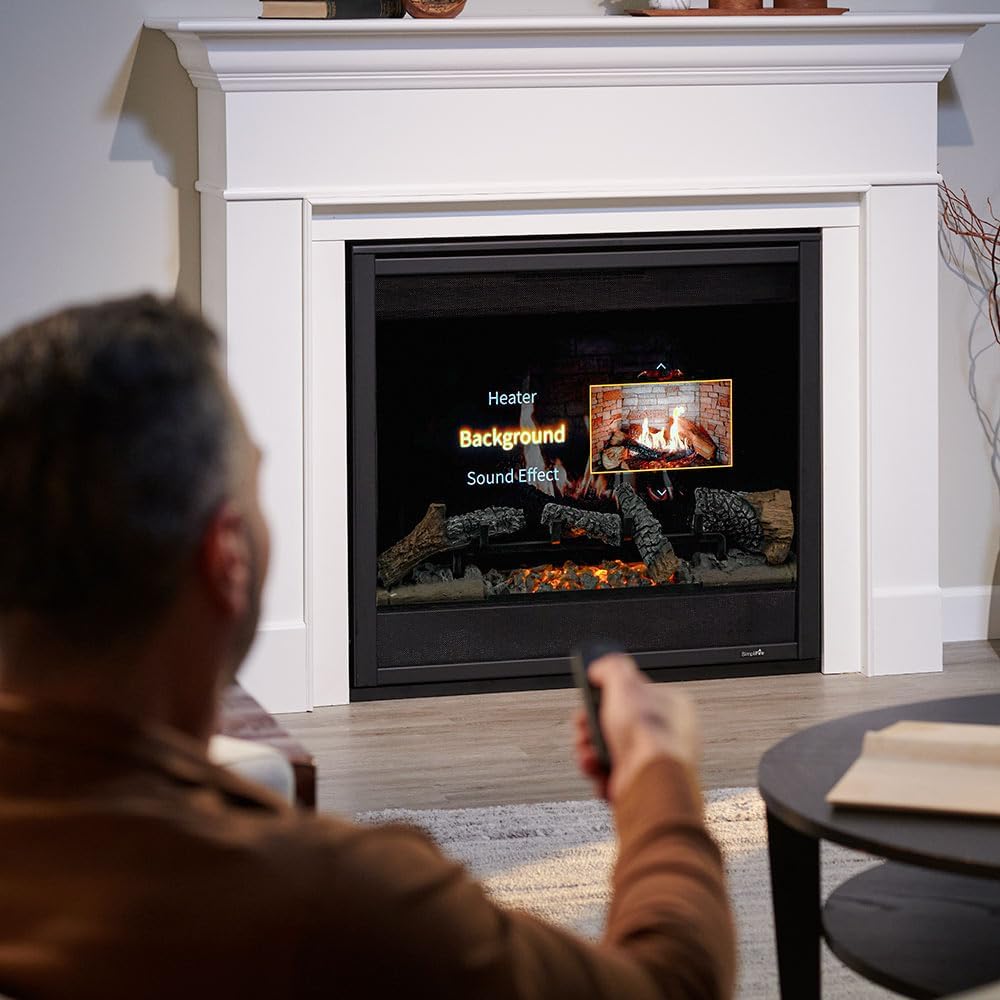
Figure 4.2: A user interacting with the fireplace using the remote control, demonstrating the ease of adjusting settings.
4.3. IntelliFire App & Voice Control
The Inception fireplace is Wi-Fi ready and compatible with the IntelliFire App, allowing control from your smart device. It also supports voice commands via Amazon Alexa and Google Assistant.
- Download the IntelliFire App from your device's app store.
- Follow the in-app instructions to connect your fireplace to your Wi-Fi network.
- Once connected, you can monitor and control all fireplace functions remotely.
- Enable the SimpliFire skill/action in your Amazon Alexa or Google Assistant app to use voice commands.
4.4. Oficialus produkto vaizdo įrašas
Watch this official video for a visual demonstration of the SimpliFire Inception Electric Fireplace features and operation.
4.1 vaizdo įrašas: Oficialus asmuoview of the SimpliFire Inception Electric Fireplace, showcasing its digital display technology, convenient controls, and thoughtful design.
5. Priežiūra ir priežiūra
Regular maintenance ensures the longevity and optimal performance of your SimpliFire Inception electric fireplace.
- Valymas:
- Prieš valydami visada atjunkite maitinimą.
- Naudokite minkštą, damp Išorinius paviršius valykite šluoste. Nenaudokite abrazyvinių valiklių ar purškiklių.
- Gently wipe the glass panel with a soft cloth. For stubborn marks, use a mild glass cleaner and then wipe dry.
- Vėdinimas: Ensure that the air intake and exhaust vents are clear of any obstructions to prevent overheating.
- Log Set and Ember Bed: The log set and ember bed are designed for durability and do not require regular cleaning. If dust accumulates, gently brush it off with a soft brush.
- Saugykla: If storing the fireplace for an extended period, disconnect it from power and store it in a dry, dust-free location.
6. Problemų sprendimas
If you encounter issues with your SimpliFire Inception fireplace, refer to the common problems and solutions below.
| Problema | Galima priežastis | Sprendimas |
|---|---|---|
| Židinys neįsijungia. | No power, remote batteries dead, main power switch off. | Check power outlet, replace remote batteries, ensure main power switch is on. |
| Liepsnos nematomos arba jos silpnos. | Flame brightness setting is low, LED lights malfunction. | Increase flame brightness via remote/app. Contact support if LEDs are faulty. |
| Šildytuvas negamina šilumos. | Thermostat setting too low, heater off, air vents blocked. | Increase thermostat setting, ensure heater is on, clear any obstructions from vents. |
| Nuotolinio valdymo pultas nereaguoja. | Batteries dead, remote out of range, interference. | Replace batteries, move closer to the fireplace, remove sources of interference. |
If the problem persists after attempting these solutions, please contact SimpliFire customer support.
7. Specifikacijos
| Funkcija | Detalė |
|---|---|
| Prekės ženklas | PAPRASTAS |
| Modelio pavadinimas | Inception Electric Fireplace with Folio Front and Wescott Mantel Kit |
| Prekės modelio numeris | SF-INC36-FFWMK |
| Gaminio matmenys | 14.5 "D x 61.88" P x 49.63" A |
| Prekės svoris | 140.5 svaro |
| Maitinimo šaltinis | Su laidu elektra |
| Šilumos išėjimas | 5000 britų šiluminiai vienetai |
| Medžiaga | Metalas |
| Apdailos tipas | Dažytos |
| Diegimo tipas | Laidinis |
| Įtraukti komponentai | Wi-Fi Module, Log Set, Multi-Function Remote |
| Vėdinimo tipas | „Vent Free“ |
| UPC | 197250006859 |
8. Informacija apie garantiją
The SimpliFire Inception Electric Fireplace comes with a Limited Warranty. For specific terms, conditions, and duration of the warranty, please refer to the official warranty documentation included with your product or contact SimpliFire customer support.
This warranty typically covers manufacturing defects and material flaws under normal use and service. Keep your proof of purchase for warranty claims.
9. Pagalba klientams
For technical assistance, troubleshooting beyond this manual, or warranty inquiries, please contact SimpliFire customer support.
- Gamintojas: SimpliFire (Part of Hearth & Home Technologies)
- Internetiniai ištekliai: Visit the official SimpliFire website or Amazon Brand Store for additional resources, FAQs, and product information.
- Naudotojo vadovas (PDF): A comprehensive user manual in PDF format is available for download čia.
- Montavimo vadovas (PDF): For detailed installation instructions, download the manual čia.
Ask a question about this manual
Ask about setup, troubleshooting, compatibility, parts, safety, or missing instructions. Manuals+ will review the question and use this page’s manual context to help answer it.