
1. Įvadas
This manual provides detailed instructions for the installation, operation, and maintenance of your AINAVI 9-inch Android 12 Car Stereo. This unit is specifically designed for Dodge Ram 1500, 2500, and 3500 models manufactured between 2013 and 2018. Please read this manual thoroughly before use to ensure proper functionality and to maximize your experience.
2. Produktas baigtasview
2.1. Pagrindinės savybės
- Operacinė sistema: Android 12 OS with ARM Cortex A55 8-Core processor.
- Atmintis: 4GB RAM + 64GB ROM for fast and smooth operation.
- Ekranas: 9-inch QLED screen with 1280x720 resolution, G+G full lamination technology, and 178° full-viewing kampas.
- Garsas: Built-in DSP with Time Correction and 48-band EQ, 4*45W max output.
- Ryšys: Wireless and wired Apple CarPlay, USB Android Auto, Built-in GPS Navigation, Dual-band 2.4Ghz & 5Ghz WiFi, Bluetooth 5.0.
- Integracija: Plug-and-play harness with CANbus decoder, supporting original vehicle functions like steering wheel control and reverse signal.
2.2. Visual Comparison
Observe the transformation of your vehicle's dashboard with the AINAVI car stereo installation.

Image: Comparison of the Dodge Ram dashboard before and after installing the AINAVI 9-inch Android 12 Car Stereo.
3. Kas yra dėžutėje
The following components are included with your AINAVI 9-inch Android 12 Car Stereo:
- 1x Android Car Stereo Head Unit
- Wiring Harness Power Cable
- CAN magistralės dekoderis
- 1x Radio Antenna Adaptor
- 1x garsiakalbis
- 1 x RCA kabelis
- 2x USB kabeliai
- 1x GPS antena
- 1x galinis View Fotoaparatas
- 1x mikrofonas
- Vartotojo vadovas (šis dokumentas)
A visual representation of the included accessories:
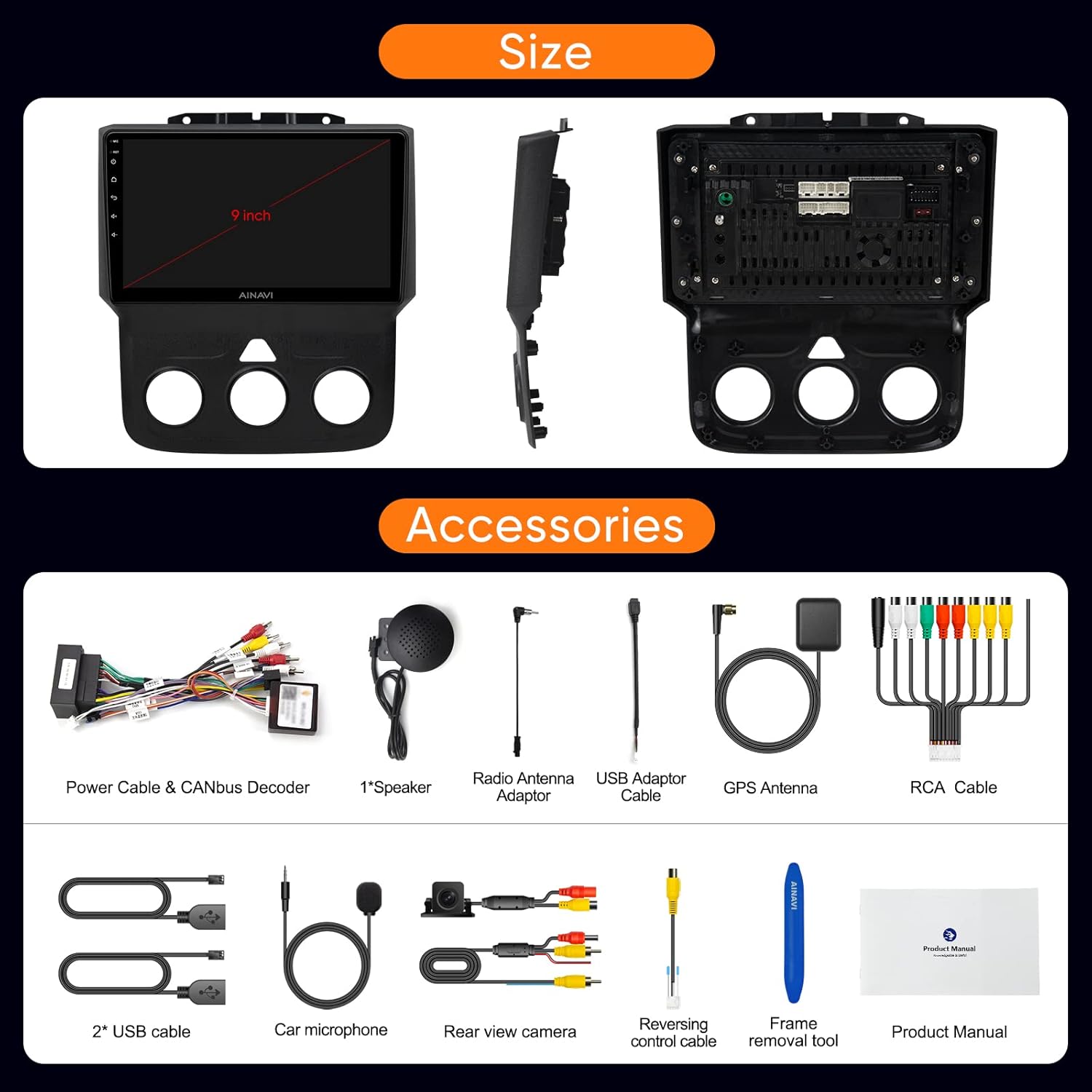
Image: All components and accessories included in the product package.

Vaizdas: Išsamus view of the wiring harness and other installation components.
4. Sąranka ir diegimas
The AINAVI car stereo is designed for a customized fit and plug-and-play installation in Dodge Ram 1500, 2500, and 3500 models from 2013-2018. It comes with a dedicated wiring harness and CANbus decoder to integrate with your vehicle's existing systems without requiring cable modifications.
4.1. Patikrinimai prieš montavimą
- Ensure your vehicle is compatible with the specified model years (2013-2018 Dodge Ram 1500/2500/3500).
- Verify all components listed in 'What's in the Box' are present.
- Prieš pradėdami montavimą, atjunkite automobilio akumuliatorių.
4.2. Diegimo veiksmai (bendrieji)
- Atsargiai nuimkite originalią automobilio garso sistemą ir prietaisų skydelio apdailą.
- Connect the provided wiring harness to the vehicle's existing connectors. The CANbus decoder will ensure compatibility with original vehicle functions.
- Connect the GPS antenna, radio antenna adaptor, USB cables, rear view camera, and microphone to the corresponding ports on the new head unit.
- Mount the new AINAVI head unit into the dashboard opening.
- Vėl sumontuokite prietaisų skydelio apdailą.
- Reconnect the vehicle's battery and power on the unit for initial testing.
For detailed visual guidance on wiring, refer to the wiring harness diagram provided in the 'What's in the Box' section.
5. Naudojimo instrukcijos
5.1. Pagrindinė sąsajos navigacija
The unit features a responsive 9-inch QLED touchscreen. Navigate through applications and settings by tapping and swiping. The main screen provides quick access to essential functions like Radio, Video, Music, and EQ.
5.2. „Apple CarPlay“ ir „Android Auto“
The stereo supports both wireless and wired Apple CarPlay, and USB-connected Android Auto. This allows seamless integration of your smartphone for navigation, calls, messages, and music.
- Ryšys: Pair your phone via Bluetooth for wireless CarPlay/Android Auto, or connect via USB for wired Android Auto.
- Valdymas balsu: Access voice commands directly by saying “Hey Siri” or “Hey Google”.
Watch these videos for connection guides:
Video: Demonstrates how to connect Wireless Android Auto to the car stereo.
Video: Shows the process of connecting Apple CarPlay to the Dodge Ram 1500/2500/3500 stereo.
Video: Guide on connecting both Apple CarPlay and Android Auto to the Ram 2013-18 stereo.

Image: Interface displaying Wireless CarPlay and Android Auto features.

Image: Smart Voice Control functionality with Apple CarPlay and Android Auto.
5.3. DSP Settings and Audio Control
The built-in Digital Sound Processor (DSP) allows for precise audio customization, including Time Correction and a 48-band Equalizer.
- Ekvalaizeris: Adjust frequency bands to tailor the sound to your preference.
- Laiko korekcija: Digitally control the sound timing for each speaker to optimize the sound field position.
Explore DSP settings and music playback:
Video: Demonstrates how to use the Split Screen feature and adjust DSP settings.
Vaizdo įrašas: Užbaigtaview of DSP functions for music playback and multimedia.

Image: DSP settings interface showing 48 EQ band and time correction.

Image: Explanation of the sound control system with DSP.
5.4. Padalinto ekrano funkcionalumas
The split-screen mode allows you to run two applications simultaneously, such as navigation and a media player.
See how to use split screen mode:
Video: Demonstrates how to use the Split Screen feature and adjust DSP settings.
5.5. GPS navigacija
The unit includes built-in GPS navigation. You can access real-time traffic information when connected to a network or download offline maps for use without internet access.

Image: GPS map display and multimedia entertainment options.
5.6. Connectivity (WiFi & Bluetooth)
- WiFi: Supports dual-band 2.4Ghz and 5Ghz WiFi for high-speed internet access and app downloads.
- "Bluetooth 5.0": Įgalina skambučius laisvų rankų įranga, muzikos transliaciją ir telefonų knygos sinchronizavimą.
5.7. Radijo funkcionalumas
The unit features an FM tuner with RDS support. You can scan for stations and save your favorites.
Learn how to use the RDS Radio Player:
Video: Demonstrates how to use the RDS Radio Player and save channel stations.
5.8. Sistemos nustatymai
Access various system settings to customize your stereo experience.
- Panel Light: Adjust panel light settings.
- Greičio vienetas: Change speed unit from km/h to mph.
- Gamykliniai nustatymai: Access advanced settings. The factory password is 123456.
Watch these videos for system settings guidance:
Video: Guide on accessing factory settings using password 123456 for Ram 1500 2013-2018.
Video: Instructions on how to change the speed unit from kilometers to miles.
6. Priežiūra
- Valymas: Ekraną ir įrenginį valykite minkšta, sausa šluoste. Venkite abrazyvinių valiklių ar tirpiklių.
- Programinės įrangos atnaujinimai: Periodically check for software updates to ensure optimal performance and access to new features. Updates can typically be found in the system settings.
- Aplinkos sąlygos: Venkite įrenginio ilgalaikio laikymo tiesioginiuose saulės spinduliuose, itin aukštose temperatūrose ar drėgmės.
7. Problemų sprendimas
If you encounter issues with your AINAVI car stereo, refer to the following common solutions:
| Problema | Galimas sprendimas |
|---|---|
| Įrenginys neįsijungia | Check power connections and vehicle's fuse box. Ensure the battery is properly reconnected. |
| Nėra garso išvesties | Verify speaker connections, check volume levels, and ensure DSP settings are not muting audio. |
| „CarPlay“ / „Android Auto“ neprisijungia | Ensure Bluetooth is on and paired (for wireless), or USB cable is securely connected. Restart phone and stereo. |
| GPS signal issues | Įsitikinkite, kad GPS antena tinkamai sumontuota ir turi aiškų view dangaus. Patikrinkite tinklo ryšį, ar nėra internetinių žemėlapių. |
| Vairo valdikliai neveikia | Verify CANbus decoder connection and check steering wheel control settings in the stereo's menu. |
| Ekranas nereaguoja | Perform a soft reset of the unit (refer to the device's reset button location, if available). |
Jei problema išlieka ir išbandžius šiuos sprendimus, susisiekite su klientų aptarnavimo tarnyba.
8. Specifikacijos
| Funkcija | Detalė |
|---|---|
| Prekės ženklas | AINAVI |
| Modelis | B0CLTQ1Q2P |
| Operacinė sistema | Android 12 |
| Procesorius | ARM Cortex A55 8-Core |
| RAM | 4 GB |
| Atminties talpa | 64 GB |
| Ekrano dydis | 9 colių |
| Rezoliucija | 1280 x 720 |
| Ekrano tipas | QLED, Capacitive Touchscreen |
| Garso išvesties režimas | Stereo (4*45W) |
| Ryšio technologija | Bluetooth 5.0, USB, Wi-Fi (2.4Ghz & 5Ghz) |
| Supported Navigation Systems | BeiDou, GPS, Galileo |
| Suderinamas transporto priemonės tipas | Dodge Ram 1500, 2500, 3500 (2013-2018) |
| Žmogaus sąsajos įvestis | Mikrofonas, Jutiklinis ekranas |
| Kontrolės metodas | Touch, Voice |
| UPC | 760762573289 |
9. Garantija ir palaikymas
AINAVI provides a vienerių metų produkto garantija from the date of purchase. For any technical assistance, troubleshooting, or warranty claims, please do not hesitate to contact us via Amazon email. Our professional technical support team will respond as soon as possible to assist you.
Prašome išsaugoti pirkimo įrodymą garantijos galiojimui.