
Įvadas
The Strich BT-FP2 is a wireless page turner pedal designed to enhance your musical performance or presentation by providing hands-free control over digital content. This device allows musicians, presenters, and other users to effortlessly navigate through sheet music, lyrics, chords, or presentation slides on their mobile phones, tablets, or computers via Bluetooth connectivity. By eliminating the need to use your hands for page turning, you can maintain focus on your instrument or presentation, ensuring a smooth and uninterrupted experience.
Sąranka
Pakuotės turinys
Prieš pradėdami, įsitikinkite, kad pakuotėje yra visi reikalingi daiktai:
- Strich BT-FP2 Wireless Page Turner Pedal
- Įkrovimo kabelis
Įrenginio įkrovimas
The BT-FP2 pedal features a built-in rechargeable Lithium-ion battery. For optimal performance, fully charge the device before its first use.
- Connect the provided charging cable to the charging port on the pedal.
- Kitą įkrovimo laido galą prijunkite prie standartinio USB maitinimo adapterio (nepridedamas) arba kompiuterio USB prievado.
- Užsidegs įkrovimo indikatoriaus lemputė. Kai prietaisas bus visiškai įkrautas, lemputė gali pakeisti spalvą arba užgesti – tai priklauso nuo modelio.
- Pilnai įkrautas akumuliatorius užtikrina iki 20 valandų nepertraukiamo naudojimo.
Susiejimas su jūsų įrenginiu
The Strich BT-FP2 uses Bluetooth for wireless connectivity with your mobile phone, tablet, or computer. It is compatible with both Apple iOS and Android platforms.
- Ensure the BT-FP2 pedal is charged and powered on. The power switch is typically located on the central unit.
- On your mobile device or computer, navigate to the Bluetooth settings.
- Įjunkite Bluetooth ir ieškokite galimų įrenginių.
- Select "BT-FP2" from the list of discovered devices to initiate the pairing process.
- Once paired, the device's Bluetooth indicator light will confirm a successful connection. The operating range is up to 10 meters (33 feet).

1 paveikslas: Priekyje view of the Strich BT-FP2 pedal, showing the two foot pedals and the central control panel with various buttons and indicator lights. This view is useful for identifying the power switch and pairing buttons.
Naudojimo instrukcijos
Pagrindinės funkcijos
The BT-FP2 pedal features two foot pedals, allowing for intuitive control of your digital content.
- Kairysis pedalas: Typically used for moving backward (e.g., previous page, previous slide).
- Dešinysis pedalas: Typically used for moving forward (e.g., next page, next slide).
- Režimo mygtukai: The central control panel includes buttons to switch between different operating modes, which may emulate various keyboard commands (e.g., page up/down, left/right arrow keys). Refer to your application's settings for optimal configuration.
Programų suderinamumas
The pedal is compatible with a wide range of applications that support external keyboard or Bluetooth input for navigation. Supported software includes, but is not limited to, GarageBand and CAKEWALK. For other applications, check their settings for options to assign keyboard shortcuts to page turning or navigation functions.

2 paveikslas: The Strich BT-FP2 pedal shown in a usage scenario, connected to a device via a red cable (likely for charging or wired connection, though primarily wireless). This image illustrates the pedal's compact design and how it might appear during use.

3 paveikslas: Iš arti view of a foot pressing one of the pedals on the Strich BT-FP2. This demonstrates the hands-free operation and the ergonomic design for foot control, highlighting its practical application during a performance.
Priežiūra
Proper care and maintenance will extend the life of your Strich BT-FP2 pedal.
- Valymas: Use a soft, dry cloth to clean the surface of the pedal. Avoid using abrasive cleaners or solvents, as they may damage the finish.
- Saugykla: Pedalą laikykite vėsioje, sausoje vietoje, toliau nuo tiesioginių saulės spindulių ir ekstremalių temperatūrų.
- Akumuliatoriaus priežiūra: To maintain battery health, avoid fully discharging the battery frequently. If storing for an extended period, charge the battery to approximately 50% every few months.
- Vandens ekspozicija: This device is not waterproof. Avoid exposure to liquids to prevent damage.
Trikčių šalinimas
If you encounter issues with your Strich BT-FP2 pedal, refer to the following common problems and solutions:
- Įrenginys neįsijungia:
- Ensure the battery is charged. Connect the charging cable and allow it to charge for at least 30 minutes.
- Patikrinkite, ar maitinimo jungiklis yra „ĮJUNGTA“ padėtyje.
- Nepavyksta susieti per „Bluetooth“:
- Make sure the pedal is powered on and within the 10-meter range of your device.
- Turn off and on Bluetooth on your mobile device or computer.
- Pamirškite įrenginį iš „Bluetooth“ nustatymų ir bandykite susieti dar kartą.
- Ensure no other devices are actively connected to the pedal.
- Pedal not responding in application:
- Check if the pedal is successfully paired with your device.
- Verify the application settings to ensure it supports external input or keyboard shortcuts for navigation.
- Try switching the operating mode on the pedal using the central buttons to see if a different mode is compatible with your application.
- Restart the application and/or your mobile device.
- Trumpas baterijos veikimo laikas:
- Prieš naudodami įsitikinkite, kad prietaisas yra visiškai įkrautas.
- Battery life can vary based on usage and environmental conditions.
- Jei problema išlieka, gali tekti pakeisti bateriją (susisiekite su palaikymo tarnyba).
Specifikacijos
Detailed technical specifications for the Strich BT-FP2 Wireless Page Turner Pedal:
| Funkcija | Detalė |
|---|---|
| Modelio numeris | BT-FP2 |
| Ryšio technologija | Bluetooth |
| Suderinami įrenginiai | Kompiuteris, nešiojamas kompiuteris, išmanusis telefonas, planšetinis kompiuteris |
| Palaikoma programinė įranga | GarageBand, CAKEWALK (and others supporting keyboard input) |
| Number of Keys/Pedals | 2 |
| Baterijos tipas | 1 ličio jonų (į komplektą įeina) |
| Baterijos veikimo laikas | Iki 20 valandų |
| belaidis diapazonas | Iki 10 metrų |
| Prekės svoris | 420 g |
| Pakuotės matmenys | 21.3 x 19.2 x 4.2 cm |
| Ypatinga funkcija | Compact, Portable |
| Gamintojas | Strichas |
| Kilmės šalis | Kinija |
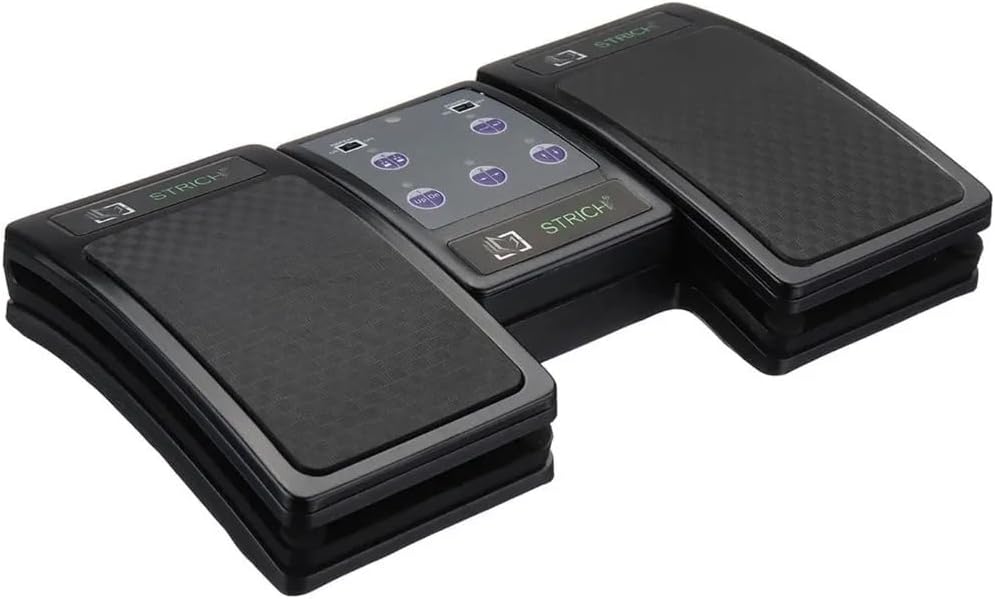
4 paveikslas: An angled top-down view of the Strich BT-FP2 pedal, showcasing its overall design and footprint. This image provides a comprehensive look at the product's physical characteristics.
Garantija ir palaikymas
Dėl garantijos informacijos ar techninės pagalbos žr. kartu su pirkiniu pateiktus dokumentus arba susisiekite tiesiogiai su pardavėju / gamintoju. Išsaugokite pirkimo įrodymą, jei prireiktų pateikti garantijos pretenziją.