
TYLT 4902Q
TYLT „MagSafe“ belaidžio įkroviklio žiedinio stovo naudotojo vadovas
Modelis: 4902Q
Prekės ženklas: TYLT
1. Įvadas
Thank you for choosing the TYLT MagSafe Wireless Charger Ring Stand. This device combines powerful MagSafe wireless charging with the convenience of a built-in kickstand, designed to seamlessly power and prop up your iPhone 12, 13, 14, and 15 series devices. This manual provides essential information for the proper setup, operation, and maintenance of your new charger.
2. Produktas baigtasview
The TYLT MagSafe Wireless Charger Ring Stand is a compact and versatile charging solution. It features a magnetic charging pad with an integrated ring kickstand.
2.1 Komponentai
- Magnetic Wireless Charging Pad with Integrated Ring Stand
- 4-foot USB-C Cable (attached)
2.2 Produktas Views

2.2.1 paveikslas: viršuje view of the TYLT MagSafe Wireless Charger Ring Stand. This image displays the circular charging pad with its black surface and the surrounding grey metallic ring. The TYLT logo and product information are visible on the black surface.

2.2.2 pav.: priekis view of the TYLT MagSafe Wireless Charger Ring Stand. This image shows the smooth, unadorned black charging surface with a subtle TYLT logo, highlighting its sleek design.

2.2.3 pav.: šonas view of the TYLT MagSafe Wireless Charger Ring Stand with the kickstand extended. This angle demonstrates how the integrated ring stand props up the charger, ready to support a phone for hands-free viewing.

2.2.4 pav.: Kampinis view of the TYLT MagSafe Wireless Charger Ring Stand with the kickstand extended. This perspective highlights the charger's profile and the integrated USB-C cable connection point.

Figure 2.2.5: The TYLT MagSafe Wireless Charger Ring Stand magnetically attached to the back of an iPhone. This image illustrates the secure MagSafe connection and how the kickstand supports the phone in a vertical orientation.
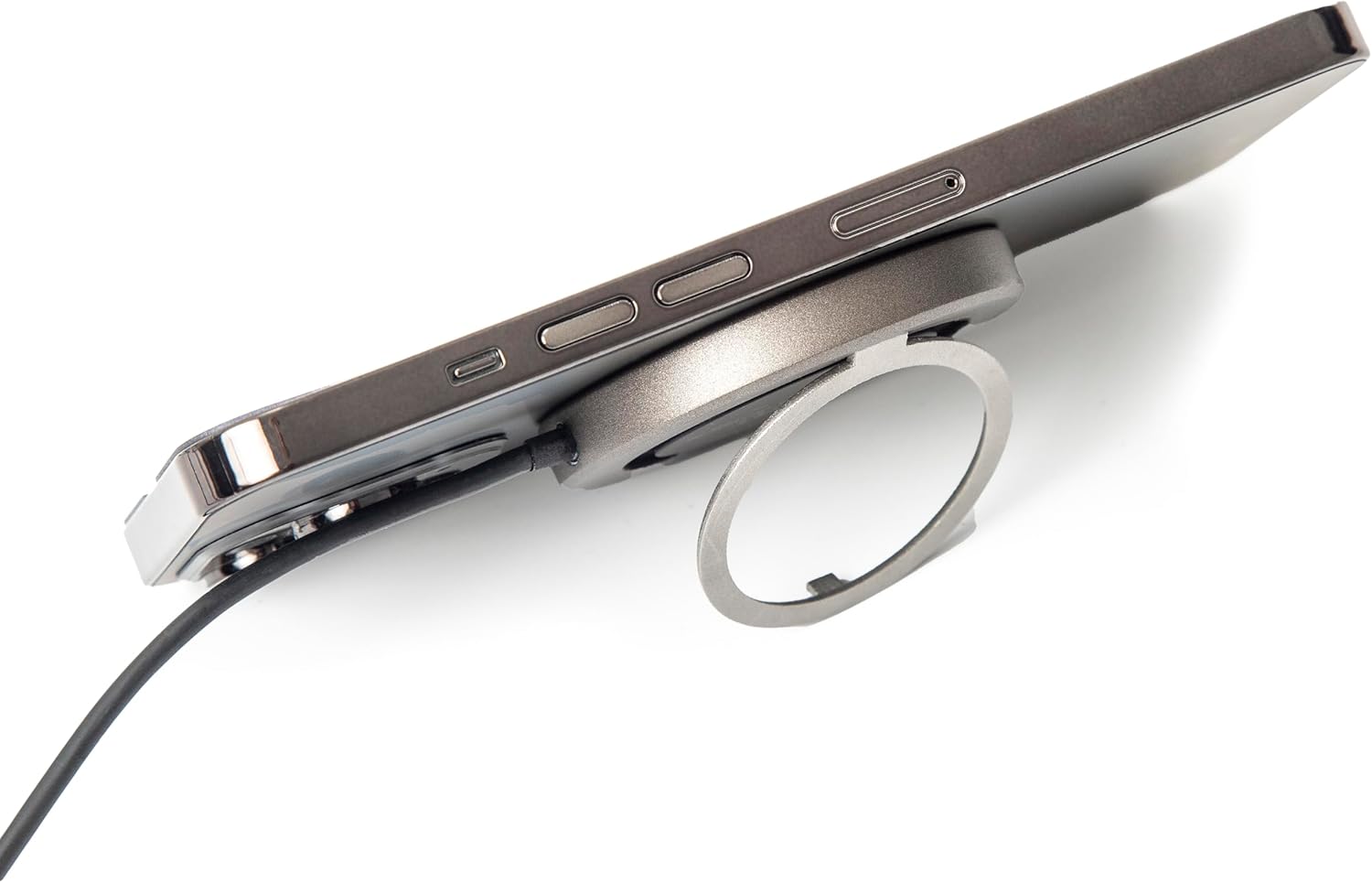
2.2.6 pav.: šonas view of the TYLT MagSafe Wireless Charger Ring Stand attached to an iPhone. This image emphasizes the slim profile of the charger when connected to a device, maintaining portability.

Figure 2.2.7: The TYLT MagSafe Wireless Charger Ring Stand with an iPhone attached, positioned on a desk. This image showcases the charger's functionality as a stand for hands-free viewing in a typical usage scenario.
3. Sąranka
- Prijunkite prie maitinimo: Plug the USB-C connector of the attached 4-foot cable into a compatible USB-C power adapter (not included). For optimal 15W fast charging, use a power adapter that supports Power Delivery (PD) with an output of at least 9V/1.8A or 12V/1.67A.
- Maitinimas: Once connected to a power source, the charger is ready for use. There is no power button.
4. Naudojimo instrukcijos
4.1 Belaidis įkrovimas
- Align Your Device: Place your MagSafe-compatible iPhone (iPhone 12, 13, 14, or 15 series) onto the black charging surface of the TYLT charger. The charger will magnetically snap into place, ensuring proper alignment for efficient charging.
- Įkrovimo indikacija: Your iPhone's screen will indicate that charging has begun. The charger is designed to work with most MagSafe-compatible phone cases, eliminating the need for case removal.
- Optimalus įkrovimas: Ensure no foreign objects (e.g., metal plates, credit cards) are between your phone and the charger, as this can interfere with wireless charging.
4.2 Integruoto atraminio stovo naudojimas
- Extend the Kickstand: Gently pull out the integrated ring from the back of the charger.
- Sureguliuoti Viewpakreipimo kampas: The ring can rotate and adjust to multiple viewing angles, allowing you to prop up your phone in either portrait or landscape orientation for hands-free viewing of videos, video calls, or other content.
- Retract the Kickstand: When not in use, fold the ring back into its recess on the charger for a compact and portable form factor.
5. Priežiūra
- Valymas: Disconnect the charger from the power source before cleaning. Use a soft, dry, lint-free cloth to wipe the surface of the charger. Do not use harsh chemicals, cleaning solvents, or strong detergents.
- Saugykla: Įkroviklį laikykite vėsioje, sausoje vietoje, apsaugotoje nuo tiesioginių saulės spindulių ir ekstremalių temperatūrų.
- Tvarkymas: Saugokite įkroviklį nuo kritimo ir stiprių smūgių. Neardykite įrenginio.
6. Problemų sprendimas
| Problema | Galima priežastis | Sprendimas |
|---|---|---|
| Įrenginys neįkraunamas arba įkraunamas lėtai. |
|
|
| Kickstand does not hold phone securely. |
|
|
| Įkroviklis naudojimo metu įkaista. |
|
|
7. Specifikacijos
| Funkcija | Detalė |
|---|---|
| Modelio numeris | 4902Q |
| Įvestis | 5V–2A, 9V–1.8A, 12V–1.67A |
| Išvestis | 15 W (maks.) |
| Ryšio technologija | USB-C (pridėtas laidas) |
| Suderinami įrenginiai | iPhone 12, 13, 14, 15 Series (MagSafe compatible) |
| Gaminio matmenys | 10 x 8 x 1 colio |
| Prekės svoris | 3.17 uncijos |
| Spalva | Juoda |
8. Saugos informacija
Prieš naudodami šį gaminį, perskaitykite visas saugos instrukcijas, kad išvengtumėte sužalojimų ar žalos.
- Do not expose the device to liquids, moisture, or humidity.
- Nelaikykite prietaiso ekstremaliose temperatūrose.
- Saugokite įrenginį nuo stiprių magnetinių laukų.
- Nebandykite išardyti, taisyti ar modifikuoti įrenginio.
- Laikyti vaikams nepasiekiamoje vietoje.
- Use only with compatible power adapters.
9. Garantija ir palaikymas
For information regarding warranty coverage, returns, or technical support, please refer to the original purchase documentation or contact TYLT customer service directly.
Grąžinimo politika: This product typically has a 30-day return/replacement policy from the date of purchase. Please check with your retailer for specific details.
Gamintojas: TYLT
For further assistance, visit the official TYLT websvetainėje arba susisiekite su jų palaikymo kanalais.
Ask a question about this manual
Ask about setup, troubleshooting, compatibility, parts, safety, or missing instructions. Manuals+ will review the question and use this page’s manual context to help answer it.