
1. Įvadas
This manual provides essential instructions for the installation, operation, and maintenance of your Seplos 3.0 BMS (Battery Management System) 48V 50A 15S Smart Balance Battery Protection Board. Please read this manual thoroughly before using the product to ensure safe and efficient operation. This intelligent BMS is designed for LiFePO4 and NCM battery systems, offering comprehensive protection and monitoring capabilities.
2. Saugos informacija
Always observe the following safety precautions to prevent injury or damage to the product and connected equipment:
- Montuoti turėtų tik kvalifikuotas personalas.
- Prieš montuodami ar atlikdami techninę priežiūrą, įsitikinkite, kad visi maitinimo šaltiniai yra atjungti.
- Verify correct polarity for all connections. Incorrect wiring can cause severe damage.
- Do not expose the BMS to moisture, extreme temperatures, or corrosive environments.
- Montavimo metu naudokite tinkamas asmenines apsaugos priemones (AAP).
- Refer to local regulations and standards for battery system installation.
3. Produktas baigtasview
The Seplos 3.0 BMS is a sophisticated battery management system designed to protect and optimize the performance of 48V (51.2V) 15S LiFePO4 and NCM battery packs. It features advanced communication protocols and robust protection mechanisms.
Pagrindinės funkcijos:
- Ląstelės konfigūracija: Supports 15 series (15S) LiFePO4 battery systems.
- Dabartinis įvertinimas: 50A continuous discharge current.
- Lygiagretus veikimas: Supports up to 16 units in parallel for increased capacity and power.
- Bendravimas: Integrated CANBUS and RS485 communication modules for inverter compatibility and system integration.
- Stebėjimas: Bluetooth module for real-time battery data viewing via smartphone application. Includes an LCD screen for local display.
- Apsaugos funkcijos: Passive balance, individual cell over-voltage apsauga, bendras per didelis tūristage protection, over-temperature protection, over-charge (discharge) protection, over-current protection, and short-circuit protection.
- Inverterio suderinamumas: Compatible with a wide range of inverters including Growatt, Goodwe, Sofar, SMA, Victron, DEYE, Luxpower, Sermatec, Renac, TBB Power, Solis, Foxess, and IMEON.
Pakuotės turinys:
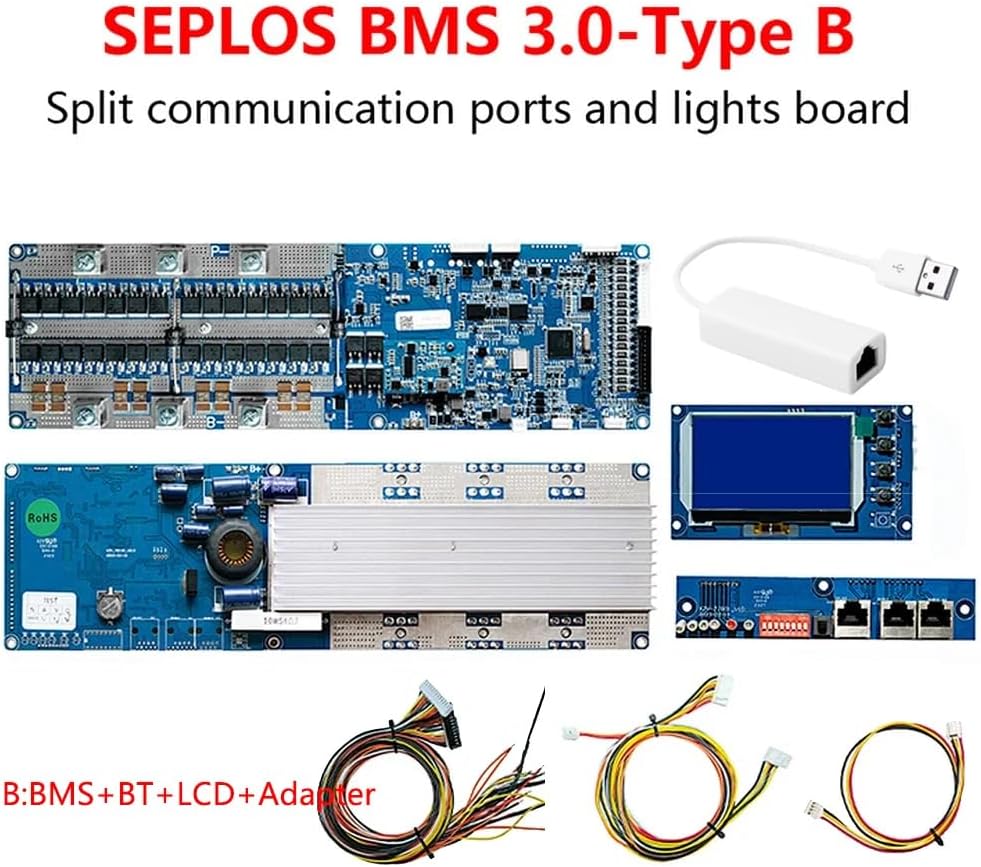
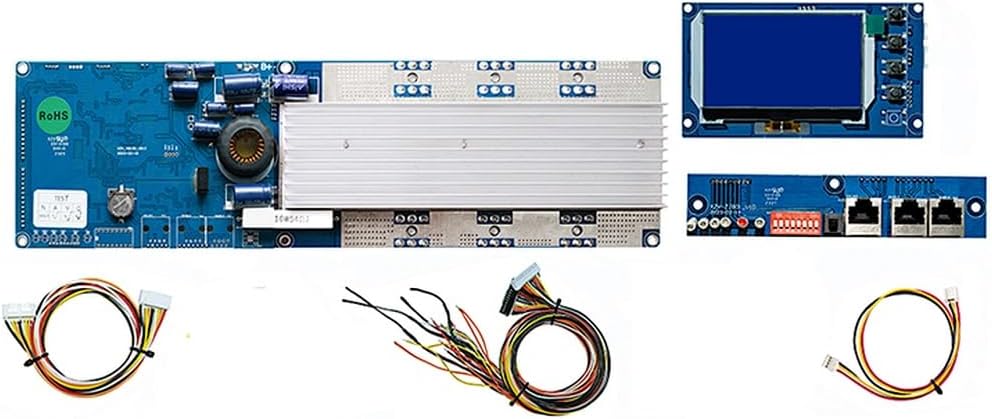
- Seplos 3.0 BMS (with CAN/RS485 and temperature sensor)
- Prijungimo kabelis
- LCD ekranas
- Bluetooth modulis
- Adapteris


4. Sąranka ir diegimas
Careful installation is crucial for the proper functioning of the BMS. Follow these general steps:
4.1 Laidų jungtys
- Balance Wires: Connect the balance wires from your 15S battery pack to the corresponding ports on the BMS. Ensure each cell voltage is correctly connected to its designated pin.
- Maitinimo kabeliai: Connect the main positive (B+) and negative (P-) terminals of the battery pack to the BMS. Observe correct polarity.
- Load/Charger Connections: Connect your load and charger to the appropriate output terminals of the BMS.
- Temperatūros jutiklis: Connect the provided temperature sensor to the BMS and place it near the battery cells for accurate temperature monitoring.
4.2 Ryšio sąranka
- Bluetooth: Power on the BMS. Enable Bluetooth on your smartphone and search for the BMS device. Pair with the device and open the dedicated Seplos app to view real-time battery data.
- CANBUS/RS485: Connect the CANBUS or RS485 communication cables from the BMS to your compatible inverter or monitoring system. Refer to the inverter's manual for specific connection and configuration details. The BMS supports automatic matching or manual switching of inverter protocols.
- Kompiuterio jungtis: For advanced parameter settings and monitoring, connect the BMS to a PC using the provided adapter and software.
4.3 Lygiagretus veikimas
The Seplos 3.0 BMS supports parallel operation of up to 16 units. When connecting multiple BMS units in parallel, ensure all units are configured correctly and follow the manufacturer's guidelines for parallel wiring to maintain system balance and safety.
5. Naudojimo instrukcijos
Once installed and powered on, the BMS will begin monitoring and protecting your battery system.
5.1 Monitoring via LCD and Bluetooth App
- LCD ekranas: The integrated LCD screen displays key battery parameters such as voltage, srovė, temperatūra ir įkrovos būsena (SOC).
- „Bluetooth“ programa: Use the Seplos smartphone application (available for Apple/Android) to access detailed real-time data, including individual cell voltages, temperature, current, and protection status. The app supports English and Chinese languages.

5.2 Apsaugos mechanizmai
The BMS continuously monitors the battery and activates protection functions when parameters exceed safe limits. These include:
- Per tomastage Apsauga: Neleidžia elementams įkrauti viršyti saugios talpostage riba.
- Nepakankamas tomastage Apsauga: Prevents cells from being discharged below their safe voltage riba.
- Apsauga nuo viršsrovių: Limits current during charge and discharge to prevent damage.
- Apsauga nuo perkaitimo: Disconnects the battery if temperatures exceed safe operating ranges.
- Apsauga nuo trumpojo jungimo: Instantly cuts off power in case of a short circuit.
When a protection is triggered, the BMS will typically disconnect the battery from the load or charger. The specific protection status can be viewed on the LCD or via the Bluetooth app.
6. Priežiūra
The Seplos 3.0 BMS is designed for minimal maintenance. However, regular checks are recommended:
- Vizuali apžiūra: Periodically inspect the BMS and all connections for any signs of damage, corrosion, or loose wiring.
- Firmware atnaujinimai: Patikrinkite gamintojo websvetainėje ar programėlėje ieškokite galimų programinės įrangos atnaujinimų, kad užtikrintumėte optimalų našumą ir prieigą prie naujų funkcijų.
- Valymas: Keep the BMS clean and free from dust and debris. Use a dry, soft cloth for cleaning. Do not use liquids or solvents.
7. Problemų sprendimas
If you encounter issues with your Seplos 3.0 BMS, refer to the following common problems and solutions:
| Problema | Galima priežastis | Sprendimas |
|---|---|---|
| BMS not powering on | Incorrect wiring, loose connections, battery discharged. | Check all power connections and polarity. Ensure battery has sufficient charge. |
| No data on LCD/App | Bluetooth not connected, communication cable loose, BMS fault. | Ensure Bluetooth is enabled and paired. Check communication cable connections. Restart BMS. |
| Baterija nesikrauna / neišsikrauna | Protection triggered (e.g., over-voltage, pagal ttage, viršsrovė). | Check BMS status on LCD/App for active protections. Address the underlying cause (e.g., balance cells, reduce load). |
| Inverter not communicating with BMS | Incorrect CANBUS/RS485 wiring, incompatible protocol, inverter settings. | Verify communication cable connections. Ensure BMS protocol matches inverter. Consult inverter manual for settings. |
If the problem persists after attempting these solutions, please contact Seplos customer support.
8. Specifikacijos
| Funkcija | Detalė |
|---|---|
| Prekės ženklas | Seplos |
| Modelio pavadinimas | seplos BMS 3.0version Type-B |
| Ląstelės konfigūracija | 15S (Series) |
| Nominalus ttage | 48 V (51.2 V) |
| Nuolatinė srovė | 50A |
| Ryšio sąsajos | CANBUS, RS485, Bluetooth |
| Ekranas | LCD ekranas |
| Lygiagretus palaikymas | Iki 16 vienetų |
| Gamintojas | SEPLOS |
| ASIN | B0CMM3WH13 |
9. Informacija apie garantiją
The Seplos 3.0 BMS comes with a 1 metų garantija from the date of purchase. This warranty covers defects in materials and workmanship under normal use. It does not cover damage caused by improper installation, misuse, accidents, unauthorized modifications, or natural disasters. Please retain your proof of purchase for warranty claims.
10. Pagalba klientams
For technical assistance, troubleshooting, or warranty inquiries, please contact Seplos customer support through the retailer where the product was purchased or visit the official Seplos website for contact information. When contacting support, please provide your product model (3.0-B 48V 50A 15S) and ASIN (B0CMM3WH13) for faster service.