
Įvadas
Ačiū, kad pirkoteasing the Yaheetech Height Adjustable White Art Desk. This manual provides essential information for the safe and efficient assembly, operation, and maintenance of your new art desk. Please read this manual thoroughly before use and retain it for future reference.

Image: The Yaheetech Height Adjustable White Art Desk, featuring a white tilting tabletop, black metal frame, two fabric drawers, a mesh shelf, and a black stool. An artwork is displayed on the tilted surface, and art supplies are visible on the side tray.
Saugos informacija
Norėdami užtikrinti saugų darbą ir išvengti žalos, laikykitės šių saugos nurodymų:
- Svorio talpa: Do not overload the tabletop beyond 220 lb (100 kg). Exceeding this limit may cause structural damage or injury.
- Surinkimas: Assembly requires two people. Ensure all components are securely fastened before use.
- Stabilumas: Padėkite stalą ant lygaus, stabilaus paviršiaus, kad jis neapvirstų.
- Rašomojo stalo perkėlimas: When moving the desk, ensure the tabletop is flat and all drawers are secured to prevent items from falling.
- Vaikai ir augintiniai: Keep children and pets away from the desk during assembly and adjustment to prevent accidents.
Pakuotės turinys
Prieš pradėdami surinkimą, patikrinkite, ar yra visi komponentai. Jei trūksta kokių nors dalių arba jos pažeistos, susisiekite su klientų aptarnavimo tarnyba.
- Height Adjustable White Art Desk Frame and Tabletop Components
- Išmatose
- Audinių stalčiai (2)
- Detachable Tabletop Side Tray
- Surinkimo detalės (varžtai, veržlės, įrankiai, jei yra)
- Instrukcijų vadovas (šis dokumentas)
Sąranka ir surinkimas
Assembly of the Yaheetech Art Desk is required and is recommended for two people. While specific step-by-step instructions are typically provided in a separate assembly guide, the general process involves:
- Išpakavimas: Atsargiai išpakuokite visus komponentus ir padėkite juos ant švaraus, minkšto paviršiaus, kad nesubraižytumėte.
- Rėmo surinkimas: Assemble the metal frame components according to the provided diagrams, ensuring all connections are secure.
- Stalviršio priedas: Attach the main tabletop and the side slide-out tabletop to the assembled frame.
- Drawer and Accessory Installation: Install the fabric drawers into their designated slots and attach the detachable side tray and pencil ledge.
- Stool Assembly: Assemble the accompanying stool.
- Galutinis patikrinimas: Before use, double-check all screws and bolts to ensure they are tightened.

Image: Dimensional diagram of the art desk and stool, indicating overall width, depth, height, and specific measurements for the tabletop, drawers, and stool.

Vaizdas: Išsamus views highlighting key features such as the retractable side desktop, anti-skid base, anti-scratch foot pads, integrated pen holder, and the adjustable lift mechanism.
Naudojimo instrukcijos
Your Yaheetech Art Desk is designed with versatility in mind. Here’s how to utilize its key features:
1. Tabletop Angle Adjustment
The main tabletop can be adjusted from 0 to 60 degrees, allowing for various activities from writing to drawing.
- Norėdami reguliuoti: Gently lift the front edge of the tabletop. The internal mechanism will allow you to set it to your desired angle.
- Flat Position (0°): Ideal for general desk use, laptop work, or reading.
- Slight Tilt (0-20°): Suitable for writing and comfortable reading.
- Medium Tilt (20-40°): Optimal for reading and light sketching.
- Steep Tilt (40-60°): Best for drafting, drawing, and painting, providing an ergonomic working posture.
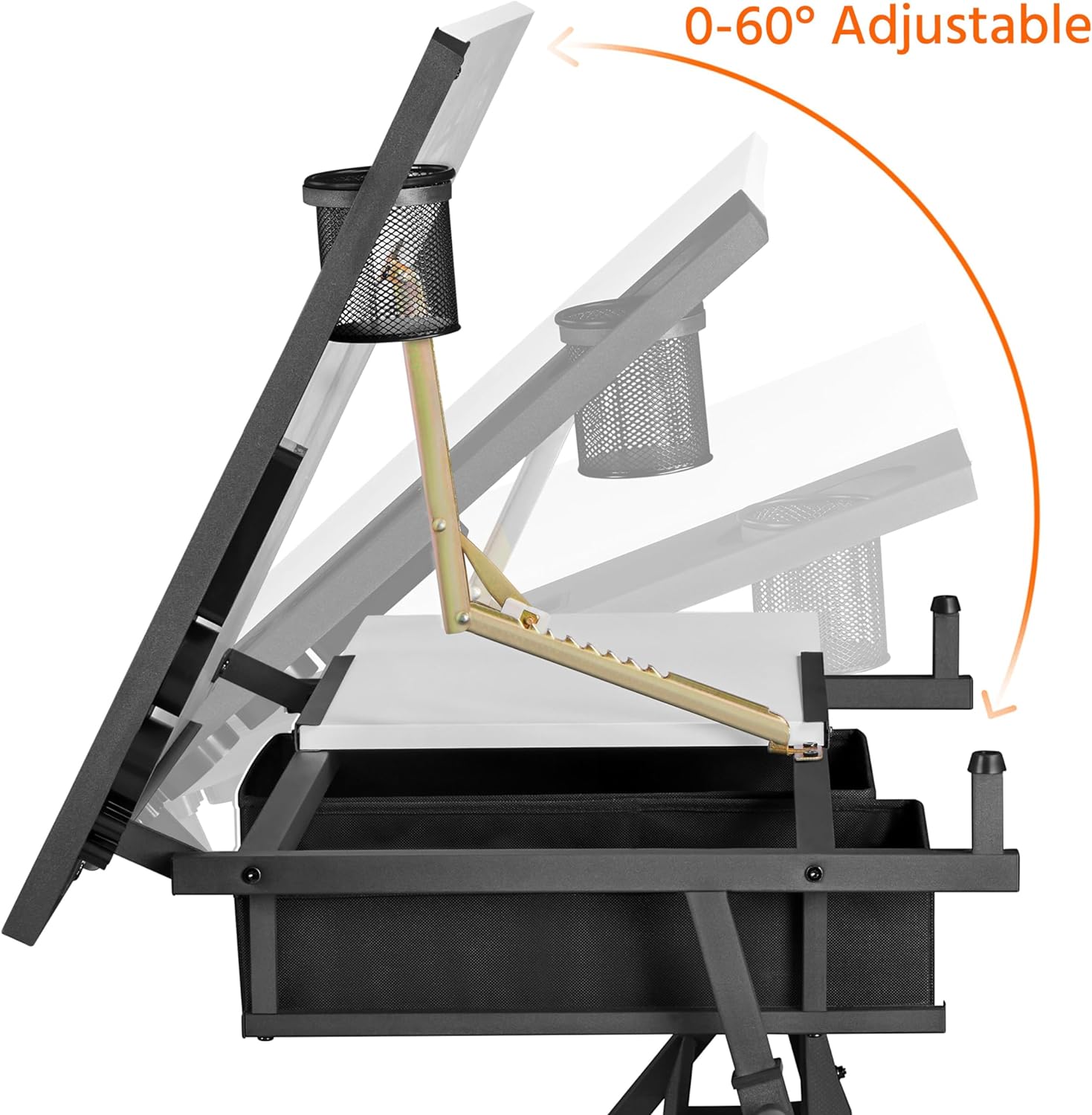
Image: Illustration demonstrating the tabletop's adjustable tilt range from 0 to 60 degrees, with a pen holder attached.

Image: Visual guide for optimal tilt angles: 0-20° for writing, 20-40° for reading, and 40-60° for drawing.
2. Aukščio reguliavimas
The desk's height can be adjusted from 27.5 inches (minimum) to 36.5 inches (maximum) to suit your preference, whether sitting or standing.
- Norėdami reguliuoti: Loosen the adjustment knobs on the legs, slide the desk to the desired height, and then securely tighten the knobs.
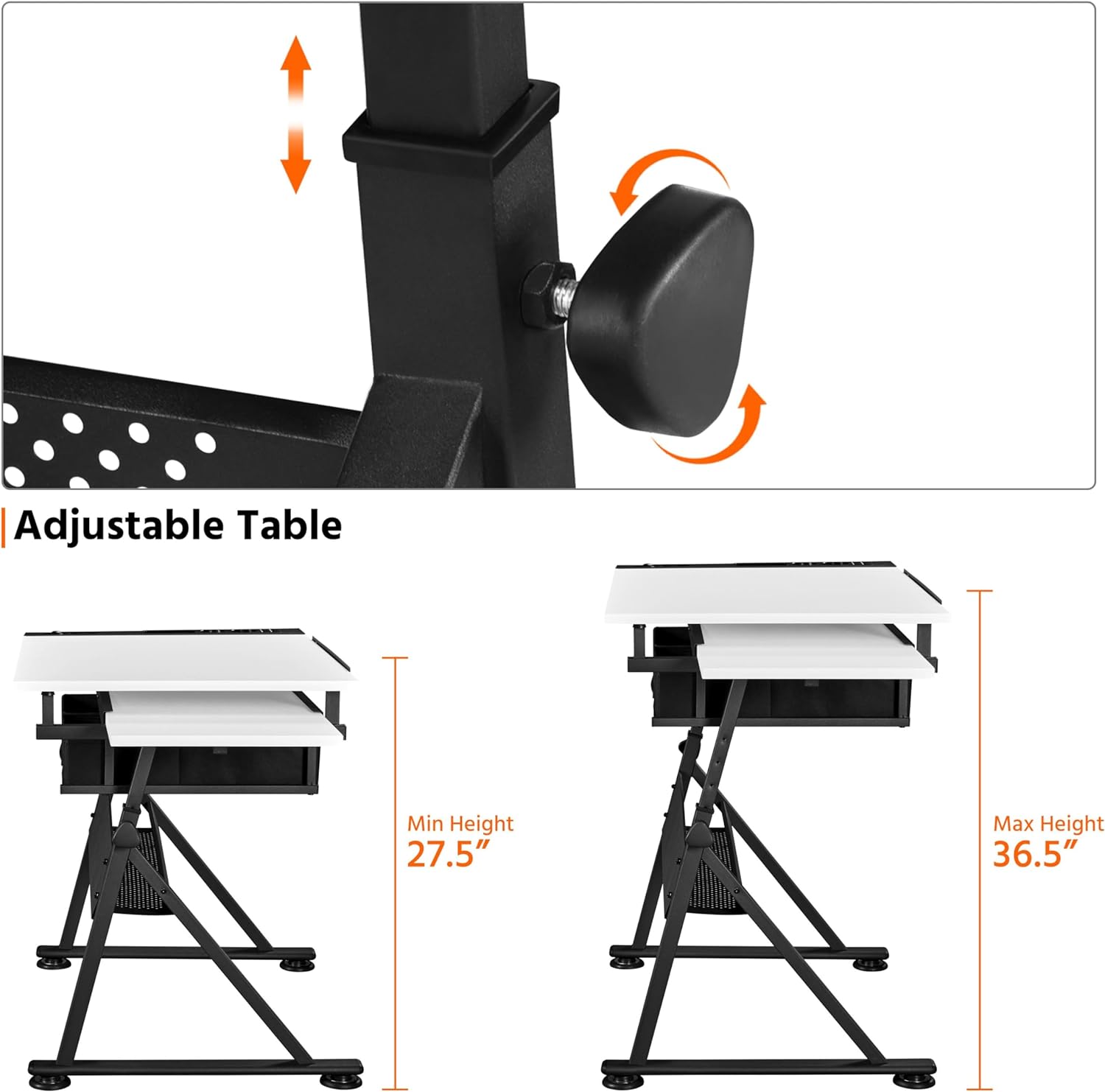
Image: Detail of the adjustable height mechanism, showing the knob and sliding leg components.

Image: A split image illustrating the desk's versatility as an art desk (tilted) and a workstation (flat), emphasizing its adjustable angle, height, and retractable tabletop.
3. Slide-out Side Top
A convenient 23.6 x 15 inch (60 x 38 cm) surface on the left side can be pulled out for additional workspace or storage.
- Pratęsti: Gently pull the side tabletop outwards from beneath the main tabletop.
- Naudojimas: Ideal for placing a laptop, tablet (for reference), palettes, or documents.
- Norėdami atšaukti: Push the side tabletop back under the main tabletop when not in use to save space.

Image: A visual representation of the retractable side tabletop, indicating its ability to slide out for extra space.
4. Handy and Organized Storage
The desk includes multiple storage options to keep your workspace tidy:
- Detachable Tabletop Side Tray: Located on the right side, this tray has separate slots for various stationery items like pens, brushes, and cups.
- Audiniai stalčiai: Two fabric drawers beneath the tabletop provide discreet storage for supplies.
- Extra Open Shelf: A mesh shelf below the drawers offers additional space for larger items like paper rolls or paint cans.

Vaizdas: Stambus planas views of the integrated stationery organizer, the two fabric drawers with the open mesh shelf below, and the mechanism for the adjustable pencil ledge.
5. Flexible Pencil Ledge
An adjustable metal pencil ledge prevents items from rolling off when the tabletop is tilted.
- Susižadeti: Lift the pencil ledge into the upright position. It will lock into place.
- Norėdami atšaukti: Use the special adjustment fitting to loosen and lower the pencil ledge, allowing for a flat desktop surface when not needed.
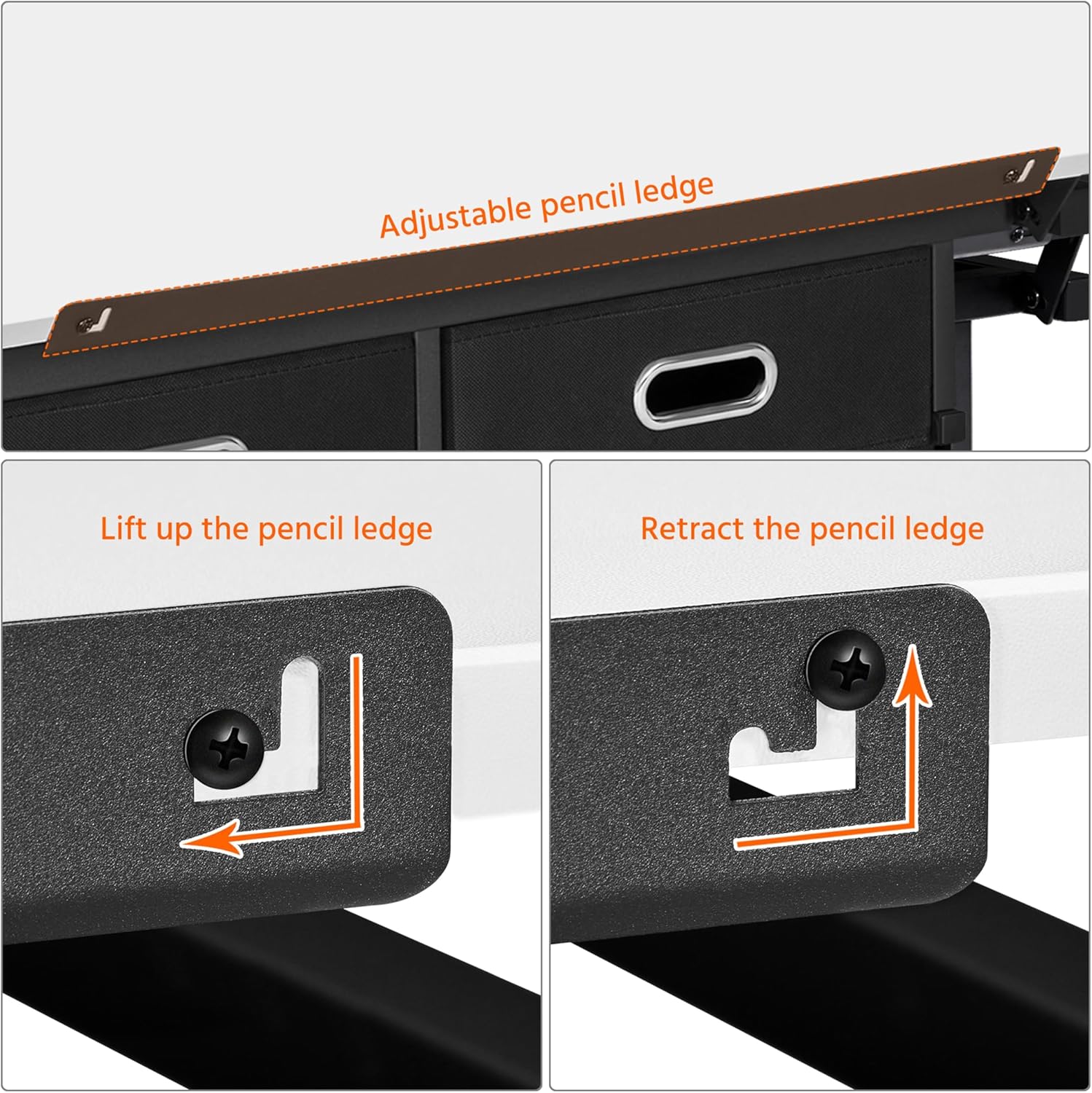
Image: Instructions showing the lifting and retracting mechanism of the adjustable pencil ledge.
Priežiūra
Proper maintenance will extend the life of your art desk:
- Valymas: Paviršius nuvalykite minkšta, damp šluoste. Venkite abrazyvinių valiklių ar stiprių cheminių medžiagų, kurios gali pažeisti apdailą.
- Išsiliejimai: Clean up spills immediately to prevent staining, especially on the MDF desktop with veneer.
- Techninė įranga: Reguliariai patikrinkite visus varžtus ir veržles ir, jei reikia, priveržkite juos, kad išlaikytumėte stabilumą.
- Judančios dalys: Ensure the tilting mechanism and height adjustment components are free of debris for smooth operation.
Trikčių šalinimas
If you encounter any issues with your Yaheetech Art Desk, refer to the following common problems and solutions:
| Problema | Galima priežastis | Sprendimas |
|---|---|---|
| Stalas svyruoja arba yra nestabilus. | Atsilaisvinusios surinkimo detalės; nelygios grindys. | Ensure all screws and bolts are tightened. Adjust the foot pads on the base to level the desk on uneven surfaces. |
| Stalviršis nepasvyra sklandžiai. | Mechanizmas užsikimšęs arba užsiteršęs. | Check for any debris or foreign objects obstructing the tilting mechanism. Clean the moving parts if necessary. |
| Aukščio reguliavimas yra sudėtingas. | Adjustment knobs are too tight; mechanism is stiff. | Loosen the adjustment knobs sufficiently. If stiff, apply a small amount of silicone lubricant to the sliding parts. |
| Side slide-out top is stuck. | Obstruction in the sliding track. | Check the track for any debris or items blocking the movement. Ensure it is aligned correctly. |
If the problem persists, please contact Yaheetech customer support for further assistance.
Specifikacijos
Detailed specifications for the Yaheetech Height Adjustable White Art Desk:
- Modelio pavadinimas: Meno stalas
- Prekinis ženklas: Yaheetech
- Spalva: Baltas
- Stilius: Modernus
- Gaminio matmenys (G x P x A): 23.6" x 47.5" x 36.5"
- Prekės svoris: 51.8 svaro
- Pagrindinė medžiaga: Metalas
- Populiariausias medžiagos tipas: Wood (MDF with waterproof and scratch-proof veneer)
- Apdailos tipas: Wood (Veneer)
- Ypatinga funkcija: Adjustable Height, Tilting Tabletop
- Kambario tipas: Classroom, Home, Office
- Rekomenduojami naudojimo būdai: Drafting, Drawing, Painting, Writing, Reading, Workstation
- Įtraukti komponentai: Height Adjustable White Art Desk, Stool
- Rekomendacija dėl didžiausios masės: 220 svarų (100 kg)
- Rekomenduojamas žmonių skaičius surinkimui: 2
- Stalčių skaičius: 2 (fabric)
- Lentynų skaičius: 1 (open mesh shelf)
- Maksimalus pakreipimo kampas: 60 laipsnių
- Minimalus aukštis: 27.36 colių (69.5 cm)
- Maksimalus aukštis: 36.5 colių
- Darbinio paviršiaus įstrižainės ilgis: 53.45 colių
- Reikalingas surinkimas: Taip
Garantija ir palaikymas
For warranty information or technical support, please contact Yaheetech customer service. You can typically find contact details on the Yaheetech official websvetainėje arba per pardavėją, iš kurio įsigijote produktą.
For more information about Yaheetech products, visit their official store: „Yaheetech“ parduotuvė „Amazon“ platformoje.