
1. Įvadas
This manual provides essential information for the safe and effective use of your APC Back-UPS BE1050G3 Uninterruptible Power Supply (UPS). The BE1050G3 is designed to provide backup power and surge protection for electronic devices in home and small business environments. It ensures continued operation of critical equipment during power outages and protects against power fluctuations.
The APC Back-UPS BE1050G3 offers additional battery backup outlets and USB charging ports, allowing you to power more of your essential devices when the main electricity supply is interrupted. This unit is optimized to maximize battery backup runtime for both high-power consuming electronics and low-power devices like home networking equipment, maintaining internet access through extended blackouts.
2. Svarbios saugos instrukcijos
Please read and follow all instructions carefully before installing or operating the UPS. Save this manual for future reference.
- Šis UPS skirtas naudoti tik patalpose.
- Nenaudokite šio UPS tiesioginiuose saulės spinduliuose, liesdamiesi su skysčiais arba ten, kur yra per daug dulkių ar drėgmės.
- Connect the UPS power cable directly to a wall outlet. Do not use extension cords or surge protectors with the UPS.
- Ensure the UPS is placed on a stable surface.
- The battery is user-replaceable. Refer to the maintenance section for proper battery replacement procedures.
- In case of an emergency, press the power button to turn off the UPS and disconnect it from the AC power supply.
3. Produkto ypatybės
The APC Back-UPS BE1050G3 provides reliable power protection and convenience:
- 1050 VA / 600 W galia: Suteikia ample power for multiple devices.
- 8 NEMA 5-15R lizdai:
- 6 outlets offer battery backup and surge protection.
- 2 outlets provide surge protection only.
- 2 USB Charging Ports (5V/3A Shared): Includes one USB-C and one USB-A port for convenient device charging.
- Vartotojo keičiama baterija: Allows for easy battery replacement with APC model APCRBC164 (sold separately).
- „PowerChute“ UPS valdymas: Dedicated data port for UPS management software (compatible with Windows 10, 22H2 Pro, 11 Pro; Mac OS uses native "Energy Saver" settings).
- Greito nutildymo funkcija: Temporarily silence audible alarms with a short press of the mute button.

Image: APC Back-UPS BE1050G3 1050VA banner.
4. Product Components and Indicators
Familiarize yourself with the various ports, outlets, and indicators on your UPS unit.

Vaizdas: Priekinė ir šoninė view of the APC Back-UPS BE1050G3, showing the power button, USB ports, and some outlets.

Vaizdas: Galinis view of the APC Back-UPS BE1050G3, displaying the 8 NEMA 5-15R outlets.
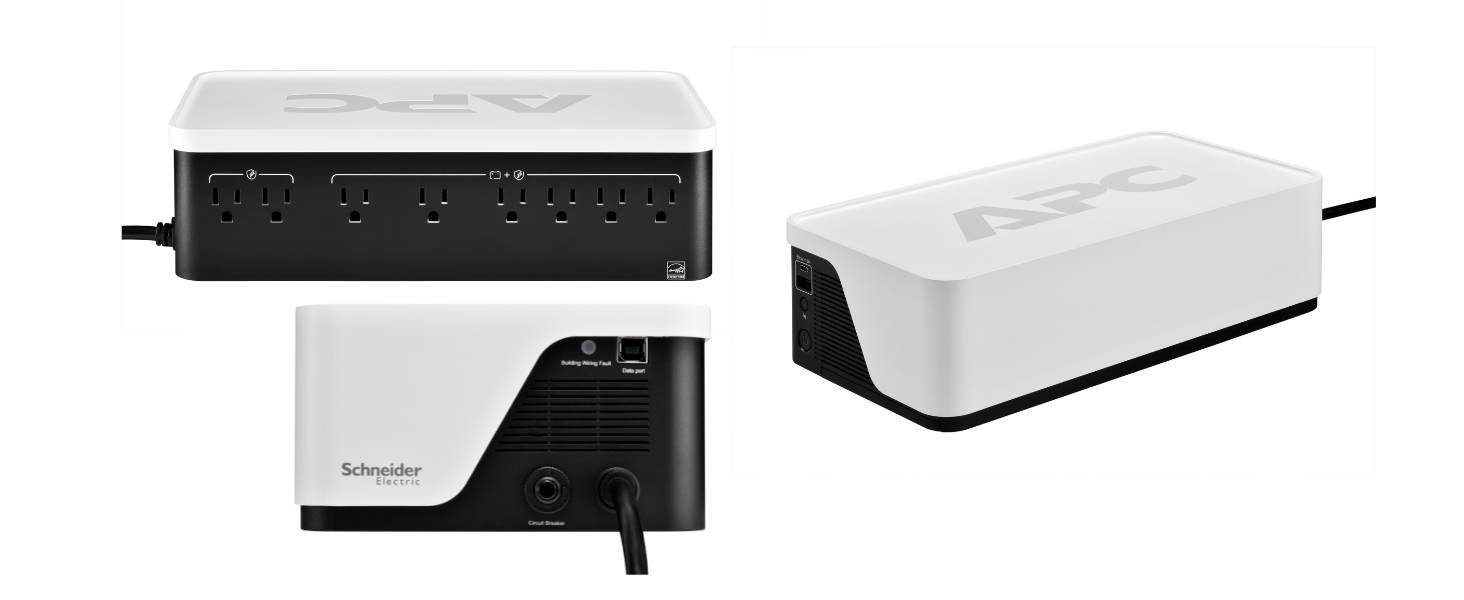
Image: Diagram illustrating the output connection specifications, showing 6 battery backup & surge protected outlets, 2 surge protection only outlets, and Type A/C USB ports.

Image: Visual guide to the UPS status indicator lights: Green for normal operation, Yellow for attention, Red for overload or battery issue.
5. Sąranka ir diegimas
- Išpakuokite ir patikrinkite: Atsargiai išpakuokite UPS ir patikrinkite, ar nėra gabenimo pažeidimų.
- Prijunkite akumuliatorių: The UPS is shipped with the battery disconnected for safety. Locate the battery compartment (usually on the bottom or side), open it, and connect the internal battery cable. Ensure a secure connection. A small spark may occur during connection, which is normal.
- Vieta: Pastatykite UPS ant lygaus, stabilaus paviršiaus, atokiau nuo tiesioginių saulės spindulių, šilumos šaltinių ir per didelės drėgmės. Užtikrinkite tinkamą vėdinimą aplink įrenginį.
- Pradinis įkrovimas: Plug the UPS power cord directly into a grounded wall outlet. Allow the unit to charge for at least 24 hours before connecting any devices to ensure full battery capacity.
- Prijunkite įrenginius:
- Plug critical devices (computer, monitor, modem, router) into the 6 battery backup and surge protected outlets.
- Plug non-critical devices (printers, scanners) into the 2 surge protection only outlets.
- Use the USB-A and USB-C ports to charge compatible mobile devices.
- Programinės įrangos diegimas (nebūtina): For advanced management and automatic shutdown features, download and install the PowerChute software from the APC website. Connect the UPS to your computer using the dedicated data port.

Image: The APC Back-UPS BE1050G3 integrated into a desk setup, providing power to headphones and a microphone.
6. Operacija
6.1 Įjungimas / išjungimas
- Norėdami įjungti: Press the power button located on the front of the unit. The status indicator will illuminate.
- Norėdami išjungti: Press and hold the power button until the unit powers down.
6.2 Būsenos indikatoriai
The LED indicator on the front panel provides information about the UPS status:
- Žalia: UPS veikia normaliai.
- Geltona: UPS operation needs attention (e.g., battery charging, minor fault).
- Raudona: UPS is overloaded, battery must be replaced, or battery is not working. Refer to the troubleshooting section.
6.3 Quick Mute Feature
During a power event, the UPS may emit audible alarms. To temporarily silence these alarms, briefly press the mute button. A short double beep sound indicates that the quick mute feature is activated.

Image: Illustration of the quick mute button and its function on the APC Back-UPS.
7. Tipinės programos
The APC Back-UPS BE1050G3 is versatile and can protect a variety of devices:
- Namų biuras: Computers, monitors, Wi-Fi routers, modems, network-attached storage (NAS).
- Pramogos: Laptops, tablets, mobile devices, gaming consoles.
- Išmanusis namas: Wi-Fi routers, security cameras, smart home assistants, baby monitors, pet feeders.
- Hobby Devices: Cricut machines, sewing machines, podcast equipment.

Image: A diagram illustrating various devices in a home that can be protected by the UPS, including Wi-Fi routers, laptops, security cameras, and pet feeders.

Image: The APC Back-UPS BE1050G3 providing power to an automatic pet feeder, ensuring continuous operation.
8. Priežiūra
8.1 Akumuliatoriaus keitimas
The battery in your APC Back-UPS BE1050G3 is user-replaceable. The typical lifespan of a UPS battery is approximately 3-5 years, depending on usage and environmental conditions. When the battery needs replacement, the UPS will indicate this via its status light and/or audible alarms.
- Pakaitinio akumuliatoriaus modelis: Use only genuine APC replacement battery model APCRBC164.
- Procedūra: Refer to the detailed instructions provided with the replacement battery kit for safe and proper installation. Always power off the UPS and disconnect it from the wall outlet before attempting battery replacement.
- Šalinimas: Dispose of old batteries properly. Contact your local recycling center for information on battery recycling.
9. Problemų sprendimas
This section addresses common issues you might encounter with your APC Back-UPS BE1050G3.
| Problema | Galima priežastis | Sprendimas |
|---|---|---|
| UPS neįsijungia | Baterija neprijungta arba išsikrovusi. | Ensure battery is properly connected. Plug UPS into wall outlet and charge for 24 hours. |
| UPS emits a continuous alarm tone | Battery fault or end-of-life. | Replace the battery with APC model APCRBC164. Note: Some older models may not allow silencing of this alarm until battery is replaced. |
| "Building Wiring Fault" indicator is lit | Laidų problema sieniniame lizde. | Consult a qualified electrician to inspect the building wiring. Do not use the UPS with faulty wiring. |
| UPS is overloaded (Red status light) | Too many devices connected or devices drawing too much power. | Disconnect non-essential devices from the battery backup outlets. Ensure total wattage neviršija 600W. |
| Trumpas baterijos veikimo laikas | Baterija sena arba nėra visiškai įkrauta. | Ensure battery is fully charged. If battery is old (3-5 years), consider replacement. |
10. Techninės specifikacijos
| Funkcija | Specifikacija |
|---|---|
| Modelio numeris | BE1050G3 |
| Talpa | 1050 600 VA / XNUMX W |
| Įvesties tomastage | 120 voltų |
| Išvesties lizdai | 8 x NEMA 5-15R (6 Battery Backup & Surge, 2 Surge Only) |
| USB įkrovimo prievadai | 1 x USB-C, 1 x USB-A (5V/3A Shared) |
| Baterijos tipas | Uždaryta švino rūgštis |
| Keičiama baterija | APCRBC164 |
| Matmenys (A x P x G) | 6.57 x 3.54 x 12.51 colio (167 x 90 x 318 mm) |
| Svoris | 9.55 svaro (4.33 kg) |
| Spalva | Juoda, Balta |

Image: Diagram showing the physical dimensions of the APC Back-UPS BE1050G3.
11. Garantija ir palaikymas
11.1 Gaminio garantija
The APC Back-UPS BE1050G3 comes with a 3 metų garantija. This warranty covers defects in materials and workmanship under normal use. Additionally, the product includes a 75 000 USD įrangos apsaugos polisas, which provides coverage for connected equipment damaged by power surges while properly connected to the UPS.
For detailed terms and conditions of the warranty and equipment protection policy, please refer to the documentation included with your product or visit the official APC websvetainę.
11.2 Pagalba klientams
For technical assistance, troubleshooting, or warranty claims, please contact APC customer support. You can find contact information on the official APC websvetainėje arba produkto pakuotėje.
When contacting support, please have your product model number (BE1050G3) and serial number readily available. The serial number is typically located on a label on the bottom or back of the UPS unit.