
1. Produktas baigtasview
This manual provides instructions for the CHUNGHOP ASK-STI6220 Voice Remote Control. This remote is designed as a replacement for specific Verizon Stream TV Box models, offering intelligent voice control and responsive button functionality for an enhanced entertainment experience.
2. Compatibility Information
The ASK-STI6220 Voice Remote Control is specifically designed to work ONLY with Verizon Stream TV Box voice remote control V2 ARRIS CCAM21LP1890T2, 2AGOFRC451A, RC451A, STI6220-D315, ASK-STI6220. It is NOT a universal remote for Verizon FiOS and is NOT compatible with Verizon Stream TV JS8V, Verizon FiOS TV 2019 - MG3-R32140B VRC4100 BLE Remote, or any Verizon remote with a "LAST" button. Please ensure your original remote's design and button layout match this model for proper functionality.
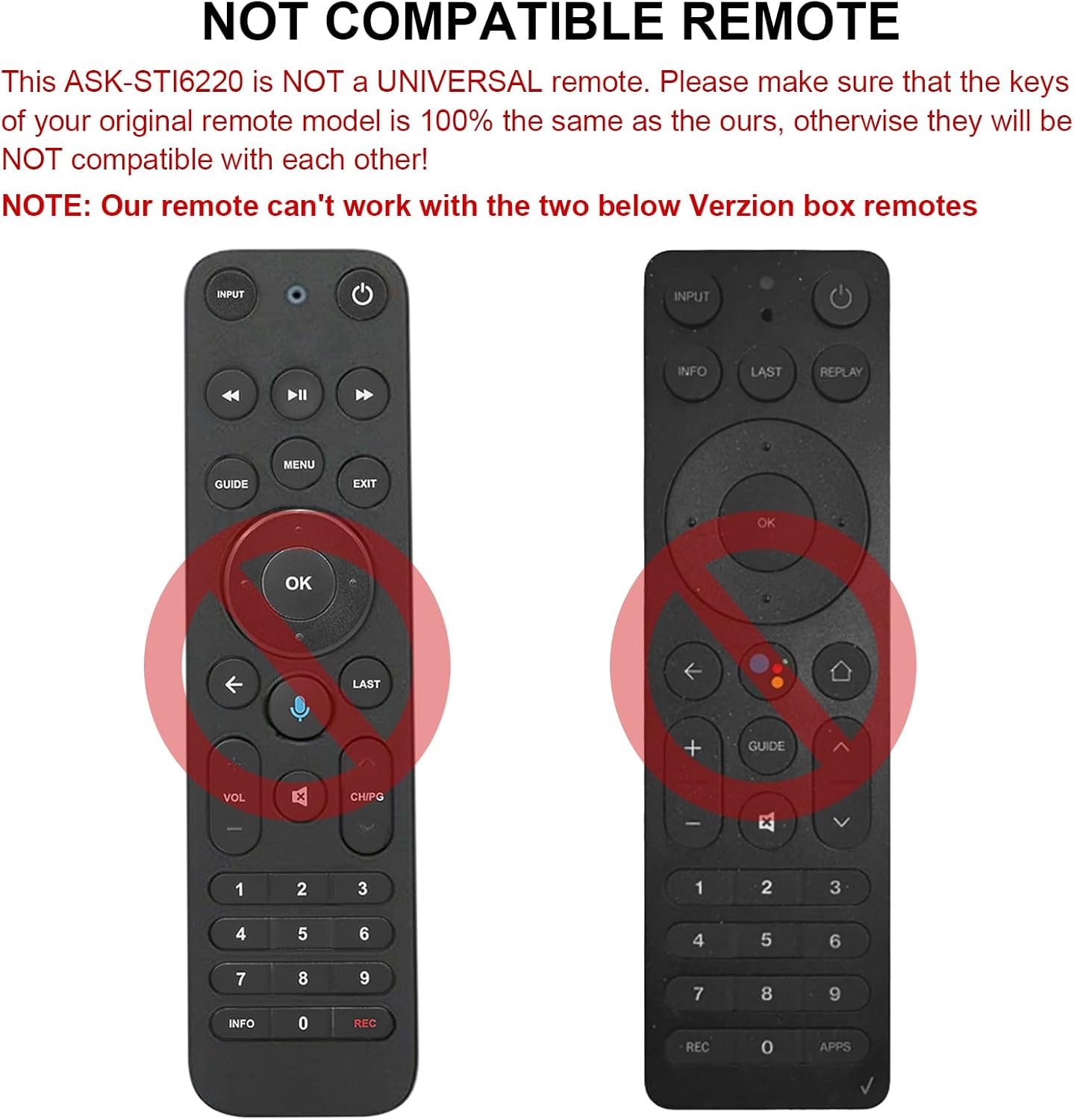
2.1 pav. Pvzamples of incompatible Verizon remotes. Ensure your original remote's buttons match the ASK-STI6220 model.

Figure 2.2: The ASK-STI6220 Voice Remote Control, compatible with Verizon Stream TV Box.
3. Sąranka ir diegimas
3.1 Akumuliatoriaus įdėjimas
Nuotolinio valdymo pultui reikalingos dvi AAA baterijos (nepridedamos). Norėdami įdėti baterijas:
- Nuimkite baterijos dangtelį nuo nuotolinio valdymo pulto galo.
- Insert two AAA batteries, ensuring correct polarity (+ and - ends match the markings inside the compartment).
- Saugiai uždėkite akumuliatoriaus dangtelį.

3.1 pav.: Baterijų skyrius dviem AAA baterijoms.
Video 3.1: Demonstration of battery installation and initial setup for the ASK-STI6220 Voice Remote.
3.2 Susiejimo instrukcijos
To use the voice remote, it must first be paired with your Verizon Stream TV Box. Follow one of the methods below:
- 1 būdas: Paspauskite mygtuką „Grįžti"ir"APP" buttons simultaneously to initiate pairing.
- 2 būdas: Alternatively, press the "OK"ir"NAMAI" buttons simultaneously to initiate pairing.
Svarbi pastaba:
- A device can only be paired with one voice remote at a time. Before pairing this new remote, please disconnect your old remote control (e.g., by removing its batteries).
- If pairing fails on the first attempt, try turning your TV Box off and then back on. If you continue to experience issues, clear any existing remote settings on your TV Box before attempting to pair again.

Figure 3.2: Visual guide for pairing the remote control.
4. Naudojimo instrukcijos
4.1 General Button Functions
The ASK-STI6220 remote features a standard layout for easy navigation and control of your Verizon Stream TV Box:
- Maitinimo mygtukas: Įjungia arba išjungia televizoriaus priedėlį.
- Įvesties mygtukas: Switches input sources on your TV.
- Navigacijos skydelis (aukštyn / žemyn / kairėn / dešinėn / gerai): Naudojamas meniu naršymui ir pasirinkimui.
- Garsumo didinimas / sumažinimas: Reguliuoja garsumą.
- Kanalas aukštyn/žemyn: Keičia kanalus.
- Leisti / pristabdyti, greitai persukti pirmyn, atsukti atgal: Medijos atkūrimo valdikliai.
- Namų mygtukas: Grąžina į pagrindinį pradinį ekraną.
- Vadovo mygtukas: Accesses the program guide.
- Skaičių klaviatūra (0–9): Tiesioginis kanalo įvedimas.
- Informacijos mygtukas: Rodo programos informaciją.
- APPs Button: Accesses applications.
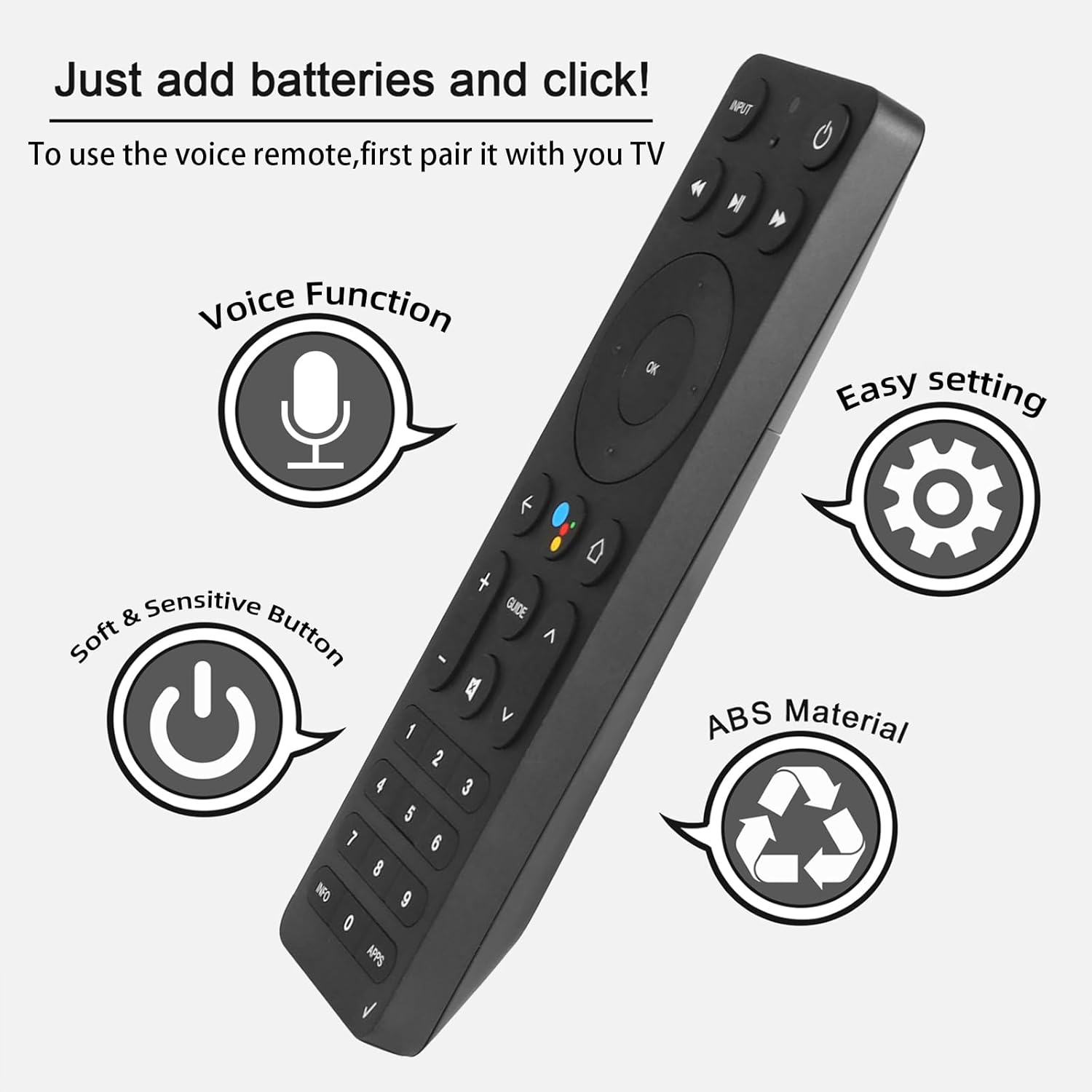
Figure 4.1: Key features and button layout of the remote control.
4.2 Išmanusis balso valdymas
The remote features an intelligent voice function, allowing you to control your TV Box with voice commands. Press the dedicated voice button (often represented by a microphone icon) and speak clearly into the remote.
Exampdaugiau balso komandų:
- "Launch channels"
- "Lower the volume"
- "Play action movie"
If the voice function does not work correctly, follow these steps:
- Go to the home page of your TV Box.
- Press the "Settings" button on the remote control.
- Select "Remote Controls and Accessories" and then "Remote Controls."
- Select to add a new remote control and follow the on-screen steps to complete the setup.

Figure 4.2: Using intelligent voice search and control.

Figure 4.3: The remote offers a 0.2-second fast response and a 33-foot transmitting distance for accurate control.
5. Priežiūra
Kad užtikrintumėte nuotolinio valdymo pulto ilgaamžiškumą ir optimalų veikimą:
- Nuotolinio valdymo pultą valykite minkštu, sausu skudurėliu. Venkite naudoti skystus valiklius ar abrazyvines medžiagas.
- Replace batteries promptly when the remote's responsiveness decreases. Always use fresh AAA batteries.
- Saugokite nuotolinio valdymo pultą nuo ekstremalių temperatūrų, tiesioginių saulės spindulių ar drėgmės.
- Nenumeskite nuotolinio valdymo pulto ir nedarykite jam stiprių smūgių.
6. Problemų sprendimas
If you encounter issues with your ASK-STI6220 remote control, please refer to the following common solutions:
- Nuotolinis nereaguoja:
- Įsitikinkite, kad baterijos įdėtos teisingai ir nėra išsikrovusios. Jei reikia, pakeiskite naujomis AAA baterijomis.
- Verify that the remote is properly paired with your Verizon Stream TV Box (refer to Section 3.2).
- Įsitikinkite, kad tarp nuotolinio valdymo pulto ir televizoriaus priedėlio nėra jokių kliūčių.
- Poravimo problemos:
- Confirm that your original remote is disconnected (e.g., by removing its batteries) as only one Bluetooth remote can be paired at a time.
- If pairing fails, try turning the TV Box off and on again, then re-attempt the pairing process.
- Clear existing remote settings on your TV Box before trying to pair again.
- Balso valdymas neveikia:
- Ensure the remote is successfully paired and the voice function is enabled on your TV Box.
- Follow the voice control setup steps outlined in Section 4.2.
- Kalbėkite aiškiai ir tiesiai į nuotolinio valdymo pulto mikrofoną.
- Remote not compatible with my device:
- This remote is specifically designed for Verizon Stream TV Box voice remote control V2 ARRIS CCAM21LP1890T2, 2AGOFRC451A, RC451A, STI6220-D315, ASK-STI6220. It is not a universal remote. Please verify your device's model number and compare your original remote's buttons with the ASK-STI6220.

Figure 6.1: Common questions and answers regarding the remote's functionality and compatibility.
7. Specifikacijos
| Funkcija | Detalė |
|---|---|
| Prekės ženklas | CHUNGHOP |
| Modelio numeris | ASK-STI6220 |
| Suderinami įrenginiai | Verizon Stream TV Box (specific models as listed in Section 2) |
| Maksimalus palaikomų įrenginių skaičius | 1 |
| Ypatinga funkcija | Ergonomiškas, balso valdymas |
| Spalva | As Shown (typically black) |
| Reikalingos baterijos | 2 AAA baterijos |
| Prekės svoris | 3.2 uncijos |
| Pakuotės matmenys | 8.19 x 3.54 x 0.94 colio |
8. Garantija ir palaikymas
For any questions or concerns regarding your CHUNGHOP ASK-STI6220 Voice Remote Control, including pairing, setup, or functionality, please contact the seller directly. Refer to your purchase documentation for specific warranty details, as these may vary.
The manufacturer, CHUNGHOP, is committed to providing support for their products.