
Įvadas
Thank you for choosing the ORORO Men's Heated Quilted Vest. This manual provides essential information for the safe and effective use, maintenance, and care of your heated vest. Please read it thoroughly before first use and retain it for future reference.
The ORORO Heated Quilted Vest is designed to provide warmth and comfort in cold conditions. It features a diamond-quilted construction, water-resistant shell, and sustainable FELLEX insulation. Integrated carbon fiber heating elements target the neck, hands (pockets), and upper back, powered by a rechargeable battery pack.
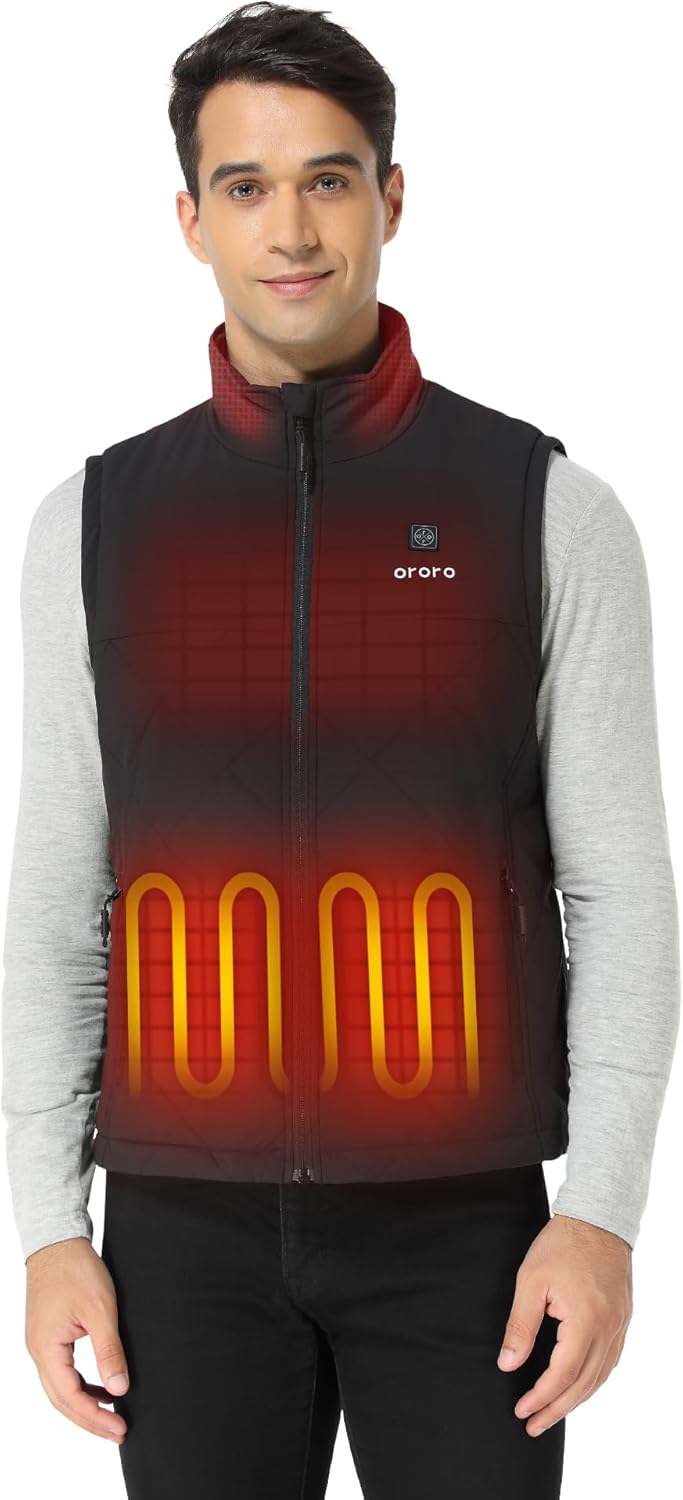
Image: A man wearing the ORORO heated quilted vest, with red highlights indicating the heating zones on the chest and back.
Pakuotės turinys
- ORORO Men's Heated Quilted Vest
- 7.38V UL Certified Battery Pack
- Vartotojo vadovas
Note: Charger is not included. Please use your own compliant USB-A port chargers.
Sąrankos instrukcijos
1. Akumuliatoriaus įkrovimas
Before initial use, fully charge the battery pack. The battery features a USB port for charging and can also be used to charge smartphones.
- Connect the battery pack to a compatible USB-A charger (not included) using a USB cable.
- The indicator lights on the battery pack will illuminate to show the charging status.
- Įkrovimas baigtas, kai visos indikatoriaus lemputės šviečia nepertraukiamai.
Image: A close-up of the ORORO battery pack, showing its compact design and LED indicator lights.
2. Connecting the Battery to the Vest
- Locate the dedicated zippered pocket inside the vest, typically on the left side.
- Connect the vest's power cable to the fully charged battery pack.
- Place the battery pack securely into the zippered pocket and close the zipper.
Naudojimo instrukcijos
Powering On and Adjusting Heat Settings
The vest features a control button, usually located on the left chest, to manage the heating elements.
- Norėdami įjungti: Press and hold the control button for approximately 3 seconds until it illuminates. The vest will typically start on the High heat setting (red light).
- To Adjust Heat Level: Press the control button briefly to cycle through the heat settings:
- Aukštas (raudona šviesa): Provides maximum heat for up to 3 hours.
- Medium (White Light): Provides moderate heat for up to 6 hours.
- Low (Blue Light): Provides gentle heat for up to 10 hours.
- Norėdami išjungti: Press and hold the control button for approximately 3 seconds until the light turns off.

Image: A man demonstrating the ease of use by pointing to the control button on the chest of the ORORO heated vest.

Image: A graphic illustrating the three heat levels (High, Medium, Low) with corresponding battery life, and a diagram showing the four heating zones in the collar, pockets, and upper back.
Priežiūra ir priežiūra
Skalbimo instrukcijos
The ORORO Heated Quilted Vest is machine washable. Follow these steps to ensure proper care and longevity of your vest:
- Atjunkite akumuliatorių: Always remove the battery pack from the vest before washing.
- Užtrauktukas: Zip up all zippers on the vest.
- Skalbimas mašina: Machine wash gently in cold water with a mild detergent.
- Nebalinti ir nelyginti: Avoid using bleach or ironing the vest.
- Džiovinti džiovyklėje žemoje temperatūroje: Tumble dry on a low heat setting or hang dry. Ensure the vest is completely dry before reconnecting the battery or storing.

Image: A man adjusting settings on a washing machine, illustrating the vest's machine washable feature.
Trikčių šalinimas
If you encounter issues with your ORORO Heated Quilted Vest, please refer to the following common solutions:
- Liemenė nešildoma:
- Įsitikinkite, kad akumuliatorius yra visiškai įkrautas.
- Verify that the battery pack is securely connected to the vest's power cable.
- Press and hold the control button for 3 seconds to ensure it is powered on.
- Neveikia indikatoriaus lemputė:
- Patikrinkite akumuliatoriaus įkrovos lygį.
- Ensure the connection between the battery and vest is firm.
- Trumpas baterijos veikimo laikas:
- Battery life varies by heat setting. High heat consumes power faster.
- Prieš kiekvieną naudojimą įsitikinkite, kad akumuliatorius yra visiškai įkrautas.
- Labai žema temperatūra gali paveikti akumuliatoriaus veikimą.
If problems persist, please contact ORORO customer support for assistance.
Specifikacijos
| Funkcija | Detalė |
|---|---|
| Modelio numeris | MINI 5K |
| Šildymo elementai | 4 Carbon Fiber (Collar, Left Pocket, Right Pocket, Upper Back) |
| Šilumos nustatymai | 3 (aukštas, vidutinis, žemas) |
| Baterijos tipas | 7.38V UL Certified Battery Pack |
| Maksimalus baterijos veikimo laikas | Up to 10 hours (on Low setting) |
| Audinio tipas | Shell: 100% Polyester; Lining: 100% Polyester; Filling: 100% Polyester |
| Izoliacija | bluesign Certified FELLEX Insulation |
| Priežiūros instrukcijos | Skalbimas mašina |
| Saugos ypatybės | NTC Overheat Protection, Short Circuit Protection, IEC Compliant |

Image: A stylized image of an NTC (Negative Temperature Coefficient) chip, symbolizing the vest's reliable overheat protection technology.

Image: A cross-section diagram illustrating the advanced carbon fiber heating elements, highlighting features like machine washability, short circuit protection, and IEC compliance.
Garantija ir palaikymas
For warranty information, product support, or any inquiries not covered in this manual, please contact ORORO customer service directly. Refer to the official ORORO webkontaktinę informaciją rasite svetainėje arba pirkimo dokumentuose.
Manufacturer: ORORO