
Įvadas
This user manual provides essential information for the proper installation, operation, and maintenance of your CPVAN 3-in-1 Carbon Monoxide Detector. This device is designed to detect carbon monoxide (CO) gas, and also displays ambient temperature and humidity. It features a 10-year electrochemical sensor and is powered by a 4-year replaceable battery, certified to EU standard EN50291. Please read this manual thoroughly before using the product to ensure safe and effective operation.

1 paveikslas: Priekyje view of the CPVAN 3-in-1 Carbon Monoxide Detector, showing the display and indicator light.
Saugos informacija
Svarbu: This device is a carbon monoxide (CO) detector, not a smoke detector or a carbon dioxide (CO2) detector. It is designed to detect carbon monoxide gas from sources such as faulty combustion appliances.
- Do not paint the detector. Paint may clog the openings and interfere with the sensor's ability to detect CO.
- Do not block the ventilation openings on the detector.
- Reguliariai tikrinkite detektorių, kaip nurodyta šiame vadove.
- Do not install the detector in areas with high humidity, extreme temperatures, or excessive dust.
- In case of an alarm, evacuate the premises immediately and call emergency services. Do not re-enter until the area has been declared safe.
- The device cannot replace a smoke or gas alarm.
Pakuotės turinys
Atidarius pakuotę, patikrinkite jos turinį, kad įsitikintumėte, jog joje yra visi daiktai ir jie nepažeisti.
- 1 × CPVAN Carbon Monoxide Detector (Model: COS-X3 plus)
- 2 × 1.5V AA Alkaline Batteries
- 2 × Wall Plugs
- 2 × varžtai
- 1 × Vartotojo vadovas
Produktas baigtasview
The CPVAN 3-in-1 Carbon Monoxide Detector integrates CO detection with temperature and humidity monitoring.

2 paveikslas: The detector's display indicates Carbon Monoxide (CO) levels, relative humidity (%RH), and temperature (°C). When CO concentration is below 25 ppm, only temperature and humidity are displayed.
Pagrindiniai komponentai:
- LCD ekranas: Shows CO concentration (PPM), relative humidity (%RH), and temperature (°C).
- Testavimo / atstatymo mygtukas: Used to test the alarm function and reset the device.
- Indikatoriaus lemputė: Displays device status (Green for normal, Yellow for fault, Red for alarm).
- Pavojaus signalas: Emits a loud sound during a CO alarm.
- Baterijų skyrius: Įsikūręs gale, skirtas AA baterijoms.

3 paveikslas: Visual representation of the indicator light states: Green for normal operation, Yellow for fault, and Red for CO alarm.
Sąranka
1. Akumuliatoriaus įdėjimas
The detector requires two 1.5V AA alkaline batteries (included).
- Atidarykite baterijų skyriaus dangtelį detektoriaus gale.
- Remove the plastic insulating strip from the pre-installed batteries.
- Įdėkite dvi AA baterijas, užtikrindami teisingą poliškumą (+ ir -).
- Close the battery compartment cover securely. The device will automatically power on.

4 paveikslas: Illustration of the battery compartment on the back of the detector, showing where to insert the two AA alkaline batteries.
2. Montavimas ir išdėstymas
Proper placement is crucial for effective CO detection. Install the detector in locations where CO may be produced. The closer it is to a potential CO source, the sooner the alarm will activate.
- Rekomenduojamos vietos: Near combustion appliances (furnaces, water heaters, fireplaces), in living areas, and bedrooms.
- Venkite: Directly above heat sources, in direct sunlight, near windows or vents, in dusty or humid areas, or behind curtains/furniture that could obstruct the sensor.
- Montavimo aukštis: For optimal detection, install the detector at a height between your waist and head level, or as per local regulations.
- Pasirinkite tinkamą sienos vietą.
- Mark the positions for the two screws using the detector's mounting holes as a guide.
- Išgręžkite dvi skyles ir įkiškite sieninius kaiščius.
- Insert the screws, leaving a small gap from the wall.
- Align the detector's mounting slots with the screws and slide it down to secure it.
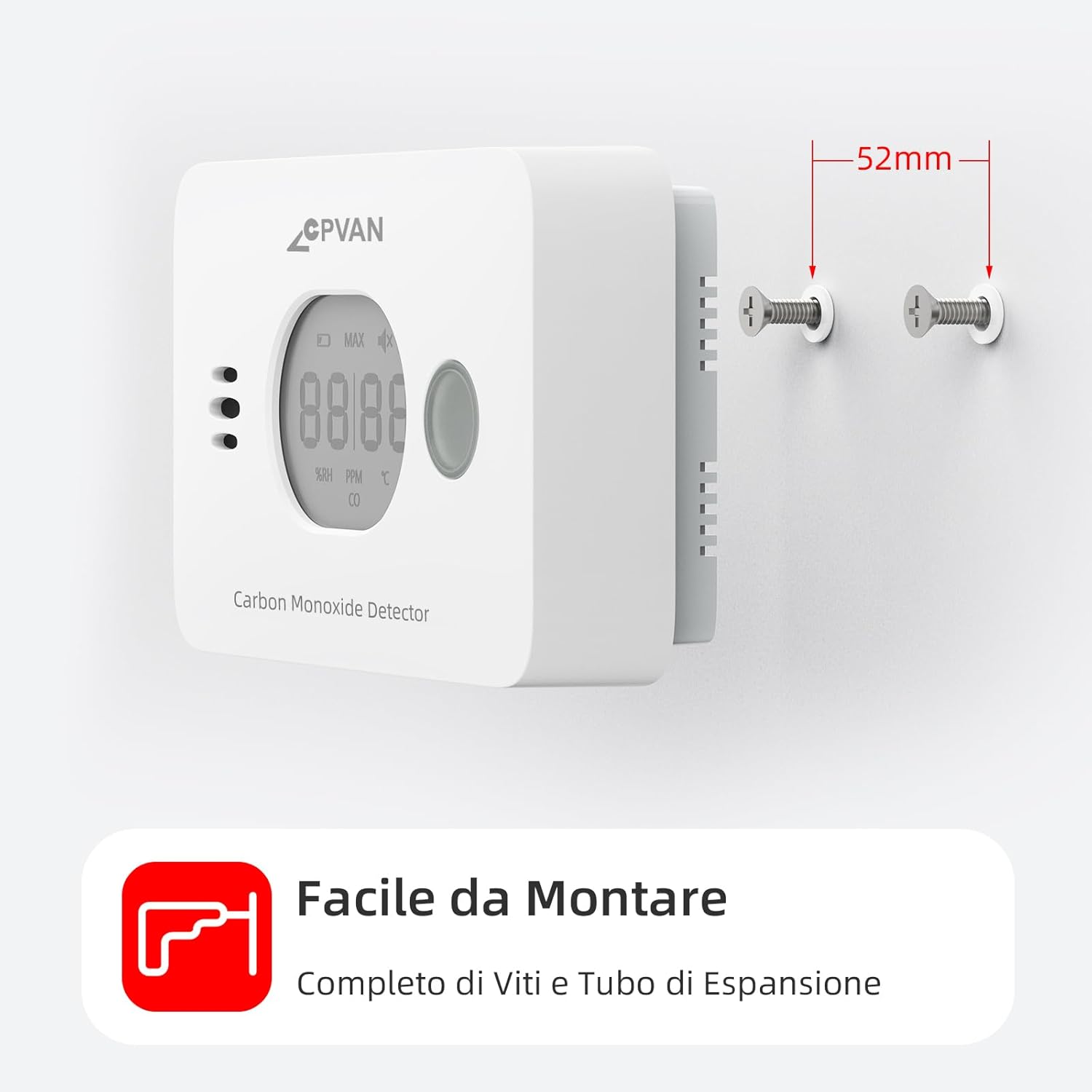
5 paveikslas: The detector can be easily mounted on a wall using the provided screws and wall plugs.

6 paveikslas: Example of optimal placement for CO detectors (red squares), heat alarms (green triangles), and smoke alarms (blue circles) within a typical home layout.
Operacija
1. Pradinis įjungimas
After battery installation, the device will perform a self-test. The display will show a brief sequence, and the green indicator light will flash. Once initialized, it will display temperature and humidity. The green light will flash approximately every 60 seconds in standby mode.
2. Rodyti informaciją
LCD ekrane pateikiama realiuoju laiku informacija:
- Temperatūra: Shown in degrees Celsius (°C).
- Drėgmė: Shown as relative humidity (%RH).
- CO Concentration: Displayed in parts per million (PPM). If CO concentration is below 25 ppm, only temperature and humidity are shown. CO concentration is updated every 4 seconds.

7 paveikslas: The real-time display shows current humidity and temperature. CO concentration is displayed when it exceeds 25 PPM, with different alarm cycles based on CO levels.
3. Signalizacijos testavimas
It is recommended to test the detector weekly to ensure proper function.
- Press and hold the Test/Reset button on the front of the detector.
- The alarm will sound loudly, and the red indicator light will flash. The display will show a high CO reading (e.g., "MAX 58 PPM CO").
- Atleiskite mygtuką, kad sustabdytumėte testą.
Alternatively, you can test by holding the detector near burning materials like paper or cigarettes for 5-10 seconds. Incomplete combustion typically produces carbon monoxide. If the detector functions correctly, it will display CO concentration and sound an audible alarm.

8 paveikslas: When CO is detected above the alarm threshold, the red light flashes and the alarm sounds.
4. Alarm Conditions and Behavior
The detector is certified to EN-50291 standards. Alarm thresholds are as follows:
| CO Concentration (PPM) | Signalizacijos laikas |
|---|---|
| 50 ppm | 60-90 minučių |
| 100 ppm | 10-40 minučių |
| 300 ppm | 0-3 minučių |
When an alarm occurs, the red indicator light will flash rapidly, and the buzzer will emit a loud, continuous alarm sound. The display will show the detected CO concentration.
What to do if the alarm sounds:
- Nedelsiant išeikite į gryną orą lauke arba atidarykite visas duris ir langus, kad išvėdintumėte patalpą.
- Atlikite žmonių skaičiavimą, kad įsitikintumėte, jog visi asmenys yra suskaičiuoti.
- Negrįžkite į patalpas, kol signalizacija neišsijungs ir patalpa nebus kruopščiai išvėdinta.
- Call your emergency services or a qualified technician to investigate the source of the CO.
Priežiūra
1. Baterijos keitimas
The detector is designed with a 4-year replaceable battery life. When the batteries are low, the device will indicate this with a specific warning (e.g., a chirp or a low battery icon on the display). Replace both AA alkaline batteries promptly when this occurs. Refer to the "Battery Installation" section for replacement steps.
2. Valymas
Clean the detector regularly to prevent dust buildup from affecting its performance.
- Naudokite minkštą, damp šluoste nuvalykite detektoriaus išorę.
- Do not use cleaning sprays, solvents, or abrasive cleaners.
- Nedažykite detektoriaus.
3. Reguliarus testavimas
Test the detector weekly using the Test/Reset button to ensure the alarm and sensor are functioning correctly.
Trikčių šalinimas
| Problema | Galima priežastis | Sprendimas |
|---|---|---|
| Detector not powering on after battery installation. | Batteries incorrectly inserted or dead. Plastic insulating strip not removed. | Ensure batteries are inserted with correct polarity. Remove the plastic insulating strip. Try new batteries. |
| Alarm sounds frequently without apparent CO source. | False alarm due to strong fumes (e.g., cleaning products, paint). Detector placed too close to a combustion source. | Ventilate the area. Relocate the detector if it's too close to a potential source or in an area with frequent fumes. |
| Detector chirps or shows low battery indicator. | Senka baterija. | Nedelsdami pakeiskite abi AA šarmines baterijas. |
| Green light not flashing every 60 seconds. | Device fault or low battery. | Check battery level. Perform a test. If issue persists, contact customer support. |
| Display shows only temperature and humidity, not CO. | CO concentration is below 25 ppm, which is normal. | This is normal operation. The CO reading will appear if the concentration exceeds 25 ppm. |
Specifikacijos
| Funkcija | Detalė |
|---|---|
| Modelio numeris | COS-X3 plus |
| Jutiklio tipas | Elektrocheminis |
| CO aptikimo diapazonas | nuo 0 iki 999 PPM |
| Temperatūros diapazonas | -9°C iki 99°C (±1°C) |
| Drėgmės diapazonas | Nuo 1 % iki 99 % RH (± 3 % RH) |
| Maitinimo šaltinis | 2 x 1.5V AA Alkaline Batteries (included) |
| Baterijos veikimo laikas | Iki 4 metų (keičiama) |
| Jutiklio tarnavimo laikas | 10 metai |
| Signalizacijos garsumas | Girdimas |
| Sertifikavimas | EN 50291 |
| Matmenys | 11 x 6 x 3 cm |
| Svoris | 200 g |
| Medžiaga | ABS |
| UPC | 765142658068 |
Garantija ir palaikymas
For warranty information and customer support, please refer to the documentation provided with your purchase or contact CPVAN customer service directly.
Manufacturer: SafeBay
Contact information may be available on the product packaging or the official CPVAN websvetainę.
Oficialūs produktų vaizdo įrašai
Pateiktuose duomenyse nerasta oficialių produktų vaizdo įrašų, kurių kūrėjo tipas būtų „Pardavėjas“.