
„Speedlink SL-630021-RRBK“
Speedlink LIBERA Rechargeable Wireless Silent Mouse
Instrukcijų vadovas
1. Produktas baigtasview
The Speedlink LIBERA is a versatile rechargeable wireless mouse designed for comfort and efficiency. It offers dual connectivity options, allowing you to connect via Bluetooth or a 2.4 GHz USB-A nano receiver. Key features include silent main buttons, a thumb scroll wheel for horizontal scrolling, and adjustable DPI settings for precise control.

Image: The Speedlink LIBERA mouse shown with its accompanying USB receiver, highlighting its sleek design and connectivity components.
2. Kas yra dėžutėje
Atidarius pakuotę, įsitikinkite, kad yra visi šie daiktai:
- Speedlink LIBERA Mouse
- USB imtuvas
- USB-C į USB-A įkrovimo laidas
- Vartotojo vadovas (šis dokumentas)
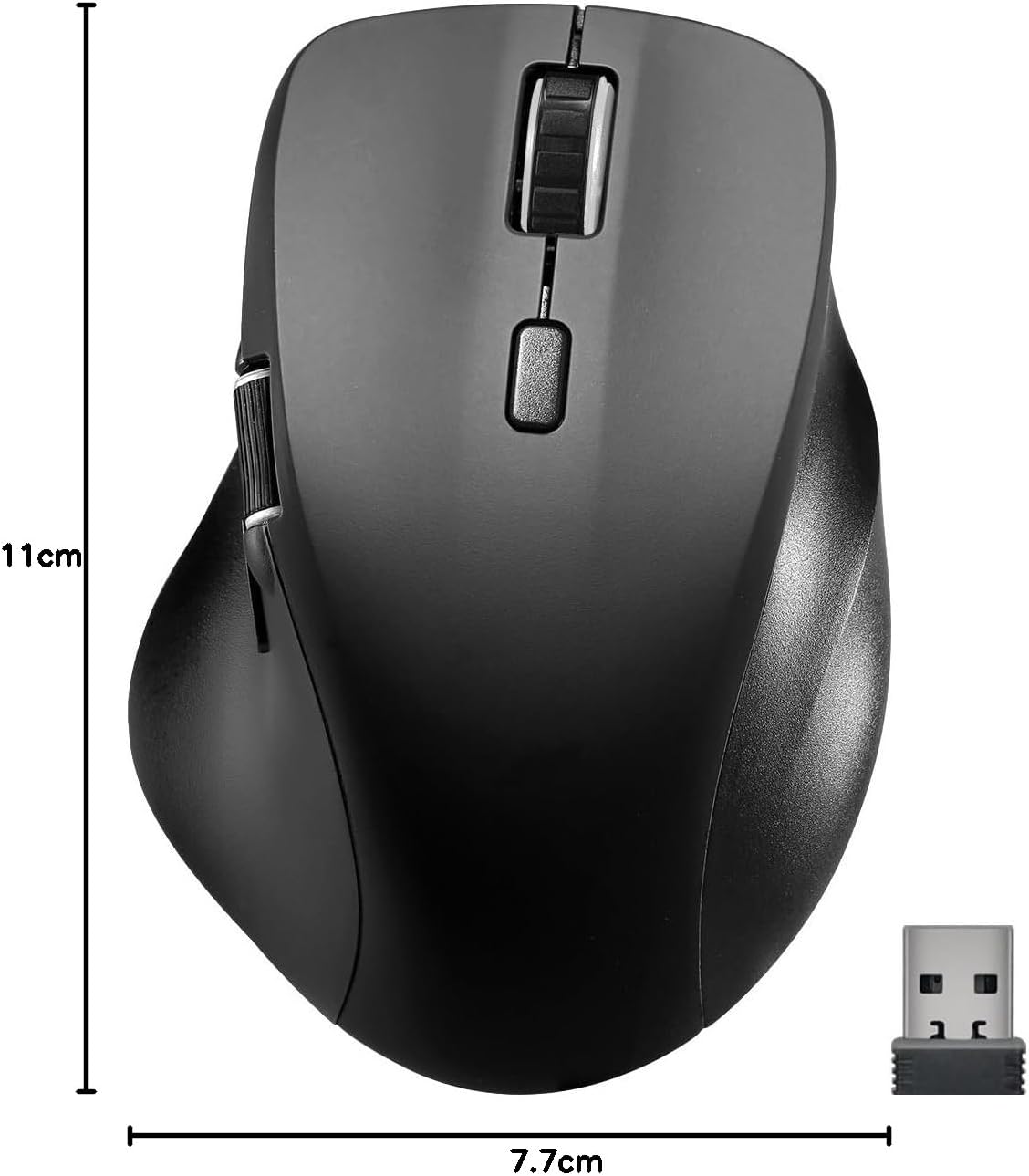
Image: The retail packaging for the Speedlink LIBERA mouse, indicating the contents and key features.
3. Sąranka
3.1. Pelės įkrovimas
Before first use, it is recommended to fully charge the mouse. The mouse can be charged while in use.
- Locate the USB-C port on the front of the mouse.
- Connect the included USB-C to USB-A charging cable to the mouse.
- Plug the USB-A end of the cable into a powered USB port (e.g., computer, USB wall adapter).
- Užsidegs įkrovimo indikatoriaus lemputė. Kai bus visiškai įkrauta, ji užges arba pakeis spalvą.

Image: The USB-C to USB-A charging cable included with the mouse, used for recharging the internal battery.
3.2. Pelės prijungimas
The Speedlink LIBERA mouse offers two connection methods: 2.4 GHz USB receiver and Bluetooth.
3.2.1. 2.4 GHz USB Connection
- Locate the USB-A nano receiver, typically stored in a compartment on the underside of the mouse.
- Prijunkite USB imtuvą prie laisvo kompiuterio USB-A prievado.
- Įjunkite pelę naudodami įjungimo / išjungimo jungiklį, esantį apačioje.
- Pelė turėtų automatiškai prisijungti prie kompiuterio.
3.2.2. „Bluetooth“ ryšys
The mouse supports up to two Bluetooth profiles.
- Įsitikinkite, kad pelė įjungta.
- Press the Bluetooth pairing button (refer to the diagram in Section 4.1 for location) to enter pairing mode. The indicator light will flash.
- Kompiuteryje eikite į „Bluetooth“ nustatymus.
- Ieškokite new devices and select "Speedlink LIBERA" from the list.
- Vykdykite visus ekrane pateikiamus nurodymus, kad užbaigtumėte susiejimo procesą.
- To switch between Bluetooth profiles or to the 2.4 GHz connection, press the mode switch button on the underside of the mouse.

Image: The Speedlink LIBERA mouse positioned next to its compact USB receiver, illustrating the 2.4 GHz wireless connection method.
4. Naudojimo instrukcijos
4.1. Mygtukų funkcijos
The Speedlink LIBERA mouse features multiple buttons for enhanced control:
- Kairysis paspaudimo mygtukas: Standard primary click function. (Silent)
- Dešinysis pelės mygtuko paspaudimas: Standard secondary click function. (Silent)
- Slinkties ratukas: Vertical scrolling. Can also be pressed for middle-click functionality.
- DPI perjungimo mygtukas: Cycles through DPI settings (1000/1600/2400/3200 DPI).
- Thumb Scroll Wheel: Located on the side, allows for horizontal scrolling of documents and web puslapių.
- Pirmyn/atgal mygtukai: Located near the thumb scroll wheel, typically used for navigation in web naršyklės arba file tyrinėtojai.

Image: A hand demonstrating the ergonomic grip and use of the Speedlink LIBERA mouse, highlighting the placement of the thumb scroll wheel and side buttons.
4.2. DPI reguliavimas
The mouse's optical sensor resolution can be adjusted to suit your preference and task. Press the DPI switch button (located behind the main scroll wheel) to cycle through the available DPI settings: 1000, 1600, 2400, and 3200 DPI. Each press will change the sensitivity, allowing for faster or slower cursor movement.
4.3. Maitinimo valdymas
The mouse features an On/Off switch on its underside to conserve battery life when not in use. It also incorporates a smart power-saving mode that activates after a period of inactivity, further extending battery life. To wake the mouse, simply move it or click any button.
5. Priežiūra
To ensure the longevity and optimal performance of your Speedlink LIBERA mouse, follow these simple maintenance guidelines:
- Valymas: Pelės paviršiui nuvalyti naudokite minkštą, sausą, nepūkuotą šluostę. Jei nešvarumai sunkiai įveikiami, šiek tiek pamirkykite.ampNuvalykite šluostę vandeniu. Venkite naudoti stiprias chemines medžiagas, tirpiklius ar abrazyvinius valiklius.
- Jutiklio priežiūra: Keep the optical sensor on the underside of the mouse clean and free from dust or debris. A small brush or compressed air can be used carefully.
- Akumuliatoriaus priežiūra: While the mouse has a rechargeable battery, avoid completely draining it frequently. Recharge it when the low battery indicator appears. Store the mouse in a cool, dry place if not used for extended periods.
- Saugykla: When transporting or storing the mouse, ensure it is protected from impacts and extreme temperatures.
6. Problemų sprendimas
If you encounter issues with your Speedlink LIBERA mouse, please refer to the following common problems and solutions:
| Problema | Galima priežastis | Sprendimas |
|---|---|---|
| Pelė nereaguoja | Mouse is off, low battery, connection issue. | Ensure mouse is on. Charge the mouse. Re-establish 2.4 GHz or Bluetooth connection. Try a different USB port. |
| Žymeklio judėjimas yra netolygus arba lėtas | Dirty optical sensor, unsuitable surface, low DPI setting. | Clean the optical sensor. Use on a clean, non-reflective mouse pad. Increase DPI setting. |
| „Bluetooth“ ryšys nepavyksta | Mouse not in pairing mode, interference, incorrect pairing steps. | Ensure mouse is in Bluetooth pairing mode. Turn off other Bluetooth devices. Remove previous pairings from computer and re-pair. |
| Įkrovimo problema | Sugedęs laidas, maitinimo šaltinio problema. | Try a different USB port or power adapter. Ensure the charging cable is securely connected. |
| Buttons not clicking or unresponsive | Software issue, physical obstruction. | Restart your computer. Ensure no debris is lodged under the buttons. |
7. Techninės specifikacijos
| Funkcija | Specifikacija |
|---|---|
| Modelio numeris | SL-630021-RRBK |
| Ryšys | Bluetooth, 2.4 GHz Radio Frequency (USB Receiver) |
| Judesio aptikimo technologija | Optinis |
| DPI raiška | 1000 / 1600 / 2400 / 3200 dpi (adjustable) |
| Mygtukai | 5 buttons + DPI switch + dual scroll wheels (vertical and horizontal) |
| Baterijos tipas | 500 mAh ličio jonų (įkraunamas) |
| Įkrovimo prievadas | USB-C |
| Matmenys (I x P x A) | 110 x 77 x 45 mm |
| Svoris | 93 g |
| Operacinės sistemos suderinamumas | „Windows 7“, „Windows 8“, „Windows 8.1“, „Windows 10“, „Windows 11“ |
8. Garantijos ir palaikymo informacija
Speedlink products are manufactured with care and undergo strict quality controls. This product is covered by a manufacturer's warranty. For detailed warranty terms and conditions, please refer to the warranty card included with your purchase or visit the official Speedlink websvetainę.
For technical support, troubleshooting assistance beyond this manual, or warranty claims, please contact Speedlink customer service through their official website or the contact information provided in your product packaging. Please have your product model number (SL-630021-RRBK) and proof of purchase ready when contacting support.
Ask a question about this manual
Ask about setup, troubleshooting, compatibility, parts, safety, or missing instructions. Manuals+ will review the question and use this page’s manual context to help answer it.