
Įvadas
Welcome to the user manual for your VOLT PLUS TECH Pro Wireless Earbuds, Model YD03. These earbuds feature advanced Bluetooth 5.3 connectivity, an intuitive LED digital display, IPX3 water and sweat resistance, noise reduction technology, and quad microphones for clear communication. This manual provides detailed instructions for setup, operation, maintenance, and troubleshooting to ensure optimal performance and longevity of your device.

Image: The VOLT PLUS TECH Pro Wireless Earbuds YD03, showing both earbuds and the charging case with its LED display.
Kas yra dėžutėje
Upon unboxing your VOLT PLUS TECH Pro Wireless Earbuds YD03, please ensure all the following components are present:
- VOLT PLUS TECH Pro Wireless Earbuds (Left and Right)
- Charging Case with Digital LED Display
- USB-C įkrovimo laidas
- Vartotojo vadovas
- Ausų antgaliai (maži, vidutiniai, dideli)
Sąranka
1. Pradinis įkrovimas
Prieš pirmą kartą naudodami, visiškai įkraukite ausines ir įkrovimo dėklą.
- Įdėkite abi ausines į įkrovimo dėklą.
- Prijunkite USB-C įkrovimo laidą prie dėklo įkrovimo prievado ir prie maitinimo šaltinio.
- The LED digital display on the case will show the charging status. Ensure both earbuds and the case are fully charged for optimal battery life.

Image: The charging case of the VOLT PLUS TECH Pro Wireless Earbuds YD03 connected to a USB-C charging cable, illustrating the charging process.
2. Įjunkite maitinimą
The earbuds will automatically power on when removed from the charging case. A blue indicator light will confirm they are on. If they do not power on automatically, press and hold the touch area on each earbud for 3-5 seconds until the blue indicator light flashes.
3. „Bluetooth“ poravimas
Norėdami susieti ausines su savo įrenginiu, atlikite šiuos veiksmus:
- Ensure the earbuds are powered on and in pairing mode (indicator lights flashing).
- Išmaniajame telefone arba „Bluetooth“ įrenginyje eikite į „Bluetooth“ nustatymus.
- Įjunkite Bluetooth.
- Ieškokite available devices and select "YD03" from the list.
- Once connected, the earbuds will provide a voice prompt stating "Connected".
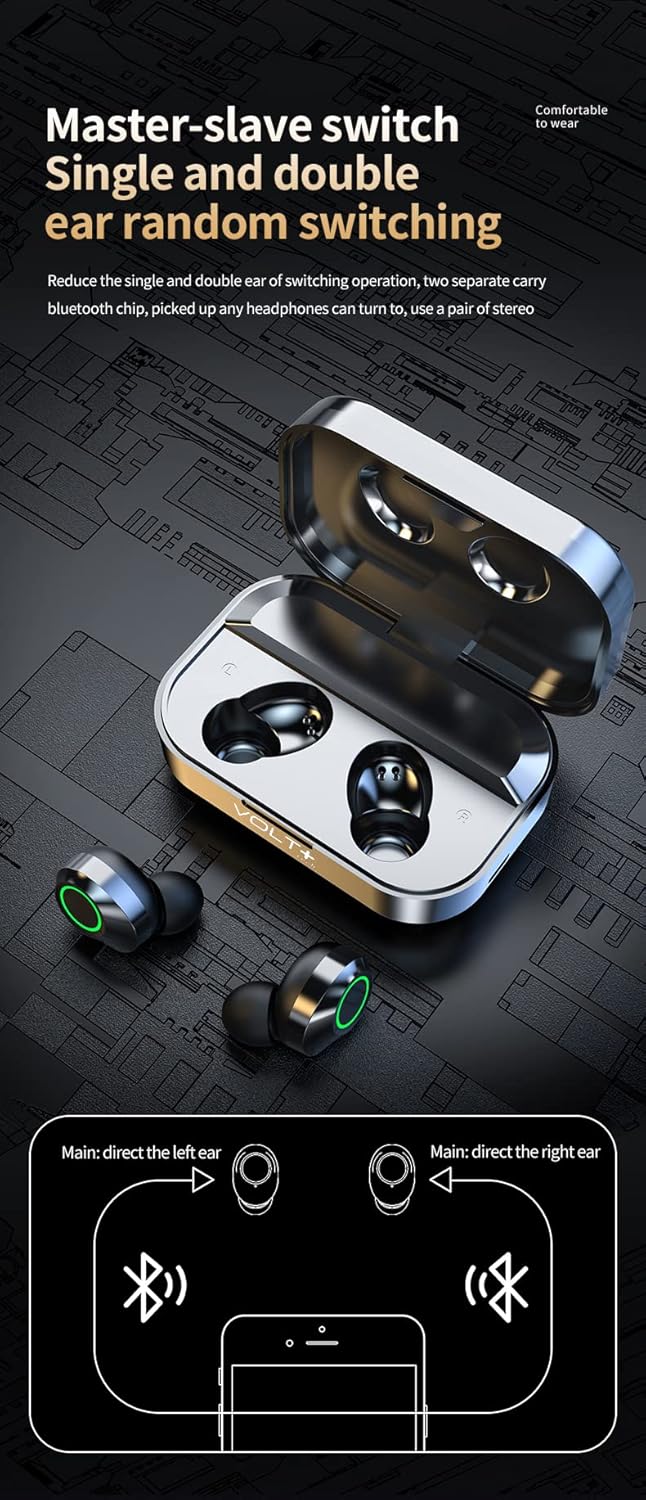
Image: Diagram illustrating the "Master-slave switch" functionality, showing how the VOLT PLUS TECH Pro Wireless Earbuds YD03 can be used individually or as a pair, and the Bluetooth pairing process.
4. Vieno ausinės naudojimas
The earbuds support independent use. You can use either the left or right earbud individually. Simply remove one earbud from the case, and it will automatically connect to your previously paired device.
Naudojimo instrukcijos
Palieskite valdiklius
The VOLT PLUS TECH Pro Wireless Earbuds feature intuitive touch controls on each earbud. The touch-sensitive area is located on the outer surface of each earbud.
- Leisti / pristabdyti: Vieną kartą bakstelėkite bet kurią ausinę.
- Kita daina: Dukart palieskite dešinįjį ausinės antgalį.
- Ankstesnė daina: Dukart palieskite kairįjį ausinės antgalį.
- Pagarsink: Tris kartus palieskite dešinįjį ausinės antgalį.
- Patildyti: Tris kartus palieskite kairįjį ausinės antgalį.
- Atsiliepti / Baigti skambutį: Vieną kartą bakstelėkite bet kurią ausinę įeinančio skambučio metu.
- Atmesti skambutį: Įeinančio skambučio metu paspauskite ir 1.5 sekundes palaikykite nuspaudę bet kurią ausinę.
- Įjunkite balso asistentą („Siri“ / „Google“ asistentas): Press and hold either earbud for 1.5 seconds (after rejecting a call or when not on a call).
- Game/Video/Music Mode: Touch switch under 4 (This instruction is unclear from the source, assuming it refers to a specific touch gesture or mode selection not fully detailed).

Image: Visual guide detailing the touch controls for the VOLT PLUS TECH Pro Wireless Earbuds YD03, showing gestures for music playback, volume adjustment, and call management.
LED skaitmeninis ekranas
The charging case features an intelligent digital LED display that shows the battery level of the charging case and each individual earbud (Left 'L' and Right 'R'). This allows you to monitor power levels accurately.

Image: An illustration explaining the "AI light intelligent digital display" on the VOLT PLUS TECH Pro Wireless Earbuds YD03 charging case, indicating battery levels for the case and individual earbuds.
Priežiūra
Tinkama priežiūra užtikrina jūsų ausinių ilgaamžiškumą ir optimalų veikimą.
- Valymas: Reguliariai valykite ausines ir įkrovimo dėklą minkštu, sausu, nepūkuotu skudurėliu. Venkite naudoti abrazyvines medžiagas ar stiprias chemines medžiagas.
- Atsparumas vandeniui: The earbuds are IPX3 water-resistant, meaning they are protected against spraying water. They are suitable for light rain, sweat, and splashes. Pastaba: įkrovimo dėklas NĖRA atsparus vandeniui. Nenardinkite ausinių arba įkrovimo dėklo į vandenį.
- Saugykla: Kai nenaudojate, laikykite ausines įkrovimo dėkle, kad jos būtų apsaugotos ir įkrautos. Laikykite vėsioje, sausoje vietoje, toliau nuo ekstremalių temperatūrų.
- Įkrovimas: Use only the provided USB-C cable for charging. Avoid using damaged cables or chargers.
Trikčių šalinimas
Jei kyla problemų dėl ausinių, žr. šiuos dažniausiai pasitaikančius sprendimus:
- Ausinės nesusiejamos:
- Įsitikinkite, kad abi ausinės yra visiškai įkrautos.
- Įsitikinkite, kad jūsų įrenginyje įjungtas „Bluetooth“.
- Išjunkite „Bluetooth“ savo įrenginyje, tada vėl jį įjunkite.
- Forget "YD03" from your device's Bluetooth list and attempt to pair again.
- Įsitikinkite, kad kiti „Bluetooth“ įrenginiai netrukdo.
- Nėra garso arba mažas garsumas:
- Check the volume level on both your earbuds (via touch controls) and your connected device.
- Įsitikinkite, kad ausinės tinkamai įstatytos į ausis.
- Nuvalykite visas ausinių garsiakalbių šiukšles.
- Iš naujo prijunkite ausines prie įrenginio.
- Neįkraunamos ausinės:
- Įsitikinkite, kad įkrovimo laidas yra tvirtai prijungtas tiek prie dėklo, tiek prie maitinimo šaltinio.
- Verify that the charging case has power (check its LED display).
- Make sure the earbuds are correctly placed in the charging case, and the charging contacts are clean.
- Išbandykite kitą USB-C laidą arba maitinimo adapterį.
- Viena ausinė neveikia:
- Įdėkite abi ausines atgal į įkrovimo dėklą, uždarykite dangtelį, palaukite kelias sekundes ir vėl jas išimkite.
- Įsitikinkite, kad abi ausinės yra įkrautos.
- Try resetting the earbuds (refer to the manufacturer's website if a specific reset procedure is available, as it's not detailed in the provided description).
Specifikacijos
| Funkcija | Detalė |
|---|---|
| Modelio pavadinimas | 03 YD |
| Ryšio technologija | Belaidis ryšys („Bluetooth“) |
| Belaidis ryšys | Bluetooth 5.3 |
| Ausinės Jack | USB-C (įkrovimo dėklui) |
| Kontrolės metodas | Lietimas, medijos valdymas |
| Triukšmo valdymas | Aktyvus triukšmo slopinimas (CVC 8.1) |
| Atsparumo vandeniui įvertinimas | IPX3 (tik ausinėms) |
| Baterijos veikimo laikas (ausinės) | 5+ hours (single charge) |
| Bendras grojimo laikas (su dėklu) | Iki 25 XNUMX+ valandų |
| Įkrovimo dėklas Akumuliatorius | 2,000 mAh |
| Medžiaga | ABS, Hi-Impact Plastic, Stainless Steel, Titanium |
| Prekės svoris | 4 uncijos |
| Gaminio matmenys | 1.5 x 1 x 1.5 colio |
| Dažnio atsakas | 48000 KHz |
Garantija ir palaikymas
Information regarding product warranty and customer support was not provided in the product details. For any warranty claims or technical assistance, please refer to the contact information provided with your purchase or visit the official VOLT PLUS TECH websvetainę.