
1. Kas yra dėžutėje
Patikrinkite, ar pakuotėje yra visi komponentai:
- Belaidžio įkrovimo dėklas
- Ausinės (kairėje ir dešinėje)
- USB-C įkrovimo laidas
- Vartotojo vadovas
- Ausų pagalvėlės (įvairūs dydžiai: S, M, L)

Image 1.1: Contents of the VOLT PLUS TECH YD03 package, including earbuds, charging case, and accessories.
2. Produktas baigtasview
The VOLT PLUS TECH YD03 Wireless Earbuds feature Bluetooth 5.3 connectivity, an LED digital display on the charging case, and touch controls for various functions. They are designed for comfort and offer noise reduction capabilities.
- "Bluetooth 5.3": Užtikrina stabilų ir efektyvų belaidį ryšį.
- LED skaitmeninis ekranas: Rodo abiejų ausinių ir įkrovimo dėklo akumuliatoriaus lygį.
- Triukšmo mažinimas: Equipped with CVC 8.1 technology and quad microphones for clear calls.
- IPX4 atsparumas vandeniui: Protects against splashes and sweat (earbuds only, charging case is not waterproof).
- Ilgas baterijos veikimo laikas: Up to 5+ hours of playback per charge, with an additional 20+ hours from the charging case.

2.1 vaizdas: Baigtaview of key features including Bluetooth 5.3, Type-C charging, intelligent digital display, HiFi stereo sound, smart noise reduction, and emergency charging function.
2.2 pav.: Išsamus view of the LED digital display on the charging case, indicating battery levels for the left earbud, charging case, and right earbud.
3. Sąranka
3.1 Pradinis susiejimas
- Įkraukite ausines: Before first use, ensure both earbuds and the charging case are fully charged. Place the earbuds into the charging case and connect the case to a USB power source using the provided USB-C cable.
- Maitinimas: Open the charging case. The earbuds will automatically power on. A blue indicator light will confirm they are on. If they do not power on automatically, press and hold the touch area on each earbud for 3-5 seconds until the blue indicator light flashes.
- Suaktyvinkite „Bluetooth“: Savo įrenginyje (išmaniajame telefone, planšetiniame kompiuteryje ir kt.) eikite į „Bluetooth“ nustatymus ir įjunkite „Bluetooth“.
- Ieškokite Įrenginys: In the list of available Bluetooth devices, search for "YD03".
- Prisijunkite: Select "YD03" to pair. The earbuds will provide a voice prompt "Connected" once pairing is successful.

Image 3.1: Earbuds placed inside the charging case, ready for initial setup or charging.
3.2 Re-pairing and Single Earbud Mode
- Once paired, the earbuds will automatically connect to the last paired device when removed from the case and Bluetooth is active on the device.
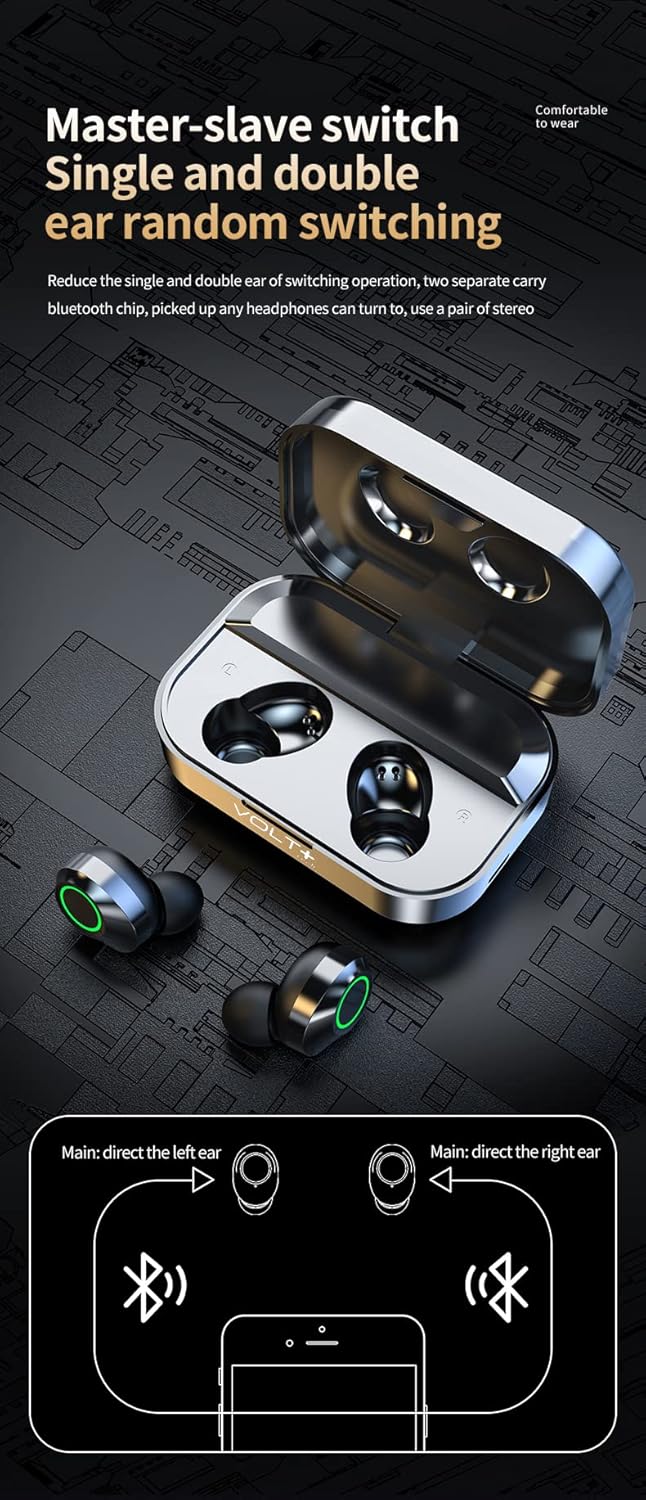
- The earbuds support independent use. Either the left or right earbud can be used alone. Simply remove one earbud from the case, and it will connect as a single unit.

Image 3.2: Diagram illustrating the flexible master-slave switching, allowing either earbud to function independently or together for stereo sound.
4. Naudojimo instrukcijos
4.1 Jutikliniai valdikliai
The earbuds feature touch-sensitive controls on their outer surface. Refer to the diagram below for specific functions:

Image 4.1: Visual guide to the touch controls on the left and right earbuds for music playback, volume adjustment, call management, and voice assistant activation.
- Leisti / pristabdyti: Single-tap on either earbud.
- Kita daina: Double-tap on the Teisingai ausines.
- Ankstesnė daina: Double-tap on the Kairė ausines.
- Pagarsink: Triple-tap on the Teisingai ausines.
- Patildyti: Triple-tap on the Kairė ausines.
- Atsiliepti / Baigti skambutį: Single-tap on either earbud.
- Atmesti skambutį: Paspauskite ir 1.5 sekundes palaikykite bet kurią ausinę.
- Įjunkite balso asistentą („Siri“ / „Google“ asistentas): Press and hold either earbud for 1.5 seconds (after rejecting a call, or when not on a call).
- Game/Music/Video Mode: Four taps on either earbud to switch between modes.
4.2 Baterijos lygio stebėjimas
The charging case features an LED digital display that shows the battery percentage of the case and the individual charge status of the left and right earbuds.

Image 4.2: The LED display on the charging case indicating the battery percentage of the case (center) and the charging status of the left (L) and right (R) earbuds.
5. Įkrovimas ir akumuliatorius
5.1 Ausinių įkrovimas
Place the earbuds into the charging case. They will automatically begin charging. The LED display on the case will show their charging status.
5.2 Dėklo įkrovimas
Connect the provided USB-C cable to the charging port on the case and plug the other end into a USB power adapter (not included) or a computer USB port. The LED display will show the charging progress of the case.

Image 5.1: The charging case connected via a USB-C cable, illustrating the charging process.
5.3 Baterijos veikimo laikas
- Earbuds provide over 5 hours of continuous playback on a single charge.
- The charging case provides an additional 20+ hours of charge, totaling over 25 hours of use.
- Pilnas dėklo įkrovimo laikas yra maždaug 2 valandos.
6. Priežiūra ir priežiūra
- Valymas: Ausinėms ir įkrovimo dėklui valyti naudokite minkštą, sausą šluostę. Venkite naudoti stiprias chemines medžiagas ar abrazyvines medžiagas.
- Atsparumas vandeniui: The earbuds are IPX4 water-resistant, meaning they are protected from splashing water from any direction. They are suitable for exercise and light rain. Įkrovimo dėklas NĖRA atsparus vandeniui. Nenardinkite ausinių ar dėklo į vandenį.
- Saugykla: Kai nenaudojate, laikykite ausines įkrovimo dėkle, kad apsaugotumėte ir liktų įkrautos.
- Temperatūra: Venkite ausinių laikymo ekstremaliose temperatūrose (karštyje arba šaltyje) arba didelėje drėgmėje.
7. Problemų sprendimas
- Ausinės nesusijungia su įrenginiu:
- Įsitikinkite, kad ausinės yra įkrautos ir įjungtos.
- Išjunkite ir įjunkite savo įrenginio „Bluetooth“.
- Forget "YD03" from your device's Bluetooth list and attempt to re-pair.
- Įdėkite ausines atgal į dėklą, uždarykite jį, palaukite kelias sekundes, tada atidarykite ir bandykite dar kartą.
- Veikia tik viena ausinė:
- Įsitikinkite, kad abi ausinės yra įkrautos.
- Place both earbuds back in the charging case, close the lid, then open it again to reset their connection.
- If the issue persists, try re-pairing both earbuds with your device.
- Ausinės neįkraunamos:
- Ensure the charging case has power (check its LED display).
- Patikrinkite, ar USB-C laidas yra tvirtai prijungtas prie korpuso ir maitinimo šaltinio.
- Ausinių ir dėklo vidaus įkrovimo kontaktus nuvalykite sausu vatos tamponėliu.
- Prasta garso kokybė:
- Ensure earbuds are properly seated in your ears. Try different size ear cushions.
- Patikrinkite garso šaltinio įrenginio garsumo ir garso nustatymus.
- Kad išvengtumėte trukdžių, priartėkite prie prijungto įrenginio.
8. Specifikacijos
| Modelio pavadinimas | 03 YD |
| Prekės ženklas | VOLT PLUS TECH |
| Ryšio technologija | Belaidis ryšys („Bluetooth 5.3“) |
| Bluetooth versija | 5.3 |
| Bluetooth diapazonas | 33 pėdos (10 metro) |
| Triukšmo valdymas | Active Noise Cancellation, Passive Noise Cancellation, Sound Isolation |
| Atsparumo vandeniui lygis | IPX4 (tik ausinėms) |
| Baterijos veikimo laikas (ausinės) | 5+ valandos |
| Bendras baterijos veikimo laikas (su dėklu) | 25+ valandos |
| Įkrovimo laikas (dėklas) | 2 valandų |
| Ausinės Jack | USB-C |
| Kontrolės metodas | Palieskite |
| Prekės svoris | 4 Ounces (Earbuds + Case) |
| Gaminio matmenys | 1.5 x 1 x 1.5 colio |
| Suderinami įrenginiai | Android, iOS, Mac, Windows, ZTE nubia Z50 Ultra |

Image 8.1: Illustration highlighting the Bluetooth 5.3 chip, emphasizing stable and upgraded connectivity.
9. Garantija ir palaikymas
For warranty information or technical support, please refer to the contact details provided with your purchase documentation or visit the official VOLT PLUS TECH websvetainėje. Išsaugokite pirkimo įrodymą, jei prireiktų pateikti garantinį ieškinį.
Gamintojas: VOLT PLUS TECH
Pirmą kartą pasiekiama data: 4 m. gruodžio 2023 d