
1. Įvadas
The Sygonix SY-5044422 Digital Timer Switch is designed for easy programming and operation, helping to manage power consumption for various appliances. This device features 20 ON/OFF programs, 3 random settings, and a countdown function, with switching intervals as short as 1 minute. Programs can be set for specific days, combinations of days, or daily. Its IP44 splash-proof rating allows for outdoor use, and an integrated battery retains settings during power outages. The timer supports a maximum switching capacity of 1800 W and includes enhanced touch protection.
2. Saugos instrukcijos
- Prieš naudodami atidžiai perskaitykite visas instrukcijas.
- This device is rated IP44, making it splash-proof for outdoor use. However, do not immerse it in water or expose it to direct jets of water.
- Ensure the total load of connected appliances does not exceed 1800 W.
- Do not open the device housing. Repairs should only be performed by qualified personnel.
- Keep out of reach of children. The device features enhanced touch protection.
- Always unplug the timer from the power outlet before cleaning.
3. Pakuotės turinys
- Sygonix SY-5044422 Digital Timer Switch
- Instrukcijų vadovas
- Informacija apie garantiją
4. Produktas baigtasview
Familiarize yourself with the components and controls of your digital timer switch.
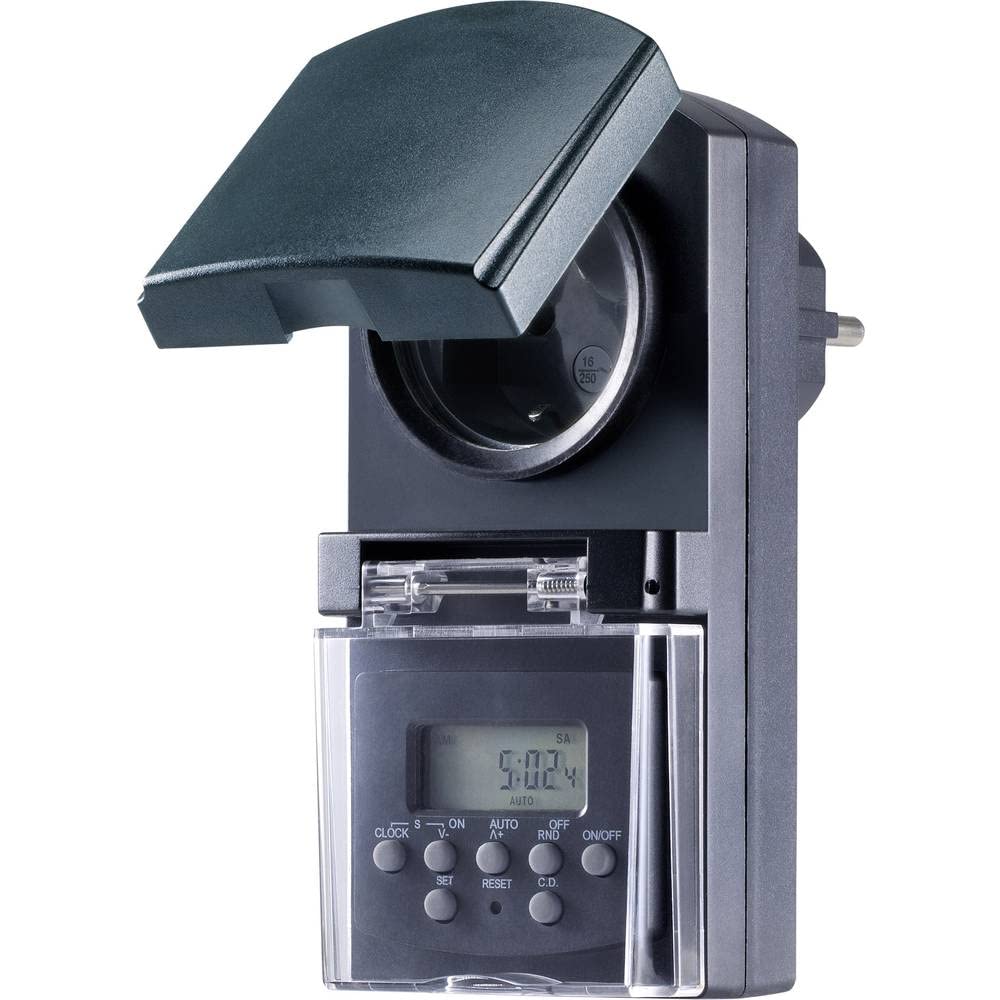
1 paveikslas: Priekyje view of the Sygonix SY-5044422 Digital Timer Switch. This image displays the LCD screen, which shows the current time and day, along with various control buttons including CLOCK, ON/OFF, SET, RESET, AUTO/A+, OFF/RND, and C.D. (Countdown).

2 paveikslas: Priekyje view of the timer with the protective cover opened, showing the integrated power socket. The display and control buttons are visible below the socket.
Valdymo mygtukai:
- LAIKRODIS: Naudojamas dabartiniam laikui ir dienai nustatyti.
- ĮJUNGTA/IŠJUNGTA: Manually switches the timer output ON or OFF.
- NUSTATYTI: Įjungia programavimo režimą ir patvirtina nustatymus.
- NUSTATYTI: Clears all settings and resets the timer to factory defaults.
- AUTO/A+: Cycles through automatic mode, program settings, and adjusts values.
- OFF/RND: Activates or deactivates the Random function.
- C.D. (Countdown): Activates or deactivates the Countdown function.
5. Sąranka
5.1 Pradinis įkrovimas
Before first use, plug the timer into a power outlet for approximately 30 minutes to charge the internal battery. This ensures the display is active and settings are retained during power outages or when unplugged.
5.2 Dabartinio laiko ir dienos nustatymas
- Paspauskite ir palaikykite LAIKRODIS mygtuką.
- Laikant LAIKRODIS, paspauskite AUTO/A+ repeatedly to set the current day (MO, TU, WE, TH, FR, SA, SU).
- Laikant LAIKRODIS, paspauskite NUSTATYTI repeatedly to set the current hour.
- Laikant LAIKRODIS, paspauskite OFF/RND pakartotinai, kad nustatytumėte dabartinę minutę.
- Atleiskite LAIKRODIS mygtuką, kad išsaugotumėte nustatymus.
5.3 Summer Time Adjustment
The timer supports a summer time function. To activate or deactivate:
- Paspauskite ir palaikykite LAIKRODIS mygtuką ir ĮJUNGTA/IŠJUNGTA button simultaneously for 3 seconds. The display will show "SUMMER" or "WINTER" to indicate the mode.
6. Naudojimo instrukcijos
6.1 Programming ON/OFF Times (Weekly Program)
The timer allows for up to 20 ON/OFF programs. Each program can be set for specific days or combinations of days.
- Paspauskite NUSTATYTI button once to enter program mode. The display will show "1 ON".
- Paspauskite AUTO/A+ to select the desired day(s) for the program (e.g., MO, TU, WE, TH, FR, SA, SU, MO-FR, SA-SU, MO-SA, etc.).
- Paspauskite NUSTATYTI to confirm the day selection.
- Paspauskite AUTO/A+ , kad nustatytumėte norimą ĮJUNGIMO valandą.
- Paspauskite OFF/RND , kad nustatytumėte norimą įjungimo minutę.
- Paspauskite NUSTATYTI again. The display will now show "1 OFF".
- Repeat steps 2-5 to set the OFF time for the same program.
- Spauskite toliau NUSTATYTI to cycle through all 20 ON/OFF programs. To exit program mode at any time, press the LAIKRODIS mygtuką.
Pastaba: After programming, ensure the timer is in AUTO mode for the programs to execute. Press ĮJUNGTA/IŠJUNGTA repeatedly until "AUTO" is displayed.
6.2 Atgalinio skaičiavimo funkcija
The countdown function allows you to switch the connected appliance ON or OFF after a set duration.
- Paspauskite CD button once. The display will show "CD ON" or "CD OFF".
- Paspauskite AUTO/A+ to set the desired countdown hour.
- Paspauskite OFF/RND to set the desired countdown minute.
- Paspauskite CD again to start the countdown. The display will show the remaining time.
- Norėdami atšaukti atgalinį skaičiavimą, paspauskite CD dar kartą.
6.3 Random Function (Presence Simulation)
The random function simulates presence by randomly switching the connected appliance ON and OFF within a set time window, deterring potential intruders.
- Įsitikinkite, kad laikmatis įjungtas AUTO režimu.
- Paspauskite OFF/RND button. The display will show "RND" to indicate the random function is active.
- The timer will now randomly switch the output ON and OFF for short periods within the programmed ON/OFF times.
- To deactivate the random function, press OFF/RND again. "RND" will disappear from the display.
6.4 Rankinis įjungimo/išjungimo perrašymas
You can manually override the programmed settings at any time.
- Paspauskite ĮJUNGTA/IŠJUNGTA button repeatedly to cycle through "ON", "OFF", and "AUTO" modes.
- "ON" means the output is continuously ON.
- "OFF" means the output is continuously OFF.
- "AUTO" means the timer will follow the programmed settings.
7. Priežiūra
- Before cleaning, always unplug the timer from the power outlet.
- Prietaisą valykite minkštu, sausu skudurėliu. Nenaudokite abrazyvinių valiklių ar tirpiklių.
- Ensure no liquids enter the device.
8. Problemų sprendimas
| Problema | Galima priežastis | Sprendimas |
|---|---|---|
| Ekranas tuščias arba blankus. | Vidinė baterija išsikrovusi. | Įjunkite laikmatį į veikiantį elektros lizdą bent 30 minučių, kad įkrautumėte bateriją. |
| Programos nevykdomos. | Laikmatis nėra automatiniame režime. | Paspauskite ĮJUNGTA/IŠJUNGTA button repeatedly until "AUTO" is displayed. |
| Incorrect time or day displayed. | Time/day was not set correctly or reset. | Refer to Section 5.2 "Setting Current Time and Day" to re-set. |
| All settings lost after power outage. | Vidinė baterija neįkrauta arba sugedusi. | Ensure the timer is regularly plugged in to keep the internal battery charged. If the issue persists, contact support. |
9. Specifikacijos
| Modelio numeris: | SY-5044422 |
| Max. Switching Capacity: | 1800 W |
| Apsaugos klasė: | IP44 (atsparus purslams) |
| Ekrano tipas: | Skaitmeninis |
| Programos: | 20 įjungimo/išjungimo programos |
| Minimum Switching Interval: | 1 minutę |
| Ypatingos savybės: | Countdown function, Random function (presence simulation), Summer time, Integrated battery for settings retention, Enhanced touch protection. |
| Gaminio matmenys: | 14 x 10 x 6 cm |
| Gamintojas: | Sygonix |
| Kilmės šalis: | Kinija |
10. Garantija ir palaikymas
This product comes with a minimum 2-year warranty from the date of purchase. In case of any issues or defects, please contact your retailer or Sygonix customer support for assistance. Keep your proof of purchase for warranty claims.