
1. Įvadas
The HUGEROCK X70 Rugged Tablet is engineered for extreme conditions, providing reliable performance for outdoor activities such as motorcycle and bicycle navigation, field monitoring, and camera applications. It features a 7-inch 2600 Nits ultra-bright display for excellent sunlight readability, an Octa-Core processor, 8GB RAM, 128GB ROM, and a robust 10000mAh battery. Designed with IP67 waterproof and MIL-STD-810G drop-proof standards, the X70 ensures durability and functionality in challenging environments.

Figure 1.1: HUGEROCK X70 Rugged Tablet with its 2600 Nits sunlight-readable display.
2. Sąrankos vadovas
2.1 Išpakavimas ir pirminė apžiūra
Upon opening the sturdy packaging, verify the presence of all components:
- Tvirtas planšetinis kompiuteris HUGEROCK X70
- Magnetinis įkrovimo laidas
- C tipo USB kabelis
- DC 12V/RS232 Charging Cable (for motorcycle use)
- External GPS Antenna (optional, if included)
- Greitos pradžios vadovas
Video 2.1: Official product video demonstrating the HUGEROCK X70 Rugged Tablet's features, including unboxing and various functionalities.
2.2 Planšetinio kompiuterio įkrovimas
The X70 offers multiple charging methods:
- C tipo USB įkrovimas: Connect the provided USB Type-C cable to the tablet's Type-C port and a compatible 5V power adapter.
- Magnetinis įkrovimas: Utilize the magnetic charging cable for convenient 5V power input. The magnetic connector securely snaps into place.
- DC 12V/RS232 Charging: For motorcycle integration, use the dedicated DC 12V/RS232 charging interface. This allows direct power from a motorcycle's 12V electrical system, bypassing the battery to prevent overheating during extended use.
Note: Only one charging mode should be used at a time.
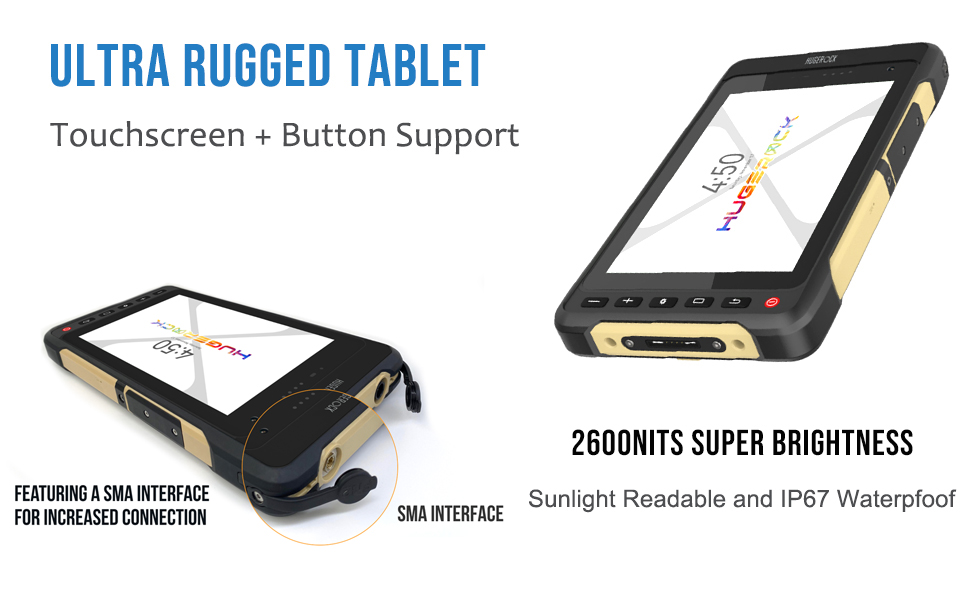
Figure 2.1: The HUGEROCK X70 supports USB Type-C, 4PIN magnetic, and DC 12V/RS232 direct charging.
2.3 SIM ir „Micro SD“ kortelių įdėjimas
The X70 supports dual Nano SIM cards or one Nano SIM and one Micro SD card for expandable storage up to 256GB. The card slots are located behind a screw-secured protective cover on the side of the tablet. Carefully remove the screws to access the slots, insert the cards as indicated, and re-secure the cover to maintain the device's waterproof and dustproof integrity.

Figure 2.2: The X70 features dual Nano SIM card slots and a Micro SD card slot for enhanced connectivity and storage.
2.4 Mounting the Tablet
The X70 is designed for versatile mounting. It features four M3-0.5 mm threaded mounting holes on the back (90 mm W x 100 mm H pattern) for custom mounting solutions. HUGEROCK also offers specialized mounts for motorcycle and bicycle use, which can be purchased separately.

Figure 2.3: The HUGEROCK X70 mounted on a motorcycle for navigation, demonstrating its outdoor utility.
3. Naudojimo instrukcijos
3.1 Įjungimas / išjungimas ir ekranas
To power on the tablet, press and hold the red power button located on the side until the screen illuminates. To power off, press and hold the power button, then select 'Power off' from the on-screen options. The 2600 Nits ultra-bright display ensures clear visibility even in direct sunlight. Adjust brightness settings via the Android system settings. The tablet also supports adaptive lighting.

Figure 3.1: Comparison illustrating the superior brightness of the X70's 2600 Nits display compared to lower brightness screens.
3.2 Touchscreen and Physical Buttons
The X70 features a responsive touchscreen that supports operation even with ordinary gloves, eliminating the need for specialized touchscreen gloves. Additionally, the tablet is equipped with physical buttons for volume control (+/-), Home, Back, and a configurable 'Gear' button for quick access to specific functions or applications.
3.3 „Android 13“ operacinė sistema
The tablet runs on a clean Android 13 operating system, free from bloatware or unnecessary advertisements. This ensures a smooth and efficient user experience. Access the Google Play Store to download and install your preferred applications.
3.4 Ryšys
The X70 offers comprehensive connectivity options:
- „Wi-Fi“: Supports Wi-Fi 5/4 for stable internet connection.
- 4G dviguba SIM kortelė: Utilize dual Nano SIM card slots for cellular data and communication.
- "Bluetooth 5.0": Connect to various Bluetooth-enabled devices such as headphones, speakers, or other peripherals.
3.5 Navigacija ir GPS
Equipped with a high-precision navigation module, the X70 provides sub-meter accuracy for GPS positioning. It supports external antennas for enhanced signal reception, ensuring stable navigation performance even in challenging environments like forests or canyons. The indicator LED will flash blue when GPS is actively working.

Figure 3.2: The X70 tablet functioning as a field monitor for a drone, showcasing its clear display and utility in outdoor settings.
3.6 laipsnių fotoaparato funkcionalumas
The X70 features a 5MP front camera and a 13MP rear camera, suitable for capturing images and videos in the field.
4. Priežiūra
4.1 Valymas ir priežiūra
Due to its rugged design and IP67 rating, the X70 can withstand exposure to water and dust. Clean the device with a soft, damp cloth. Avoid using harsh chemicals or abrasive materials. Ensure all port covers are securely closed after charging or accessing SIM/SD card slots to maintain water and dust resistance.

Figure 4.1: The X70's robust construction ensures it is IP67 waterproof, dropproof, dustproof, and shakeproof, making it suitable for harsh environments.
4.2 Uosto apsauga
All ports on the X70 are protected by screw-secured covers to ensure water and dust resistance. When opening these covers (e.g., to access the USB port or SIM/SD card slots), exercise caution to avoid losing the small screws. It is recommended to use a small piece of tape to hold the screws in place once loosened, or to perform these operations in a controlled environment where screws can be easily retrieved if dropped.
4.3 Akumuliatoriaus priežiūra
The X70 is equipped with a 10000mAh battery. To maximize battery lifespan, avoid extreme temperatures and prolonged exposure to direct sunlight when not in use. When using the DC 12V direct charging feature on a motorcycle, the tablet bypasses the internal battery to prevent overheating, which is beneficial for battery longevity during continuous operation.
5. Problemų sprendimas
5.1 „Wi-Fi“ ryšio problemos
If you experience intermittent Wi-Fi disconnections, particularly with WPA3 security protocols, try toggling the Wi-Fi off and on in the tablet's settings. If the issue persists, consider adjusting your router's security settings or creating a guest network with a different security type if feasible.
5.2 Power Loss with 12VDC Direct Charging
When operating directly from a 12VDC power source (e.g., motorcycle ignition), the tablet may shut down immediately if the 12V power is disconnected. This is by design to prevent battery overheating. To avoid sudden shutdowns, ensure continuous 12V power or power off the tablet gracefully before disconnecting the external power source. The tablet will not automatically switch to internal battery power when the 12VDC source is removed.
5.3 Indicator LED Behavior
The indicator LED on the tablet displays different states:
- Raudona: Įkrovimas.
- Žalia: Pilnai įkrautas.
- Mirksi mėlynai: GPS is active and working.
If the flashing blue light is distracting, especially during night use, a small piece of opaque tape can be used to cover it. However, this will also obscure charging status indicators.
6. Specifikacijos
| Funkcija | Specifikacija |
|---|---|
| Prekės ženklas | HUGEROKAS |
| Modelio pavadinimas | X70 |
| Stovinčio ekrano dydis | 7 colių |
| Ekrano raiška | 1920 x 1080 pikselių (Full HD) |
| Maksimali ekrano skiriamoji geba | 1920x1080 |
| RAM | 8 GB |
| Flash atminties dydis | 128 GB (Expandable up to 256GB with TF card) |
| Operacinė sistema | Android 13 |
| Procesoriaus prekės ženklas | ARM Octa-Core |
| Belaidis tipas | 802.11ac (Wi-Fi 5/4), Bluetooth 5.0 |
| Galinis Webkumštelio raiška | 13 MP |
| Priekyje Webkumštelio raiška | 5 MP |
| Baterijos talpa | 10000 mAh (ličio polimeras) |
| Vidutinis baterijos veikimo laikas (valandomis) | 7 valandų |
| Prekės svoris | 3.01 svaro |
| Gaminio matmenys (IxPxH) | 8.19 x 4.76 x 0.63 colio |
| Spalva | Desert Yellow |
| Atsparumo vandeniui įvertinimas | IP67 |
| Apsauga nuo kritimo | MIL-STD-810G |
7. Garantija ir palaikymas
The HUGEROCK X70 Rugged Tablet is manufactured by HUGEROCK and sold by Soten Technology INC. For warranty information, technical support, or service inquiries, please refer to the contact details provided in your product packaging or visit the official HUGEROCK websvetainę. Išsaugokite pirkimo čekį garantiniams reikalavimams.