
1. Įvadas
Thank you for choosing the Newday 142 cm White Ceiling Fan. This manual provides essential information for the safe installation, operation, and maintenance of your new ceiling fan. Please read these instructions thoroughly before installation and keep them for future reference.
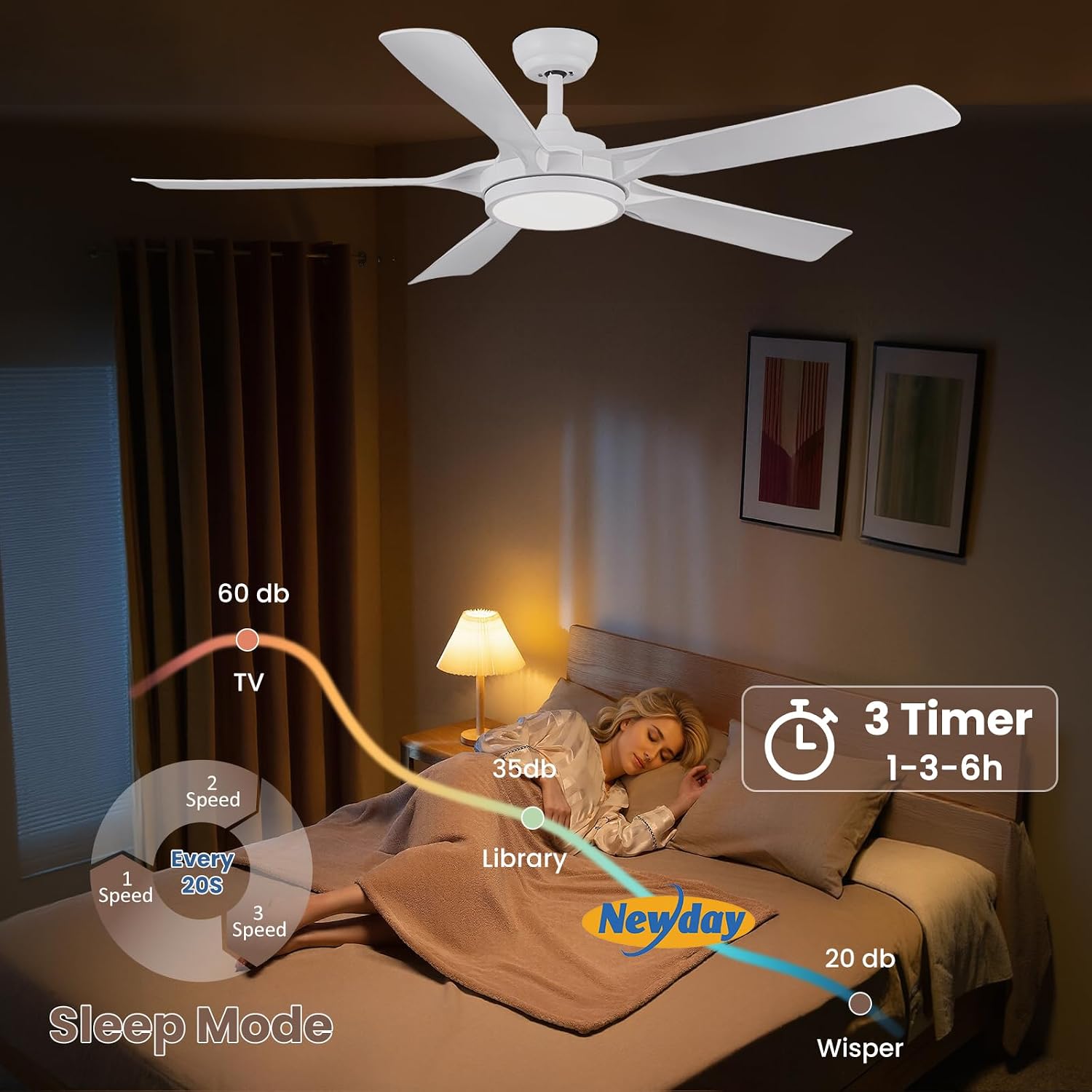
Image 1.1: The Newday 142 cm White Ceiling Fan, showcasing its modern design and integrated LED light.
2. Saugos informacija
Įrengdami ir naudodami elektros prietaisus, visada laikykitės pagrindinių saugos priemonių, kad sumažintumėte gaisro, elektros smūgio ir sužalojimo riziką.
- Prieš montuodami, valydami ar atlikdami techninę priežiūrą, įsitikinkite, kad maitinimo šaltinis yra atjungtas.
- Montavimą turi atlikti kvalifikuotas elektrikas, laikydamasis vietinių elektros kodeksų.
- Tvirtinimo konstrukcija turi būti pajėgi išlaikyti ventiliatoriaus svorį (maždaug 8.59 kg).
- Nekiškite jokių daiktų į ventiliatoriaus mentes, kai ventiliatorius veikia.
- Šis ventiliatorius skirtas naudoti tik patalpose.
3. Pakuotės turinys
Prieš pradėdami montuoti, patikrinkite, ar visi komponentai yra ir nepažeisti.
- Ceiling Fan Unit with 5 ABS Blades
- Integrated Dimmable LED Light
- Nuotolinio valdymo pultas (reikalingos 2 AAA baterijos, pridedamos)
- Montavimo įranga
- Vartotojo vadovas
4. Montavimas
This section outlines the general steps for installing your Newday ceiling fan. Professional installation is recommended.
- Paruoškite montavimo vietą: Ensure the ceiling junction box is securely mounted and can support the fan's weight. The fan can be installed on flat ceilings or sloped ceilings up to 15 degrees.
- Sumontuokite montavimo laikiklį: Attach the mounting bracket to the ceiling junction box using the provided hardware.
- Surinkite ventiliatorių: Attach the fan blades to the motor housing. Connect the LED light assembly.
- Ventiliatoriaus prijungimas: Connect the fan's electrical wires to the household wiring according to the wiring diagram in the full installation guide (not included in this summary). Ensure all connections are secure.
- Ventiliatoriaus montavimas: Carefully lift the fan assembly and hang it on the mounting bracket. Secure the fan to the bracket.
- Bandomoji operacija: Atkurkite maitinimą ir patikrinkite ventiliatoriaus bei apšvietimo funkcijas naudodami nuotolinio valdymo pultą.

Image 4.1: This image illustrates the fan's dimensions (142 cm width, 32 cm height), recommended room size (16-36 m²), and compatible mounting types (flat mount and slope mount up to 15°).
5. Naudojimo instrukcijos
Your Newday ceiling fan is controlled by a remote control, offering convenience and a range of customizable settings.
5.1 Nuotolinio valdymo pulto funkcijos
- Maitinimo įjungimas/išjungimas: Įjungia arba išjungia ventiliatorių ir šviesą.
- Ventiliatoriaus greičio valdymas: Adjusts between 6 fan speeds (77, 96, 121, 145, 163, and 185 RPM).
- Šviesos įjungimas / išjungimas: Controls the LED light independently.
- Light Color Temperature Adjustment: Cycles through 3 color temperatures: 3000K (Warm White), 4000K (Natural Light), and 6500K (Cool White).
- Light Brightness Dimming: Adjusts LED brightness from 20% to 100%.
- Laikmačio funkcija: Nustatykite ventiliatorių taip, kad jis automatiškai išsijungtų po 1, 3 arba 6 valandų.
- Reversible Function (Summer/Winter Mode): Keičia peilio sukimosi kryptį.
5.2 Ventiliatoriaus greičio valdymas
The fan offers 6 adjustable speeds to suit your comfort needs. Speed 1-2 provides a gentle breeze, 3-4 a natural wind, and 5-6 a strong cooling wind, with a maximum air volume of 8000 CFM.

Image 5.1: This image details the 6 adjustable fan speeds, categorized into Slow (1-2), Medium (3-4), and Fast (5-6) settings, along with their respective RPM ranges and power consumption. The maximum air volume is 7000 CFM.
5.3 Šviesos valdymas
The integrated 24W LED light is dimmable from 20% to 100% and offers three color temperatures: 3000K (Warm White, 2080 LM), 4000K (Natural Light, 2474 LM), and 6500K (Cool White, 2194 LM).

Image 5.2: This image demonstrates the stepless adjustable color temperature (3000K, 4200K, 6500K) and brightness (20% to 100%) of the fan's LED light.
5.4 Timer and Quiet Operation
The fan features a 1, 3, or 6-hour timer for convenient automatic shut-off. The DC motor ensures quiet operation, making it suitable for bedrooms and other quiet environments. The fan also has a memory function that recalls the last setting after power off.

Image 5.3: This image highlights the fan's sleep mode, indicating low noise levels (as low as 20 dB) and the 1, 3, or 6-hour timer function.
5.5 Reversible Function (Summer/Winter Use)
The fan includes a reversible motor for year-round comfort. In summer, the fan rotates counter-clockwise to create a cooling downdraft. In winter, it rotates clockwise to circulate warm air trapped near the ceiling, balancing room temperature.

Image 5.4: This image visually explains the reversible function, showing counter-clockwise rotation for rapid cooling in summer and clockwise rotation for balancing heating in winter.
6. Priežiūra
Reguliarus valymas užtikrina optimalų ventiliatoriaus veikimą ir pailgina jo tarnavimo laiką.
- Valymas: Reguliariai nuvalykite ventiliatoriaus mentes ir variklio korpusą minkšta šluoste.amp audinys. Nenaudokite abrazyvinių valiklių ar tirpiklių.
- Ašmenų balansas: If the fan wobbles, check that all blade screws are tight and that the blades are properly balanced.
- Šviesos šaltinis: The LED light source is replaceable. Refer to the full service manual for instructions on how to change it.
- Maitinimo atjungimas: Always disconnect power at the circuit breaker before performing any cleaning or maintenance.
7. Problemų sprendimas
Jei kyla problemų dėl ventiliatoriaus, žr. šias dažniausiai pasitaikančias problemas ir sprendimus:
| Problema | Galima priežastis | Sprendimas |
|---|---|---|
| Ventiliatorius neįsijungia | No power supply; Remote control batteries dead; Incorrect wiring. | Check circuit breaker; Replace remote batteries; Verify wiring connections. |
| Šviesa neveikia | LED light source faulty; Incorrect wiring. | Replace LED light source; Verify wiring connections. |
| Ventiliatoriaus virpėjimas | Atsilaisvinę peilių varžtai; Nesubalansuoti peiliai; Atsilaisvinęs tvirtinimo laikiklis. | Tighten all blade screws; Balance blades using a balancing kit (not included); Ensure mounting bracket is secure. |
| Nuotolinio valdymo pultas neveikia | Išsikrovusios baterijos; nuotolinio valdymo pultas nesuporuotas. | Replace batteries (2 AAA); Refer to the full manual for remote pairing instructions. |
Jei problemos išlieka, susisiekite su klientų aptarnavimo tarnyba.
8. Specifikacijos
| Prekės ženklas | Newday |
| Modelio numeris | ND-56-1126WT-DE |
| Matmenys (I x P x A) | 142 x 142 x 35.5 cm |
| Grynasis svoris | 8.59 kg |
| Ašmenų medžiaga | ABS |
| Būsto medžiaga | Acrylonitrile Butadiene Styrene, Acrylic, Metal |
| Spalva | Baltas |
| Variklio tipas | DC variklis |
| Ventiliatoriaus greičiai | 6 speeds (77, 96, 121, 145, 163, 185 RPM) |
| Maksimalus oro tūris | 8000 CFM |
| Šviesos tipas | Integruotas reguliuojamo ryškumo LED |
| LED vattage | 24 vatų |
| Ryškumo diapazonas | 20 % – 100 % |
| Spalvų temperatūros | 3000 K (šiltai balta), 4000 K (natūrali šviesa), 6500 K (šaltai balta) |
| Maksimalus šviesos srautas | 2474 Lumens (at 4000K) |
| Kontrolės metodas | Nuotolinio valdymo pultas |
| Laikmačio nustatymai | 1h, 3h, 6h |
| Installation Slope | Iki 15° |
| Maitinimo šaltinis | Su laidu elektra |
| Nuotolinės baterijos | 2 AAA (įtraukta) |
| Energijos etiketė | F |
9. Garantija ir palaikymas
Newday is committed to providing quality products and excellent customer service. While specific warranty details are not provided in this document, please retain your proof of purchase for any warranty claims.
For technical assistance, troubleshooting beyond this manual, or to inquire about warranty service, please contact Newday customer support through the retailer where the product was purchased or visit the official Newday websvetainę.


