
1. Įvadas
The ESP32-PICO-KIT-1 is a compact development board designed by Espressif, featuring the ESP32-PICO-V3 chip. This board provides a robust hardware platform for developing and prototyping applications based on the ESP32, enabling users to explore its extensive functionalities, including Wi-Fi connectivity. This manual will guide you through the essential steps to set up, operate, maintain, and troubleshoot your ESP32-PICO-KIT-1.
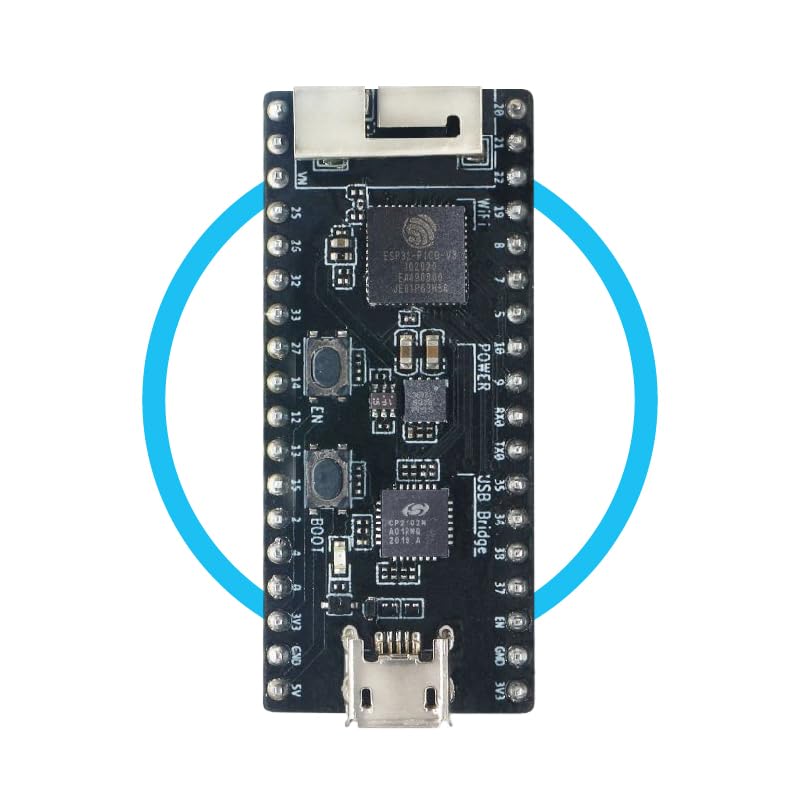
Figure 1: Espressif ESP32-PICO-KIT-1 Development Board. This image displays the compact form factor of the development board, highlighting its main components and pin headers.
2. Sąranka
Follow these steps to prepare your ESP32-PICO-KIT-1 for development:
- Išpakavimas: Carefully remove the ESP32-PICO-KIT-1 board from its packaging. Inspect for any visible damage.
- Maitinimo jungtis: Connect the board to your computer using a standard Micro-USB cable. The board will draw power from the USB port. Ensure the cable is securely connected to both the board's Micro-USB port and your computer's USB port.
- Tvarkyklės diegimas: Depending on your operating system (Windows, macOS, Linux), you may need to install USB-to-Serial drivers (e.g., CP210x or FTDI drivers) to allow your computer to communicate with the ESP32-PICO-KIT-1. These drivers are typically available on the Espressif official website or the chip manufacturer's websvetainę.
- Kūrimo aplinkos sąranka: Install the necessary development tools, such as the Espressif IDF (IoT Development Framework) or Arduino IDE with ESP32 board support. Refer to the official Espressif documentation for detailed instructions on setting up your preferred development environment.
3. Operating the ESP32-PICO-KIT-1
Once your development environment is set up, you can begin programming and operating your ESP32-PICO-KIT-1:
- Connecting to the IDE: Open your chosen Integrated Development Environment (IDE). Select the correct board model (ESP32 Dev Module or similar) and the serial port corresponding to your connected ESP32-PICO-KIT-1.
- Uploading Firmware: Write or load your application code. Compile the code and then upload it to the ESP32-PICO-KIT-1 board via the USB connection. The board will typically reset automatically after a successful upload.
- Monitoring Serial Output: Use the serial monitor feature in your IDE to view debug messages and output from your running application on the ESP32-PICO-KIT-1. Ensure the baud rate in the serial monitor matches the baud rate configured in your code.
- „Wi-Fi“ ryšys: The ESP32-PICO-KIT-1 supports Wi-Fi. Your application code can utilize the ESP-IDF Wi-Fi libraries to connect to local networks, host access points, or perform other network-related tasks.
4. Priežiūra
Proper care ensures the longevity and reliable operation of your ESP32-PICO-KIT-1:
- Tvarkymas: Always handle the board by its edges to avoid touching sensitive electronic components. Static electricity can damage the board.
- Valymas: Jei reikia, švelniai nuvalykite plokštę minkštu, sausu, antistatiniu šepetėliu arba šluoste. Venkite naudoti skysčius ar abrazyvines medžiagas.
- Saugykla: Plokštę laikykite sausoje, vėsioje vietoje, toliau nuo tiesioginių saulės spindulių ir ekstremalių temperatūrų. Jei laikote ilgesnį laiką, naudokite antistatinius maišelius.
- Maitinimas: Use a stable and appropriate power supply (via USB) to prevent damage to the board. Avoid using uncertified or faulty USB cables.
5. Problemų sprendimas
Čia pateikiami dažniausiai pasitaikančių problemų, su kuriomis galite susidurti, sprendimai:
- Kompiuteris neaptiko plokštės:
- Įsitikinkite, kad USB laidas yra visiškai prijungtas ir veikia.
- Verify that the correct USB-to-Serial drivers are installed for your operating system.
- Išbandykite kitą kompiuterio USB prievadą.
- Nepavyksta įkelti programinės įrangos:
- Check if the correct serial port is selected in your IDE.
- Ensure the board is in programming mode (some boards require pressing a 'BOOT' button while resetting).
- Verify that your development environment is correctly configured for the ESP32.
- Close any other applications that might be using the serial port.
- No Output on Serial Monitor:
- Confirm the baud rate in the serial monitor matches the baud rate set in your code.
- Ensure your code includes serial print statements.
- Check if the board is powered and running your program.
- „Wi-Fi“ ryšio problemos:
- Double-check Wi-Fi credentials (SSID and password) in your code.
- Ensure the Wi-Fi network is within range and operating on a 2.4 GHz band (ESP32 typically supports 2.4 GHz).
- Verify that your router is not blocking new connections or has MAC address filtering enabled.
6. Specifikacijos
Key technical specifications for the ESP32-PICO-KIT-1 Development Board:
| Funkcija | Detalė |
|---|---|
| Modelio pavadinimas | ESP32-PICO-KIT-1 |
| Procesoriaus prekės ženklas | Espressif |
| Procesoriaus skaičius | 2 |
| Įdiegtos RAM atminties dydis | 520 KB |
| RAM atminties technologija | LPDDR2 |
| Ryšio technologija | Wi-Fi |
| Iš viso USB prievadų | 1 |
| Operacinė sistema | Linux (compatible) |
| Suderinami įrenginiai | Computers, Smartphones, Microcontrollers |
7. Informacija apie garantiją
The ESP32-PICO-KIT-1 Development Board comes with a 2 metų gamintojo garantija. This warranty covers defects in materials and workmanship under normal use. For warranty claims or detailed terms and conditions, please refer to the official Espressif websvetainėje arba susisiekite su jų klientų aptarnavimo tarnyba.
Additionally, the product is eligible for a 30-day refund/replacement return policy from the point of purchase, subject to the retailer's terms.
8. Parama
For further assistance, technical documentation, and community support, please visit the official Espressif websvetainė:
- „Espressif“ oficialus Websvetainė: www.espressif.com
- Dokumentacija: Access detailed datasheets, programming guides, and application notes for the ESP32-PICO-KIT-1 and ESP32 series.
- Bendruomenės forumai: Engage with other developers and Espressif experts to share knowledge and troubleshoot issues.
For direct inquiries regarding your purchase, please contact the seller, ESPRESSIF SYSTEMS, through the Amazon platform.