
Įvadas
Welcome to the iRobot Roomba i1 (1152) Robot Vacuum user manual. This guide provides essential information for setting up, operating, maintaining, and troubleshooting your robot vacuum. The Roomba i1 is designed to efficiently clean hard floors and carpets, utilizing Wi-Fi connected mapping technology to navigate your home.
Svarbi saugos informacija
Before using your Roomba i1 robot vacuum, please read all safety instructions carefully. Failure to follow these instructions may result in electric shock, fire, or serious injury.
- Šį prietaisą gali naudoti vaikai nuo 8 metų ir asmenys, turintys ribotų fizinių, jutiminių ar protinių gebėjimų arba neturintys patirties ir žinių, jei jie yra prižiūrimi arba yra instruktuojami, kaip saugiai naudoti prietaisą ir supranta su tuo susijusius pavojus. .
- Children should not play with the appliance. Cleaning and user maintenance shall not be made by children without supervision.
- Naudokite tik taip, kaip aprašyta šiame vadove.
- Nenaudokite lauke arba ant šlapių paviršių.
- Neleisti naudoti kaip žaislo. Būtinas didelis dėmesys, kai naudojasi vaikai arba jie yra šalia jų.
- Nenaudokite su pažeistu laidu ar kištuku. Jei prietaisas neveikia taip, kaip turėtų, buvo numestas, pažeistas, paliktas lauke arba įmestas į vandenį, grąžinkite jį į techninės priežiūros centrą.
- Netraukite ir neneškite už laido, nenaudokite laido kaip rankenos, neuždarykite durelių ant laido ir netraukite laido už aštrių briaunų ar kampų. Neleiskite prietaiso per laidą. Laikykite laidą toliau nuo įkaitusių paviršių.
- Neištraukite kištuko traukdami už laido. Norėdami atjungti kištuką, imkite už kištuko, o ne už laido.
- Nelieskite kištuko ar prietaiso šlapiomis rankomis.
- Nekiškite jokių daiktų į angas. Nenaudokite, kai jokia anga užblokuota; saugokite nuo dulkių, pūkelių, plaukų ir nieko, kas gali sumažinti oro srautą.
- Plaukus, laisvus drabužius, pirštus ir visas kūno dalis laikykite toliau nuo angų ir judančių dalių.
- Neimkite nieko, kas dega ar rūko, pavyzdžiui, cigarečių, degtukų ar karštų pelenų.
- Nenaudokite degiems ar degiems skysčiams, pvz., benzinui, surinkti arba nenaudokite vietose, kur jų gali būti.
- Nenaudokite be dulkių maišelio ir (arba) filtrų.
- Apsaugokite nuo netyčinio paleidimo. Prieš prijungdami prie akumuliatoriaus, paimdami ar nešdami prietaisą, įsitikinkite, kad jungiklis yra išjungtoje padėtyje.
- Įkraukite tik gamintojo nurodytu įkrovikliu. Įkroviklis, tinkamas vieno tipo akumuliatorių paketui, gali sukelti gaisro pavojų, kai naudojamas su kitu akumuliatoriumi.
- Prietaisus naudokite tik su specialiai tam skirtomis baterijomis. Naudojant bet kokius kitus akumuliatorių blokus gali kilti sužeidimo ir gaisro pavojus.
- Kai nenaudojate akumuliatoriaus, laikykite jį toliau nuo kitų metalinių objektų, pvz., sąvaržėlių, monetų, raktų, vinių, varžtų ar kitų smulkių metalinių objektų, kurie gali sujungti vieną gnybtą prie kito. Akumuliatoriaus gnybtų trumpasis sujungimas gali sukelti nudegimus arba gaisrą.
- Netinkamomis sąlygomis iš akumuliatoriaus gali išsiskirti skystis; vengti kontakto. Atsitiktinai kontaktuojant, nuplaukite vandeniu. Jei skysčio pateko į akis, papildomai kreipkitės medicininės pagalbos. Iš akumuliatoriaus išsiveržęs skystis gali sudirginti arba nudeginti.
- Nenaudokite pažeisto ar modifikuoto akumuliatoriaus ar prietaiso. Pažeistos arba modifikuotos baterijos gali elgtis nenuspėjamai, o tai gali sukelti gaisrą, sprogimą arba susižeisti.
- Saugokite akumuliatorių ar prietaisą nuo ugnies ar per aukštos temperatūros. Patekimas į ugnį arba aukštesnė nei 130 ° C (265 ° F) temperatūra gali sukelti sprogimą.
- Laikykitės visų įkrovimo instrukcijų ir nekraukite akumuliatoriaus ar prietaiso už instrukcijose nurodyto temperatūros diapazono ribų. Netinkamai įkraunant arba esant temperatūrai, kuri nepatenka į nurodytą diapazoną, galite sugadinti akumuliatorių ir padidinti gaisro pavojų.
- Teikti techninę priežiūrą kvalifikuotam remontininkui, naudojant tik identiškas atsargines dalis. Taip bus užtikrintas gaminio saugumas.
- Nekeiskite ir nebandykite taisyti prietaiso arba akumuliatoriaus bloko (jei taikoma), išskyrus atvejus, nurodytus naudojimo ir priežiūros instrukcijose.
Pakuotės turinys
Verify that all original components are included in your package:
- iRobot Roomba i1 Robot Vacuum
- Namų bazinė įkrovimo stotis
- Linijos laidas
- 1 ličio jonų baterija (iš anksto įdiegta)
- Šoninis šepetys
- Filter (Cloth Type)
- Dual Multi-Surface Rubber Brushes
Sąranka
Follow these steps to set up your Roomba i1 robot vacuum for first use:
- Pasirinkite namų bazės vietą: Place the Home Base charging station against a wall in an open, uncluttered area. Ensure there is at least 1.5 feet (0.5 meters) of clear space on each side of the Home Base and 4 feet (1.2 meters) in front of it.
- Prijunkite maitinimo laidą: Plug the line cord into the Home Base and then into a wall outlet. Ensure the Home Base is powered on.
- Įkraukite robotą: Place your Roomba i1 onto the Home Base. The robot will emit a tone to confirm it is properly docked and charging. Allow the robot to charge for at least 3 hours before its first cleaning mission. The light ring around the CLEAN button will pulse white while charging and turn solid white when fully charged.
- Atsisiųskite „iRobot Home“ programą: For full functionality, download the iRobot Home App on your smartphone or tablet. The app will guide you through connecting your robot to your Wi-Fi network and setting up cleaning schedules.
- Prisijunkite prie „Wi-Fi“: Follow the in-app instructions to connect your Roomba i1 to your home Wi-Fi network. This enables smart features like mapping, scheduling, and integration with voice assistants.

Operating Your Roomba i1
Your Roomba i1 is designed for intelligent and efficient cleaning. Here's how to operate it:
Valymo darbo pradžia
- Naudojant mygtuką „CLEAN“: Press the large CLEAN button on top of the robot once to wake it up, then press it again to start a cleaning cycle.
- Naudojant „iRobot Home“ programėlę: Open the app and tap the "CLEAN" button to start a cleaning job from anywhere. You can also schedule cleaning times and customize cleaning preferences through the app.
- Valdymas balsu: The Roomba i1 is compatible with Google Home. Once connected via the iRobot Home App, you can use voice commands like "Hey Google, ask Roomba to start cleaning."
Valymo ypatybės
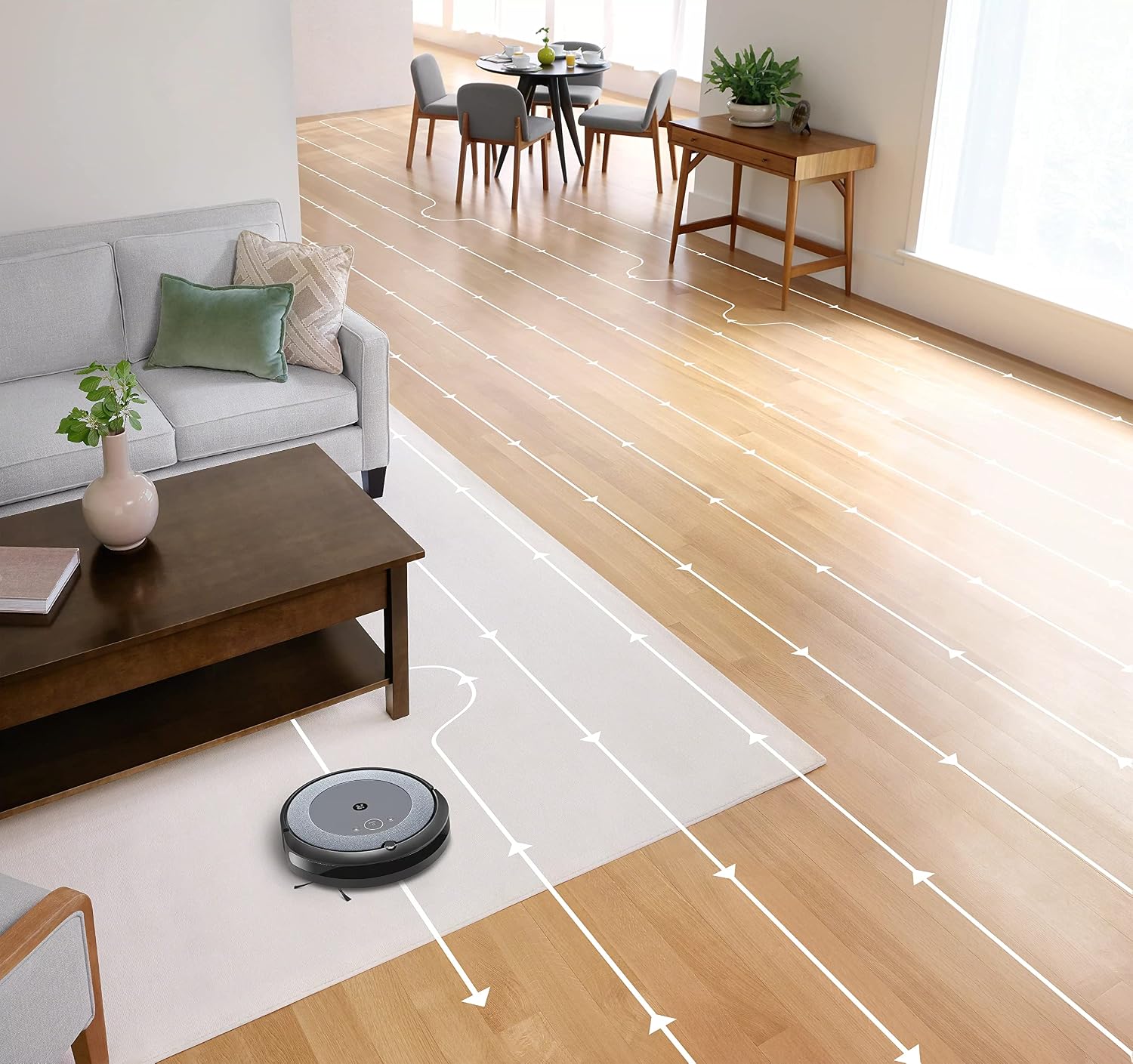
- Pažangi navigacija: The robot cleans in neat, efficient rows, adapting to different floor types including carpets and hard floors.
- Dvigubi daugiapaviršiniai guminiai šepečiai: These brushes are designed to prevent tangles with pet hair and effectively pick up dirt and debris from various surfaces.
- Dirt Detect™ Technology: The robot uses acoustic and optical sensors to find dirtier areas and spends more time cleaning them.
- Automatic Dirt Disposal (with compatible Clean Base): If you have a compatible Clean Base (sold separately), the robot will automatically empty its dustbin into an enclosed bag, allowing for weeks of hands-free cleaning.


Priežiūra
Regular maintenance ensures your Roomba i1 operates at peak performance. Always turn off the robot and disconnect it from the Home Base before performing any maintenance.
Dulkių dėžės ištuštinimas
- Paspauskite šiukšliadėžės atlaisvinimo mygtuką ir ištraukite šiukšliadėžę.
- Atidarykite šiukšliadėžės dureles ir išmeskite šiukšles į šiukšliadėžę.
- Tap the bin against the trash can to dislodge any trapped debris.
Cleaning the Filter (Cloth Type)
- Išimkite filtrą iš dulkių konteinerio.
- Pabaksnokite filtrą į šiukšliadėžę, kad pašalintumėte šiukšles. Neplaukite filtro.
- Replace the filter every 2 months, or more frequently if you have pets.
Šepečių valymas
- Pinch the yellow brush release tabs to lift the brush frame.
- Remove the brushes and remove any hair or debris wrapped around them or trapped beneath the yellow caps.
- Įstatykite šepečius atgal, įsitikindami, kad jie užsifiksavo savo vietoje.
Šoninio šepetėlio valymas
- Use a coin or small screwdriver to remove the screw holding the side brush.
- Remove the side brush and clean any hair or debris from the brush and its post.
- Vėl uždėkite šoninį šepetį ir priveržkite varžtą.
Jutiklių ir įkrovimo kontaktų valymas
- Wipe the charging contacts on the robot and Home Base with a clean, dry cloth.
- Wipe the cliff sensors (located on the bottom of the robot) and the front bumper sensor window with a clean, dry cloth.
Trikčių šalinimas
If your Roomba i1 encounters an issue, the robot will play an audible alert and the light ring around the CLEAN button will flash. Consult the iRobot Home App for specific error messages and solutions.
Dažnos problemos ir sprendimai:
- Robotas neįkraunamas: Ensure the Home Base is plugged in and the robot is properly docked. Clean the charging contacts on both the robot and Home Base.
- Robotas įstrigo arba įstrigo: Clear obstacles from the robot's path. If it frequently gets stuck in the same area, consider using Virtual Wall Barriers (sold separately) or adjusting furniture.
- Prastas valymo efektyvumas: Empty the dust bin, clean or replace the filter, and clean the main brushes and side brush. Ensure the robot's sensors are clean.
- Robotas neprisijungia prie „Wi-Fi“: Ensure your Wi-Fi router is on and within range. Restart your router and the robot. Follow the Wi-Fi setup instructions in the iRobot Home App again.
- Robotas skleidžia neįprastus garsus: Check the brushes and wheels for any trapped debris or hair. Clean them thoroughly.
For more detailed troubleshooting, refer to the iRobot Home App or the iRobot support websvetainę.
Specifikacijos
| Prekės ženklas | iRobot |
| Modelio pavadinimas | Roomba i1 (1152) |
| Ypatinga funkcija | Smart, Wi-Fi Connected Mapping |
| Spalva | Juoda/Pilka |
| Įtraukti komponentai | Robot Vacuum, Home Base, Line Cord, Battery, Side Brush, Filter, Dual Multi-Surface Rubber Brushes |
| Filtro tipas | Audinys |
| Maitinimo šaltinis | Maitinamas baterijomis |
| Baterijos | 1 ličio jonų baterija (pridedama) |
| Kontrolės metodas | Programėlė |
| Suderinami įrenginiai | „Google“ pagrindinis puslapis |
| Formos faktorius | Robotas |
| Gaminio matmenys | 13.5 x 3.6 x 13.4 colio |
| Prekės svoris | 13.2 svaro |
| Paviršiaus rekomendacija | Kilimai, kietos grindys |
| UPC | 657768820809 |
| ASIN | B0CPQ3RVDK |
Garantija ir palaikymas
This product is sold as a renewed item. Please refer to the specific warranty terms provided by the seller or Amazon Renewed at the time of purchase. For technical support, troubleshooting assistance, or to purchase replacement parts, please visit the official iRobot support website or contact iRobot customer service. You can also find helpful resources within the iRobot Home App.
Palaikymas internetu: www.irobot.com/support