
1. Įvadas
Thank you for choosing the ieGeek 5MP Outdoor Wi-Fi Security Camera. This manual provides essential information for the proper installation, operation, and maintenance of your camera. Please read these instructions carefully before use and retain them for future reference. This camera is designed to provide reliable outdoor surveillance with advanced features for enhanced security.
2. Produktas baigtasview
The ieGeek 5MP Outdoor Wi-Fi Security Camera offers high-definition monitoring with flexible connectivity and smart detection capabilities.
Pagrindinės funkcijos:
- 5MP HD raiška: Provides clear and vivid images and videos with 2880x1600 resolution and 4x digital zoom.
- Dual-Band Wi-Fi (2.4/5 GHz): Supports both 2.4 GHz and 5 GHz Wi-Fi for stable and faster network connection.
- 360° PTZ Monitoring: Pan (355° horizontal) and Tilt (120° vertical) functionality allows for comprehensive area coverage.
- Spalvotas naktinis matymas: Three night vision modes (color, infrared, smart) with a range of up to 15 meters (50 feet).
- PIR Humanoid Detection: Advanced human detection reduces false alarms caused by non-human movements.
- Garso ir šviesos signalizacija: Deters intruders with customizable sound and light alerts.
- Nepertraukiamas įrašymas visą parą: Supports continuous recording and event-based recording.
- Vietinė ir debesies saugykla: Compatible with Micro SD cards (up to 128GB, not included) and cloud storage options.
- Kelių vartotojų bendrinimas: Share camera access with family members via the dedicated app.
- IP65 atsparumas oro sąlygoms: Sukurtas naudoti lauke, atsparus dulkėms ir vandeniui.
Kameros komponentai:
The camera unit typically includes the main camera body, dual Wi-Fi antennas, a power input port, and a Micro SD card slot.
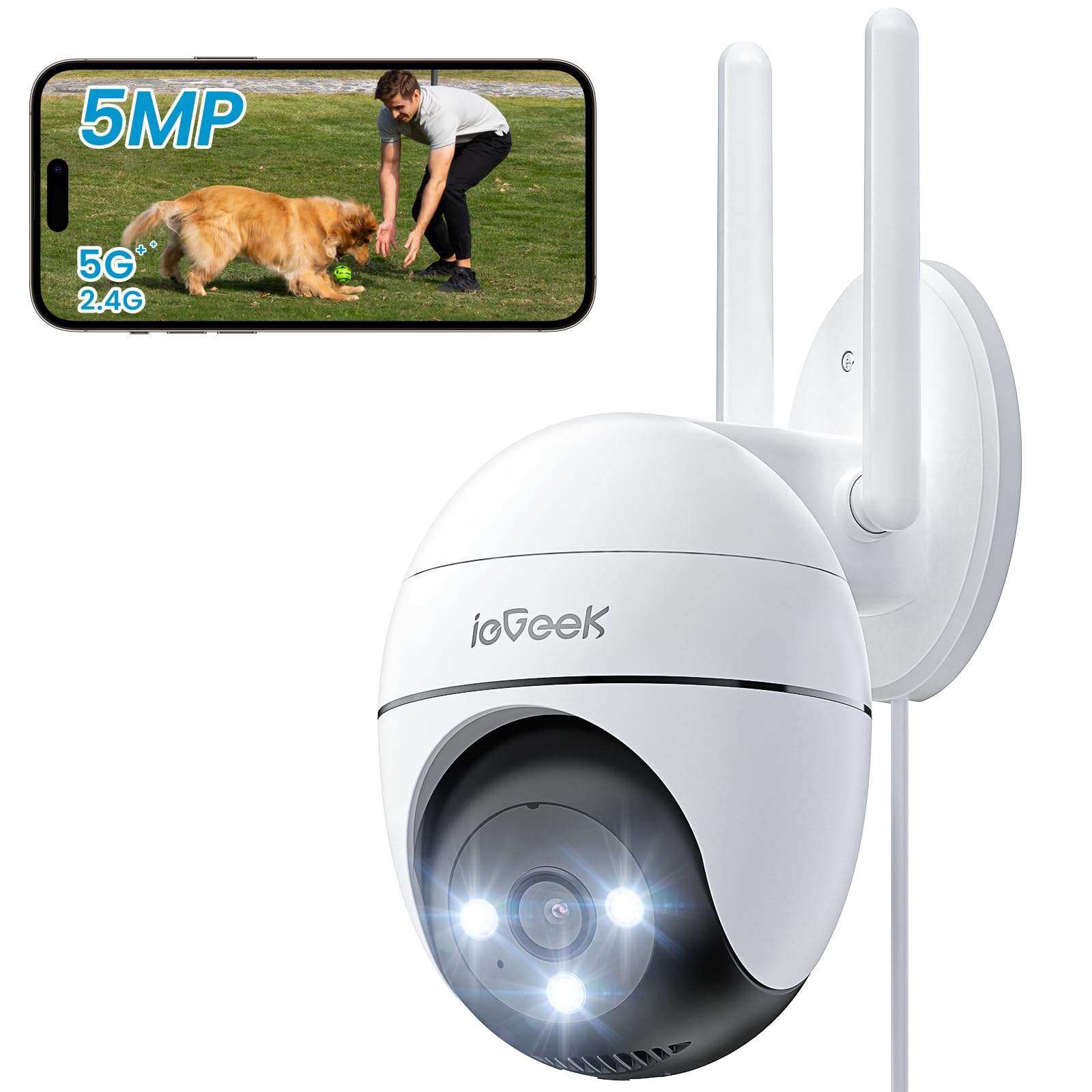
Figure 2.1: ieGeek 5MP Outdoor Wi-Fi Security Camera (Model ZS-GQ4)

2.2 pav. Baigtaview of ieGeek 5MP Camera Features including PTZ, 24/7 recording, 2-way audio, humanoid tracking, Alexa compatibility, local and cloud storage, multi-user sharing, customizable alert areas, AI detection, and acoustic/light alarms.

Figure 2.3: The camera features a 5dBi antenna for improved Wi-Fi signal strength and stability.
3. Sąrankos instrukcijos
3.1 Pakuotės turinys
- ieGeek 5MP Outdoor Wi-Fi Security Camera
- Maitinimo adapteris
- Montavimo varžtai ir inkarai
- Vartotojo vadovas
3.2 Programėlės atsisiuntimas ir paskyros registravimas
- Atsisiųskite ieGeek kamera or „CloudEdge“ app from your smartphone's app store (iOS/Android).
- Register for an account using your email address and create a secure password.
3.3 Kameros prijungimas
- Power on the camera by connecting it to a power outlet using the provided adapter.
- Open the ieGeek Cam/CloudEdge app and tap the "+" icon to add a new device.
- Follow the on-screen instructions to connect the camera to your 2.4 GHz or 5 GHz Wi-Fi network. Ensure your phone is connected to the same Wi-Fi network during setup.
- Kai būsite paraginti, nuskaitykite telefone rodomą QR kodą kameros objektyvu.
- Prisijungę galite pavadinti savo kamerą ir pradėti tiesioginį transliavimą. viewing.

Figure 3.1: Connecting the power adapter to the camera.
3.4 Fizinis įrengimas
- Choose a suitable outdoor location with a clear view ir stiprų „Wi-Fi“ signalą.
- Gręžimo skylėms pažymėti naudokite pateiktą tvirtinimo šabloną.
- Drill holes, insert anchors, and secure the camera base with screws.
- Sureguliuokite fotoaparato kampą pagal poreikį.

Figure 3.2: Ensure optimal Wi-Fi signal strength at the chosen installation location for stable performance.
4. Naudojimo instrukcijos
4.1 Tiesiogiai View ir PTZ valdymas
- Open the ieGeek Cam/CloudEdge app and select your camera to view gyvas pašaras.
- Use the on-screen joystick or swipe gestures to control the camera's pan (horizontal 355°) and tilt (vertical 120°) movements.

Figure 4.1: Control the camera's 355° horizontal and 120° vertical rotation directly from your smartphone app.
4.2 Naktinio matymo režimai
Kamera turi tris naktinio matymo režimus:
- Spalvotas naktinis matymas: Utilizes built-in spotlights to provide full-color images in low-light conditions.
- Infraraudonųjų spindulių nakties vizija: Naudoja infraraudonųjų spindulių šviesos diodus, kad būtų galima gauti nespalvotus vaizdus visiškoje tamsoje.
- Išmanusis naktinis matymas: Automatically switches between infrared and color night vision upon detection of motion.
4.3 Judesio aptikimas ir signalizacijos
- PIR Humanoid Detection: Configure sensitivity levels in the app to minimize false alarms.
- Pritaikomos aptikimo zonos: Nustatykite konkrečias judesio aptikimo sritis, kad būtų sutelktas dėmesys į kritines zonas.
- Garso ir šviesos signalizacija: When motion is detected, the camera can activate a siren and/or spotlights to deter intruders. You can choose between silent, spotlight only, siren only, or both siren and spotlight modes.

Figure 4.2: Select from silent, spotlight only, siren only, or both siren and spotlight alarm modes to suit your security needs.

Figure 4.3: The camera's humanoid motion tracking follows detected human figures, reducing false alarms from other movements.

Figure 4.4: AI smart monitoring can differentiate between various detection types such as people, animals, packages, and vehicles (some features may require a subscription).
4.4 Įrašymas ir saugojimas
- Nepertraukiamas įrašymas: The camera supports 24/7 continuous recording to a Micro SD card (not included).
- Renginio įrašas: Įrašo vaizdo įrašus, kai aptinkamas judesys.
- „Micro SD“ kortelė: Įdėkite „Micro SD“ kortelę (iki 128 GB) į tam skirtą lizdą, skirtą vietinei saugyklai.
- Saugykla debesyje: Optional cloud storage plans are available through the app for secure off-site backup.

Figure 4.5: The camera supports 24/7 continuous recording, ensuring constant surveillance.
5. Priežiūra
5.1 Kameros valymas
- Prieš valydami įsitikinkite, kad kamera yra išjungta.
- Naudokite minkštą, damp šluoste nuvalykite fotoaparato korpusą.
- For the lens, use a specialized lens cleaning cloth to avoid scratches. Do not use harsh chemicals or abrasive cleaners.
5.2 Aplinkosaugos aspektai
- The camera has an IP65 weather resistance rating, making it suitable for outdoor use in various weather conditions.
- Darbinės temperatūros diapazonas: nuo -20 °C iki 50 °C (nuo -4 °F iki 122 °F).

Figure 5.1: The camera is designed with IP65 weather resistance to withstand outdoor elements like rain.

Figure 5.2: The camera operates effectively within a wide temperature range of -20°C to 50°C.
6. Problemų sprendimas
If you encounter issues with your ieGeek camera, please refer to the following common troubleshooting steps:
6.1 Ryšio problemos
- Fotoaparatas neprisijungęs: Ensure the camera is powered on and within range of your Wi-Fi router. Check your Wi-Fi signal strength in the app. Try restarting the camera and your router.
- Nepavyko prisijungti prie „Wi-Fi“: Verify your Wi-Fi password is correct. Ensure you are connecting to a 2.4 GHz or 5 GHz network as supported. If using a dual-band router, ensure the camera is connecting to the correct band.
6.2 Judesio aptikimo problemos
- Too Many False Alarms: Adjust the PIR detection sensitivity in the app. Define specific detection zones to exclude areas with frequent irrelevant movements (e.g., trees swaying).
- Nėra judesio aptikimo: Ensure motion detection is enabled in the app settings. Check the camera's field of view for obstructions. Increase detection sensitivity if necessary.
6.3 Vaizdo kokybės problemos
- Neryškus vaizdas: Clean the camera lens carefully. Ensure there is no condensation on the lens.
- Prastas naktinis matymas: Ensure the night vision mode is set correctly (color, infrared, or smart). Check for any obstructions blocking the infrared LEDs or spotlights.
6.4 Kiti klausimai
- SD kortelė neįrašo: Ensure the Micro SD card is inserted correctly and is not full. Format the SD card via the app if it's a new card or if issues persist.
- Programėlė neatsako: Close and restart the app. Ensure your smartphone's operating system is up to date.
If these steps do not resolve your issue, please contact ieGeek customer support for further assistance.
7. Specifikacijos
| Modelis | ZS-GQ4 |
| Rezoliucija | 5 MP (2880 x 1600) |
| Objektyvas | 3.6 mm |
| Skaitmeninis priartinimas | 4x |
| Naktinio matymo atstumas | Iki 15 metrų (50 pėdų) |
| Wi-Fi ryšys | 2.4 GHz / 5 GHz Dual-Band |
| Panardinimo / pakreipimo diapazonas | 355°, pakreipimas 120° |
| Saugojimo parinktys | „Micro SD“ kortelė (iki 128 GB, nepridedama), debesies saugykla |
| Atsparumas oro sąlygoms | IP65 |
| Darbinė temperatūra | -20°C iki 50°C (nuo -4°F iki 122°F) |
| Matmenys | 17 x 9 x 10 cm |
| Kontrolės metodas | Mobile App (ieGeek Cam / CloudEdge) |
| Signalo tipas | PIR Humanoid Motion Detection, Sound & Light Alarm |
8. Garantija ir palaikymas
„ieGeek“ yra įsipareigojusi tiekti aukštos kokybės produktus ir puikų klientų aptarnavimą.
8.1 Informacija apie garantiją
- 2 metų garantija: Your ieGeek camera is covered by a 2-year warranty from the date of purchase, protecting against manufacturing defects.
- 30 dienų pinigų grąžinimo garantija: If you are not satisfied with your purchase, you may return the product for a full refund within 30 days.

Figure 8.1: ieGeek offers a 2-year warranty and a 30-day money-back guarantee, along with lifetime support.
8.2 Pagalba klientams
For any questions, technical assistance, or warranty claims, please contact ieGeek customer support. Refer to the contact information provided with your product packaging or visit the official ieGeek websvetainėje, kur rasite išsamios pagalbos.
- Palaikymas internetu: Apsilankykite www.iegeek.com/support (pvzample link, please refer to actual websvetainė)
- Pagalba el. paštu: support@iegeek.com (pvzample email, please refer to actual contact)
- Techninis palaikymas visą gyvenimą: ieGeek provides lifetime technical support for its products.