
SZSINOCAM B0CPXDFVRP
Szsinocam Wi-Fi Camera Outdoor/Indoor User Manual
Model: B0CPXDFVRP | Brand: SZSINOCAM
1. Įvadas
This manual provides detailed instructions for the installation, operation, and maintenance of your Szsinocam Wi-Fi Camera. Designed for both outdoor and indoor surveillance, this camera offers advanced features to enhance your security and monitoring needs. Please read this manual thoroughly before using the product to ensure proper setup and optimal performance.

Figure 1: Szsinocam Wi-Fi Camera and Mobile Application Interface
2. Produkto ypatybės
The Szsinocam Wi-Fi Camera is equipped with a range of features designed for comprehensive surveillance:
- Dvigubo objektyvo ir dvigubo ekrano stebėjimas: Features two independent lenses allowing simultaneous monitoring of two different areas.
- Didelės raiškos vaizdavimas: Užfiksuoja aiškų ir detalų maistątage with 4-megapixel resolution.
- Flexible Pan & Tilt: Offers a 355° horizontal rotation and 60° vertical tilt for extensive coverage.
- 6x skaitmeninis priartinimas: Allows for closer inspection of details within the monitored area.
- Three Night Vision Modes: Supports infrared, full-color, and intelligent night vision for clear viewprasto apšvietimo sąlygomis.
- Judesio aptikimas ir įspėjimai: Automatically detects movement and sends instant notifications to your connected device.
- Dvipusis garsas: Įgalina ryšį realiuoju laiku per kameroje integruotą mikrofoną ir garsiakalbį.
- Kelios saugojimo parinktys: Supports both cloud storage and local storage via a Micro SD card (up to 256GB, sold separately).
- Universalus montavimas: Can be mounted on a wall, placed on a flat surface, or installed on the ceiling.

Figure 2: Dual Lens and Dual Screen Capability

Figure 3: High-Resolution 4MP Image Quality
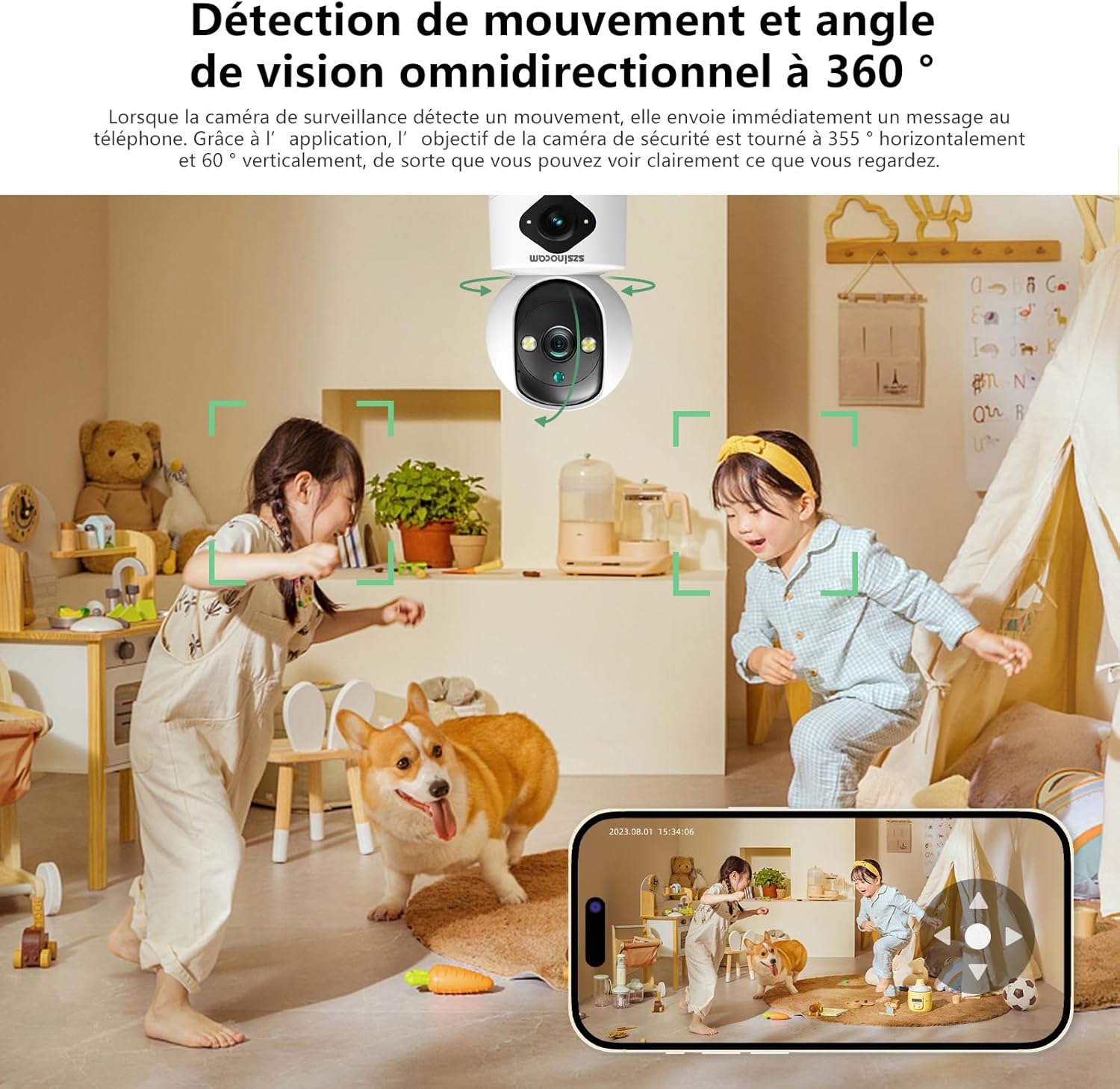
Figure 4: Three Night Vision Modes
3. Sąrankos vadovas
3.1 Pakuotės turinys
Prieš tęsdami įsitikinkite, kad pakuotėje yra visi reikalingi daiktai:
- Szsinocam Wi-Fi Camera
- Maitinimo adapteris
- USB kabelis
- Montavimo laikiklis ir varžtai
- Vartotojo vadovas (šis dokumentas)
3.2 Kameros įjungimas
- Prijunkite USB laidą prie fotoaparato maitinimo prievado.
- Prijunkite kitą USB kabelio galą prie pateikto maitinimo adapterio.
- Prijunkite maitinimo adapterį į standartinį elektros lizdą. Kamera įsijungs ir pradės paleidimo seką.
3.3 Mobiliosios programėlės diegimas
Norėdami kontroliuoti ir view your camera, you need to install the dedicated mobile application:
- Scan the QR code provided on the camera packaging or in the quick start guide to download the official application. Alternatively, search for the application name (e.g., "OKAM PRO" or similar) in your device's app store (App Store for iOS, Google Play Store for Android).
- Įdiekite programą išmaniajame telefone ar planšetiniame kompiuteryje.
- Registruokite naują paskyrą arba prisijunkite, jei jau turite.
3.4 Kameros susiejimas
Follow these steps to pair your camera with the mobile application:
- Ensure your mobile device is connected to a 2.4GHz Wi-Fi network. The camera supports both 2.4GHz and 5GHz Wi-Fi.
- Open the mobile application and select "Add Device" or the '+' icon.
- Choose the camera type (e.g., "Wi-Fi Camera" or "Smart Camera").
- Follow the on-screen prompts to enter your Wi-Fi network name (SSID) and password.
- The application will generate a QR code. Position your camera's lens approximately 15-20 cm (6-8 inches) in front of your phone screen, ensuring the QR code is clearly visible to the camera.
- Wait for the camera to emit a confirmation sound or voice prompt indicating successful connection.
- Prisijungę galite pavadinti savo kamerą ir pradėti tiesioginį transliavimą. viewing.
4. Naudojimo instrukcijos
4.1 Tiesiogiai View ir Valdymas
After successful pairing, tap on the camera's name in the application to access the live view. Čia galite:
- „Pan & Tilt“: Use the directional controls on the screen to rotate the camera horizontally (355°) and vertically (60°).
- Skaitmeninis priartinimas: Pinch to zoom in or out on the live feed (up to 6x).
- Dvipusis garsas: Tap the microphone icon to speak through the camera's speaker, and listen through your phone's speaker.
- Snapshot & Record: Capture still images or record video clips directly to your phone's gallery.
4.2 Įrašymas ir saugojimas
The camera supports two primary recording methods:
- „Micro SD“ kortelės saugykla: Insert a Micro SD card (up to 256GB, Class 10 or higher recommended) into the designated slot on the camera. The camera will automatically begin recording based on your settings (continuous, motion-triggered).
- Saugykla debesyje: Subscribe to the cloud storage service through the mobile application for secure, off-site video backup. This ensures your footage is safe even if the camera is damaged or stolen.

Figure 5: Recording Options: Cloud and Micro SD Card
4.3 Judesio aptikimas ir įspėjimai
Configure motion detection settings in the application:
- Įjungti / išjungti: Turn motion detection on or off.
- Jautrumas: Adjust the detection sensitivity to minimize false alarms.
- Įspėjimai: Receive push notifications on your mobile device when motion is detected.
- Veiklos zonos: Apibrėžkite konkrečias sritis kameros viduje view judesio aptikimui.

Figure 6: Motion Detection and Wide Angle View
4.4 Naktinio matymo režimai
The camera offers three night vision modes for optimal viewing in various low-light conditions:
- Infraraudonųjų spindulių režimas: Naudojant infraraudonųjų spindulių šviesos diodus, visiškoje tamsoje gaunami aiškūs nespalvoti vaizdai.
- Spalvotas naktinis matymas: Utilizes built-in spotlights to provide full-color images even in very low light.
- Išmanusis režimas: Automatiškai perjungia infraraudonųjų spindulių ir spalvotus režimus pagal aptiktą judesį ar apšvietimo sąlygas.
5. Diegimo parinktys
The Szsinocam Wi-Fi Camera offers flexible installation to suit your needs:
- Montavimas ant sienos: Use the provided mounting bracket and screws to secure the camera to a wall.
- Plokščiojo paviršiaus išdėstymas: Tiesiog padėkite kamerą ant bet kokio lygaus paviršiaus, pavyzdžiui, stalo, lentynos ar rašomojo stalo.
- Montavimas prie lubų: Attach the camera to the ceiling using the mounting bracket for an overhead view.

7 pav.: Lanksčios diegimo parinktys
6. Priežiūra
- Valymas: Kameros objektyvą ir korpusą valykite minkštu, sausu audiniu. Nenaudokite skystų valiklių ar abrazyvinių medžiagų.
- Firmware atnaujinimai: Regularly check the mobile application for firmware updates. Keeping your camera's firmware updated ensures optimal performance, new features, and security enhancements.
- Aplinkos sąlygos: Ensure the camera is operated within its specified temperature and humidity ranges. Avoid direct exposure to extreme weather conditions if installed outdoors without proper protection.
7. Problemų sprendimas
| Problema | Galima priežastis | Sprendimas |
|---|---|---|
| Kamera neįsijungia. | Power adapter or cable faulty; no power from outlet. | Check power connection. Try a different outlet or USB cable/adapter. |
| Unable to pair camera with app. | Incorrect Wi-Fi password; camera too far from router; 5GHz network used; QR code not scanned properly. | Ensure correct 2.4GHz Wi-Fi password. Move camera closer to router. Ensure QR code is clear and camera lens is clean. Reset camera if necessary. |
| Prasta vaizdo kokybė. | Nešvarus objektyvas; nepakankamas apšvietimas; tinklo pralaidumo problemos. | Clean the camera lens. Ensure adequate lighting or enable appropriate night vision mode. Check Wi-Fi signal strength. |
| Judesio aptikimo įspėjimai negaunami. | Motion detection disabled; app notifications turned off; incorrect sensitivity. | Enable motion detection in app. Check phone notification settings. Adjust sensitivity. |
| SD card not recording. | SD card full, faulty, or not formatted; recording settings incorrect. | Format SD card via app. Replace SD card if faulty. Check recording schedule/settings. |
8. Specifikacijos
| Funkcija | Detalė |
|---|---|
| Prekės ženklas | SZSINOCAM |
| Modelis | B0CPXDFVRP |
| Veiksminga nejudančioji raiška | 3 MP |
| Maksimalus užrakto greitis | 1/30 sekundžių |
| Pakuotės matmenys (I x P x A) | 12.8 x 10.6 x 8.7 centimetrai |
| Pakuotės svoris | 0.36 kilogramo |
| Ryšys | „Wi-Fi“ (2.4 GHz / 5 GHz) |
| Sandėliavimas | „Micro SD“ kortelė (iki 256 GB), debesies saugykla |
| Pirmoji laisva data | 16 m. gruodžio 2023 d |
Pastaba: specifikacijos gali būti keičiamos be išankstinio įspėjimo.
9. Garantija ir palaikymas
For warranty information and technical support, please refer to the contact details provided with your purchase or visit the official SZSINOCAM websvetainėje. Išsaugokite pirkimo kvitą kaip pirkimo įrodymą garantiniams reikalavimams.
Dėl papildomos pagalbos taip pat galite susisiekti su pardavėju per platformą, kurioje įsigijote produktą.
Ask a question about this manual
Ask about setup, troubleshooting, compatibility, parts, safety, or missing instructions. Manuals+ will review the question and use this page’s manual context to help answer it.