
Įvadas
Thank you for choosing the Hecate G3m Pro Wireless Bluetooth Gaming Mouse. This manual provides detailed instructions for setting up, operating, and maintaining your new gaming mouse. Designed for performance and versatility, the G3m Pro offers three-mode connectivity, a high-precision sensor, and a lightweight, silent design to enhance your gaming experience.
Produktas baigtasview
The Hecate G3m Pro features a robust design with multiple buttons and connectivity options. Familiarize yourself with the mouse components before use.
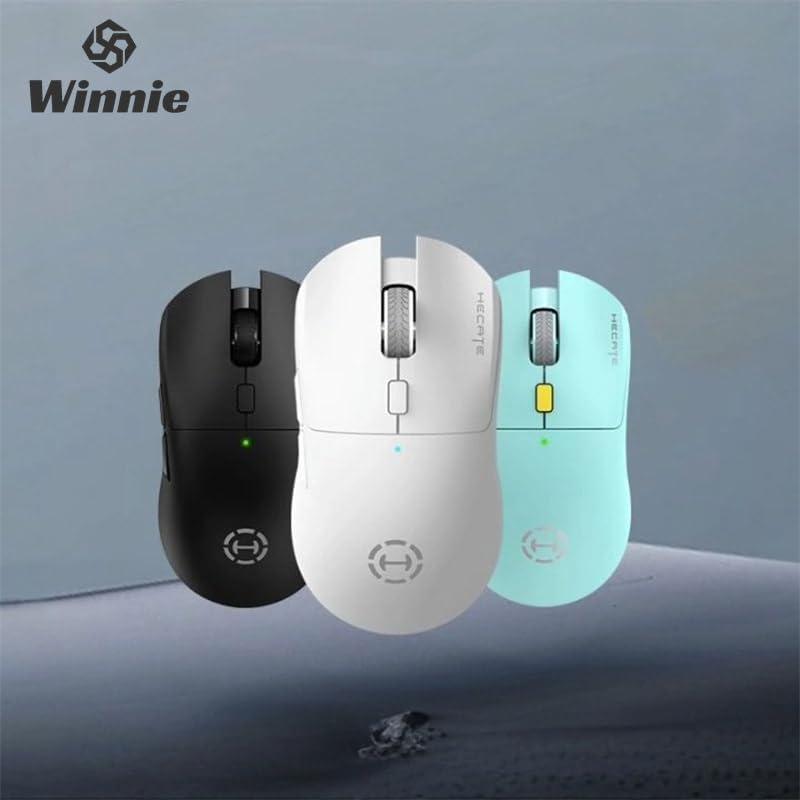
Figure 1: Hecate G3m Pro Wireless Gaming Mouse (Black)
- Kairysis / dešinysis paspaudimo mygtukai: Standartinės pelės funkcijos.
- Slinkties ratukas: Slinkties ir vidurinio pelės mygtuko paspaudimo funkcijoms.
- DPI ciklo mygtukas: Adjusts the mouse sensitivity (DPI) on the fly.
- Šoniniai mygtukai: Programmable for various in-game actions or navigation.
- Ryšio režimo jungiklis: Located on the underside, allows switching between 2.4GHz, Bluetooth, and Wired modes.
- USB-C prievadas: Laidiniam prijungimui ir įkrovimui.
Sąranka
Follow these steps to set up your Hecate G3m Pro mouse.
1. Pelės įkrovimas
Before first use, ensure the mouse is fully charged. Connect the provided USB-C cable to the mouse's USB-C port and the other end to a USB power source (e.g., computer, wall adapter). The LED indicator will show charging status.
2. Connecting via 2.4GHz Wireless (USB Dongle)
- Locate the USB 2.4GHz receiver (dongle) usually stored in a compartment on the underside of the mouse.
- Prijunkite USB imtuvą prie laisvo kompiuterio USB prievado.
- Switch the connectivity mode selector on the mouse to the '2.4G' position.
- The mouse should automatically connect to your computer. The LED indicator may flash briefly and then become solid to indicate a successful connection.
3. Prisijungimas per Bluetooth
- Switch the connectivity mode selector on the mouse to the 'BT' (Bluetooth) position.
- Kompiuteryje arba įrenginyje eikite į „Bluetooth“ nustatymus ir įjunkite „Bluetooth“.
- The mouse LED indicator will start flashing, indicating it is in pairing mode.
- Select 'Hecate G3m Pro' from the list of available Bluetooth devices on your computer/device to pair.
- Once paired, the LED indicator will become solid.
4. Connecting via Wired Mode
- Prijunkite pridėtą USB-C laidą prie pelės USB-C prievado.
- Prijunkite kitą USB-C kabelio galą prie laisvo kompiuterio USB prievado.
- Switch the connectivity mode selector on the mouse to the 'Wired' position.
- Pelė veiks kaip laidinė pelė ir taip pat įkraus vidinę bateriją.
Naudojimo instrukcijos
Understand the functions of your mouse for optimal use.
DPI reguliavimas
Press the DPI cycle button (usually located behind the scroll wheel) to cycle through different DPI settings. Each press will change the sensitivity, often indicated by a change in the LED color or a specific number of flashes. The mouse supports up to 26000 DPI.
Režimo perjungimas
Use the switch on the underside of the mouse to select your preferred connection mode: 2.4GHz, Bluetooth, or Wired. Switch modes according to your device and usage scenario.
Tinkinimo mygtukai
For advanced customization of buttons and macros, it is recommended to download the official Hecate software (if available) from the manufacturer's website. This software allows you to reassign button functions, create profiles, and fine-tune performance settings.
Priežiūra
Proper maintenance ensures the longevity and performance of your mouse.
Valymas
- Pelės paviršiui nuvalyti naudokite minkštą, sausą šluostę.
- Įsisenėjusiam purvui šiek tiek pamirkykiteampNuvalykite šluostę vandeniu arba švelniu valymo tirpalu. Venkite stiprių cheminių medžiagų.
- Neleiskite skysčiams patekti į pelės vidinius komponentus.
- Clean the optical sensor on the underside periodically with a cotton swab to ensure accurate tracking.
Akumuliatoriaus priežiūra
- Venkite dažnai visiškai iškrauti akumuliatorių.
- Charge the mouse when the battery indicator suggests low power.
- If storing the mouse for an extended period, charge it to about 50% and store it in a cool, dry place.
Sandėliavimas
Store the mouse in a clean, dry environment away from extreme temperatures and direct sunlight. Keep it away from dust and moisture.
Trikčių šalinimas
If you encounter issues with your Hecate G3m Pro mouse, refer to the following common solutions.
Pelė nereaguoja
- Patikrinkite akumuliatorių: Įsitikinkite, kad pelė įkrauta. Prijunkite ją USB-C laidu, kad įkrautumėte.
- Patikrinkite ryšio režimą: Verify that the mode switch on the underside of the mouse is set to the correct mode (2.4G, BT, or Wired) for your connection type.
- 2.4 GHz ryšys: Įsitikinkite, kad USB imtuvas yra tvirtai prijungtas prie veikiančio USB prievado. Išbandykite kitą USB prievadą.
- „Bluetooth“ ryšys: Re-pair the mouse with your device. Go to Bluetooth settings, remove the mouse, and then add it again. Ensure your device's Bluetooth is enabled.
- Laidinis ryšys: Įsitikinkite, kad USB-C laidas yra tvirtai prijungtas prie pelės ir kompiuterio. Išbandykite kitą USB prievadą arba laidą.
Inconsistent Tracking or Cursor Movement
- Švarus jutiklis: Nuvalykite optinį jutiklį pelės apačioje.
- Pelės kilimėlis: Use the mouse on a clean, uniform surface or a high-quality mouse pad. Avoid reflective or glass surfaces.
- DPI nustatymas: Adjust the DPI setting using the DPI cycle button to find a comfortable sensitivity.
Mygtukai neveikia
- Programinės įrangos trikdžiai: Jei naudojate pasirinktinę programinę įrangą, pabandykite atkurti numatytuosius mygtukų priskyrimus.
- Bandymas kitame įrenginyje: Connect the mouse to another computer to determine if the issue is with the mouse or the original device's settings.
Specifikacijos
Detailed technical specifications for the Hecate G3m Pro Wireless Bluetooth Gaming Mouse.
| Funkcija | Aprašymas |
|---|---|
| Modelis | G3m Pro |
| Prekės ženklas | Hecate |
| Ryšio technologija | 2.4 GHz belaidis, „Bluetooth“, laidinis (USB-C) |
| Judesio aptikimas | Optical (Paw3395 Sensor) |
| DPI (taškai colyje) | Iki 26000 DPI |
| Pagreitis | 50G |
| IPS (coliai per sekundę) | 600 |
| Mygtukų skaičius | 6 |
| Volelių skaičius | 1 (Scroll Wheel) |
| Rankų orientacija | Abipusis |
| Ypatinga funkcija | Lightweight (Approx. 63g) |
| Galios tipas | Įkraunama baterija |
| Rekomenduojamas naudojimas | Žaidimas |
| Suderinami įrenginiai | Personal Computer, Laptop, Game Console |
| Operacinės sistemos | „Linux“, „Windows XP“ (ir naujesnės versijos) |
Garantija ir palaikymas
Your Hecate G3m Pro Wireless Bluetooth Gaming Mouse comes with a warranty and dedicated support.
Informacija apie garantiją
All products are covered by a 12 mėnesių garantija nuo įsigijimo datos. Ši garantija taikoma gamybos defektams ir problemoms, kylančioms dėl įprasto naudojimo.
Pagalba klientams
If you encounter any problems with your product, such as defective or incorrect items, please do not hesitate to contact us. We are committed to providing prompt assistance and will respond to your inquiries within 24 hours. Please refer to your purchase documentation for specific contact details or visit the official Hecate support websvetainę.