
VOLT PLUS TECH F9
VOLT PLUS TECH F9 Wireless V5.3 Bluetooth Earbuds User Manual
Modelis: F9
1. Įvadas
Thank you for choosing the VOLT PLUS TECH F9 Wireless V5.3 Bluetooth Earbuds. This manual provides essential information for setting up, operating, and maintaining your new earbuds. Please read it carefully before use.
Pakuotės turinys
- 2x belaidės ausinės
- 1 x 2000mAh Power Bank Charging Case
- 1 x USB-C įkrovimo laidas
- 3 x Pairs of Ear Adapters (Small, Medium, Large)
- 1 x Vartotojo vadovas

Image 1.1: Contents included in the VOLT PLUS TECH F9 Earbuds package.
2. Produktas baigtasview
The VOLT PLUS TECH F9 earbuds feature a compact design with a multi-functional charging case that also serves as a power bank. The case includes an LED display to show battery levels.
Ausinių ypatybės
- Smart Touch Control: Skirta muzikos, skambučių ir balso asistento valdymui.
- Mikrofonas: Integruota skambučiams.
- LED indikatorius: On each earbud for status.
Įkrovimo dėklo ypatybės
- 2000 mAh išorinė baterija: Charges earbuds and can provide emergency charge for mobile devices.
- LED skaitmeninis ekranas: Rodo akumuliatoriaus procentątage of the charging case and charging status of individual earbuds.
- USB-C įvestis: Dėklo įkrovimui.

2.1 vaizdas: Baigtaview of the earbuds and charging case with LED display.

Image 2.2: The bright LED display on the charging case indicates battery levels.
3. Sąranka ir susiejimas
Pradinis įkrovimas
- Prieš pirmą kartą naudodami, visiškai įkraukite įkrovimo dėklą ir ausines.
- Connect the USB-C charging cable to the charging case and a power source. The LED display will show the charging progress.
- Place the earbuds into the charging case. They will begin charging automatically. The LED indicators on the earbuds will light up, and the case display will show their charging status.
"Bluetooth" poravimas
- Automatinis įjungimas: Atidarykite įkrovimo dėklą ir ausinės automatiškai įsijungs bei pradės veikti susiejimo režimu.
- Įjungti Bluetooth: Savo įrenginyje (pvz., išmaniajame telefone) eikite į „Bluetooth“ nustatymus ir įjunkite „Bluetooth“.
- Pasirinkite įrenginį: Look for "F9" or similar in the list of available devices and select it to connect.
- Patvirtinimas: Once connected, you will hear a confirmation tone, and the earbud LED indicators will change.
The earbuds feature Bluetooth V5.3 for a stable and efficient connection. They will automatically reconnect to the last paired device when taken out of the case.

Image 3.1: Fast Bluetooth auto-pairing process.
4. Naudojimo instrukcijos
The F9 earbuds utilize smart touch controls for various functions.
Jutiklinio valdymo funkcijos
| Veiksmas | Kairė ausinė (L) | Dešinė ausinė (R) |
|---|---|---|
| Leisti / pristabdyti muziką | Paspauskite vieną kartą | |
| Kita daina | Greitai paspauskite du kartus | N/A |
| Ankstesnė daina | N/A | Greitai paspauskite du kartus |
| Padidinti garsumą | N/A | Paspauskite tris kartus |
| Sumažinti garsumą | Paspauskite tris kartus | N/A |
| Atsiliepti / Baigti skambutį | Click/Double click | |
| Atmesti skambutį | Paspauskite ir palaikykite 2 sekundes | |
| Įjungti balso asistentą („Siri“ / „Google“ asistentas) | Greitai paspauskite du kartus | |

Image 4.1: Smart touch control guide for earbud functions.
5. Įkrovimas
Ausinių įkrovimas
Place the earbuds into the charging case. They will automatically begin charging. The LED display on the case will show the charging status for each earbud.
Charging the Case (Power Bank)
Connect the provided USB-C cable to the charging port on the case and to a USB power adapter. The LED display will show the battery percentage of the case as it charges.
Using the Case as a Power Bank
The 2000mAh charging case can also be used to provide an emergency charge to your mobile phone or other small devices. Connect your device's charging cable to the USB output port on the charging case.

Image 5.1: Charging your phone using the earbud charging case.
Baterijos veikimo laikas
A full charge provides approximately 5 hours of music time and 6 hours of talk time for the earbuds. The 2000mAh charging case can recharge the earbuds multiple times, extending total usage to over 24 hours.
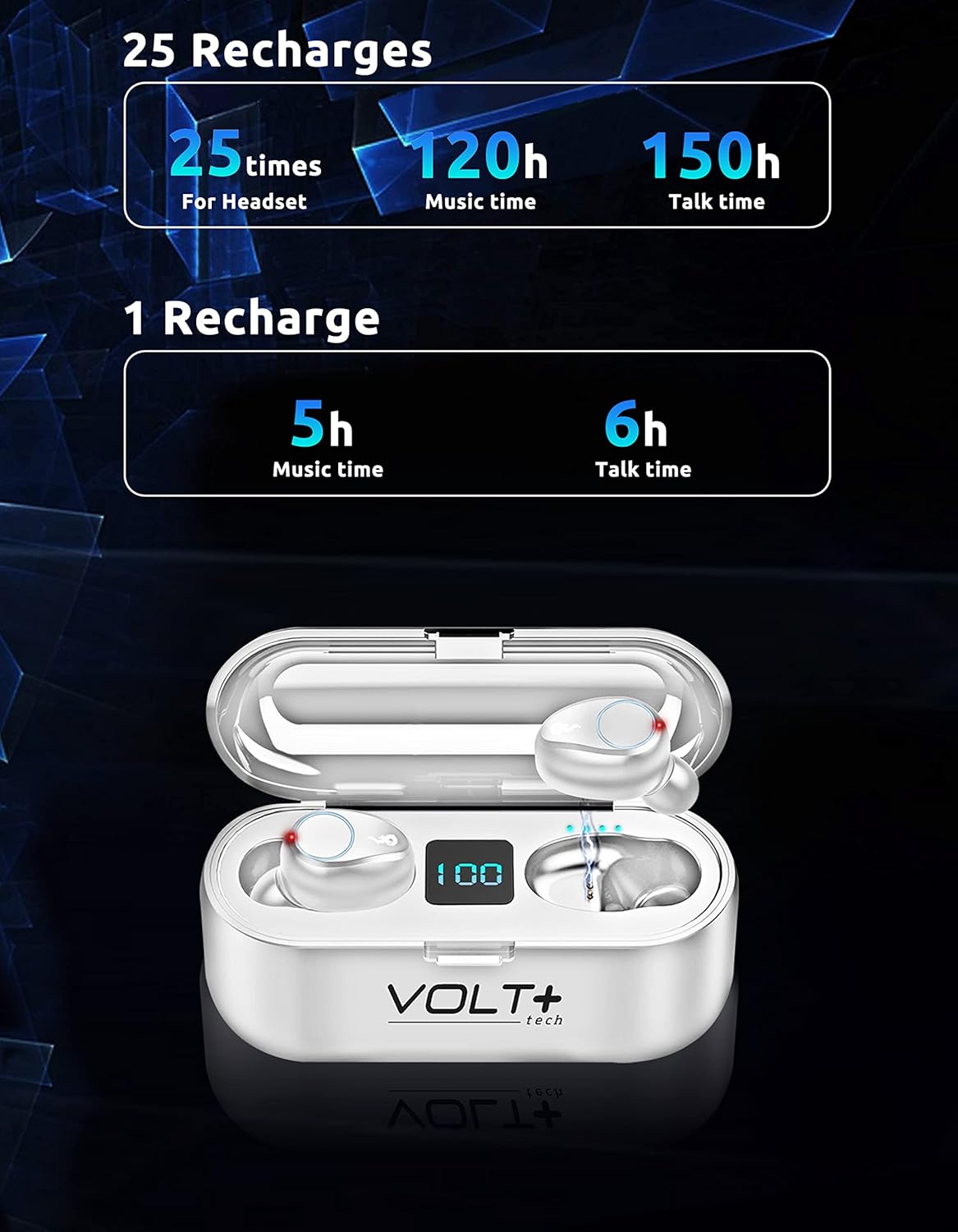
Image 5.2: Battery life and recharge capabilities.
6. Priežiūra ir priežiūra
Valymas
- Reguliariai valykite ausines ir įkrovimo dėklą minkštu, sausu, nepūkuotu skudurėliu.
- Nuimkite ausų galiukus ir nuvalykite juos švelniu muilu bei vandeniu, tada kruopščiai nusausinkite prieš vėl įdėdami.
- Įsitikinkite, kad abiejų ausinių ir dėklo įkrovimo kontaktai yra švarūs ir be šiukšlių.
Atsparumas vandeniui (IPX7)
The earbuds are IPX7 waterproof, meaning they can withstand immersion in water up to 1 meter for 30 minutes. This makes them suitable for rainy outdoor sports and sweating during workouts. However, the charging case is not waterproof. Do not immerse the charging case in water.

Image 6.1: IPX7 waterproof rating of the earbuds.
Sandėliavimas
Kai nenaudojate, laikykite ausines įkrovimo dėkle, kad jos būtų apsaugotos ir įkrautos. Venkite ekstremalių temperatūrų ir tiesioginių saulės spindulių.
7. Problemų sprendimas
Ausinės nesusiejamos
- Įsitikinkite, kad abi ausinės yra įkrautos.
- Išjunkite „Bluetooth“ savo įrenginyje, tada vėl jį įjunkite.
- Forget the "F9" device in your device's Bluetooth settings and try pairing again.
- Įdėkite ausines atgal į dėklą, uždarykite dangtelį, palaukite kelias sekundes, tada atidarykite, kad iš naujo inicijuotumėte susiejimo režimą.
Only One Earbud Working
- Įsitikinkite, kad abi ausinės yra įkrautos.
- Try placing both earbuds back into the charging case, close the lid, and then take them out again to allow them to re-sync with each other.
- If the issue persists, try resetting the earbuds (refer to specific reset instructions if available in a full manual, or try forgetting the device and re-pairing).
Įkrovimo dėklas neįkraunamas
- Patikrinkite, ar USB-C laidas ir maitinimo adapteris nepažeisti.
- Ensure the cable is securely connected to both the case and the power source.
- Išbandykite kitą USB-C laidą arba maitinimo adapterį.
Prasta garso kokybė
- Ensure earbuds are properly seated in your ears. Try different sized ear tips.
- Clean the earbud mesh to remove any wax or debris.
- Ensure your device is within the Bluetooth range (up to 33 feet/10 meters) and there are no significant obstructions.
8. Specifikacijos
| Funkcija | Detalė |
|---|---|
| Modelio pavadinimas | F9 |
| Bluetooth versija | 5.3 |
| Bluetooth diapazonas | 33 pėdos (10 metro) |
| Įkrovimo dėklo akumuliatoriaus talpa | 2000 mAh |
| Ausinių baterijos veikimo laikas (vienas įkrovimas) | Approx. 5 hours music, 6 hours talk time |
| Bendras baterijos veikimo laikas (su dėklu) | Daugiau nei 24 XNUMX valandų |
| Įkrovimo laikas | Maždaug 30 minutės (ausinės) |
| Atsparumo vandeniui lygis | IPX7 (tik ausinėms) |
| Triukšmo valdymas | Active Noise Cancellation, Passive Noise Cancellation, Sound Isolation (CVC 8.0) |
| Garso tvarkyklės tipas | Dinaminis vairuotojas |
| Garso tvarkyklės dydis | 26 milimetrų |
| Jautrumas | 103 dB |
| Varža | 25.94 omai |
| Kontrolės metodas | Palieskite |
| Suderinami įrenginiai | Android, iOS, Mac, Windows, Nubia Red Magic 5G |
| Ausinių matmenys | Approx. 0.9 x 0.5 inches |
| Korpuso matmenys | Maždaug 2.7 x 1.3 x 1.2 colio |
| Prekės svoris | 4 uncijos (iš viso) |

Image 8.1: Physical dimensions of the earbuds and charging case.
9. Informacija apie garantiją
VOLT PLUS TECH products are designed and manufactured to the highest quality standards. This product is covered by a limited warranty from the date of purchase. Please retain your proof of purchase for warranty claims. The warranty covers manufacturing defects but does not cover damage caused by misuse, accidents, unauthorized modifications, or normal wear and tear.
10. Pagalba klientams
If you encounter any issues or have questions regarding your VOLT PLUS TECH F9 Wireless Bluetooth Earbuds, please contact our customer support team. Refer to the contact information provided on the product packaging or our official webpagalbos svetainę.
Ask a question about this manual
Ask about setup, troubleshooting, compatibility, parts, safety, or missing instructions. Manuals+ will review the question and use this page’s manual context to help answer it.