
1. Įvadas
The Ulanzi HP004 Smartphone Mount is a versatile and portable accessory designed to securely hold your smartphone for various photography, videography, and viewing needs. Its foldable design, stable base, and multi-angle adjustment capabilities make it suitable for both professional and casual use. This manual provides detailed instructions for the proper setup, operation, and maintenance of your device.

Image 1.1: The Ulanzi HP004 Smartphone Mount, designed for photographers and general users.
2. Pakuotės turinys
Įsitikinkite, kad pakuotėje yra visi komponentai:
- Ulanzi HP004 Crab Tripod Smartphone Mount
- Tool Wrench (Hex Key)
- Instrukcijų vadovas (šis dokumentas)

Image 2.1: Contents of the Ulanzi HP004 package, including the mount and a tool wrench.
3. Sąrankos instrukcijos
3.1 Unfolding the Mount
- Gently unfold the base legs of the mount until they form a stable triangular stand.
- Extend the main arm of the mount to your desired height and angle.

Image 3.1: The Ulanzi HP004 in its compact, folded state.

Image 3.2: The compact size of the Ulanzi HP004 when folded, demonstrating its portability.
3.2 Išmaniojo telefono prijungimas
- Locate the smartphone clamp kalno viršuje.
- Gently pull apart the spring-loaded clamp to widen the opening.
- Įdėkite savo išmanųjį telefoną į clamp, ensuring it is centered and securely held by the rubberized grips. The clamp supports phones with a width of 6 to 9.5 cm (2.36 to 3.74 inches).

Image 3.3: A smartphone securely mounted in the Ulanzi HP004 in portrait mode.
3.3 Adjusting Angles
The Ulanzi HP004 features multiple articulation points for flexible angle adjustment:
- Base Hinge: Allows for forward and backward tilt of the main arm.
- Mid-Arm Hinge: Provides additional height and angle adjustments.
- Telefonas Clamp Pasukimas: Telefonas klamp can rotate 360 degrees for quick switching between portrait and landscape orientations.

Image 3.4: Diagram illustrating the multi-angle adjustment capabilities of the Ulanzi HP004.
3.4 Using Expansion Ports
The mount is equipped with several expansion options:
- 1/4-inch Screw Hole: Located at the base, this allows attachment to other tripods or accessories.
- Arca Slot: Integrated into the base for quick mounting on Arca-Swiss compatible tripod heads.
- Dual Cold Shoes: Two cold shoe mounts are available on the phone clamp for attaching accessories like fill lights or microphones.

3.5 pav.: Išsamus view of the Ulanzi HP004's versatility and expandability, highlighting its 1/4" screw hole, Arca slot, and cold shoe mounts.
4. Naudojimo instrukcijos
4.1 Desktop Stand Usage
For stable desktop use, ensure the base legs are fully extended and placed on a flat, stable surface. Adjust the arm and phone clamp to achieve your desired viewing angle for video calls, content consumption, or recording.
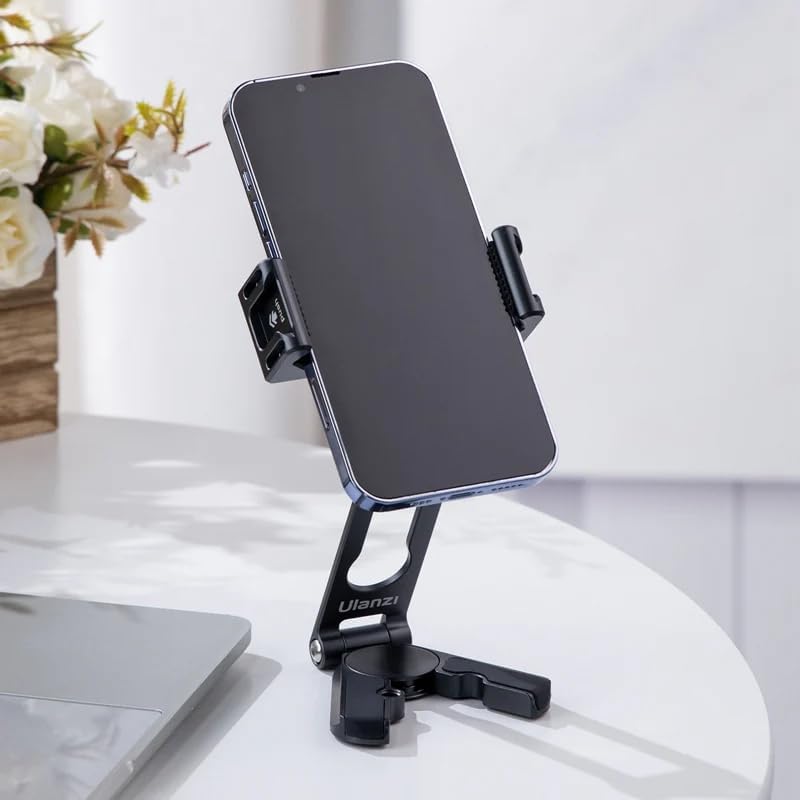
Image 4.1: The Ulanzi HP004 functioning as a desktop stand with a smartphone in landscape orientation.

Image 4.2: The Ulanzi HP004 holding a smartphone in portrait orientation on a desk.
4.2 Handheld Usage
When folded, the Ulanzi HP004 can be used as a compact handheld grip for vlogging or mobile photography. Ensure the mount is securely held to prevent accidental drops.
4.3 Multi-Scenario Application
The Ulanzi HP004 is designed for various applications, including:
- Darbalaukis viewįrašymas
- Attaching to larger tripods for elevated shots
- Handheld vlogging or mobile photography
- Live streaming with external accessories (light, microphone)

Image 4.3: A collage demonstrating various usage scenarios for the Ulanzi HP004, including desktop, handheld, and mounted on a larger tripod.
5. Priežiūra
5.1 Valymas
To clean the Ulanzi HP004, wipe it with a soft, dry cloth. For stubborn dirt, a slightly damp cloth can be used. Avoid using harsh chemicals or abrasive materials, as these may damage the finish or rubberized grips.
5.2 Saugykla
When not in use, fold the mount into its compact form and store it in a dry, cool place away from direct sunlight and extreme temperatures. This helps preserve the integrity of the materials and moving parts.
6. Problemų sprendimas
6.1 Mount is unstable
- Ensure the base legs are fully extended and locked into position.
- Verify that the surface on which the mount is placed is flat and stable.
- Check that your smartphone is properly centered in the clamp.

Image 6.1: The stable structure of the Ulanzi HP004, featuring a base split-leg design for enhanced stability.
6.2 Phone not fitting in clamp
- Confirm your phone's width is within the supported range of 6-9.5 cm (2.36-3.74 inches).
- Ensure you are fully extending the spring-loaded clamp before inserting the phone.
6.3 Difficulty adjusting angles
- The hinges are designed to provide moderate damping for stable positioning. Apply gentle, firm pressure when adjusting.
- If any hinge feels excessively stiff, ensure no debris is obstructing the mechanism.
7. Specifikacijos
| Funkcija | Detalė |
|---|---|
| Modelis | HP004 |
| Prekės ženklas | Ulanzi |
| Spalva | Juoda |
| Medžiaga | Aliuminio lydinys |
| Telefonas Clamp Plotis | 6–9.5 cm (2.36–3.74 colių) |
| Svoris | 135g |
| Savybės | Foldable, Lightweight, Multi-angle Adjustment, 1/4" Screw Hole, Arca Slot, Dual Cold Shoes |
| UPC | 617308603118 |
| ASIN | B0CR1F1DFG |
8. Informacija apie garantiją
The Ulanzi HP004 Smartphone Mount comes with a 1 metų ribota garantija nuo įsigijimo datos. Ši garantija taikoma gamybos defektams ir gedimams įprasto naudojimo sąlygomis. Ji netaikoma žalai, atsiradusiai dėl netinkamo naudojimo, nelaimingų atsitikimų, neleistinų modifikacijų ar įprasto nusidėvėjimo. Išsaugokite pirkimo įrodymą, jei galėtumėte pateikti pretenzijas dėl garantijos.
9. Pagalba klientams
For technical assistance, warranty claims, or general inquiries regarding your Ulanzi HP004 Smartphone Mount, please contact Ulanzi customer support through the official website or your retailer's support channels. When contacting support, please have your product model (HP004) and proof of purchase available.


