
Įvadas
MASINGO Soprano X2 is a portable karaoke machine designed for versatile audio entertainment. It features a 40-watt speaker system with an 8-inch woofer and 1.5-inch tweeter, two wireless microphones, and multiple connectivity options including Bluetooth, USB, MicroSD, Aux, and FM radio. This manual provides detailed instructions for setting up, operating, and maintaining your Soprano X2 to ensure optimal performance and enjoyment.

Image: The Soprano X2 machine being transported, highlighting its portability with a retractable handle and wheels.
Pakuotės turinys
Patikrinkite, ar jūsų siuntinyje yra visi toliau išvardyti daiktai:
- 1 x Soprano X2 Karaoke Machine
- 2x belaidžiai mikrofonai
- 1 x Maitinimo adapteris (9 V nuolatinė srovė)
- 1 x Device Holder
- 1 x 3.5 mm AUX kabelis
- 1 x 3.5 mm AUX-RCA TV Cable
- 1x nuotolinio valdymo pultas
- 1 x Naudotojo vadovas (šis dokumentas)

Image: A visual representation of the Soprano X2 machine and its complete set of accessories.
Produktas baigtasview
Familiarize yourself with the main components of your Soprano X2 karaoke machine.

Image: The Soprano X2 karaoke machine with its primary accessories.
Valdymo skydelio išdėstymas
The top panel of the Soprano X2 houses all controls for power, mode selection, and audio adjustments.

Image: Labeled diagram of the Soprano X2 control panel.
Sąranka
1. Įrenginio įkrovimas
- Connect the included DC 9V power adapter to the "DC 9V input" port on the control panel and plug it into a power outlet.
- The unit's internal battery will begin charging. A full charge provides up to 8 hours of operation.
- Prieš naudojant pirmą kartą, rekomenduojama visiškai įkrauti įrenginį.
2. Installing Microphones
- Each wireless microphone requires 2 AA batteries (not included). Open the battery compartment at the bottom of the microphone and insert the batteries, observing polarity.
- Turn on the microphones using their respective power switches. They will automatically connect to the Soprano X2 unit when the unit is powered on.
- Utilize the microphone clips on the side of the machine for convenient storage.

Image: Wireless microphones with notes on quick synchronization and battery requirements.
3. Attaching the Tablet Holder
- Secure the device holder to the designated slot on top of the Soprano X2 unit.
- Adjust the holder to accommodate your tablet or smartphone for lyric display.
Naudojimo instrukcijos
1. Maitinimo įjungimas/išjungimas
- To power on the Soprano X2, press and hold the power button on the control panel.
- Norėdami išjungti, dar kartą paspauskite ir palaikykite maitinimo mygtuką.
2. Režimo pasirinkimas
- Press the "Mode" button on the control panel to cycle through available input modes: Bluetooth, Aux, USB, MicroSD, and FM Radio.
3. „Bluetooth“ ryšys
- Select Bluetooth mode on the Soprano X2. The unit will enter pairing mode, indicated by a flashing Bluetooth icon or voice prompt.
- On your smart device (phone, tablet), enable Bluetooth and search for "MASINGO X2" in the list of available devices.
- Select "MASINGO X2" to pair. Once connected, a confirmation sound or steady light will indicate successful pairing.
4. USB / „MicroSD“ atkūrimas
- Įdėkite USB atmintinę arba „MicroSD“ kortelę su garso įrašu files into the respective port on the control panel.
- The unit will automatically switch to USB or MicroSD mode and begin playing music. Use the playback controls (play/pause, next/previous track) on the control panel or remote.
5. FM radijas
- Pasirinkite FM radijo režimą.
- Use the tuning controls on the panel or remote to scan for and select radio stations.
6. Real-Time Karaoke Mode
- This feature allows you to remove original vocals from any song playing via Bluetooth, USB, or MicroSD.
- While music is playing, activate the karaoke mode function (refer to the control panel diagram for the specific button, often labeled "Vocal Cut" or similar). The machine will process the audio to minimize original vocals, allowing you to sing along.
7. TV jungtis
- Per Bluetooth: Pair your TV's Bluetooth audio output with the Soprano X2 as described in the Bluetooth Connection section.
- Via Aux to RCA Cable: Connect one end of the included 3.5mm AUX-RCA TV cable to the AUX input on the Soprano X2 and the RCA ends to the audio output ports on your TV.
- This allows you to display lyrics on your TV while the audio plays through the Soprano X2.

Image: Soprano X2 connected to a television for lyric display.
8. Garso reguliavimas
- Mašinos tūris: Adjust the overall sound output of the unit.
- Aukštas dažnis: Control the high-frequency sounds for clarity.
- Bosas: Control the low-frequency sounds for depth.
- Aidas: Add an echo effect to your vocals.
- Mikrofono garsumas: Adjust the volume of the wireless microphones independently.
Priežiūra
- Valymas: Use a soft, dry cloth to clean the exterior of the machine. Do not use liquid cleaners or abrasive materials.
- Akumuliatoriaus priežiūra: For optimal battery life, fully charge the unit before long periods of storage. If storing for an extended time, charge the battery every 3-6 months. Remove AA batteries from microphones if not in use for prolonged periods.
- Saugykla: Store the Soprano X2 in a cool, dry place away from direct sunlight and extreme temperatures.
Trikčių šalinimas
| Problema | Galima priežastis | Sprendimas |
|---|---|---|
| Įrenginys neįsijungia | Low battery; Power adapter not connected or faulty. | Charge the unit using the power adapter. Ensure the adapter is securely connected and the outlet is functional. |
| Nėra garso išvesties | Per mažas garsumas; Neteisingas įvesties režimas; Įrenginys netinkamai prijungtas. | Increase machine volume. Select the correct input mode. Reconnect your audio source (Bluetooth, Aux, USB, MicroSD). |
| Microphones not working or experiencing interference | Microphone batteries low or incorrectly inserted; Microphones not powered on; Interference from other wireless devices. | Replace AA batteries in microphones, ensuring correct polarity. Turn on microphones. Move away from other wireless devices or sources of interference. |
| „Bluetooth“ susiejimas nepavyksta | Soprano X2 not in pairing mode; Device too far; Bluetooth disabled on device. | Ensure Soprano X2 is in Bluetooth pairing mode. Keep devices within range. Enable Bluetooth on your smart device. Forget previous pairings and try again. |
Specifikacijos
Detailed technical specifications for the MASINGO Soprano X2 Karaoke Machine:
- Modelis: X2
- Išėjimo vattage: 40 vatų
- Garsiakalbių sistema: 8 colių žemų dažnių garsiakalbis, 1.5 colio aukštų dažnių garsiakalbis
- Ryšio technologija: Bluetooth, Aux, USB, MicroSD, FM Radio
- Baterijos tipas: Ličio jonų (vidinis)
- Baterijos veikimo laikas: Iki 8 valandų
- Mikrofonai: 2 x Wireless VHF microphones (AA battery powered)
- Maitinimo šaltinis: Battery Powered, DC 9V Adapter
- Prekės svoris: 11 svaro
- Gaminio matmenys (I x P x A): 12 x 11 x 19 colio
- Montavimo tipas: Grindų stovėjimas
- Suderinami įrenginiai: Išmanusis telefonas, planšetinis kompiuteris
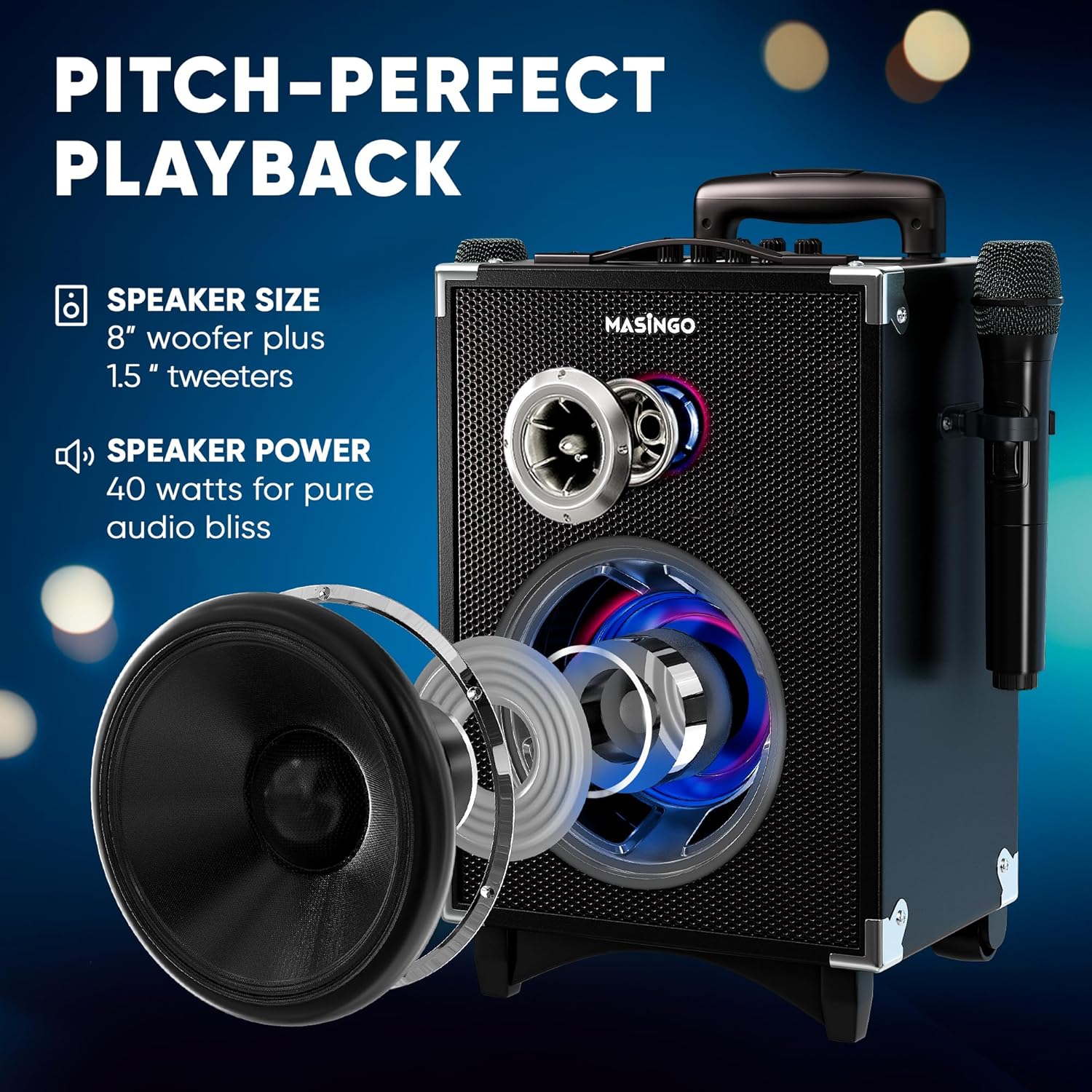
Image: Diagram illustrating the internal speaker components and power output.
Garantija ir palaikymas
For warranty information, please refer to the warranty card included in your product packaging or visit the official MASINGO website. For technical support, troubleshooting assistance, or any inquiries regarding your Soprano X2 karaoke machine, please contact MASINGO customer service through their official channels.
Palaikymas internetu: Visit the MASINGO official webDUK ir pagalbos išteklių svetainė.
Kontaktinė informacija: Refer to your product packaging or the MASINGO websvetainėje rasite naujausią klientų aptarnavimo kontaktinę informaciją.