
WESECUU 8050
WESECUU lemputės tipo apsaugos kameros, modelis 8050, naudotojo vadovas
Modelis: 8050
1. Įvadas
This manual provides detailed instructions for the installation, operation, and maintenance of your WESECUU Light Bulb Security Camera Model 8050. Please read this manual thoroughly before using the product to ensure proper function and safety.

Image 1.1: WESECUU Light Bulb Security Camera Model 8050 (Two Pack) and smartphone interface.
2. Saugos informacija
- Prieš montuodami arba atlikdami techninę priežiūrą įsitikinkite, kad maitinimas yra atjungtas.
- The camera is designed for E27 light sockets (100V~240V). Use only with compatible sockets.
- Avoid exposing the camera to extreme temperatures, humidity, or direct water spray. While rated IP65 for outdoor use, proper placement is crucial to prevent water ingress into the socket.
- Nebandykite patys ardyti ar taisyti fotoaparato. Dėl pagalbos kreipkitės į klientų aptarnavimo tarnybą.
- Laikyti vaikams nepasiekiamoje vietoje.
3. Pakuotės turinys
Patikrinkite, ar pakuotėje yra visi reikalingi daiktai:
- WESECUU Light Bulb Security Camera(s)
- E27 Light Socket Adapter
- Instrukcijų vadovas (šis dokumentas)
4. Produktas baigtasview
The WESECUU Light Bulb Security Camera Model 8050 offers comprehensive surveillance features in a discreet light bulb form factor. Key features include:
- 2K FHD Resolution: Pateikiamas aiškus ir išsamus vaizdo įrašastage.
- Dviejų juostų WiFi: Supports both 2.4GHz and 5GHz wireless networks for flexible connectivity.
- 360° aprėptis: Pan 355° and Tilt 90° for a wide viewzonoje.
- Spalvotas naktinis matymas: Equipped with floodlights and IR lights for clear, colored images in low-light conditions.
- Dvipusis pokalbis: Integruotas mikrofonas ir garsiakalbis bendravimui realiuoju laiku.
- Išmanus žmogaus aptikimas: Reduces false alarms by focusing on human shapes.
- Judesių sekimas: Automatically follows detected objects.
- 24/7 įrašymas: Supports cloud storage and local TF card storage (up to 128GB, not included).
- „Alexa“ suderinamumas: Integrate with Amazon Alexa for voice control and viewing.


4.1 pav.: Įvairūs views of the WESECUU Light Bulb Security Camera.
5. Sąrankos instrukcijos
5.1 Fizinis įrengimas
- Išjungti: Ensure the power to the light socket is turned off at the circuit breaker before beginning installation.
- Įsukti: Carefully screw the WESECUU Light Bulb Security Camera into a standard E27 light socket. If your existing socket is not E27, use the provided E27 light socket adapter.
- Maitinimas: Restore power to the light socket. The camera will power on and initiate its self-test.

Image 5.1: Easy installation into an E27 light socket.
5.2 Programėlės atsisiuntimas ir prisijungimas
- Atsisiųsti programą: Ieškokite the 'Eseecloud' app in your smartphone's app store (iOS or Android) and download it.
- Registruoti paskyrą: Open the Eseecloud app and follow the on-screen instructions to register a new account or log in if you already have one.
- Pridėti įrenginį: Programėlėje palieskite piktogramą „+“, kad pridėtumėte naują įrenginį.
- Bluetooth Quick Connection: Enable Bluetooth on your smartphone. The app will guide you through the Bluetooth quick connection process to detect and pair with the camera.
- WiFi konfigūracija: Select your 2.4GHz or 5GHz WiFi network and enter the password. Ensure your phone is connected to the same WiFi network during this step.
- Užbaigimas: Prisijungę galite pavadinti savo kamerą ir pradėti tiesioginį transliavimą. viewing.

Image 5.2: The camera supports both 2.4GHz and 5GHz WiFi networks.
6. Naudojimo instrukcijos
6.1 Tiesiogiai View ir Atkūrimas
- Open the Eseecloud app and select your camera from the device list to access the live view.
- Naudokite atkūrimo funkciją, kad iš naujo nustatytumėteview įrašytas footage from your cloud storage or TF card.
6.2 Pasukimo, pakreipimo ir priartinimo (PTZ) valdymas
The camera offers a 355° horizontal pan and 90° vertical tilt. Use the controls within the Eseecloud app to adjust the camera's viewing kampas.

Image 6.1: Camera demonstrating auto-tracking and PTZ capabilities.
6.3 Dvipusis pokalbis
To use the two-way talk feature, tap the microphone icon in the live view interface of the Eseecloud app. You can speak through your phone, and your voice will be projected through the camera's speaker. Similarly, you can hear audio from the camera's location through your phone.

Image 6.2: Illustration of the two-way voice communication feature.
6.4 Judesio aptikimas ir įspėjimai
- Įjungti aptikimą: In the app settings, enable motion detection and smart human detection. This will filter alerts to primarily notify you of human presence.
- Įspėjimai: When motion or a human is detected, the camera will send real-time notifications to your smartphone.
- Judesių sekimas: If enabled, the camera will automatically track the detected object within its field of view.
- Sirena: An audible siren can be activated via the app to deter intruders.

Image 6.3: Human detection and real-time alert functionality.
6.5 Naktinis matymas
The camera automatically switches between day and night vision modes. It utilizes six floodlights and six IR lights to provide clear, colored images even in complete darkness.
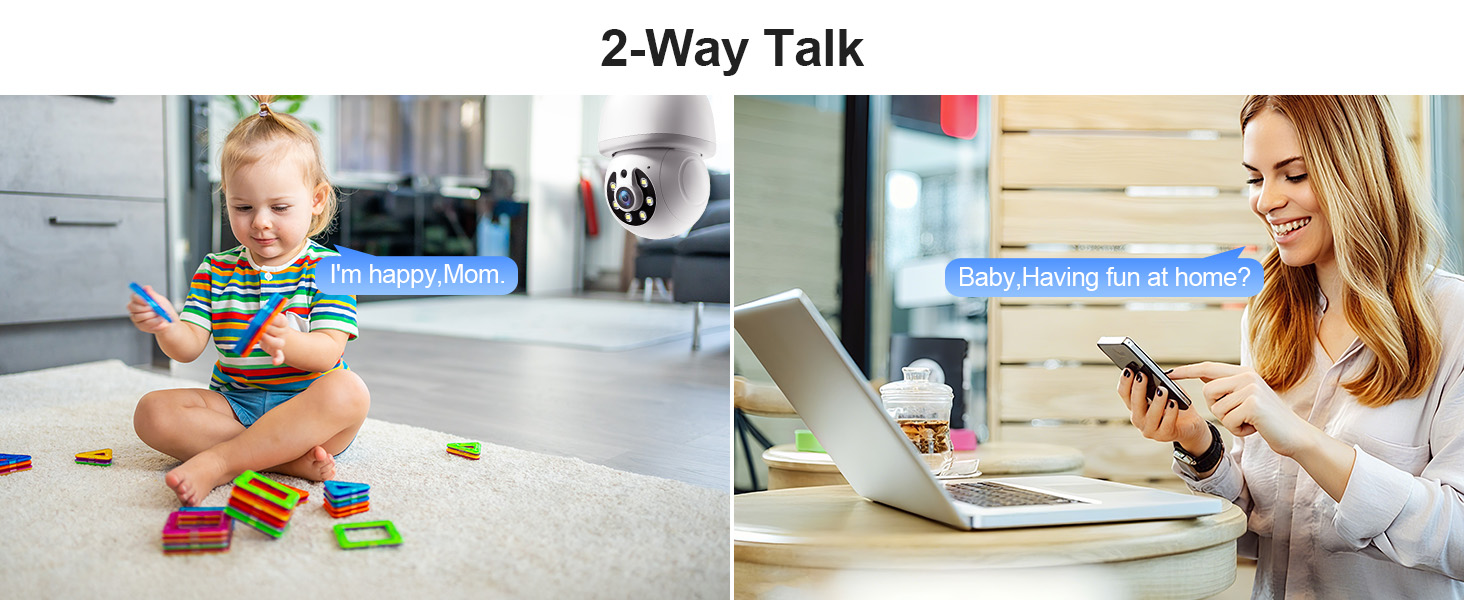
Image 6.4: Comparison of infrared and 2K full-color night vision.
6.6 Įrašymas ir saugojimas
The camera supports continuous 24/7 recording. You have two storage options:
- Saugykla debesyje: Subscribe to the Eseecloud app's cloud storage service for remote access to your recordings.
- TF kortelės saugykla: Insert a TF (microSD) card (up to 128GB, not included) into the camera's slot for local recording.

Image 6.5: 24/7 recording options with cloud and SD card storage.
6.7 „Alexa“ integracija
The WESECUU camera is compatible with Amazon Alexa. To connect:
- Atidarykite „Alexa“ programėlę savo išmaniajame telefone.
- Go to 'Skills & Games' and search for 'Eseecloud'.
- Enable the Eseecloud skill and link your Eseecloud account.
- Discover devices. You can then use voice commands like "Alexa, show me the [camera name]" on compatible Alexa devices with screens.

Image 6.6: Camera integration with Amazon Alexa.
6.8 Patrol Guard Mode
The Patrol Guard mode allows you to set multiple distinct viewpoints (presets). The camera will automatically cycle through these preset positions at custom intervals, providing continuous monitoring of different areas.

Image 6.7: Visualization of the Patrol Guard mode with multiple presets.
7. Priežiūra
- Valymas: Švelniai nuvalykite fotoaparato objektyvą ir korpusą minkštu, sausu skudurėliu. Nenaudokite stiprių cheminių medžiagų ar abrazyvinių valiklių.
- Firmware atnaujinimai: Regularly check the Eseecloud app for available firmware updates to ensure optimal performance and security.
- Saugykla: Jei fotoaparatą ketinate laikyti ilgesnį laiką, atjunkite jį nuo maitinimo šaltinio ir laikykite vėsioje, sausoje vietoje.
8. Problemų sprendimas
| Problema | Galima priežastis | Sprendimas |
|---|---|---|
| Kamera neprisijungia prie „Wi-Fi“ | Incorrect WiFi password; camera too far from router; incorrect WiFi band selected. | Verify WiFi password. Move camera closer to router. Ensure you are connecting to a 2.4GHz or 5GHz network as supported. Restart camera and router. |
| Prasta vaizdo kokybė | Nešvarus objektyvas; nepakankamas apšvietimas; tinklo pralaidumo problemos. | Clean the camera lens. Ensure adequate lighting for optimal color night vision. Check your internet speed. |
| Nėra judesio aptikimo įspėjimų | Motion detection disabled; sensitivity too low; app notifications blocked. | Enable motion detection and human detection in the app. Adjust sensitivity settings. Check your phone's notification settings for the Eseecloud app. |
| Dvipusis pokalbis neveikia | Microphone/speaker permissions not granted; volume too low. | Check app permissions on your phone. Adjust volume settings in the app and on your phone. |
| TF kortelė neįrašo | TF card full or corrupted; not inserted correctly. | Format the TF card in the app. Reinsert the TF card. Replace with a new TF card if corrupted. |
9. Specifikacijos
| Funkcija | Specifikacija |
|---|---|
| Modelio pavadinimas | 8050 |
| Naudojimas viduje / lauke | Indoor, Outdoor (IP65 rated) |
| Vaizdo įrašymo raiška | 2K (3 MP Maximum Webkameros vaizdo raiška) |
| Ryšio technologija | Wireless (Wi-Fi 2.4G/5G) |
| Maitinimo šaltinis | Corded Electric (E27 light socket, 100V~240V) |
| Valdiklio tipas | Amazon Alexa |
| Montavimo tipas | Montavimas ant lubų |
| Ypatingos savybės | 2-Way Audio, Image Sensor, Color Night Vision, Human Detection, Motion Tracking |
| Saugojimo parinktys | Cloud Storage, TF Card (up to 128GB, not included) |
| Gaminio matmenys | 1 x 1 x 1 colio |
| Prekės svoris | 1.1 svaro |
10. Pagalba klientams
For technical assistance, troubleshooting not covered in this manual, or warranty inquiries, please contact WESECUU customer support through the contact information provided with your purchase or on the official WESECUU websvetainę.
Ask a question about this manual
Ask about setup, troubleshooting, compatibility, parts, safety, or missing instructions. Manuals+ will review the question and use this page’s manual context to help answer it.