
1. Įvadas
This manual provides essential instructions for the safe and efficient operation, maintenance, and troubleshooting of the Nilfisk Advance SC450 Walk-Behind Automatic Scrubber. Please read this manual thoroughly before operating the machine to ensure proper usage and to prevent injury or damage.
The Nilfisk Advance SC450 is a compact, battery-powered walk-behind scrubber designed for daily cleaning tasks in various environments such as hospitals, schools, manufacturing plants, and warehouses. It offers high productivity, reliable operation, and ease of use.
2. Saugos informacija
WARNING: Failure to follow these safety instructions may result in serious injury or damage to the machine.
- Always wear appropriate personal protective equipment (PPE) such as safety glasses and non-slip footwear during operation and maintenance.
- Ensure the machine is turned off and disconnected from the power source before performing any maintenance or adjustments.
- Do not operate the scrubber on inclines exceeding the manufacturer's recommendations.
- Rankas, kojas ir laisvus drabužius laikykite toliau nuo judančių dalių.
- Use only approved cleaning solutions and follow their safety guidelines.
- Do not allow untrained personnel to operate the machine.
- Store the machine in a dry, secure location when not in use.
- Įkraudami baterijas pasirūpinkite tinkama ventiliacija.
3. Sąranka
3.1 Išpakavimas
Carefully remove the scrubber and all accessories from the packaging. Inspect for any shipping damage. Retain packaging for future transport if needed.
3.2 Baterijos įdėjimas ir įkrovimas
The SC450 uses (2) 105 Ah wet batteries (part number 56206962). Ensure batteries are properly installed in the battery compartment (dimensions: 13.7 x 13.7 x 11.8 inches).
- Atidarykite akumuliatoriaus skyriaus dangtelį.
- Place the batteries securely in the compartment, ensuring correct polarity when connecting.
- Connect the battery charger (115VAC/24VDC) to the machine and a suitable power outlet.
- Allow batteries to fully charge before first use. Refer to the battery charger manual for specific charging instructions.
3.3 Pad Holder and Pad Installation
The scrubber is equipped with a 20-inch disc pad holder (part number L08837018).
- Ensure the machine is off and the brush deck is raised.
- Align the cleaning pad (not included) with the pad holder.
- Attach the pad to the pad holder, ensuring it is centered and secure.
- Lower the brush deck into position.
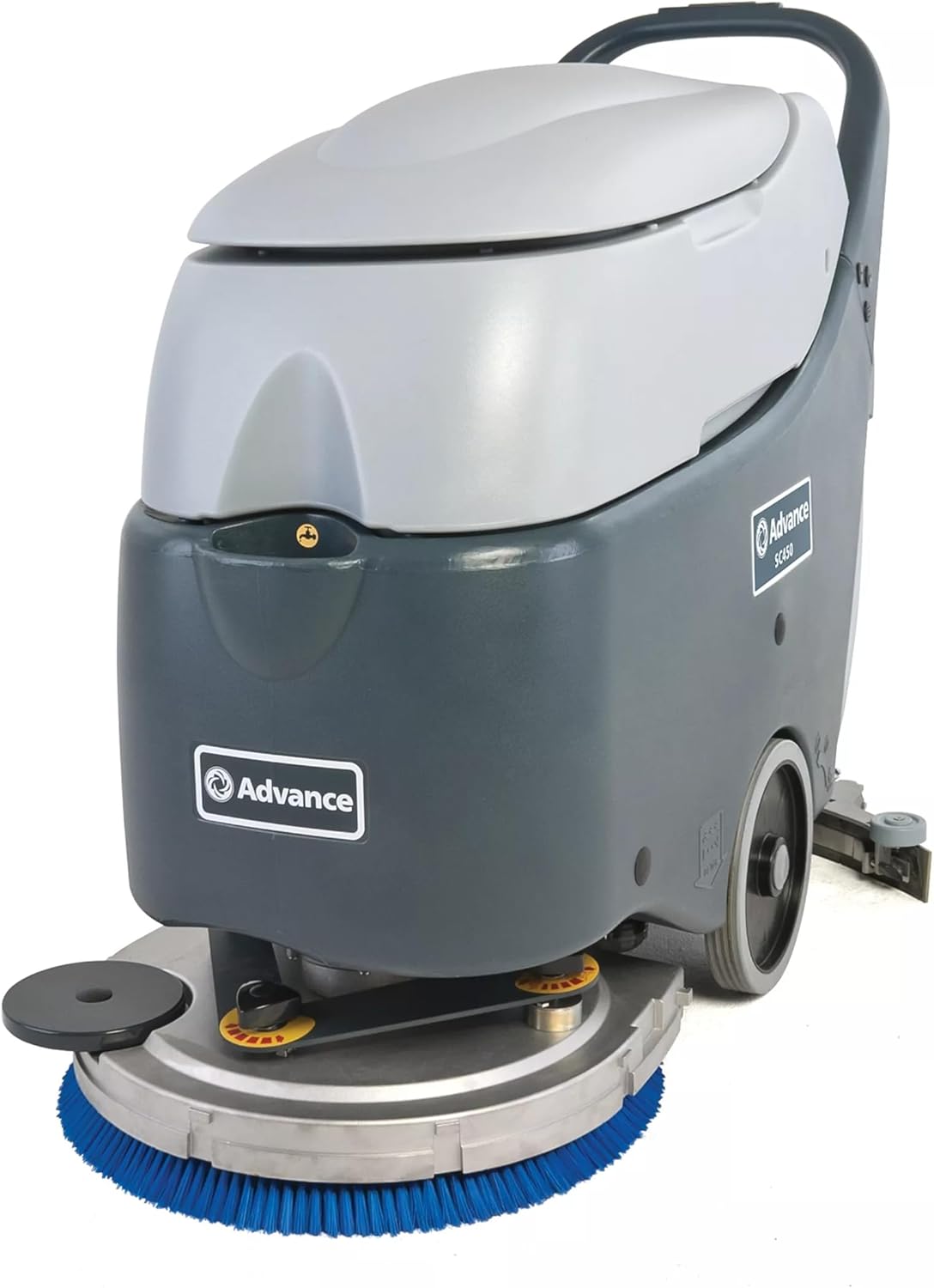
1 pav.: priekis view of the Nilfisk Advance SC450 scrubber, showing the blue cleaning pad and disc.
3.4 Splash Guard Installation
Install the splash guard (part number 9096736000) to prevent water and solution from splashing during operation.
- Locate the mounting points for the splash guard.
- Securely attach the splash guard according to the machine's design.
3.5 Tirpalo bako pildymas
- Open the solution tank cap.
- Fill the tank with clean water and the recommended cleaning solution. The solution tank capacity is 10.5 gallons (39.75 liters).
- Do not overfill. Close the cap securely.
4. Naudojimo instrukcijos
4.1 Valdymas baigtasview
Familiarize yourself with the control panel, typically located on the handle. This includes the power switch, brush engagement lever, solution flow control, and squeegee lift lever.

2 pav.: galinis view of the Nilfisk Advance SC450 scrubber, showing the handle and control panel.
4.2 Įrenginio paleidimas
- Ensure the solution tank is filled and the recovery tank is empty.
- Lower the squeegee to the operating position.
- Įjunkite pagrindinį maitinimo jungiklį.
- Engage the brush motor and adjust the solution flow as needed.
- Begin walking at a steady pace. The maximum speed is 3 mph (4.83 kph).
4.3 Scrubbing Procedure
Guide the machine in overlapping passes to ensure complete coverage. The scrubbing width is 20 inches (50.8 cm). The automatic squeegee release feature protects the squeegee when encountering obstacles.
4.4 Mašinos sustabdymas
- Disengage the brush motor and turn off the solution flow.
- Pakelkite valytuvą.
- Išjunkite pagrindinį maitinimo jungiklį.
4.5 Emptying the Recovery Tank
The recovery tank has a capacity of 11.9 gallons (45.05 liters). Empty it regularly to maintain optimal performance.
- Locate the drain hose or recovery tank lid.
- Drain the dirty water into an appropriate disposal area.
- The recovery tank features a removable lid for easy cleaning.
5. Priežiūra
Regular maintenance ensures the longevity and optimal performance of your SC450 scrubber.
5.1 Kasdienė priežiūra
- Clean Recovery Tank: After each use, empty and rinse the recovery tank thoroughly. The removable lid facilitates easy cleaning.
- Inspect Squeegee Blades: Check for wear, tears, or damage. Clean any debris from the squeegee.
- Clean Brushes/Pads: Remove and clean the scrubbing pad or brush. Replace if worn.
- Nuvalymo mašina: Nuvalykite mašinos išorę naudodami skelbimąamp audinys.
5.2 Akumuliatoriaus priežiūra
- Recharge After Each Use: Fully recharge the batteries after each use to maximize battery life.
- Check Water Levels (Wet Batteries): Periodically check the electrolyte levels in the wet batteries and top up with distilled water if necessary, following battery manufacturer guidelines.
- Laikykite terminalus švarius: Įsitikinkite, kad akumuliatoriaus gnybtai yra švarūs ir be korozijos.
5.3 Periodiniai patikrinimai
- Patikrinkite žarnas ir jungtis: Patikrinkite visas žarnas ir jungtis, ar nėra nuotėkių ar pažeidimų.
- Brush Deck Inspection: Ensure the brush deck operates smoothly and is free from obstructions.
6. Problemų sprendimas
Šiame skyriuje pateikiami dažniausiai pasitaikančių veikimo problemų sprendimai. Dėl čia nepaminėtų problemų kreipkitės į įgaliotąjį techninės priežiūros personalą.
| Problema | Galima priežastis | Sprendimas |
|---|---|---|
| Mašina neužsiveda | Žemas akumuliatoriaus įkrovimas Pagrindinis maitinimo jungiklis išjungtas Atsipalaidavusi akumuliatoriaus jungtis | Įkraukite baterijas Įjunkite maitinimo jungiklį Patikrinkite ir pritvirtinkite akumuliatoriaus jungtis |
| Prastas šveitimo efektyvumas | Worn brush/pad Insufficient solution flow Incorrect cleaning solution | Replace brush/pad Adjust solution flow control Use recommended cleaning solution |
| Water left on floor | Worn or damaged squeegee blades Squeegee not properly adjusted Pilnas surinkimo bakas | Pakeiskite valytuvo mentes Adjust squeegee angle/pressure Tuščias regeneravimo bakas |
| Reduced running time | Baterijos nevisiškai įkrautos Aging batteries | Ensure full charge cycle Apsvarstykite galimybę pakeisti bateriją |
7. Specifikacijos
Technical specifications for the Nilfisk Advance SC450 Walk-Behind Automatic Scrubber:
| Funkcija | Vertė |
|---|---|
| Modelis | SC450 |
| Gamintojas | Nilfisk Advance |
| ttage | 24 V |
| Šepečio variklio galia | 480 W |
| Vakuuminio variklio galia | 330 W |
| Scrubbing Width | 20 coliai (50.8 cm) |
| Valytuvo plotis | 30 coliai (76.2 cm) |
| Tirpalo bako talpa | 10.5 l (39.75 l) |
| Atkūrimo bako talpa | 11.9 l (45.05 l) |
| Maksimalus veikimo laikas | 140 min |
| Šepečio greitis | 154 aps./min |
| Garso slėgio lygis | 68 dB(A) |
| Svoris su baterijomis | 285 svarai (129.27 kg) |
| Matmenys (I x P x A) | 46.2 x 22 x 38.6 colio (117.35 cm x 55.88 cm x 98.04 cm) |
| Maks. Greitis | 3 mylių per valandą (4.83 km/h) |
| IP apsaugos klasė | IPX4 |
| Izoliacijos klasė | I |
| Baterijos skyriaus dydis (I x P x A) | 13.7 x 13.7 x 11.8 in (34.80 cm x 34.80 cm x 29.97 cm) |
| Paviršiaus rekomendacija | Kietos grindys, kilimai |
| Įtraukti komponentai | (1) Pad Holder, (2) 105 Ah Wet Battery, (1) Splash Guard, Battery Charger |
8. Garantija ir palaikymas
For warranty information, please refer to the documentation provided with your purchase or contact your authorized Nilfisk Advance dealer. For technical support or service inquiries, please contact your local Nilfisk Advance service center or the dealer from whom the product was purchased.