
YiBiChin ERF2R36H
YiBiChin ERF2R36H Replacement Remote Control User Manual
For Hisense Smart UHD 4K TVs
1. Įvadas
This manual provides instructions for the YiBiChin ERF2R36H Replacement Remote Control. This remote is designed to be a direct replacement for your original Hisense Smart UHD 4K TV remote, offering immediate functionality without the need for complex programming. It is compatible with a wide range of Hisense Smart UHD 4K TV models, including those that originally used the ERF3A80 remote.
Please note that this remote control operates using infrared technology and does not support voice control functions.
2. Sąranka
2.1 Akumuliatoriaus įdėjimas
The ERF2R36H remote control requires two AAA batteries (not included) for operation. Follow these steps to install the batteries:
- Nuotolinio valdymo pulto gale raskite baterijų skyriaus dangtelį.
- Paspauskite skirtuką žemyn ir pastumkite dangtelį žemyn, kad atidarytumėte skyrių.
- Įdėkite dvi AAA baterijas, užtikrindami, kad teigiamas (+) ir neigiamas (-) poliai teisingai sutaptų su žymėjimais skyriaus viduje.
- Stumkite baterijų skyriaus dangtelį atgal į vietą, kol jis tvirtai spragtelės.

Image: Back of the remote control with the battery compartment open, illustrating the correct insertion of two AAA batteries.
2.2 Initial Use (No Programming Required)
This remote control is pre-programmed for compatible Hisense Smart UHD 4K TVs. Once batteries are installed, it should function immediately with your television. No additional programming or pairing steps are necessary.
3. Naudojimo instrukcijos
The ERF2R36H remote control features standard television functions and dedicated shortcut keys for popular streaming services.
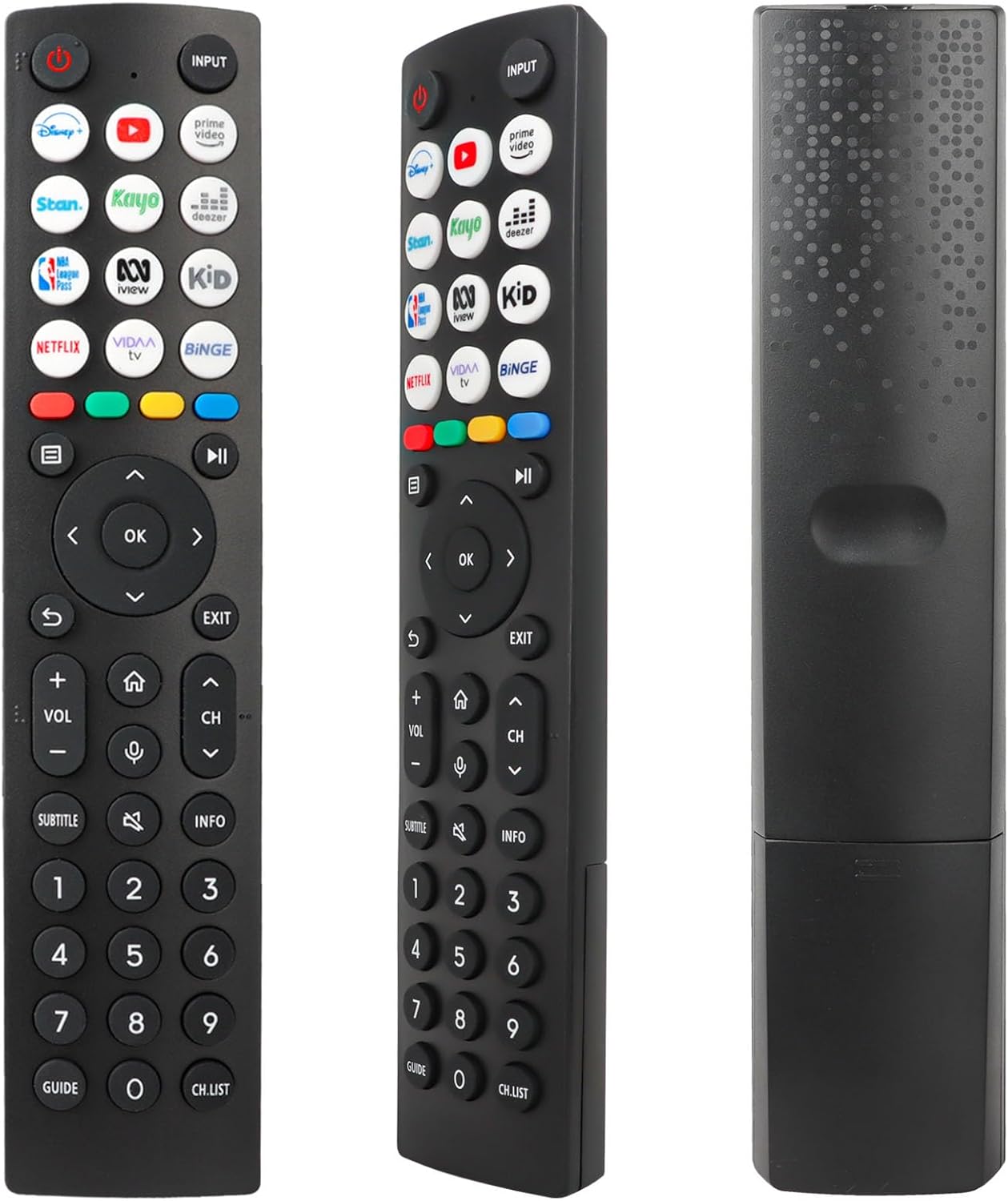
Vaizdas: priekis view of the remote control, displaying the layout of all buttons.
3.1 Pagrindinės funkcijos
- Galia (Raudonas apskritimas su linija): Įjungia arba išjungia televizorių.
- Įvestis: Selects the input source (e.g., HDMI 1, HDMI 2, AV).
- Garsumo didinimas / sumažinimas (VOL +/-): Reguliuoja garso stiprumą.
- Kanalo aukštyn/žemyn (CH +/-): Keičia televizijos kanalą.
- Nutildyti (Garsiakalbis su X ženklu): Išjungia arba įjungia televizoriaus garsą.
- Navigacijos skydelis (aukštyn, žemyn, kairėn, dešinėn, gerai): Naudojamas naršyti meniu ir patvirtinti pasirinkimus.
- Atgal (Curved Arrow): Grįžta į ankstesnį ekraną arba meniu.
- Išeiti: Išeina iš dabartinio meniu arba programos.
- Pradžia (Namo piktograma): Pasiekia pagrindinį televizoriaus ekraną arba išmanųjį centrą.
- Informacija: Rodo informaciją apie dabartinę programą arba turinį.
- Paantraštė: Įjungia arba išjungia subtitrus.
- Vadovas: Atidaromas elektroninis programų vadovas.
- CH.LIST.: Rodo kanalų sąrašą.
- Skaičių mygtukai (0–9): Tiesiogiai įveskite kanalų numerius.
3.2 spartieji klavišai
The remote control includes 12 dedicated shortcut buttons for quick access to popular streaming applications. To use these buttons, ensure the corresponding applications are installed and configured on your Hisense Smart TV.
- Disney+: Launches the Disney+ streaming service.
- YouTube: Paleidžia „YouTube“ programą.
- Pagrindinis vaizdo įrašas: Launches Amazon Prime Video.
- Stan: Launches the Stan streaming service.
- Kayo: Launches the Kayo Sports streaming service.
- Deezer: Launches the Deezer music streaming service.
- NBA: Launches the NBA League Pass application.
- iView: Launches the ABC iView taikymas.
- Vaikas: Likely a shortcut to a Kids' content section or app.
- „Netflix“: Launches the Netflix streaming service.
- VIDAA televizija: Launches the VIDAA Smart TV platform interface.
- Binge: Launches the Binge streaming service.
4. Priežiūra
4.1 Akumuliatoriaus keitimas
Replace the batteries when the remote control's response becomes sluggish or stops working. Always replace both AAA batteries at the same time with new ones. Do not mix old and new batteries, or different types of batteries.
4.2 Valymas
Nuotolinio valdymo pultą valykite minkšta, sausa šluoste. Jei nešvarumai sunkiai įveikiami, lengvai nuvalykite.ampNuvalykite šluostę vandeniu arba švelniu, neabrazyviniu valikliu. Venkite naudoti stiprias chemines medžiagas ar abrazyvines medžiagas, nes jos gali pažeisti nuotolinio valdymo pulto paviršių arba vidinius komponentus.
4.3 Saugykla
Nuotolinio valdymo pultą laikykite sausoje vietoje, toliau nuo tiesioginių saulės spindulių ir ekstremalių temperatūrų. Jei nuotolinio valdymo pulto ilgesnį laiką nenaudosite, patartina išimti baterijas, kad jos neištekėtų.
5. Problemų sprendimas
- Nuotolinis nereaguoja:
- Patikrinkite, ar baterijos įdėtos teisingai, tinkamu poliškumu.
- Pakeiskite baterijas naujomis AAA tipo baterijomis.
- Įsitikinkite, kad tarp nuotolinio valdymo pulto ir televizoriaus infraraudonųjų spindulių imtuvo yra aiškus matomumas. Kliūtys gali blokuoti signalą.
- Įsitikinkite, kad nuotolinio valdymo pultas nukreiptas tiesiai į televizorių.
- Ribotas veikimo diapazonas:
- This remote has a maximum range of 10 meters. If you are further away, move closer to the TV.
- Weak batteries can reduce the effective range. Replace them if necessary.
- Shortcut keys not working:
- Ensure the corresponding streaming applications are installed and updated on your Hisense Smart TV.
- Įsitikinkite, kad jūsų televizorius turi aktyvų interneto ryšį.
- No voice control:
- This remote control operates via infrared and does not support voice control functionality. This is a design characteristic, not a malfunction.
6. Specifikacijos
| Funkcija | Aprašymas |
|---|---|
| Prekės ženklas | YiBiChin |
| Modelio pavadinimas | ERF2R36H |
| Ryšio technologija | Infraraudonųjų spindulių |
| Suderinami įrenginiai | Hisense Smart UHD 4K Televisions |
| Ypatinga funkcija | Nereikia jokio programavimo |
| Spalva | Juoda |
| Mygtukų skaičius | 12 shortcut buttons plus standard controls |
| Valdiklio tipas | Infraraudonųjų spindulių valdymas |
| Didžiausias diapazonas | 10 metrai |
| Baterijos reikalavimas | 2 x AAA baterijos (į komplektą neįeina) |
7. Parama
If you receive an incorrect or damaged remote control, please contact the seller for assistance. They will respond as soon as possible to provide a satisfactory solution.
Išsaugokite šį vadovą, kad galėtumėte pasinaudoti ateityje.
Ask a question about this manual
Ask about setup, troubleshooting, compatibility, parts, safety, or missing instructions. Manuals+ will review the question and use this page’s manual context to help answer it.