myPhone Flip LTE naudojimo instrukcija

Image: The myPhone Flip LTE, a blue flip phone, shown open with its display and large keypad visible. The back of the phone is also visible, showing the camera and SOS button.
1. Įvadas
Sveiki atvykę
Thank you for choosing the myPhone Flip LTE. This manual provides essential information on how to set up, operate, and maintain your new device. Please read it carefully to ensure optimal performance and longevity of your phone.
Produktas baigtasview
The myPhone Flip LTE is a practical flip phone designed for clear communication and ease of use. Key features include:
- VoLTE Technology: Ensures high-quality audio for clear conversations.
- 2.8 colių ekranas: Large and bright for easy readability of messages and information.
- SOS mygtukas: Provides quick access to emergency functions, including alarm, text message, and calling predefined contacts.
- Dviejų SIM kortelių palaikymas: Allows the use of two SIM cards simultaneously.
- 1000 mAh baterija: Offers extended standby time, up to 6 days on a single charge.
- USB-C įkrovimas: Patogus ir universalus įkrovimo prievadas.
- Patogi vartotojo sąsaja: Features large, comfortable buttons and practical shortcuts for simple operation.

Image: A person, likely a senior, is shown smiling while holding the myPhone Flip LTE to their ear, demonstrating the phone's ease of use for its target demographic.
2. Sąranka
Pakuotės turinys
Prieš pradėdami, įsitikinkite, kad pakuotėje yra visi reikalingi daiktai:
- myPhone Flip LTE Handset
- Baterija (1000 mAh)
- USB-C įkrovimo laidas
- Vartotojo vadovas (šis dokumentas)
Inserting SIM Card(s) and Battery
- Atsargiai nuimkite telefono galinį dangtelį.
- Locate the SIM card slots. The myPhone Flip LTE supports Dual SIM.
- Gently slide your Micro-SIM card(s) into the designated slot(s) until they click into place. Ensure the metal contacts face downwards. Exercise caution when handling the SIM card holders to avoid damage.
- Įdėkite bateriją į jos skyrių, sulygiuodami auksinius baterijos kontaktus su telefono kontaktais.
- Uždėkite galinį dangtelį, tvirtai spausdami, kol jis užsifiksuos vietoje.

Image: The back of the myPhone Flip LTE, a blue phone, featuring the camera lens and the prominent SOS button.
Pradinis įkrovimas
Before first use, it is recommended to fully charge your phone. Connect the USB-C cable to the phone's charging port and the other end to a compatible USB power adapter or computer. The charging port is located at the bottom of the phone.

Vaizdas: Stambus planas view of the bottom edge of the myPhone Flip LTE, clearly showing the USB-C charging port and two small gold charging contacts.
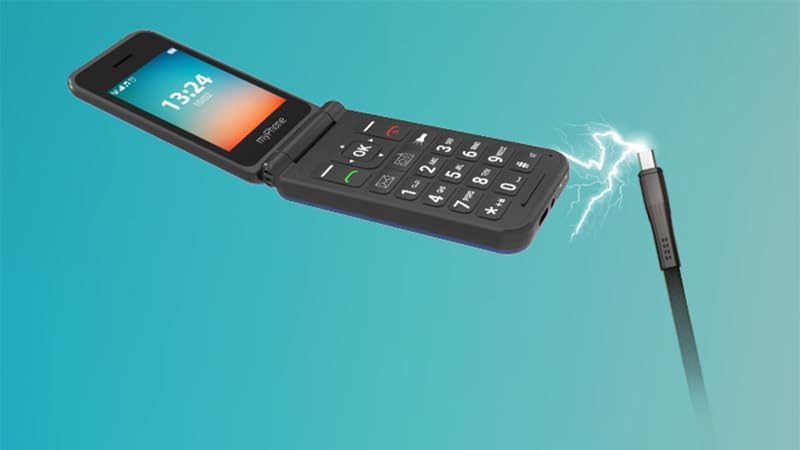
Image: An illustration depicting the myPhone Flip LTE being charged, with a USB-C cable connected to its port and a lightning bolt symbol indicating power transfer.
3. Operating Your myPhone Flip LTE
Pagrindinės funkcijos
- Maitinimo įjungimas/išjungimas: Press and hold the red call end button to power the phone on or off.
- Skambinimas: Įveskite telefono numerį naudodami klaviatūrą ir paspauskite žalią skambinimo mygtuką.
- Skambučių priėmimas: Press the green call button to answer an incoming call. You can also configure the phone to answer by opening the flip.
- Žinučių siuntimas: Navigate to the 'Messages' menu, select 'New Message', enter your text, and choose a recipient.
- Keypad and Navigation: The large, well-spaced buttons are designed for easy dialing and text input. Use the directional pad (up, down, left, right) and the 'OK' button for menu navigation.

Paveikslėlis: Tiesioginis frontas view of the myPhone Flip LTE, open, clearly displaying its large screen with time and date, and the well-arranged, large-button keypad below.

Paveikslėlis: kampuotas view of the myPhone Flip LTE, open, with a focus on the large, clear keypad, highlighting its user-friendly design.
Ypatingos savybės
- SOS mygtukas: Located on the back of the phone. Press and hold this button to activate the emergency function. The phone will trigger an alarm, send a text message, and call predefined emergency contacts. Ensure you set up your emergency contacts in the phone settings.

Image: A close-up of the SOS button on the back of the myPhone Flip LTE, illuminated with a red glow, indicating its activation or readiness for emergency use.
- Žibintuvėlis: The phone includes a built-in flashlight for convenience. Access it via a dedicated shortcut button on the keypad.
- FM radijas: Enjoy your favorite radio stations. Note that headphones (not included) may be required to act as an antenna for optimal reception.
- VoLTE (Voice over LTE): This technology provides superior call quality, ensuring clear and crisp conversations. The myPhone Flip LTE supports 4G LTE for reliable communication.

Image: The myPhone Flip LTE is shown alongside the text '4G LTE VoLTE', emphasizing its advanced connectivity features for high-quality calls.
4. Priežiūra
Valymas
To keep your phone in good condition, wipe it regularly with a soft, dry cloth. Avoid using harsh chemicals or abrasive materials, as these can damage the phone's surface.
Akumuliatoriaus priežiūra
The 1000 mAh battery provides up to 6 days of standby time. To maximize battery life:
- Venkite ekstremalių temperatūrų.
- Charge the phone regularly, but avoid overcharging or letting the battery completely drain too often.
- Use only the provided USB-C cable or a certified compatible charger.

Image: The myPhone Flip LTE is displayed next to the text '1000 mAh', highlighting its battery capacity.
Sandėliavimas
When not in use for extended periods, store the phone in a cool, dry place away from direct sunlight and extreme temperatures. Ensure the battery has some charge before storing.
5. Problemų sprendimas
Bendros problemos ir sprendimai
| problema | Galima priežastis | Sprendimas |
|---|---|---|
| Telefonas neįsijungia | Išsikrovęs akumuliatorius; Maitinimo mygtukas nepakankamai ilgai nuspaustas | Charge the phone for at least 30 minutes; Press and hold the power button for several seconds. |
| Prasta skambučio kokybė | Weak signal; Network congestion | Move to an area with better network coverage; Try making the call again later. |
| Baterija neišlaiko įkrovos | Battery degradation; Improper charging | Ensure you are using the correct charger; Consider replacing the battery if it's old. |
| SIM kortelė neaptikta | SIM card improperly inserted; Damaged SIM card | Reinsert the SIM card carefully, ensuring it is correctly seated; Try a different SIM card to rule out a faulty SIM. |
6. Techninės specifikacijos
| Funkcija | Specifikacija |
|---|---|
| Prekės ženklas | MP myPhone |
| Modelio pavadinimas | Flip LTE |
| Modelio numeris | IN-FL-TLMYFLIPNB |
| Ekrano dydis | 2.8 colių |
| Ekrano tipas | LCD |
| Rezoliucija | 240 x 320 pikselių |
| RAM Installed Size | 48 MB |
| Flash atminties dydis | 128 MB |
| Baterijos talpa | 1000 mAh (ličio jonų) |
| Vidutinis baterijos veikimo laikas | Iki 6 dienų |
| Korinio ryšio technologija | 4G |
| Ryšys | Bluetooth |
| Ypatingos savybės | Dual SIM, SOS Button, Flashlight |
| Operacinė sistema | Kita sistema |
| Matmenys | 11.9 x 8.7 x 5.3 cm; 107 g (Packaging) |
7. Garantija ir palaikymas
Informacija apie garantiją
Your myPhone Flip LTE comes with a standard manufacturer's warranty. Please refer to the warranty card included in your package for specific terms and conditions, including coverage period and what is covered. Keep your proof of purchase for warranty claims.
Pagalba klientams
If you encounter any issues not covered in this manual or require further assistance, please contact myPhone customer support. Contact details can typically be found on the manufacturer's official websvetainėje arba ant produkto pakuotės.