
1. Įvadas
This manual provides detailed instructions for the installation, operation, and maintenance of your EZoneTronics RM-26VW93-2G32 9-inch Android 11 Car Stereo. This universal car radio is designed for various VW models including Passat, Golf MK5, Golf MK6, Jetta, T5, EOS, POLO, Touran, Seat, and Sharan. It features an Android 11 operating system, integrated CarPlay and Android Auto, Bluetooth 5.0, FM/RDS radio, and GPS navigation. Please read this manual thoroughly before using the product to ensure proper function and safety.
2. Saugos informacija
- Visada vairuokite įrenginį atsakingai ir laikydamiesi vietinių kelių eismo taisyklių. Dėl išsiblaškiusio vairavimo gali įvykti avarijos.
- Do not attempt to install or repair the unit yourself if you are not qualified. Improper installation can cause damage to the vehicle's electrical system or the unit itself.
- Įsitikinkite, kad visi laidai yra tinkamai prijungti ir izoliuoti, kad išvengtumėte trumpojo jungimo.
- Laikykite įrenginį atokiau nuo vandens ir per didelės drėgmės.
- Saugokite įrenginį nuo ekstremalių temperatūrų.
3. Pakuotės turinys
Patikrinkite, ar pakuotėje yra visi toliau išvardyti daiktai:
- 1 x EZoneTronics Android Car Stereo Unit
- 1x GPS antena
- 1 x VW Wiring Harness
- 1 x CANBUS dėžutė
- 1 x radijo antenos adapteris
- 1x USB adapteris
- 1 x Naudotojo vadovas (šis dokumentas)
4. Produktas baigtasview
The EZoneTronics RM-26VW93-2G32 is a 9-inch universal car stereo designed to enhance your driving experience with advanced features and seamless integration. Key features include:
- „Android 11“ sistema: Provides a fast, stable, and user-friendly operating environment.
- 9-inch TFT Capacitive Touchscreen: High-definition display with 1280 x 720 pixels for clear visuals.
- Integrated CarPlay & Android Auto: Connect your smartphone via USB for navigation, music, calls, and messages.
- "Bluetooth 5.0": For hands-free calling, phonebook access, and audio streaming (A2DP).
- GPS navigacija: Built-in receiver compatible with various navigation apps like Waze, Navfree, and Google Maps.
- FM/RDS radijas: Automatic memory and preset scanning for your favorite stations.
- Vairo valdymo palaikymas: Retains original vehicle steering wheel control functionality via CANBUS.
- Multimedijos grotuvas: Supports various audio and video formats.
- Galinio kameros įvestis: Supports CVBS/AHD cameras for parking assistance.
- 32GB Flash atmintis: Ample storage for music, map data, and videos.
- 4 x 45W Output Power: Perteikia aiškų ir galingą garsą.
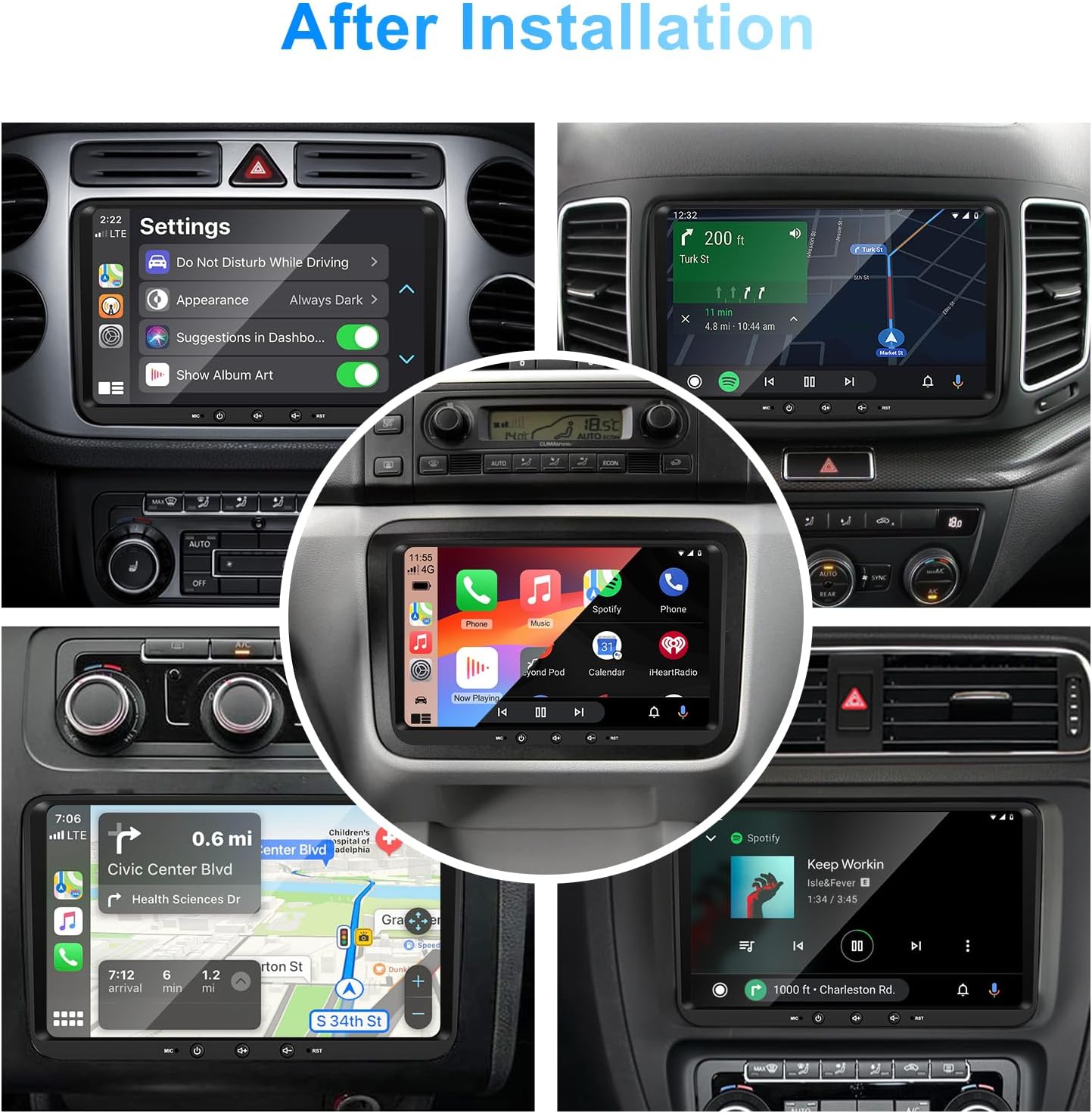
1 vaizdas: priekis view of the EZoneTronics 9-inch Android 11 Car Stereo unit, showcasing its large touchscreen display and sleek design.
5. Sąranka ir diegimas
Rekomenduojamas profesionalus montavimas. Prieš pradėdami montavimą, įsitikinkite, kad transporto priemonės maitinimas yra atjungtas.
5.1 Sujungimo schema
Refer to the following diagram for proper wiring connections. Each connector is labeled for clarity.

Image 2: Detailed wiring diagram illustrating connections for the power harness, CANBUS box, USB extension, backup camera video input, radio antenna adapter, and GPS antenna.
5.2 Diegimo veiksmai (bendrieji)
- Nuimkite originalų įrenginį: Carefully remove your vehicle's existing car stereo unit and trim panels.
- Prijunkite maitinimo laidą: Connect the provided VW wiring harness to the vehicle's wiring and then to the car stereo unit. Ensure all connections are secure.
- Prijunkite CANBUS dėžę: Integrate the CANBUS box as shown in the wiring diagram. This enables steering wheel controls and other vehicle data integration.
- Prijunkite GPS anteną: GPS anteną montuokite vietoje, kur nėra šviesos. view of the sky (e.g., dashboard or windshield corner) and connect it to the unit.
- Prijunkite radijo anteną: Use the provided radio antenna adapter to connect the vehicle's radio antenna to the unit.
- Connect USB Adapters: Connect the USB extension harnesses for external USB devices.
- Pasirenkamos jungtys: Connect any optional accessories such as a backup camera (CVBS/AHD), external amplifier (RCA output), or additional video inputs/outputs.
- Bandymo funkcionalumas: Before fully reassembling the dashboard, temporarily connect the unit and test all functions (power, audio, radio, GPS, Bluetooth, steering wheel controls, camera).
- Saugus vienetas: Once all functions are verified, secure the car stereo unit in the dashboard and reassemble all trim panels.
6. Naudojimo instrukcijos
This section details the primary functions and operations of your EZoneTronics car stereo.
6.1 Pagrindinės operacijos
- Maitinimo įjungimas/išjungimas: Norėdami įjungti arba išjungti įrenginį, paspauskite ir palaikykite maitinimo mygtuką (paprastai esantį priekiniame skydelyje). Trumpas paspaudimas paprastai nutildo / įjungia garsą.
- Garsumo valdymas: Use the physical volume knob or the on-screen controls to adjust the audio level.
- Jutiklinio ekrano sąsaja: Navigate through menus and applications by tapping, swiping, and pinching on the 9-inch capacitive touchscreen.
6.2 „Android 11“ sistema
The unit runs on Android 11, providing a familiar smartphone-like experience. You can download and install various applications from the Google Play Store.

Image 3: Screenshot of the Android 11 system interface, showing various applications and media options available on the car stereo.
6.3 „CarPlay“ ir „Android Auto“
Connect your iPhone or Android smartphone via USB to access CarPlay or Android Auto. This allows for safe and convenient use of phone features while driving.
- Ryšys: Connect your smartphone to one of the unit's USB ports using a certified USB cable.
- Aktyvinimas: The unit should automatically detect and prompt you to launch CarPlay or Android Auto. Follow on-screen instructions.
- Savybės: Access navigation, make calls, send/receive messages, and play music using voice commands (Siri or Google Assistant) or the touchscreen.

Image 4: Display showing the CarPlay interface with Siri voice commands and the Android Auto interface with Google Assistant commands, demonstrating smartphone integration.
6.4 GPS navigacija
The unit includes a built-in GPS receiver and supports various navigation applications.
- Pre-installed Maps: Sygic Maps are typically pre-installed. For offline use, download regional map data as needed.
- Naršymas internete: Connect to Wi-Fi or use a mobile hotspot to access real-time traffic information and online map services like Google Maps.
- External GPS Antenna: Įsitikinkite, kad išorinė GPS antena yra tinkamai prijungta ir padėta optimaliam signalo priėmimui.

Image 5: The car stereo displaying an online navigation map, showing a route and real-time traffic conditions within a vehicle dashboard.
6.5 „Bluetooth“ ryšys 5.0
Connect your smartphone via Bluetooth for hands-free communication and audio streaming.
- Poravimas: Enable Bluetooth on your smartphone and search for the car stereo (e.g., "EZoneTronics"). Select the device and confirm the pairing code.
- Skambinimas laisvų rankų įranga: Make and receive calls directly from the car stereo. Access your phonebook and recent call history.
- Garso transliacija (A2DP): Play music from your smartphone through the car stereo's speakers.

Image 6: The car stereo displaying music playback via Bluetooth 5.0, with a smartphone shown next to it also playing music, illustrating the wireless audio connection.
6.6 FM/RDS radijas
Access local radio stations with the built-in FM/RDS tuner.
- Tiuningas: Use the on-screen controls to manually tune to frequencies or perform an automatic scan for available stations.
- Išankstiniai nustatymai: Išsaugokite mėgstamiausias stotis išankstinių nustatymų mygtukuose, kad galėtumėte jas greitai pasiekti.
- RDS (radijo duomenų sistema): Rodo stoties informaciją, pvz., dainos pavadinimą, atlikėją arba programos tipą, jei yra.
6.7 Vairo valdymas
The unit supports your vehicle's original steering wheel controls through the CANBUS box, allowing you to manage audio and other functions without taking your hands off the wheel.
- Funkcionalumas: Control volume, change tracks, answer calls, and switch modes directly from your steering wheel.
- Konfigūracija: In some cases, steering wheel controls may require initial configuration in the unit's settings menu.

Image 7: Illustration showing a steering wheel with control buttons and corresponding icons on the car stereo display, indicating seamless integration of steering wheel controls.
6.8 Audio Settings (32-Band EQ)
Customize your audio experience with the built-in 32-band equalizer and other sound controls.
- Ekvalaizeris: Adjust frequency bands to fine-tune the sound output to your preference.
- Iš anksto nustatyti EQ režimai: Select from various preset equalizer modes (e.g., Pop, Rock, Jazz, Classic).
- Fader / Balance: Adjust the audio distribution between front/rear and left/right speakers.
- Garsumas: Enhance bass and treble at low volume levels.

Image 8: Screenshot of the car stereo's 32-band equalizer interface, showing adjustable frequency sliders and preset sound modes, along with a visual representation of sound distribution in a car cabin.
6.9 After Installation Overview
Once installed, the unit provides a comprehensive interface for various functions, including system settings, navigation, media playback, and vehicle information.
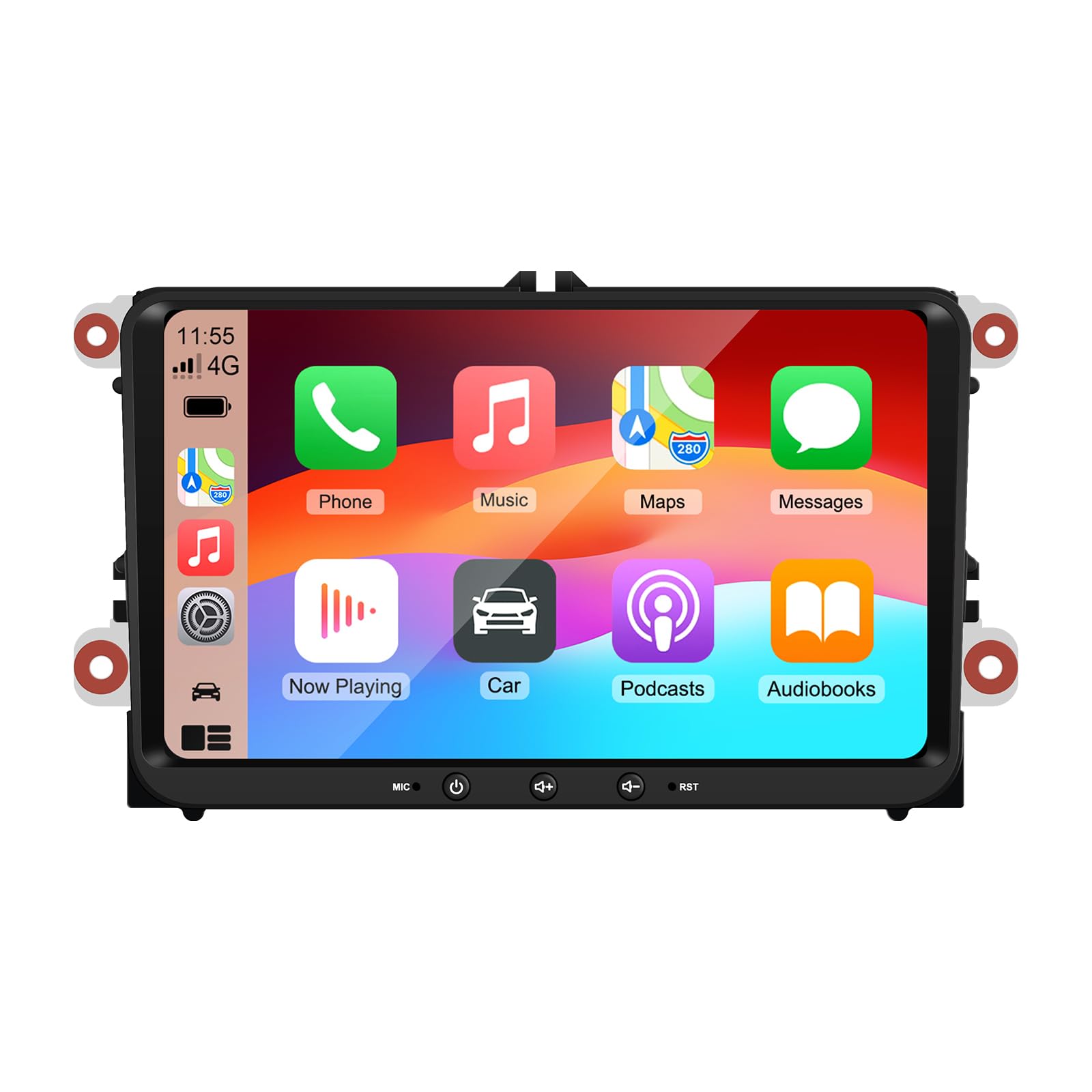
Image 9: A collage of various screen displays from the car stereo after installation, showing settings, navigation, CarPlay, Spotify, and vehicle information screens.
7. Priežiūra
- Ekrano valymas: Jutiklinį ekraną švelniai nuvalykite minkšta, nepūkuota šluoste. Įsisenėjusias dėmes šiek tiek nuvalykiteampNuvalykite šluostę vandeniu arba ekranui saugiu valikliu. Venkite stiprių cheminių medžiagų.
- Programinės įrangos atnaujinimai: Reguliariai tikrinkite, ar yra programinės įrangos atnaujinimų, per įrenginio nustatymų meniu arba gamintojo websvetainę, kad būtų užtikrintas optimalus našumas ir prieiga prie naujų funkcijų.
- Sistemos atstatymas: If the unit experiences persistent issues, a factory reset option is available in the settings. Note that this will erase all user data and settings.
8. Problemų sprendimas
If you encounter problems with your EZoneTronics car stereo, refer to the following common issues and solutions:
| Problema | Galima priežastis | Sprendimas |
|---|---|---|
| Įrenginys neįsijungia. | Neteisingas laidų prijungimas; perdegęs saugiklis; transporto priemonės maitinimo problema. | Check power connections and fuses. Consult a professional installer. |
| Nėra garso. | Volume muted; Speaker wiring incorrect; Ampkeltuvo problema. | Check volume and mute settings. Verify speaker connections. |
| GPS signalas prarastas arba netikslus. | GPS antena netinkamai pritvirtinta arba atjungta. | Įsitikinkite, kad GPS antena turi laisvą view dangaus ir yra saugiai prijungtas. |
| „Bluetooth“ susiejimas nepavyksta. | Bluetooth not enabled on phone/unit; Incorrect pairing process. | Ensure Bluetooth is active on both devices. Restart pairing process. |
| Vairo valdikliai neveikia. | CANBUS box not connected; Incorrect configuration. | Verify CANBUS box connection. Check steering wheel control settings in the unit. |
9. Specifikacijos
Technical specifications for the EZoneTronics RM-26VW93-2G32 car stereo:
| Funkcija | Specifikacija |
|---|---|
| Modelio numeris | RM-26VW93-2G32 |
| Operacinė sistema | Android 11 |
| Ekrano dydis | 9 colių |
| Ekrano raiška | 1280 x 720 pikselių |
| Procesorius | Quad Core 1.5G |
| RAM | 2G DDR4 |
| Vidinė saugykla | 32 GB „flash“ atmintis |
| Bluetooth versija | 5.0 |
| Išėjimo galia | 4 x 45 W (iš viso 180 vatų) |
| Kanalų skaičius | 2 |
| GPS imtuvas | Built-in, with external antenna |
| Wi-Fi | Įmontuotas |
| USB įvestis | 2x galinis USB |
| Kameros įvestis | CVBS/AHD compatible |
| Gamintojas | Rhythm Electronics Limited |
10. Garantija ir palaikymas
10.1 Informacija apie garantiją
The EZoneTronics RM-26VW93-2G32 car stereo comes with a 1 metų garantija nuo įsigijimo datos. Ši garantija taikoma gamybos defektams ir gedimams įprasto naudojimo metu. Ji netaikoma žalai, atsiradusiai dėl netinkamo įrengimo, netinkamo naudojimo, nelaimingų atsitikimų ar neleistinų modifikacijų.
10.2 Pagalba klientams
For technical assistance, warranty claims, or any questions regarding your product, please contact our customer support team:
- El. paštas: support@ezonetronics.com
When contacting support, please provide your product model number (RM-26VW93-2G32) and a detailed description of the issue.